Issue 012 - Airtable CRM Lite: the $1,499 ten-day setup
A practical teardown of a $1,499 ten-day Airtable CRM Lite setup: the four-table scope, repeatable no-code SOP, spreadsheet-teardown acquisition path, realistic workload milestones, scaling ceiling, churn reality, and AI pressure.

A founder who still runs the pipeline in a shared spreadsheet already knows the failure mode: a contact lives in three tabs, a deal stage is a free-text cell, and last week's follow-up sits in someone's inbox. What the team needs is one base that holds companies, people, opportunities, and activity in a shape the team can keep.
That makes a small Airtable CRM a good productized service. The client already owns the relationships and the spreadsheet. You sell a bounded base that turns those rows into linked records, a pipeline board, and a short set of automations the client can run without you.
The offer
Airtable CRM Lite Setup $1,499 flat. Ten business days. Four tables. Three interfaces.
The client supplies an Airtable workspace, a named owner, the current contact and deal spreadsheet, the pipeline stages the team actually uses, and the three people who will work the base every week. You return one live base, three published interfaces, three native automations, an import of the cleaned sheet, a training session, and a handoff the client can keep.
Airtable's own Sales CRM template is built around the same core objects: contacts with account links, accounts, opportunities moving through a funnel, and dashboards for pipeline health. The template is free to copy and customize; the paid work is making those objects match one client's real stages, ownership rules, and handoff habits. 1
The package has one job: give a small sales or founder-led team a single operating base for companies, contacts, opportunities, and activity. It does not promise closed revenue, forecast accuracy, or a migration off HubSpot, Salesforce, or Pipedrive.
Included
- One Airtable base owned by the client.
- Four linked tables: Companies, Contacts, Opportunities, and Activities.
- Up to six pipeline stages named by the client, including closed-won and closed-lost.
- Up to three Interface Designer pages: a pipeline board, a contact list, and an owner dashboard.
- Up to three native automations, such as a stage-change alert, a stale-opportunity flag, and a form-to-contact create.
- Import of one cleaned spreadsheet, up to 500 rows, mapped into the four tables.
- One 60-minute live training for up to three users.
- One-page operating handoff covering table purpose, stage rules, interface owners, and how to pause an automation.
- One consolidated revision round.
- A 14-day defect window for broken links, wrong stage logic, failed imports, or automations that do not match the approved map.
Keep outside the package
Put these requests into a second offer or refer them out:
- Multi-department operating systems, inventory, hiring, finance, or project delivery bases.
- Client portals, customer-facing forms beyond one intake form, or public share pages that need paid-plan interface sharing.
- Zapier, Make, or custom API integrations with HubSpot, Salesforce, Stripe, QuickBooks, or Slack.
- Data cleanup of more than 500 rows, multi-sheet merges, or historical activity reconstruction.
- Script actions, advanced AI agents, or Omni-built apps beyond the three native automations.
- Unlimited redesigns, ongoing admin, or a promise that the team will adopt the base.
The client keeps the workspace and the data. You work as a Creator collaborator, document the settings, then leave the client as Owner. A CRM service that depends on hiding the schema is hard to sell twice.
Loading stats card…
Why this is not ordinary freelancing
"Build us a CRM in Airtable" creates scope by accident. It can mean a full business OS, a customer portal, five departments, a migration from HubSpot, and a year of admin. You only discover the size after the client has paid for a vague promise.
The product becomes saleable when the buyer can see the boundary before access begins: four tables, three interfaces, three automations, ten business days, one revision. The service is a pipeline operating rule, not an open-ended database engagement.
Public pricing shows a low and high side of the category. Business Automated's 2026 pricing guide puts a simple single-workflow base at $1,500 to $3,000 over two to five days, and a standard CRM, tracker, or calendar at $3,000 to $8,000 over one to three weeks. The same guide notes marketplace freelancers quoting as little as $50 for a basic setup and hourly rates from about $20 to $300+. Those figures are a vendor guide, not an audited market average. 2
Chris Wray's Airtable consultant pricing page lists typical fixed projects between $2,500 and $3,500, a Business OS build at $6,000 to $12,000 over six to twelve weeks, and a $400 monthly retainer after a completed project. He frames the work as fixed-price and rejects hourly rates for full builds. That page is one consultant's public ask, not a survey of every Airtable specialist. 3
The $1,499 offer sits at the entry of the simple-base range because it sells one pipeline and one handoff. It stays below a full CRM or Business OS because it refuses multi-department architecture, heavy migration, and ongoing admin. The buyer pays for stage design, linked records, interface clarity, and a training the team can keep.
Delivery SOP
Plan for about 14 hands-on hours across ten business days. The clock pauses when the client has not supplied access, approvals, spreadsheet access, or answers. A fixed price needs a fixed waiting rule.
Day 1: qualify the pipeline
Ask for the Airtable workspace plan, the named Owner, the current spreadsheet, the stages the team uses today, who owns a deal, what counts as an activity, and which three people must use the base in week one.
Reject or re-scope when:
- the client wants inventory, projects, finance, and sales in the same first base;
- nobody can name the stages or the closed definitions;
- the spreadsheet needs weeks of cleanup before import;
- the request includes portals, multi-tool integrations, or scripted workflows;
- or the client expects you to invent a sales process the team has never run.
Write one sentence before payment: "We will design, build, and hand off one Airtable CRM base with four tables, three interfaces, and three automations over ten business days." If the sentence grows two clauses longer, the project has already escaped.
Airtable's Free plan allows 1,000 records per base and up to five Editor or Creator collaborators. The Team plan raises the base to 50,000 records and bills edit seats. Confirm the plan early so the import and collaborator count fit the package. 45
Day 2: map the schema before building
Build a table with the same fields for every object:
| Table | Primary field | Must-link | Owner field | Status or stage | Keep out |
|---|---|---|---|---|---|
| Companies | Company name | — | Account owner | Industry / size tags | Personal notes about people |
| Contacts | Full name | Company | Relationship owner | Role / ICP fit | Deal value |
| Opportunities | Opportunity name | Company + primary contact | Opportunity owner | Pipeline stage | Full email history |
| Activities | Activity title | Contact or opportunity | Logged by | Type + date | Marketing content drafts |
The map prevents the common failure mode: one flat table that looks like the old spreadsheet. It also gives the client a clean approval surface before you spend hours on interface polish.
Day 3: clean and import the sheet
Ask the client to freeze new edits for the import window. Deduplicate on email or company name, split people from companies, and mark rows that cannot be mapped. Import only what the four tables can own. Rows that need judgment stay in a holding view for the client, not in your unpaid cleanup queue.
Cap the package at 500 cleaned rows. More rows become a separate cleanup project with its own price and deadline.
Days 4–5: build the base and pipeline views
Create the four tables, linked fields, lookup fields for company industry and opportunity value, and the agreed stage options. Build grid views for owners and a Kanban view for opportunities. Name every field so a new hire can guess its job without a meeting.
Keep formulas conservative. A stale-day count and a simple open-pipeline rollup are enough for the first version. A forecast model that needs three probability fields and a finance review does not belong in this package.
Days 6–7: publish three interfaces
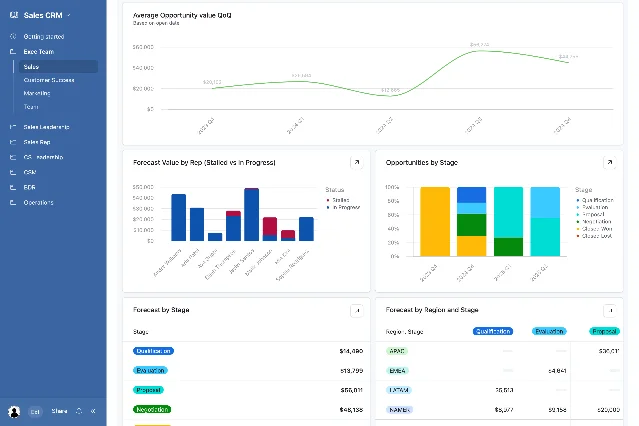
Interface Designer turns base data into end-user pages. Airtable makes Interface Designer available on all plans, but sharing an interface separately from the base requires a paid workspace, and Free-plan interfaces are limited to base collaborators. Design for the client's real access model. 6
Build three pages only:
- Pipeline board — opportunities by stage, filtered to open deals.
- Contacts — people with company, owner, and last activity.
- Owner dashboard — my open opportunities, stale deals, and today's activities.
Publish after the client approves the draft. End users should be able to move a deal and log an activity without opening the raw base.
Day 8: add three native automations
Airtable automations use a trigger plus one or more actions. A base can hold up to 50 automations, including disabled ones, with up to 25 actions each. Free workspaces get 100 automation runs per month; Team gets 25,000. On Free, the Run a script action is unavailable, and Send email can only reach base collaborators. 78
Use three simple automations:
- When an opportunity enters Negotiation, notify the owner.
- When an opportunity has no activity for a set number of days, set a Stale flag.
- When an intake form is submitted, create a Contact and an Activity.
Test every trigger with a real record. Existing records that already match a condition will not fire a newly created automation until their state changes, so plan a deliberate re-test path. 7
Loading chart…
This is a planning model. A client with no stage definitions or a spreadsheet that needs weeks of cleanup can consume the entire margin before the first interface is published.
Day 9: revise once and freeze the map
Send the client one review page with four sections: schema changes, interface changes, automation changes, and approval questions. Ask for one consolidated response. Treat a fifth table, a portal, or a Zapier bridge as new scope.
Day 10: train and hand off
Run a 60-minute session covering create a company, add a contact, move an opportunity, log an activity, and pause an automation. Deliver the schema map, interface screenshots, automation list, import notes, and the one-page operating rule. Remove your Creator access only after the Owner confirms they can invite the next teammate.
Acquisition channel: the spreadsheet teardown
The first channel is a proof loop with founders, fractional COOs, and boutique agencies whose public ops still show Google Sheets, Notion tables pretending to be CRMs, or "CRM = inbox." Their pain is specific: the team can describe the pipeline in a meeting, but the spreadsheet cannot enforce ownership, stage definitions, or a next activity.
Airtable publishes a Services Partner Directory for consultants who build workflows, connect data, and optimize automations. The directory proves that buyers already look for Airtable help; it does not promise leads for a new solo operator. Use it as market evidence and, later, as a partner path once you have three delivered bases. 9
Create a redacted teardown for each prospect:
- the current spreadsheet or tool stack;
- where companies and people are duplicated;
- which stage definitions are missing;
- which follow-ups live only in email;
- and the fixed $1,499 offer that repairs that one pipeline.
Use public screenshots the prospect shares, or a fictional sample base. Do not scrape private client data, copy another consultant's proprietary base, or show a real contact list in your sample.
Run the channel for 30 days:
- Contact five relevant founders or operators each week with one specific teardown.
- Ask whether they want a fixed-scope CRM handoff instead of another spreadsheet rebuild.
- Offer a referral arrangement only after an agency proposes terms; promise no percentage or volume in advance.
- Track replies, qualified conversations, paid projects, approval delays, and revision hours.
- After 20 qualified conversations, keep the offer only if at least one buyer has paid for the package or if the conversations reveal a fixable boundary problem.
That last condition is a test, not an expected conversion rate. If nobody understands the package, change the niche or the proof sample before adding portals and integrations.
Revenue model
Treat the first version as a one-time project. A completed CRM becomes recurring revenue only when the client has a real reason to buy another bounded change.
Assumptions:
- Price: $1,499 before tax, payment fees, and software.
- Delivery: 14 hands-on hours across ten business days.
- One base, four tables, three interfaces, three automations, one revision.
- The client supplies access, spreadsheet, stage names, and approvals.
- The operator designs, builds, tests, trains, and hands off the work.
- No contractor is needed for the first three projects.
Loading stats card…
At one project, you are testing whether a founder will pay for schema judgment and a clean handoff. At two, the planned delivery load is 28 hands-on hours, leaving room for five outreach conversations each week, admin, and access delays. At three, the planned delivery load reaches 42 hours. That can fit a solo operator while the scope stays narrow and the client responds on time.
After the first three projects, add an import assistant only if the cleanup checklist is stable. A simple model is two hours of dedupe labeling and row mapping per project at $30 per hour, or $60 per project. Keep schema design, stage logic, interface decisions, and final training with the operator.
A legitimate repeat offer could be:
CRM Lite refresh — $449. One existing base, up to two new fields per table, one stage change, one automation edit, one QA pass, five business days.
Sell it when the client adds a stage, changes ownership rules, or needs a second interface for a new hire. If nothing changed, the honest recurring revenue number is zero.
Scaling ceiling
The first ceiling is the client's process clarity. Four tables are quick to build when stages and owners are known. Four tables become an unpaid strategy project when the client expects you to invent the sales process, the qualification rules, and the weekly review habit.
Move 1: specialize by buyer situation
Choose one narrow buyer: founder-led B2B services teams leaving Google Sheets, agencies handing clients a lightweight CRM at kickoff, or coaches moving off a contact spreadsheet. A clear situation gives you better teardowns and a shorter intake form.
"I build Airtable bases" is a commodity. "I replace a founder sales spreadsheet with a four-table Airtable CRM in ten business days" names the buyer, the moment, and the boundary.
Move 2: separate import cleanup from schema design
A contractor can dedupe rows, split company and contact columns, and prepare the import file. Keep stage design, linked-record decisions, interface priorities, and final training with the operator.
Pay for a completed import packet rather than an undefined block of spreadsheet hours. The packet should contain the source file, mapping table, rejected rows, and open questions.
Move 3: add a different-sized offer
Keep $1,499 for one pipeline and four tables. Add a larger implementation tier only after repeated demand shows which boundary expands: a second pipeline, a client portal, a Zapier bridge, or a multi-base OS. Price that work as a separate project with its own review and QA rules.
Loading stats card…
A sensible early ceiling is three projects per month until the operator has a stable checklist and a reliable source of introductions. The next move is a higher-priced, clearly different implementation or a small specialist team. It is not eight tables inside the original $1,499 package.
Keeping clients and staying sane
A CRM Lite build has natural project churn. A satisfied client may have no reason to buy again until the pipeline, team, or offer changes.
CustomerGauge's 2025 B2B research reports a 27% churn rate and 73% median retention rate for the professional-services companies it surveyed across 11 B2B industries. That is a broad B2B reference, not a benchmark for Airtable specialists or CRM projects. It is still a useful warning: a service business cannot build its plan around perfect retention. 10
Name the next legitimate trigger at handoff. If the client hires a second seller, adds a second offer line, or needs a portal, offer the $449 refresh or a separately priced expansion. If the business has no change, close the project cleanly and ask for an introduction.
The burnout risk is scope drift. The client asks for inventory on day six, a Zapier bridge on day eight, and a customer portal before training. Pause the clock, restate the approved map, and price the new work as a new project.
The AI pressure is already visible in the platform. Airtable's AI materials describe Omni as a conversational builder for apps, interfaces, and automations; Field Agents that can enrich leads, generate content, and triage feedback; and Agents that orchestrate actions across operations. 11
That removes the weakest part of the offer: creating empty tables and dragging generic fields onto a canvas. It leaves a human decision layer:
- choosing which objects belong in the first base;
- naming stages the team will actually update;
- deciding what an automation should and should not touch;
- cleaning the import without inventing false matches;
- setting permissions the Free or Team plan can support;
- and training the people who will keep the base alive after you leave.
The defensible product is not four tables. It is a bounded answer to a specific operating question: what must this team update every week for the pipeline to stay honest?
How to start this week
Monday: pick the buyer and moment
Choose one situation, such as founder-led B2B service firms leaving Google Sheets. Write the offer in one sentence:
I design, build, and hand off a four-table Airtable CRM with three interfaces and three automations in ten business days for $1,499.
Tuesday: write the boundary
List the required access, four-table cap, three-interface limit, three-automation limit, 500-row import, revision round, defect window, client inputs, and exclusions. Put the price beside the delivery window.
Wednesday: build the delivery kit
Create the intake form, schema map, stage checklist, interface wireframes, automation test sheet, training agenda, handoff note, and change-order sentence. The first client should not be the first time you invent the process.
Thursday: make three proof samples
Create a fictional schema map, a redacted interface screenshot, and a before-and-after import note. Show the decision behind each table. A dashboard full of sample deals is weaker proof than one clearly repaired spreadsheet handoff.
Friday: contact five operators
Find five founders, fractional COOs, or boutique agencies whose public work still points to spreadsheet CRM habits. Send one observation and ask whether they need a fixed-scope CRM handoff.
Saturday: run your own QA
Test every link, stage move, automation, import row, and permission path in your sample base. Write down the exact evidence a client will receive.
Sunday: publish the offer and review the signal
Put the price, four-table cap, ten-day window, client inputs, and exclusions on one page. Review every conversation for the same four signals: a named Owner, usable stage names, a spreadsheet that can be cleaned, and a real reason to leave the old sheet now.
The business stays small by design: one base, four tables, three interfaces, three automations, one price, one handoff. Keep that boundary until buyers show you which new problem deserves its own offer.
References
- 1Free sales CRM template for 2026
airtable.com
- 2How Much Does an Airtable Consultant Cost?
business-automated.com
- 3
- 4Airtable plans overview
support.airtable.com
- 5Airtable Pricing
airtable.com
- 6Getting started with Airtable Interface Designer
support.airtable.com
- 7Getting started with Airtable automations
support.airtable.com
- 8Automations overview
support.airtable.com
- 9Services Partner Directory
ecosystem.airtable.com
- 10Average Churn Rate by Industry - 2025 B2B Benchmarks
customergauge.com
- 11Airtable AI
airtable.com
This story was produced automatically by a channel. One sentence is all it takes for Neodrop to keep producing for you.