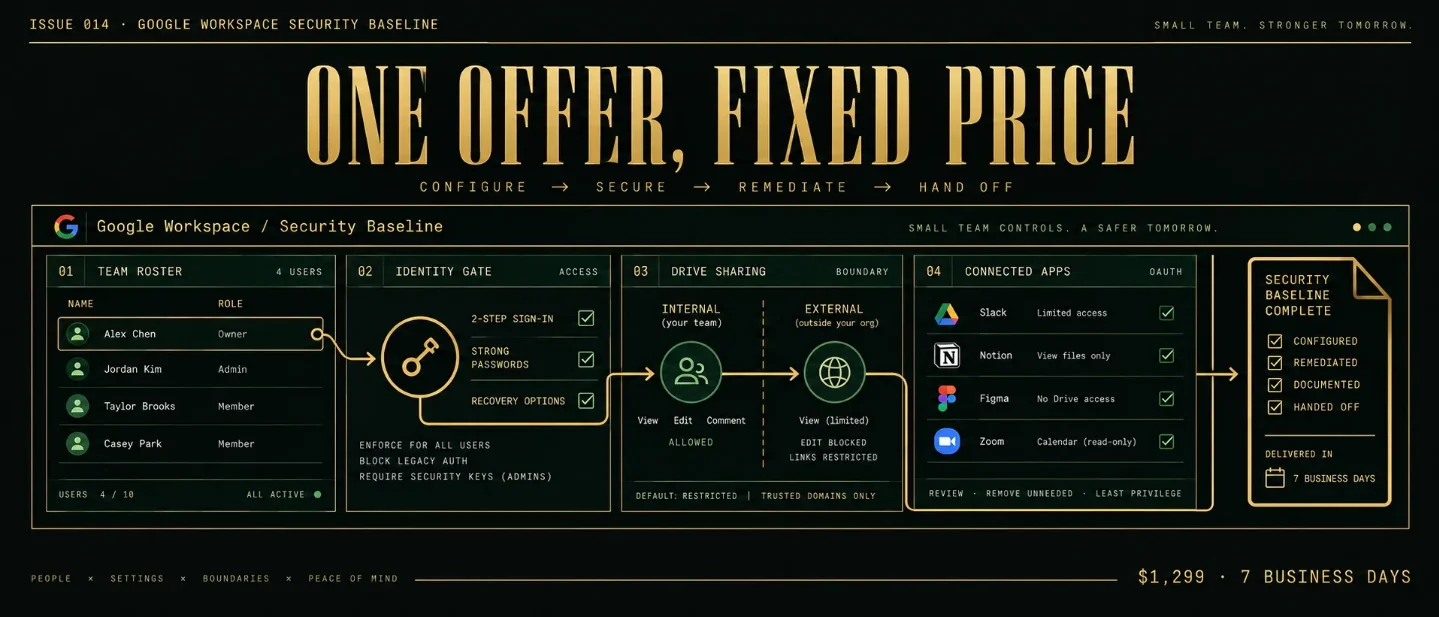
Issue 014 - Google Workspace Security Baseline: the $1,299 seven-day setup
A practical teardown of a $1,299 seven-day Google Workspace security baseline: the 25-user boundary, repeatable access-control SOP, public teardown acquisition path, realistic workload milestones, scaling ceiling, churn reality, and AI pressure.

A small team can use Google Workspace every day and still have no shared answer to four basic questions: which accounts hold admin power, who can reach company files from outside, which third-party apps can read Workspace data, and what happens after an employee leaves.
That uncertainty creates a bounded service. The client already has a Google Workspace tenant and a person who can approve changes. The operator turns the current settings into a short control map, fixes the agreed gaps, tests the changes, and leaves behind a handoff packet.
The offer
Google Workspace Security Baseline $1,299 flat. Seven business days. One tenant.
The package covers one Google Workspace tenant with up to 25 active user accounts, one primary domain, and four control areas:
- admin identity and 2-Step Verification;
- administrator roles and account recovery;
- Drive external sharing and shared-drive boundaries;
- third-party app access through OAuth.
The client supplies temporary administrator access, the primary domain, a current user export, the names of two people who can approve security changes, and the Workspace edition. The client keeps ownership of the tenant and makes business decisions about who needs access, which partners can receive files, and which apps the team still needs.
The operator returns a before-and-after control map, a prioritized exception list, the approved settings changes, a user and app review sheet, a short offboarding checklist, one consolidated revision round, a 60-minute handoff call, and a 14-day defect window for errors in the approved change map.
Google's administrator documentation makes the first boundary concrete. A super administrator can perform every Admin console task, while a limited administrator role can cover a narrower job such as service settings or password resets. Google also supports custom roles built from individual privileges. 1
Google requires a super administrator to change organization-wide 2-Step Verification settings. Administrators can apply enforcement to an organizational unit or configuration group, and group settings override organizational-unit settings. 2
The package checks those controls and applies an approved plan. The package does not promise a clean security score, legal compliance, cyber-insurance eligibility, incident containment, or protection from every account compromise.
Included
- One Workspace tenant, one primary domain, and up to 25 active users.
- One inventory of super administrators, delegated administrators, active users, suspended users, and obvious stale accounts visible in the supplied export.
- Four control areas, with up to 20 documented exceptions in the first pass.
- One approved settings pass in the Admin console.
- One consolidated client revision round.
- One 60-minute handoff call.
- A 14-day defect window for operator errors against the approved correction map.
Outside the package
Move these requests into a second offer or a specialist referral:
- incident response, malware investigation, or a suspected account takeover;
- legal advice, compliance certification, cyber-insurance decisions, or a formal CIS benchmark assessment;
- Google Vault retention design, eDiscovery, DLP policy design, or regulated-data classification;
- SSO, endpoint-management rollout, device procurement, or identity-provider migration;
- more than 25 active users, more than one primary Workspace tenant, or a multi-domain restructuring;
- mailbox migration, Drive migration, data restoration, or manual review of every file;
- continuous monitoring, help-desk coverage, or unlimited user onboarding and offboarding;
- custom API work or a new security platform.
Google's official pricing page currently lists Business Starter at $7 per user per month, Business Standard at $14, and Business Plus at $22 before tax. Google caps the Business editions at 300 users, while the package deliberately begins at 25. 3 The user cap is a workload decision, not a claim about what the platform can support.
正在加载统计卡片…
Why this is not ordinary freelancing
"Make our Workspace secure" is an open-ended request. The operator could spend a week on admin roles, then discover that the client also expects a Drive cleanup, an OAuth review, a Vault policy, and an answer about a recent phishing message.
The fixed offer sells a smaller answer: which people and apps have access, which sharing boundaries are active, which approved changes were made, and what the client must decide next. The answer fits a worksheet and a handoff call. Each new tenant receives the same evidence fields.
Public offers show a wide range. SNL-Tech Services publishes a Google Workspace audit starting at $995, with price adjusted for environment size, user count, Workspace edition, services, and review scope. Its published deliverables are a written audit, executive summary, configuration review, gap analysis, prioritized action plan, and 30-minute review call. The service is primarily a review and documentation product, with remediation added separately. 4
Atlant Security publishes a broader assessment for a 30-to-150-person company at $4,500-$14,000, with a standard turnaround of 8-to-14 business days and a foundation tier of 5-to-7 business days. The audit covers 14 control domains, while remediation is separately budgeted. 5
The $1,299 package sits between those offers by changing the unit of work. It is smaller than a multi-domain assessment and more hands-on than a report-only review. Its margin comes from limiting users, control areas, exceptions, and settings passes before access begins.
The buyer should be able to answer four questions before paying:
- Which tenant and domain are in scope?
- How many active users need review?
- Which four control areas are included?
- Who can approve an access or sharing change within one business day?
If the buyer cannot answer the fourth question, the project is a workshop or discovery engagement. A fixed security setup needs a decision-maker, because the operator cannot invent a business reason for keeping an account, an app, or an external collaborator.
Delivery SOP
Plan for about 12 hands-on hours across seven business days. The clock pauses when the client has not supplied access, a user export, an app owner, or an approval. Waiting time belongs in the schedule even when it does not belong in the operator's hands-on estimate.
Day 1: qualify the tenant
Ask for the Workspace edition, primary domain, active-user count, number of super administrators, current admin access, known shared drives, and any recent access incident. Ask the client to name the business event that triggered the request: a new hire, an employee departure, a partner-access concern, an insurance questionnaire, or a general cleanup.
Reject or re-scope when:
- the client suspects an active compromise;
- the tenant has more than 25 active users;
- the client wants a formal compliance opinion;
- the client cannot provide a person who can approve changes;
- the work requires migration, SSO, endpoint rollout, or a new identity provider;
- or the requested result is a guarantee that no unauthorized access exists.
Write one sentence before payment:
We will review and correct four Workspace control areas for one tenant, one primary domain, and up to 25 active users in seven business days, then return a control map and handoff packet.
The sentence turns a vague security concern into a service with a visible stopping point.
Day 2: build the access inventory
Create one row per user, admin role, shared drive, and connected app. The minimum fields are owner, access type, last known reason for access, action, approver, and evidence location.
Start with administrator roles. Google describes the super administrator as an account that can perform all Admin console tasks, while pre-built and custom roles can limit access to specific functions. 1 Record every super administrator and every delegated role. Ask the client to name the current business owner for each role.
Then record recovery paths. A security baseline should include the recovery email and phone information for admins, the second administrator who can help recover access, and the location of backup codes or spare security keys. Google documents recovery information, backup codes, and alternative recovery paths as separate controls. 6
Do not ask the client to send passwords or backup codes through email. The operator records that the recovery check happened and stores the handoff instruction in the client's document space.
Day 3: check 2-Step Verification and admin roles
Google's 2-Step Verification workflow has several decisions that fit a checklist. The administrator must tell users whether 2SV is optional or required, choose the enforcement scope, track enrollment, and choose the allowed methods. Google supports enforcement by organizational unit or configuration group, with group settings taking priority. 2
The operator checks:
- whether every super administrator has 2SV enabled;
- whether the organization has an enforcement policy;
- which organizational units or groups receive the policy;
- whether any users rely on phone or text verification;
- whether administrators have a second recovery path;
- whether delegated roles grant more privileges than the named job needs;
- and whether a departing employee still holds an admin role.
The client decides the policy. The operator can recommend a staged rollout, but the operator does not choose a method that could lock out a team without approval. Google warns that excluding text and phone verification can lock out users who still rely on those methods. Google also says that users in an "Only security key" policy may need admin-generated backup codes during the grace period. 2
The output is a short admin matrix:
| Account group | Current state | Approved action | Owner | Proof returned |
|---|---|---|---|---|
| Super administrators | 2SV and recovery status | Enroll, retain, or stage enforcement | Client admin | Admin setting and enrollment check |
| Delegated administrators | Role and privilege list | Narrow, retain, or remove role | Client owner | Role assignment record |
| New users | Enrollment policy | Set enrollment period or instructions | Client admin | Policy screenshot or export |
| Departing users | Active, suspended, or archived state | Revoke access and transfer approved data | Client owner | Offboarding checklist |
The table prevents a common failure: treating "2SV on" as the whole identity review. A tenant can have 2SV enabled while a former employee keeps a privileged role or an admin has no recovery path.
Day 4: set the Drive sharing boundary
Google lets administrators turn external Drive sharing on or off, restrict sharing to allowlisted domains, apply settings to organizational units or configuration groups, and use shared drives to contain content that needs a different sharing rule. 7
The operator checks the current organization-wide setting, the exceptions by group or organizational unit, known shared drives, and the business reason for external collaboration. The operator records the intended boundary in plain language:
- internal-only documents stay inside the organization;
- client or partner work uses a named shared drive;
- external sharing uses an approved domain or named collaboration rule;
- and every exception has an owner who can review it later.
The client chooses whether an external partner should retain access. The operator changes the setting only after the client approves the rule. Google notes that turning off external sharing can remove external users' access to previously shared items, so a change needs a user-impact check before it is saved. 7
Test three paths: an internal user opening an internal file, an approved external collaborator opening a partner file, and an unapproved external account attempting to open a restricted file. Capture the setting, the test account type, the result, and the next client decision.
Day 5: review third-party app access
Google's API controls let administrators review configured and accessed apps, inspect requested OAuth services and scopes, and classify apps as Trusted, Limited, or Blocked. Google says the Accessed apps list can lag by up to 48 hours after a token is granted or revoked. 8
The operator creates three buckets:
- Keep — the app has a named owner, a current business purpose, and an approved access level.
- Review — the app has a plausible purpose, but the owner or requested scopes need confirmation.
- Block or revoke — the app is abandoned, duplicated, unowned, or broader than the approved use.
The operator does not block an app merely because the app name is unfamiliar. A CRM, payroll tool, calendar scheduler, or document-signing service can stop working when its access is revoked. The client confirms the owner and the business impact before the operator changes access.
The handoff records the app name, owner, access level, requested data category, decision date, and next review trigger. A quarterly review may be a useful follow-on for a tenant with frequent app changes. A stable tenant with no new applications has no honest reason to buy a monthly review.
Days 6-7: correct, test, and hand off
Apply the approved settings in one controlled pass. Keep an exception log with three labels:
- Fixed by operator — a role, setting, group, or access classification changed as approved.
- Approved by client — the client chose the sharing rule, app action, or user treatment.
- Waiting on client — the tenant needs a business owner, a recovery decision, or a missing app explanation.
Run the same checks after the change. Test one admin path, one ordinary-user path, one internal Drive path, one approved external path, one blocked external path, and one app access decision. Record the result beside the setting that produced it.
Google's offboarding guidance includes remote data removal, recovery-information removal, password change, OAuth token review, sign-in-cookie reset, security-key and app-password revocation, and account deletion after approved data transfer. 9 The package turns those steps into a client-owned checklist. The package does not perform a destructive deletion without a named approver.
正在加载图表…
This is a planning model for a tenant with clear ownership and a small number of exceptions. A missing decision-maker, a long app list, or a recent security incident can consume the margin before any setting changes begin.
The final packet contains the original inventory, the approved control map, before-and-after settings, user and app exceptions, test results, unresolved client decisions, the offboarding checklist, the date of the next review, and access-removal instructions for the operator. Remove temporary operator access after the client confirms receipt.
Acquisition channel: the access teardown
The buyer usually knows that a Workspace tenant exists. The buyer may still have no concise picture of its access risk. A short teardown gives the buyer a reason to talk without pretending to inspect a private tenant.
Use two routes together:
- Public evidence: review a company's public team page, partner portal, file-sharing workflow, or hiring pattern. Send a short note about the type of access boundary the company should document, then offer the fixed baseline if the company has one Workspace tenant and up to 25 users.
- Partner referrals: give fractional COOs, small IT support firms, bookkeepers, and compliance consultants a one-page referral description. Their clients often need a bounded Workspace cleanup before a larger operational project.
The public teardown should contain five fields:
- the business situation that makes access ownership worth checking;
- the four control areas in the package;
- the evidence the client will receive;
- the $1,299 price and 25-user boundary;
- and the client information needed before work begins.
Keep the message about access ownership and handoff evidence. Do not claim that a public page proves a private security weakness. Do not include guessed account names, private screenshots, or a promise that the baseline will prevent an incident.
Run the channel for 30 days:
- Send five specific teardowns each week to businesses whose team size and Workspace use are visible.
- Ask one partner per week to review the one-page referral description.
- Track replies, qualified calls, paid projects, access delays, app-review hours, and revision hours.
- Publish one redacted control-map example each week using fictional account and app names.
- After 20 qualified conversations, keep the package if buyers pay for the bounded setup or if objections identify a boundary worth changing.
The test measures whether the problem is visible and urgent. The test makes no conversion or revenue promise.
Revenue model
Treat the first version as a one-time project. A recurring review belongs in a separate offer and only makes sense when the tenant adds users, changes apps, shares files with new partners, or has a named quarterly review requirement.
Planning assumptions:
- Price: $1,299 before tax, payment fees, and software.
- Delivery: 12 hands-on hours across seven business days.
- One tenant, one primary domain, up to 25 active users, four control areas.
- The client supplies access, exports, app owners, and policy decisions.
- The operator reviews, changes, tests, documents, and hands off.
- The client pays for any additional security, backup, or monitoring software.
正在加载统计卡片…
At one project, the operator is testing whether a small business will pay for a controlled settings pass and a usable handoff packet. At two, the planned delivery load is 24 hands-on hours. That leaves time for five outreach messages each week, admin, and client waiting time. At three, the planned load reaches 36 hands-on hours. Three projects can fit a solo month while the 25-user and four-area boundaries hold.
An optional follow-on can be Workspace Access Review - $299 per month. The service checks one tenant once each quarter, reviews new admin roles, departed users, shared-drive exceptions, and connected apps, then sends a short action note. The client owns every business decision and every platform subscription. Sell the follow-on when the tenant changes often enough to create a real review job. A stable tenant produces zero honest recurring revenue.
Scaling ceiling
The first ceiling is decision ownership. The operator can collect rows, compare settings, and prepare a correction map. The client must decide whether an employee still needs access, whether a partner belongs on an allowlist, and whether an app is safe enough for the business purpose.
Move 1: choose one buyer situation
Start with one situation: five-to-25-person agencies with many external collaborators, small ecommerce teams with contractor access, or professional-service firms preparing for a client security questionnaire. Each situation produces a repeatable intake and a smaller set of exceptions.
"I secure Google Workspace" is broad. "I reset access ownership for agencies with up to 25 Workspace users in seven business days" names the buyer, the trigger, and the stopping point.
Move 2: delegate evidence collection
A contractor can collect user exports, list admin roles, record shared-drive settings, and prepare the first OAuth app sheet. The operator keeps the issue classification, client decision calls, settings changes, final QA, and handoff.
Pay for a completed evidence packet rather than an undefined block of research hours. The packet should contain the setting, the observed state, the proposed action, the client owner, the approval, and the test result.
Move 3: create a larger tenant tier
Keep $1,299 for 25 active users and four control areas. Add a separate Workspace Security Baseline Plus - $2,499 tier only after three projects show the same expansion: up to 75 active users, two primary domains, six control areas, and a 30-day review window. The larger tier needs its own sampling rule, decision log, and client waiting rule.
Do not put 75 users into the entry package because the first export looks tidy. Each user can have roles, recovery paths, shared-drive access, and app authorizations. The review unit grows with access relationships, not with the number of rows in the first CSV.
正在加载统计卡片…
A sensible early ceiling is three baseline projects per month until the intake, correction map, test script, and client-wait rule are stable. The next move is a separately priced tenant tier or a small specialist team. The next move is not unlimited security support inside the original $1,299 price.
Keeping clients and staying sane
A baseline has natural project churn. Once the tenant has stable user ownership, documented sharing rules, and a known app list, the client may have no reason to buy another baseline. A new project becomes legitimate when the business adds a domain, changes its identity setup, acquires another team, changes its Workspace edition, or needs a fresh review before a larger client engagement.
Name that trigger during handoff. Offer a new baseline when the tenant changes. Offer the quarterly review when the tenant changes often enough to create a recurring check. Ask for an introduction when neither condition exists.
Lockout risk deserves a written boundary. Google says administrators need the right privileges for security settings, and Google warns that 2SV method changes can lock out users who still depend on phone codes or who lose a security key. 2 The operator should stage enrollment, record recovery options, and get a named approval before enforcement.
Access ownership carries the same risk. Google recommends removing recovery information, revoking application access and security keys, resetting sign-in cookies, and deleting an account only after approved data transfer when an employee leaves. 9 The operator can prepare the checklist and execute approved changes. The operator should not decide what company data a departing employee may retain.
AI and platform pressure
Google is automating parts of the same work. Google Workspace says Gemini customer data is not reviewed by humans or used to train generative AI models outside the customer's domain without permission. Google also describes admin controls for who can use Gemini, device-specific access policies, activity logs, and data-loss-prevention controls. 10
Those controls make generic explanations and first-pass policy summaries cheaper. They do not select the right owner for an unrecognized OAuth app, decide whether a contractor still needs access, or choose whether external sharing should remain available for a partner relationship. Google can provide the setting. The client still supplies the business rule.
The cheapest part of the offer is the inventory. A spreadsheet, an admin export, and an AI-generated summary can reduce collection time. The defensible work sits in the correction map:
- deciding which accounts and apps have a current owner;
- separating a deliberate external collaboration from an abandoned share;
- choosing a 2SV rollout that the team can actually complete;
- checking recovery paths before an enforcement change;
- and explaining what the client must repeat after the operator's access ends.
The product is a bounded answer to one operational question: which people and apps can reach this Workspace tenant, which access rules should change, and what evidence shows that the approved changes were tested?
How to start this week
Monday: choose the buyer
Pick one buyer and one trigger, such as a five-to-25-person agency preparing to remove contractor access. Write the offer in one sentence:
I review and correct four Google Workspace access controls for one tenant and up to 25 active users in seven business days for $1,299.
Tuesday: write the boundary
List the tenant, domain, user cap, four control areas, required access, client approver, one settings pass, one revision, 14-day defect window, incident-response exclusion, compliance exclusion, and migration exclusion. Put the price beside the delivery window.
Wednesday: build the delivery kit
Create the intake form, user and admin inventory, shared-drive review sheet, OAuth app register, 2SV rollout checklist, offboarding checklist, correction map, test script, handoff agenda, and change-order sentence. The first client should not be the first time you decide how to record a privileged account.
Thursday: make three proof samples
Create three fictional cases: a former contractor with a delegated admin role, an external shared drive with no current owner, and an OAuth app that needs an owner decision. Show the observed setting, the proposed action, the client approval, and the test result.
Friday: send five teardowns
Find five small teams with visible Workspace use or a relevant partner introduction. Send one access-ownership observation and ask whether the owner wants a fixed-scope baseline. Keep the message about a documented control map, not about guaranteed protection.
Saturday: run your own QA
Rehearse the intake, count active users, test the correction map, confirm the operator's temporary access can be removed, and read every offboarding step aloud. Write down the evidence a client will receive for each control area.
Sunday: review the signal
Put the price, user cap, seven-day window, client inputs, and exclusions on one page. Review every reply for four signals: a visible access problem, one Workspace tenant, a named decision-maker, and a user count inside the boundary.
The business stays small by design: one tenant, one domain, 25 users, four control areas, one settings pass, and one evidence packet. Keep that boundary until buyers show which larger access problem deserves its own offer.
参考来源
- 1About administrator roles - Google Workspace Help
knowledge.workspace.google.com
- 2Deploy 2-Step Verification - Google Workspace Help
knowledge.workspace.google.com
- 3Compare Flexible Pricing Plan Options - Google Workspace
workspace.google.com
- 4Google Workspace Audit for Small Businesses - SNL-Tech Services
snl-techservices.com
- 5Google Workspace Security Audit Checklist 2026 - Atlant Security
atlantsecurity.com
- 6Add recovery information for admins & users - Google Workspace Help
knowledge.workspace.google.com
- 7Manage external sharing for your organization - Google Workspace Help
knowledge.workspace.google.com
- 8Control which third-party & internal apps access Google Workspace data - Google Workspace Help
knowledge.workspace.google.com
- 9Maintain data security after an employee leaves - Google Workspace Help
knowledge.workspace.google.com
- 10Generative AI security, compliance and privacy - Google Workspace
workspace.google.com
这条内容由频道自动生产。你也可以用一句话,让 Neodrop 为你持续生产。