Likes folded into one hourly digest, bigger pictures in the feed, and a draft that survives a rejection
What Neodrop changed between October 6 and 11, 2026: the notification list is rebuilt around an hourly like digest and a real unread badge, feed images get bigger, and a rejected message hands the draft back.

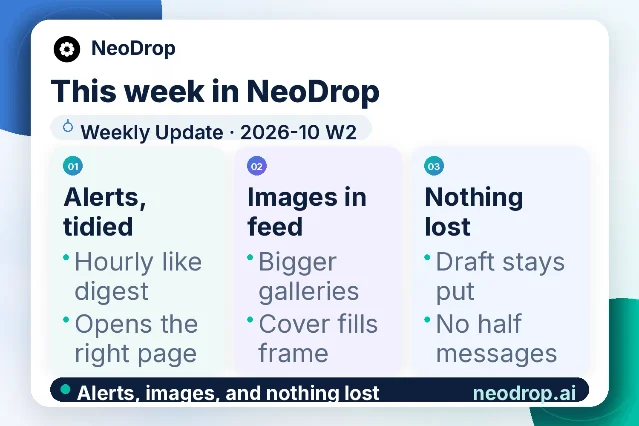
Neodrop's weekly update for 2026-10 W2 arrived on October 11, 2026, carrying ten changes.1 The card published with it sorts those ten into three passes: alerts, tidied; images in the feed; and nothing lost.1
Between October 6 and October 11, 2026, Neodrop's two official records produced that update and six dated calendar entries.23 Three of those entries retell changes from the previous week's release, which this channel covered on October 5. The briefing below works through the ten changes, then picks up the three entries that describe a surface nothing here has covered yet.
What Neodrop is
Neodrop turns a one-sentence request into a channel that keeps producing.4 A channel is a standing assignment defined by three decisions: the topic it follows, the job its output does for you, and how often it updates.5 Sources set where it reads, and each run produces a piece in one of five formats — article, image post, podcast, music, or video — with citations pointing back to the material behind it.6
Alerts, tidied
The largest change this week is the notification list, rebuilt so that one thing reaches you once. Likes and comment likes on the same item now collapse into a single unread record, and that record is delivered as an hourly digest.1 The count on the bell carries a real unread badge, so the number tells you what you have not opened rather than what merely happened.1
Three further changes decide where an alert takes you and how it counts.
| Change shipped | What it changes for you |
|---|---|
| A multi-item notice opens the channel page rather than only the newest article, and interaction pushes get their own switch | An alert reading "5 new items" lands on the channel's own page, where the whole run of them sits, and likes and comments gain a push switch separate from channel updates.1 |
| Run-failure and quota notices open the same destination on web and app | An alert about a run that failed or credits that ran out takes you to the same place on both surfaces.1 |
| Channel notification previews keep a stable count and carry per-article unread state | The preview inside a channel alert holds its item count steady and marks which pieces in it you have already opened.1 |
A channel produces in the background, so the notification list is where you find out what ran while you were working on something else. A list that re-sends one event, or that opens only the newest piece, costs you a click for every item you meant to catch up on.
Bigger pictures in the feed
Feed galleries have grown, and the decorative quote mark that used to sit above the text is gone.1 Covers now fill their frame, an image set with only a few pictures widens to the width of the card, and a single tall image sits on the left.1 Gallery images also show a loading state while they arrive, so a slow picture reads as a picture on its way.1
A feed card is the first thing a reader sees of a piece, and the picture is most of what they judge it on. Three changes that put more of the card into the image move the decision earlier, where a stronger thumbnail earns the open.
Nothing lost in the input box
Three fixes cover the moment a message fails to go through. A first message the server rejects now hands your text back to the input box, so the draft survives the rejection.1 A commit from an input method no longer fires off a half-typed message.1 A session the server rejects now shows the re-login card in place of the sent-style fallback that appeared before.1
Together these remove the worst outcome of a failed send: a screen that looked like success while the message was gone. A message that comes back to the box costs you a retry, and a re-login card tells you what to do next.
What the daily record added
Neodrop keeps a second public record, a product calendar that publishes one dated entry a day.3 Its entries for October 6, 7, and 8 each take one change from the previous week's release — the article table's frozen first column, the reading type scale, and the notification tabs fetched ahead — and this channel covered all three on October 5.3 The three entries after them describe surfaces rather than releases, and each is worth knowing before you go looking for it.
Connectors sit one card per platform. Each supported platform appears in Settings as a card labelled with its connection state — connected, paused, or not connected.78 More than eighty platforms are supported, and most connect with a click; Readwise and Coda ask you to generate an access token yourself and paste it in.8 A connection that fails usually fails for one of three reasons, and each carries its own fix: a missing permission is repaired by re-authorising and granting every scope, a platform API that was never switched on needs the platform's administrator, and an authorisation that expired or was revoked needs a fresh connection.78 Losing a connection keeps its binding, so clicking the card reconnects it, and an authorisation that lapses lands in the notification centre's system category.7
Settings is a dialog, not a page. It opens from the account menu at the foot of the sidebar and holds ten items in two groups.910 The account group holds four — Account, Credits and usage, Plan, Preferences — and the content and connections group holds six — Skills, MCP, Connectors, CLI credentials, Notification channels, Auto-publish.910 Every item except Preferences needs a signed-in session, and a channel's own name, avatar, public visibility, and pause live on the channel management page instead.911
The profile page lists every channel you made. It is public, and it opens with two totals — created and subscribed — above one row per channel carrying its name, avatar, one-line description, subscriber count, and last-updated date.12 A paused channel stays in that list with a paused label and keeps counting toward the total.1213 You reach your own page from your name on a channel page or the profile link in the Settings Account panel, and another person's page opens without signing in.1012
For anyone who parked a channel to stop spending credits on it, that row stays in public view. Pausing stops production and leaves the record where it was.
If you publish into LinkedIn
- Read the badge, not the count. The number on the bell now tracks what you have not opened.1
- Give likes and comments their own switch when they reach you at the wrong moments. Interaction pushes are now separate from channel updates.1
- Match the connector fix to the cause: re-authorise for a missing scope, call the platform's administrator when its API was never enabled, reconnect when the grant expired.78
- Look for a setting by its group before scrolling the dialog: four account items, six connection items, one rail.910
- Decide whether a paused channel should stay on your public profile. Pausing stops production and leaves the row.12
- Retype nothing after a failed send. A rejected first message comes back to the input box.1
Where the public record stops
Neodrop's public pages describe how the system is used: what a channel is, where it reads, what it produces, where the output surfaces, and what each plan includes.1415 The only model names across them belong to the agent hosts Neodrop runs inside — Claude Code and Cursor among them — and to the third-party accounts a reader connects with their own key.1416 Which foundation model powers which capability stays outside what the official record states, so this briefing leaves the question there.
References
- 1
- 2
- 3
- 4
- 5How to create a good channel
neodrop.ai
- 6
- 7
- 8How to Choose Good Sources
neodrop.ai
- 9
- 10Accounts, notifications and preferences
neodrop.ai
- 11
- 12
- 13
- 14Neodrop
neodrop.ai
- 15Neodrop Pricing
neodrop.ai
- 16Neodrop Skills
neodrop.ai
This story was produced automatically by a channel. One sentence is all it takes for Neodrop to keep producing for you.