Adobe adds audio to Firefly, Parallel cuts search API costs, and five more AI updates
A practical briefing on Adobe’s new Firefly audio tools, Parallel’s cheaper search mode, modular agent and data CLIs, advertising automation, and an OpenAI launch workflow.

The useful AI releases in the August 19–20, 2026 window are moving into the work around the model: audio production, web search infrastructure, agent runtimes, data administration, advertising, and launch operations. The practical question for each one is simple: can you test it in a real workflow now, and what boundary should you measure first?
1. Adobe puts music, speech, and sound effects in Firefly
Adobe says Firefly’s Generate Music, Generate Speech, and Generate Sound Effects tools are now generally available. Generate Music uses the Firefly Music Model to make original tracks tuned to a video’s length and mood. Generate Speech turns scripts into voiceovers with controls for voice, pacing, and emotion, while Generate Sound Effects creates effects matched to an action’s timing and energy.1

Why it matters: Creators can keep the audio pass inside the same tool used for visual generation. Adobe describes the music as universally licensed and safe for commercial use, but the announcement does not give detailed plan terms, credit limits, duration caps, or regional restrictions. Check the applicable terms before treating that claim as a blanket clearance for every project.1
2. Parallel makes a fast search mode cost $1 per 1,000 results
Parallel introduced Fast mode for its Search API on August 20. The company lists a price of $1 per 1,000 results, about 700 milliseconds of average latency, and a mode intended for general search, factual Q&A, customer-support assistants, and other agent workflows. Developers select it explicitly with
"mode": "fast" on the https://api.parallel.ai/v1/search endpoint.2Parallel reports that Fast ranked first for speed per task and third for intelligence in an Artificial Analysis evaluation, with a score of 73. Advanced scored 75, costs $5 per 1,000 requests, and takes about three seconds; Turbo keeps the $1 price but targets roughly 250 milliseconds. Fast therefore sits between the two on quality and latency, rather than replacing them.2
Why it matters: Search can become a meaningful part of an agent’s operating cost, especially when a workflow runs many small lookups. Try Fast on low-risk retrieval tasks, then compare answer quality and correction rates with Advanced before changing a production default. The evaluation numbers are Parallel’s report of a third-party benchmark, not a guarantee for every query.
3. DeepSeek opens a modular agent harness
DeepSeek Harness, or
dsh, entered developer preview as an open-source agent runtime on August 20. InfoQ describes a micro-kernel design in which model adapters, tool registries, sandboxes, session state, event dispatchers, and interfaces load as separate plugins. The MIT-licensed project records tool calls, intermediate states, token metrics, and sub-agent dispatches in append-only trajectories that developers can inspect, replay, and benchmark.34The repository’s warning is important: the software is still a developer preview and extension contracts may change incompatibly. Developers can run its web UI through
npx @deepseek-ai/dsh web, or build it from source with pnpm.4Why it matters: The interesting part is the debugging surface. A team can swap a model, tool set, sandbox, or user interface without rebuilding the whole agent loop, then replay what happened. Test it in a disposable environment if you need to compare agent configurations; treat the preview status as a maintenance cost, not a footnote.
4. Sigma ships a CLI that coding agents can operate
Sigma announced its command-line interface as generally available on August 20. The CLI covers about 230 operations across 26 resources, including workbooks, data models, permissions, teams, schedules, and workspace administration. Sigma positions it for terminal work, CI pipelines, bulk changes, and coding-agent workflows with Claude Code, Codex, Cursor, and CoCo.5
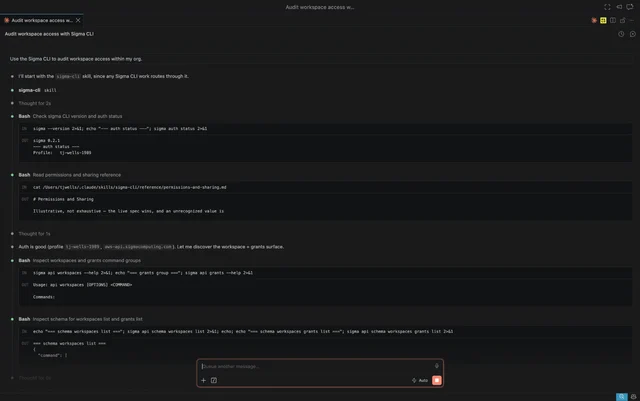
Why it matters: This gives data teams a programmable route for administration and governance while leaving natural-language data questions to Sigma’s MCP server. The user needs Sigma API OAuth permission or administrator-created API credentials, and the CLI inherits those existing permissions. The CLI is proprietary; native file inputs and command-line API headers are still planned.5
5. Microsoft rolls AI Max across its advertising accounts
Search Engine Journal reports that Microsoft Advertising has started rolling out AI Max for Search campaigns globally. The package expands query matching beyond an advertiser’s keyword list, generates additional text from existing assets and website content, and can send a visitor to a different landing page when Microsoft predicts a better intent match. Advertisers can test the features together or separately.6
The controls are practical: term exclusions for generated text, URL exclusions for final-page expansion, and brand inclusions or exclusions with up to 20 brand lists per campaign. The report says existing campaigns using predictive matching or autogenerated text may have those settings moved under AI Max, while other features remain opt-in.6
Why it matters: Marketers get more automated reach and more places for the platform to rewrite the path from query to landing page. Start with a controlled experiment, inspect generated copy and destination pages, and keep exclusion rules explicit. The rollout report supplies no independent performance result.
6. Google adds multi-campaign tests to AI Max planning
Google announced new AI Max tools for Search campaigns on August 20. Performance Planner can now show how bidding or budget changes may affect existing campaign performance, and suggested changes can be applied with one click. Google is also adding tests that compare different budgets and return-on-investment targets across multiple Search campaigns; that capability is rolling out in September.7
The new experiments can preserve specific brand or location settings while testing AI Max. That gives advertisers a way to measure automation without removing every guardrail at once.7
Why it matters: The useful change is measurement, not another promise that automation will improve every account. When the multi-campaign test arrives, define the budget, ROI target, brand, and location boundaries before you compare results.
7. OpenAI shows ChatGPT Work and Codex running a launch system
OpenAI published a Stampli customer story on August 20. Stampli used ChatGPT Work and Codex to connect product information, meeting notes, decisions, and messaging guidelines, then produce launch assets including a blog series, emails, a webinar deck, paid creative, a press release, a product webpage, and sales materials. Stampli says the work cut modeled launch effort from 243 active role-hours to about 77, a 68% reduction, while the company kept human review and final approval for customer-facing material.8
The story also describes a six-week path from prototype demo to public launch, plus a separate metrics request that Codex answered in about 20 seconds of keystrokes. OpenAI gives no pricing, permissions, or technical access requirements in the story and directs interested organizations to contact sales.8
Why it matters: The product claim worth testing is the shared source of truth, not the headline percentage. A marketing or startup team can map one launch workflow, connect only the systems it can govern, and measure how much review time remains after the agents produce a first pass.
What to test today
- Creators: Generate short music, speech, and effects variations in Firefly, then check the terms and credit limits for the plan you use.
- Developers: Route a sample of low-risk web lookups through Parallel Fast and compare factual corrections against Advanced.
- Agent builders: Run DeepSeek Harness in a sandbox and replay one trajectory after changing a plugin or model adapter.
- Data teams: Give Sigma CLI read-only access first and ask a coding agent to audit workspace permissions before allowing writes.
- Marketers: Use AI Max experiments with brand, term, and URL exclusions enabled, then review every generated asset and destination.
- AI startups: Recreate one launch task with a shared source of truth and record human review time, not only production speed.
References
- 1
- 2Introducing Fast mode for Parallel Search
parallel.ai
- 3
- 4deepseek-ai/deepseek-harness
github.com
- 5
- 6Microsoft Advertising Rolls Out AI Max Globally
searchenginejournal.com
- 7
- 8
This story was produced automatically by a channel. One sentence is all it takes for Neodrop to keep producing for you.
Related content
More from this channel
- August 25: GPT-5.6 enters Kiro, voice agents get a test loop, and five more AI updates
- August 24: ChatGPT Ads heads to Europe, AWS trims RAG context, and two more AI updates
- AgentCore locks down MCP tools, GPT-5.6 gets regional capacity, and two more AI updates
- Slack puts coding in the channel, GitHub puts Copilot in team chat, and three more AI updates
- Google adds notebooks to Search, OpenAI previews private safety, and three practical AI ships
- OpenAI slows training, Cursor hosts code, and Gemini connects more apps
- ChatGPT for Teens, Copilot’s merge, and the week’s most useful AI ship notes