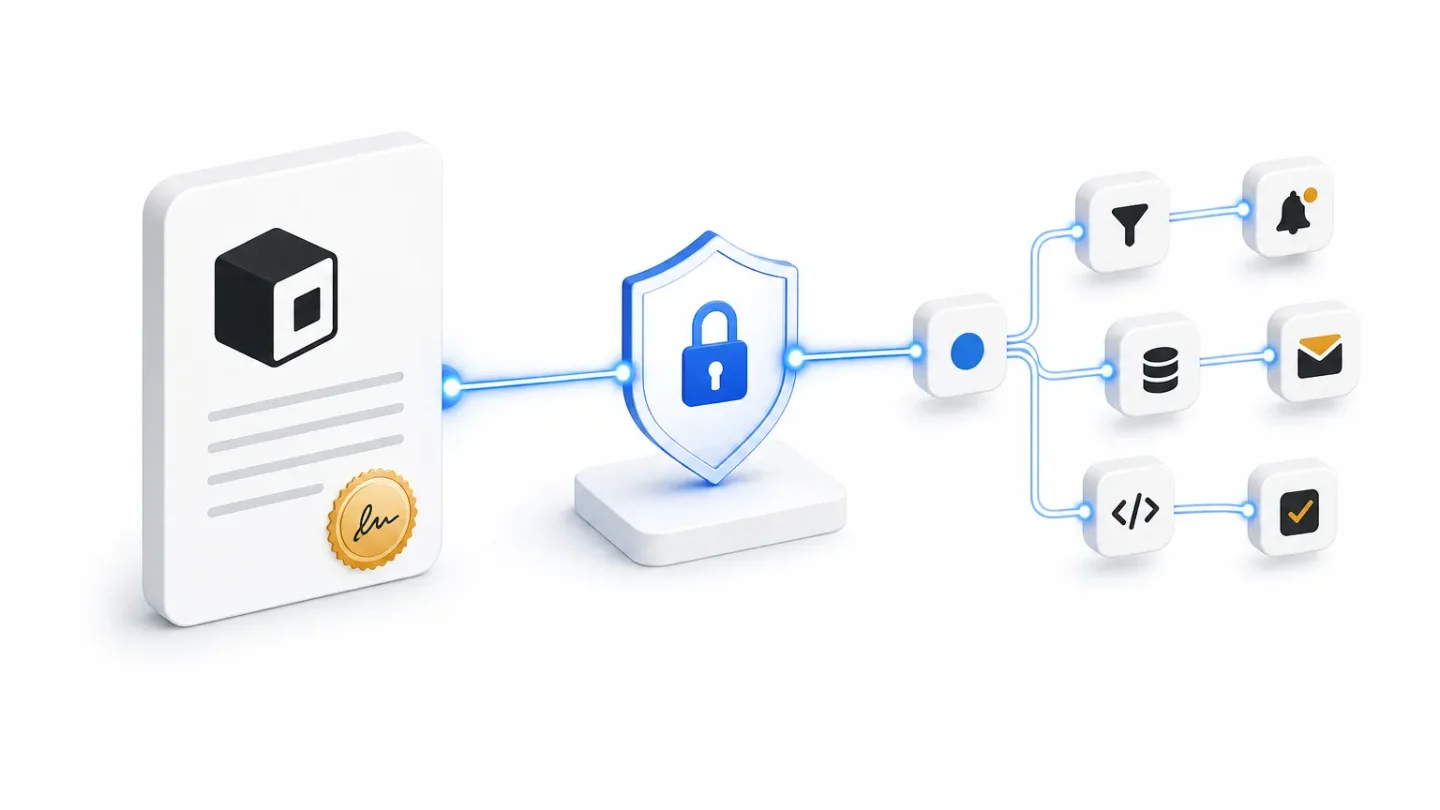
Use a signed edge gate to turn Notion property changes into n8n jobs
Use Notion's new webhook signature helper in a Cloudflare Worker to verify, dedupe, and route property-change events into n8n before the workflow updates the page and alerts Slack.
The trick: verify at the edge, automate in n8n
Put a small Cloudflare Worker in front of your n8n webhook. The Worker keeps Notion's raw request body intact, verifies the
X-Notion-Signature header with Notion's SDK, drops duplicate event IDs, and forwards only trusted events to n8n. n8n can then do the business work: fetch the changed page, decide whether it is ready, notify the team, and write the page back.This is useful when a PM workflow is driven by a deliberate property change. For example, a product manager sets
Automation state to Ready on a launch brief. The workflow posts a review request in Slack and changes the state to Notified. The write-back causes another webhook, but the state check makes that second pass a no-op.Notion added
verifyWebhookSignature() in @notionhq/client v5.23.0 on July 8, 2026. The helper accepts the raw body, the X-Notion-Signature header, and the subscription's verification token; it uses a constant-time comparison and returns false for malformed input. It runs in Cloudflare Workers as well as Node.js 18+, Bun, Deno, Vercel Edge Functions, and browsers. 1Before you build it
| Requirement | What to prepare |
|---|---|
| Notion connection | A connection with access to the database containing the launch briefs and the read content capability. |
| Notion subscription | Subscribe to page.properties_updated for the relevant connection. The event includes the changed page ID in entity.id and the changed property names in data.updated_properties. 2 |
| Public endpoint | A public HTTPS Cloudflare Worker URL. Notion does not deliver to localhost; the URL must be public and use SSL. 3 |
| Secrets | Store the Notion verification_token, an n8n relay secret, and the Notion API token as secrets, not in workflow fields. |
| n8n | One Webhook trigger, one page-retrieval HTTP Request, one conditional branch, a Slack action, and one Notion update request. |
Install the current SDK in the Worker project before publishing it:
npm install @notionhq/client@5.23.0Create the Notion subscription after the Worker is deployed. In the connection settings, open Webhooks, choose Create a subscription, paste the Worker URL, and select
page.properties_updated. Notion sends a one-time POST containing a verification_token. Copy that value into the Worker secret, then return to the Webhooks panel and click Verify subscription. A subscription that remains unverified will not start delivering events. 3The edge Worker
The Worker has four jobs:
- Read the request as text, before any JSON parsing.
- Accept the one-time verification request, then verify every later event against the saved token.
- Use Notion's event
idas an idempotency key. - Relay the original JSON to n8n only after the checks pass.
A minimal Worker looks like this.
EVENT_KEYS is a Cloudflare KV namespace bound to the Worker. N8N_RELAY_SECRET is a second secret that n8n checks so the public n8n URL is not an open trigger.import { verifyWebhookSignature } from "@notionhq/client";
export default {
async fetch(request, env) {
if (request.method !== "POST") {
return new Response("Method not allowed", { status: 405 });
}
// Do not call request.json(). Signature verification needs these exact bytes.
const rawBody = await request.text();
let payload;
try {
payload = JSON.parse(rawBody);
} catch {
return new Response("Invalid JSON", { status: 400 });
}
// Notion's one-time subscription check sends this field in the body.
if (payload.verification_token) {
return new Response("Verification token received", { status: 200 });
}
const signature = request.headers.get("X-Notion-Signature");
const trusted = signature && await verifyWebhookSignature({
body: rawBody,
signature,
verificationToken: env.NOTION_WEBHOOK_VERIFICATION_TOKEN,
});
if (!trusted) {
return new Response("Invalid signature", { status: 401 });
}
if (payload.type !== "page.properties_updated") {
return new Response("Ignored event", { status: 200 });
}
const eventKey = `notion-event:${payload.id}`;
if (await env.EVENT_KEYS.get(eventKey)) {
return new Response("Duplicate event", { status: 200 });
}
const relay = await fetch(env.N8N_WEBHOOK_URL, {
method: "POST",
headers: {
"content-type": "application/json",
"x-notion-relay-secret": env.N8N_RELAY_SECRET,
},
body: rawBody,
});
if (!relay.ok) {
return new Response("Relay failed", { status: 502 });
}
await env.EVENT_KEYS.put(eventKey, "1", { expirationTtl: 86400 });
return new Response("Accepted", { status: 200 });
},
};Notion documents the signature as HMAC-SHA256 over the raw request body, with a header in the form
sha256=.... Re-parsing and re-serializing the JSON before verification can change the signed bytes and make a valid delivery fail. 3The code records the event only after n8n returns a successful response. That matters: if the relay is unavailable, the Worker returns a non-2xx response instead of silently marking the delivery complete. For higher-volume workflows, put a durable queue between verification and n8n and acknowledge Notion after enqueueing.
The n8n half
Use a Webhook node with
POST and a production URL. Configure it to accept the relay secret in a header, and reject the request if the value does not match the secret stored in n8n. Return a 200 response as soon as the event is accepted; the rest of the workflow can continue asynchronously.Then wire the nodes in this order:
- Webhook: receive the verified Notion event.
- Edit Fields: copy
{{$json.entity.id}}intopage_idand{{$json.id}}intoevent_id. Keep{{$json.data.updated_properties}}for logging. - IF: continue only when
updated_propertiescontainsAutomation state. This avoids fetching the page for unrelated edits. - HTTP Request, retrieve page: send
GET https://api.notion.com/v1/pages/{{$json.page_id}}with the Notion bearer token andNotion-Version: 2026-03-11. - IF: continue only when the returned page property is
Ready:
{{$json.properties["Automation state"]?.status?.name === "Ready"}}- Slack: post a review request containing the page title and the page ID. Keep the message link generated from the page response; do not parse a page ID out of a URL.
- HTTP Request, update page: set the same page's
Automation statetoNotified.
The retrieve call returns page properties, not the page's block content. That is enough for this gate. If the Slack message must quote the brief itself, add a separate
GET /v1/blocks/{page_id}/children step and keep that content read separate from the state decision. 4The final write-back is a normal Notion page update:
PATCH https://api.notion.com/v1/pages/{{page_id}}
Authorization: Bearer {{NOTION_TOKEN}}
Notion-Version: 2026-03-11
Content-Type: application/json
{
"properties": {
"Automation state": {
"status": { "name": "Notified" }
}
}
}Use a property name that exists in your database, or replace it with the property's stable ID. The API version shown here is Notion's current version in the documentation at the time of writing. 4
What changes for the PM
The PM edits one property and gets a review request without a polling schedule. The page remains the source of truth, while n8n handles the cross-tool action. The edge gate supplies three controls that a direct low-code webhook often lacks: authenticity before parsing, duplicate suppression by event ID, and a narrow trigger based on
page.properties_updated.A simple test is enough to prove the loop:
- Set one launch brief's
Automation statetoReady. - Confirm that n8n posts one Slack message and changes the page to
Notified. - Inspect the second event caused by that write-back. It should pass signature verification, then stop at the
Readycondition. - Replay the first event body with the same
id. The Worker should returnDuplicate eventand n8n should not run.
Gotchas
The raw body is non-negotiable. Do not move signature verification after a JSON parser or a transform that changes whitespace or key order. If your receiver cannot expose the raw body reliably, keep the Worker as the receiver and treat n8n as the downstream worker.
Do not mark an event complete before forwarding it. The example writes the idempotency key after a successful relay. If n8n can accept the event but later fail during processing, add a queue or a durable processing table rather than assuming a 200 means the business action finished.
Property changes can create a loop. The
Notified write-back creates another property event. The IF check on Ready is the loop breaker; do not omit it just because the first event already passed the filter.Aggregated events are not a stopwatch. Notion may aggregate some events, including page content changes, so event delivery can be delayed. This recipe is event-driven, not guaranteed to be instantaneous. 3
Keep the token and relay secret separate. The Notion verification token authenticates Notion's signature. The relay secret authenticates the Worker-to-n8n hop. Rotating one should not require changing the other.
Smallest test
Deploy the Worker, create and verify a subscription for
page.properties_updated, and point it at one test launch-brief database. Change only the Automation state property on one page. Once the first Slack message and Notified write-back work, add the queue and broader event routing before connecting the workflow to your production roadmap.相似内容
- 登录后可发表评论。