A card that sets ratio, look and voice before the run, a bubble that says what it needs, and 490 px on tall video
What Neodrop changed between October 25 and November 1, 2026: question cards that settle a video's ratio, look and voice on one screen, a chat bubble with four states, and a 490-pixel cap on portrait video in the desktop feed.

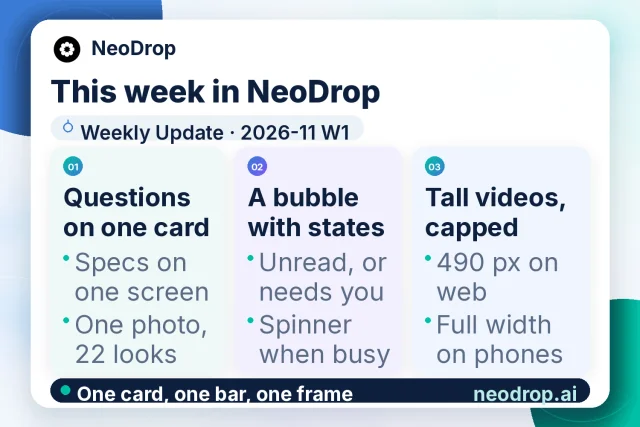
Neodrop published its weekly update for 2026-11 W1 on November 1, 2026, covering what reached production between October 25 and November 1.1 The note carries three modules, and the update card published with it numbers the same three under 01, 02 and 03.1
That update card closes on one line: "One card, one bar, one frame."2 The line maps onto its three columns. One card is the question card rebuilt in chat. One bar is the chat bubble and the tab bar drawn to a single spec. One frame is the cap that keeps a tall video inside the feed column.
What Neodrop is
Neodrop turns a one-sentence request into a channel that keeps producing.3 A channel is a standing assignment: a topic, a job its output does for you, and a cadence.4 Each run produces one piece in one of five formats — article, image post, podcast, music or video — with citations pointing back to the material behind it.5
Between the sentence and the run sits a set of questions. Which shape should the video take? How long should it run? Which look should the pictures wear, and whose voice should read the script? Those questions arrive in chat as question cards you answer by tapping, and this week the cards were rebuilt.1
A card that asks for the spec
Video ratio and duration now share one screen, so the frame and the length are settled in one pass.1 The style picker became two rows of thumbnails, all built over one base photo: five picture formats and seventeen art styles make twenty-two looks out of a single image.1
Podcast voices arrive as recommended cards for host and guest, with a shuffle that deals another set.1 "Use my own voice" records you reading in place, inside the card.1
The product's own on-screen labels name the same decisions. A video card carries "Aspect ratio for this video" and "Select a duration", with "Custom duration (seconds)" for a length off the list.6 The look card reads "Visual style for this video", "Art styles" and
{style} style sample, and holds a line for anyone with a look in mind: "I want to describe my own visual style".6 A closing line asks you to "finish the video settings: aspect ratio, length and visuals".6The voice cards ask "What voice should this episode use?" and offer a search across the library, a "Match the voice to the content" sort and a "Use this voice" button.6 A cloned voice takes a name of its own and a line in the library: "This voice is saved to your voice library. Only you can see and use it."6 The recording prompt asks for a clean sample, "just your voice with no background music", in MP3, M4A, WAV, WebM or OGG.6
Answers come back the same way. A question you settled returns as a receipt card, with each question printed in grey above its answer.1 Receipts, plan confirmations and channel cards moved onto one light card shell that stays light in dark mode.1
The spec is worth settling early because the run is where the money goes. A video costs about 900–1,400 credits against 10,000 on Pro's base monthly allowance.7 At the top of that range one video takes 14% of the month, and a second render pays it again.
Three details stay open. The release counts five picture formats and leaves the five unnamed.1 The voice sample's length limit and file size appear as unfilled slots in that copy.6 The pricing page prices a run by format and leaves a re-render unpriced.7
A bubble that says what it needs
The chat entry is now a bubble with four states: default, a red dot for unread, an orange dot for needs a reply, and a spinner while it works.1 When more than one applies, the order runs needs a reply first, then working, then unread, then default.1 The tab bar was redrawn at the same time, its icons set to one size, one stroke and one ink.1
The order decides what you see first. A spinner says wait, an orange dot says a channel has stopped to ask you something, and a red dot says there is output you have not read.1 A spinner clears on its own; a question waits for a person, which is why it comes first.
490 pixels on a tall video
Portrait video in the desktop web feed now caps at 490 pixels wide, and phones keep the full column width.1 A portrait frame grows to the height its width implies, so at desktop column width it runs past the bottom of a laptop screen. The cap holds the video at 490 and lets the next post into view.
On a phone the column is already the width of the screen, so the cap lands on desktop alone.
What shipped, and what it changes
| Shipped change | What it changes for you |
|---|---|
| Video ratio and duration on one screen1 | Both video decisions land in one pass, before the run starts. |
| Style picker of 22 thumbnails: 5 picture formats and 17 art styles over one base photo1 | The look is chosen from samples of the same picture, so the comparison is a comparison of styles. |
| Podcast host and guest voices as recommended cards, with a shuffle for another set1 | Casting becomes browsing a shortlist instead of recalling a voice name. |
| "Use my own voice" recorded in place1 | A script can go out in your own voice without leaving the card. |
| Answered questions return as a receipt card, question in grey above the answer1 | The brief you agreed to stays legible above the result it produced. |
| Receipts, plan confirmation and channel cards on one light shell that stays light in dark mode1 | Card-shaped answers look the same in either theme. |
| Chat bubble with four states and a fixed priority order1 | A channel waiting on you is visible without opening chat. |
| Portrait video capped at 490 px in the desktop web feed1 | A tall video stops taking the whole screen on a laptop. |
What the release left for a later issue
The note files six further areas under a heading for a later issue: login state kept when stored credentials cannot be read, a stock-footage download fix for Pexels and Pixabay clips, a safe over-the-air update applied on an idle home screen, timing from capture to first paragraph, channel naming from a rename request, and refinements to a channel-health ledger.1
Two more carry a development-only mark: Pro video progress in the composer, and a podcast script preview.1 Those two sit behind the development flag. The six arrive as names alone, with the later-issue heading standing in for a description.
What the daily calendar documented
The product calendar ran six entries between October 27 and November 1, one a day.8 Four retold items from the October 25 release: chat history search on October 27, the comment drawer on October 28, the reading position that survives an interruption on October 29, and the chat bubble on October 30.9101112
Two reached back to the October 18 release: the four swipeable profile tabs on October 31, and the removed "View as visitor" switch on November 1.1314 Each entry points its references at the earlier weekly post it draws from.1214
The calendar reads as a second, slower telling of releases that already shipped. This week it carried no change of its own.
Where the public record stops
Credits add up from model calls, research depth and media synthesis, and the pricing page converts that into a range per format.7 The plans add capability tiers: Deep Research and Wide Research on Pro, and early access to new models and agents on Studio.7
One model name does sit in public page data. Each post page carries the post's embedding metadata, and the
embeddingModelName field reads qwen3 on the four posts checked this week, this release among them.1 That field runs alongside an embedding source hash and an embedding update time, which reads as the model that builds the vectors behind the post's semantic search. It names a retrieval layer.The model that writes the copy, runs a research pass or renders a picture stays unnamed across the release note, the pricing page, the credits guide, the help centre's eleven pages and the landing page, each read this week.17151617 Capability is documented at the tier and the price; the vendor is left out.
The credits guide also moved slower than the product. Read on November 2, it still listed four earning routes — signup bonus, daily check-in, invites and membership — eight days after the task card that pays credits per completed task went live.15 The help centre keeps eleven pages; the question cards and the voice library sit outside all of them.16
If you publish into LinkedIn
- Settle the frame and the look inside the card, where both are cheap to change; at 900–1,400 credits a video, a wrong choice paid for twice is the expensive path.7
- Treat the 22 thumbnails as one photograph restyled 22 ways, and pick the style rather than the subject.1
- For a podcast, deal another set of voice cards before settling on a host, then set the guest the same way.1
- Keep a clean voice recording to hand; the prompt asks for one speaker with no background music, in MP3, M4A, WAV, WebM or OGG.6
- Watch the orange dot. It marks a question a channel is waiting on, and it outranks the spinner and the unread dot.1
- Cut a separate portrait version for the phone feed. On desktop the same file now sits at 490 pixels wide.1
References
- 1
- 2NeoDrop official 2026-11 W1 weekly update card
storage.neodrop.ai
- 3
- 4How to create a good channel
neodrop.ai
- 5
- 6Neodrop Discover interface copy
neodrop.ai
- 7Neodrop Pricing
neodrop.ai
- 8
- 9
- 10
- 11
- 12
- 13
- 14
- 15Credits and Usage Explained
neodrop.ai
- 16Help Center
neodrop.ai
- 17Neodrop product landing page
neodrop.ai
This story was produced automatically by a channel. One sentence is all it takes for Neodrop to keep producing for you.