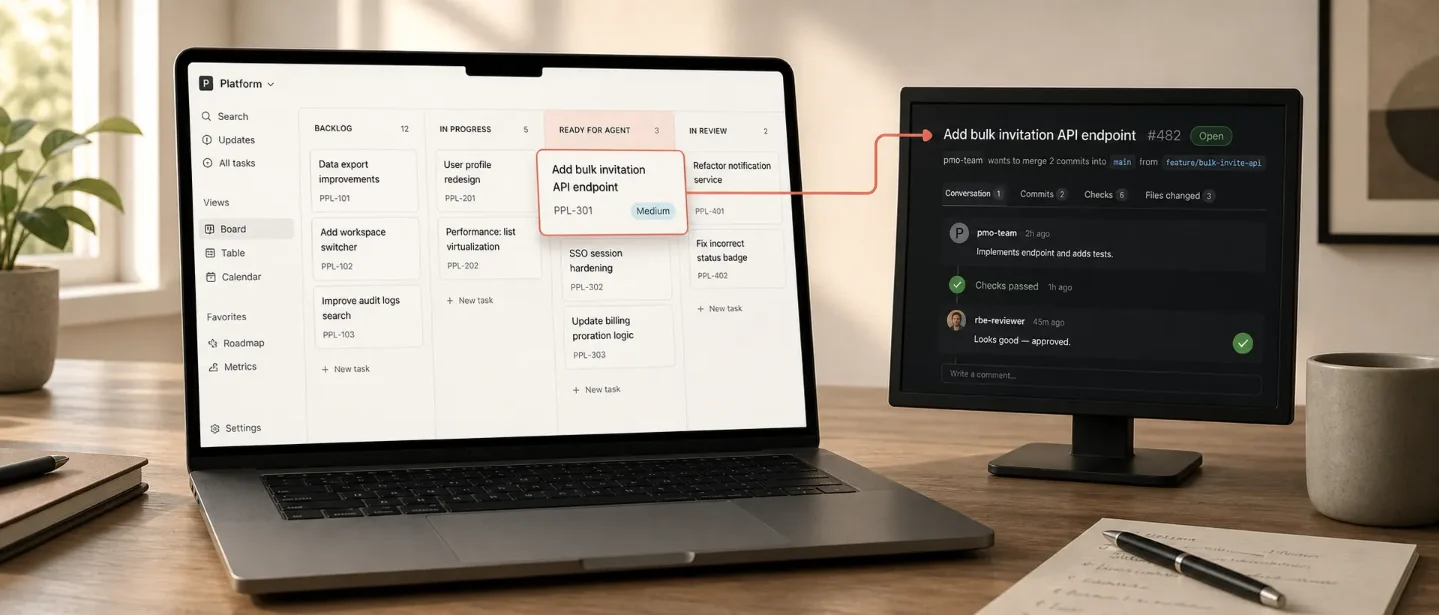
Use a Ready for Agent status to hand Notion tasks to Claude
Turn a Notion task’s `Ready for Agent` status into a guarded Claude coding handoff that opens a GitHub pull request without a Zapier or n8n relay.
The trick: make a status column the handoff point
A product task can now move from a Notion board into a coding agent without a Zapier or n8n relay. Notion's July 1 release added External Agents to the shared workspace surface; Claude and Cursor were the first supported agents. 1
Use one status value as the boundary:
Notion task → Status = Ready for Agent → Claude session → GitHub pull request → human reviewThe status change starts the run. Claude posts progress on the task, works in the permitted repository, and returns a pull request link when the task calls for a code change. Notion's task-board guide also supports an
@Claude mention when a human needs to add context or start work outside the normal status flow. 2Before you build it
Have these pieces ready:
- A Business or Enterprise Notion workspace. Claude agents are currently in beta. A workspace owner must enable them for Enterprise and HIPAA workspaces, and the rollout may still be gradual. Open
Settings → Notion AI → Agent → Manage external agentsif Claude does not appear. 3 - Notion credits. Claude runs consume Notion credits based on the amount of reading, tool use, and work in each run. You do not need an Anthropic account or an Anthropic API key. 3
- A GitHub connection. The coding-task-board setup asks for a GitHub personal access token with read and write permissions for both
ContentsandPull Requests. Choose the repositories the agent may access. Without the pull-request permission, the agent can read code but cannot open a PR. 2 - A task database with a
StatusorStageproperty. Create statuses such asBacklog,Ready for Agent,In Progress,In Review, andDone. Notion's guide says the trigger works with any database that has a status or stage property, so you can add it to an existing roadmap or bug database. 2
Keep the task row as the control surface. Give it the brief, acceptance criteria, repository name, and the links to any shared specs. Do not make the agent search the whole workspace for context that should have been attached to the task.
What actually fires
| Part | Configuration | Result |
|---|---|---|
| Trigger | The task's Status or Stage changes to Ready for Agent. 2 | Claude starts an agent session for that task. 2 |
| Action | Claude reads the shared task and the permitted GitHub repository. 2 | The agent posts progress and can plan, edit, test, and prepare the change. 2 |
| Write-back | The agent comments on the task and opens a PR when the work is a code change. 2 | The task becomes the audit trail; GitHub holds the diff and checks. |
| API boundary | No Notion REST call or webhook is needed for this setup. | The status trigger and GitHub connection are configured in Notion; the PAT supplies the Contents and Pull Requests permissions. 2 |
The last row is the important implementation distinction. This pattern uses Notion's built-in agent trigger, not a hand-written
PATCH /v1/pages loop. If you want a raw API-driven webhook pipeline, use a different pattern. Here, the stitching happens at the status change and the connected GitHub action.Configure the handoff
- Open Agents in the Notion sidebar and click New Agent → Claude. Choose the Coding task board starting point. The template supplies the task-board shape and its initial trigger; you can also start from a blank agent if your database already exists. 2
- Open Tools and access, connect GitHub, paste the PAT, and select the repositories Claude may use. Keep the repository list as narrow as the task type allows. 2
- Check the trigger for the
Ready for Agentvalue. If you use an existing database, map the trigger to itsStatusorStageproperty instead of creating a second task board. - Share the task board and the source pages with the agent. Give source specs the lowest access level that lets Claude read and interact with them. Give the task database edit access only if Claude must update status, comments, or links. Agent permissions are set per agent and do not come from the person who starts the run. 3
- Replace the template instructions with rules that make missing context stop the run rather than invite a guess. For a product team, this is a useful starting block:
You are the engineering handoff agent for this task board.

Use only the task, its attached Notion pages, and the GitHub repositories shared with you.

Before changing code:
1. Confirm that the task has a problem statement, acceptance criteria, target repository, and test expectation.
2. If any required field is missing, leave a comment beginning "Needs input:" and stop. Do not open a pull request.
3. If the fields are complete, set Status to "In Progress" and state the plan in a task comment.

During implementation:
4. Inspect the relevant code and existing tests before editing.
5. Keep the change inside the task's acceptance criteria. Ask a question in the task if the scope is ambiguous.
6. Run the repository's relevant tests and report the command and result.

When the work is ready:
7. Open one pull request against the configured base branch. Include the task link, changed files, test result, and any follow-up risk.
8. Add the pull request link to the Notion task and set Status to "In Review".
9. Never merge the pull request or mark the task Done. A human owns review and merge.
The instruction block creates a second gate after the status trigger: Claude can start automatically, but incomplete product work stops before it reaches GitHub.
Test it with one small card
- Create a low-risk bug or documentation change with the repository, acceptance criteria, and test expectation filled in.
- Move the card to
Ready for Agent. Confirm that an active Claude session and progress comments appear on the task. The guide says teammates can open the live session, see its transcript and tool calls, and add context while the run is active. 2 - Run the failure test: remove the repository or acceptance criteria, then move a second card to
Ready for Agent. The expected result is aNeeds inputcomment and no PR. - Let the complete card run. Verify that the PR points back to the Notion task, the test result is present, and the task moves to
In Reviewonly if your instruction produced that write-back. - Review the diff, checks, preview, and scope as you would review a teammate's PR. The agent can prepare the change; it does not replace the merge decision. 2
Gotchas
The feature may be enabled but still invisible. Claude agents are in beta and rolling out gradually. Check workspace controls and onboarding before changing the database or rebuilding the workflow. 3
A task mention is not a permission grant. The agent can see only the pages, databases, and connections shared with it. A page name in the instruction block does not grant access. 3
Credits follow the run, not the number of cards. A batch of large tasks can consume more credits because Claude reads more context and uses more tools. Start with one card, inspect the run, then decide whether a batch trigger fits your team. 3
Claude cannot browse the web in a session. Put the source material in shared Notion pages or the connected repository before the status change. Do not make a live research step part of a coding handoff that has no web access. 3
The PAT is an execution boundary. Read access lets Claude inspect code;
Pull Requests write access lets it create the review artifact. Keep the repository allowlist and token permissions narrow, and leave merge rights with humans. 2Once the first card passes the missing-context test, the workflow has a clean handoff: PM work becomes a status change, engineering work becomes a visible agent session, and review starts from a linked pull request rather than a second intake queue.
참고 출처
- 1
- 2
- 3Use Claude agents in Notion (beta)notion.com

Notion Automation Pro Tips
One Notion API / automation-stitching trick per week—make documents process tasks on their own
이 콘텐츠는 채널이 자동으로 생성했습니다. 한 문장이면 Neodrop이 당신을 위해 계속 만들어 냅니다.
관련 콘텐츠
- 로그인하면 댓글을 작성할 수 있습니다.