
Cloudflare Drop: deploy first, sign up later
Cloudflare Drop is useful now for temporary static previews, demos, review artifacts, and stakeholder handoffs. The article recommends using it as a low-friction preview tool, while watching for production-hosting details before treating it as a migration trigger.

Cloudflare Drop is useful now for demos, review links, and low-friction static previews. It is not yet a reason to migrate a production hosting stack.
The short verdict: use it when the artifact is temporary; watch it when the decision is production hosting. Cloudflare Drop lets a developer upload a folder or ZIP in the browser, get a live site, and claim the deployment later if it should become permanent. Cloudflare announced the feature on July 8 and said the first deployment does not require a Cloudflare account. 1
That changes the first five minutes of adoption. It does not yet answer the harder production questions around build pipelines, quotas, pricing, observability depth, branch previews, or team governance.
What changed
Cloudflare Drop is a browser-based static-site deployment path. A user can upload a folder or ZIP containing static HTML, CSS, JavaScript, images, and fonts. Cloudflare then deploys the site on the Workers platform and serves it from Cloudflare's global network. 1
The public entry point is cloudflare.com/drop. The page describes the flow as: "Drop a folder. Or a zip. Summon your site - HTML, CSS, JS. See it live instantly." 2
The unclaimed deployment gets a temporary preview URL that stays live for 1 hour. During that hour, the user can test the site, share it, or claim it. 1 The claim path is explicit: click Claim, log in or create a Cloudflare account, verify email, and keep the deployment permanently. 1
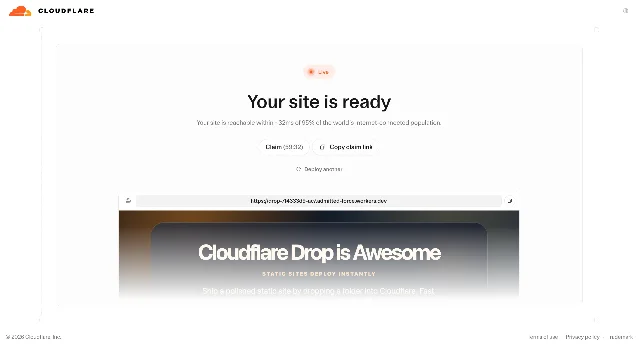
After a user claims a site, Cloudflare says the user can add a domain, enable observability, enable Markdown for Agents, and set access controls to make the site private. 1 Those post-claim options matter because they turn Drop from a disposable preview into a possible on-ramp for a real Cloudflare account.
Why it matters
Most hosting products still begin with account creation. Drop reverses that sequence. The first step is no longer "create an account, choose a project, connect a repository, configure a build, deploy." The first step is "drop the files and see whether the result is useful."
That is a real workflow change for teams that constantly pass around static artifacts. A front-end engineer can send a built prototype without asking a teammate to clone a repo. A DevOps engineer can hand a vendor a one-hour reproduction page without provisioning a project. A product team can review a static export before deciding whether it deserves a permanent deployment.
The strongest use cases are narrow:
- Static prototypes where a live URL is more useful than a screenshot.
- Pull-request review artifacts that do not need a branch preview system.
- Client or stakeholder demos where the site should disappear unless someone claims it.
- One-off documentation, landing-page, or design-review builds that already compile to static files.
Drop is also a developer-acquisition feature. The account arrives after the first success, not before it. For a platform company, that is a meaningful change because the product experience starts with the deployment result rather than the signup form.
What keeps it watch-only
The first limitation is scope. Cloudflare describes Drop around static HTML, CSS, JavaScript, images, and fonts. 1 A team choosing a primary hosting platform still needs to evaluate server-side rendering, functions, queues, databases, background jobs, deployment previews, access policy, rollback behavior, and integration with its source-control workflow.
The second limitation is the public detail level. Cloudflare's launch material specifies the 1-hour temporary preview and the claim flow, but it does not publish separate Drop pricing, production quotas, or service-level terms for this upload path. 1 2 That is fine for a preview tool. It is not enough for a migration decision.
The third limitation is operational fit. Drag-and-drop deployment is fastest when the output already exists. Production teams usually need the opposite: repeatable builds from source, environment separation, audit trails, promotion rules, and rollback. Drop may feed into that world after a site is claimed, but the published workflow is still an upload-first path.
Migrate or watch?
Use Cloudflare Drop now if your team needs fast static previews. The ideal case is a folder or ZIP that already contains the final assets and needs a shareable URL for minutes or hours. In that job, Drop removes setup work that usually has nothing to do with the artifact being reviewed.
Watch Cloudflare Drop if your question is whether Cloudflare should become your default static hosting platform. The feature is a strong on-ramp, but the migration case still depends on the permanent project workflow after claim: domains, access control, observability, source-control integration, pricing, and team controls.
Do not migrate because of Drop alone if your application depends on server-side runtime behavior, database-backed previews, complex CI/CD, or long-lived staging environments. Drop is best read as a new entry point into Cloudflare, not as a complete replacement for a hosting pipeline.
The practical move is simple. Add Drop to the team's toolbox for disposable static URLs. Keep the platform migration decision tied to the permanent Cloudflare workflow that begins after the claim button.
Cover image from Cloudflare's Cloudflare Drop changelog.
관련 콘텐츠
- 로그인하면 댓글을 작성할 수 있습니다.