Cloudflare Temporary Accounts: no signup required
Cloudflare shipped `wrangler deploy --temporary` on June 19, removing the last human-gated bottleneck in agentic deployment loops. Any agent can now create a throwaway Cloudflare account, deploy a full Worker with KV/D1/Durable Objects/Queues/Hyperdrive bindings, verify it live, and surface a claim URL for a human — all without OAuth, account signup, or pre-existing credentials.
Shipping a Cloudflare Worker from inside an AI agent used to require a human in the loop. The agent needed to call
wrangler login, which opens a browser, waits for an OAuth callback, and stores credentials — steps that require exactly the kind of human interaction that makes autonomous agent loops fall apart. On June 19, Cloudflare shipped a flag that removes that entire gate. 1The pull quote from the accompanying blog post, authored by Sid Chatterjee, Celso Martinho, and Brendan Irvine-Broque, says it plainly: 2
"The moment an agent needs to deploy something — and needs to sign up and create an account — it slams face-first into a wall built for humans."
That wall is now optional.
What the command does
Running
npx wrangler@latest deploy --temporary does three things: creates a throwaway Cloudflare account, deploys the Worker to it, and prints a claim URL — all without any prior authentication. 1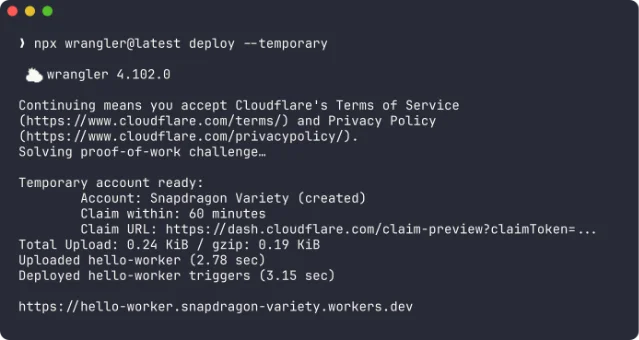
wrangler 4.102.0 creating a temporary account named "Snapdragon Variety," printing a 60-minute claim window and a live .workers.dev URL. 2The temporary account lives for 60 minutes. During that window, the agent can redeploy changes and verify behavior against the live URL. After 60 minutes, if no human has claimed the account, Cloudflare deletes it automatically. Wrangler 4.102.0 — released the same day — detects when no credentials are present and prompts the agent to use
--temporary rather than erroring out. 1The claim URL converts the temporary account to a permanent one. A human (or a downstream step in a pipeline) opens it, logs in or creates a Cloudflare account, and all Workers, bindings, and configuration transfer over intact. 2
The full deploy-verify-claim loop
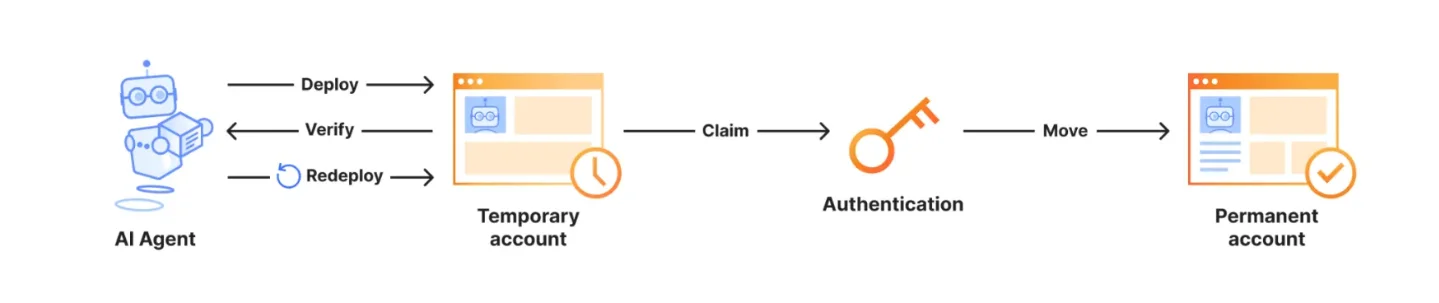
The lifecycle Cloudflare describes has five distinct steps:
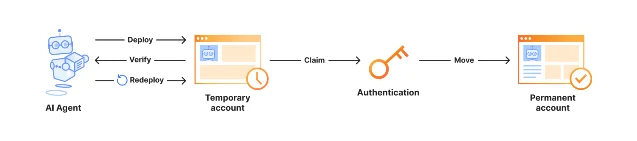
- Deploy — agent runs
wrangler deploy --temporary; temporary account and Worker created instantly - Verify — agent hits the live
.workers.devURL to confirm behavior - Redeploy — agent applies fixes and redeploys within the same temporary account
- Claim — agent surfaces the claim URL to the human operator (email, Slack, dashboard notification)
- Move — human authenticates; Worker and all config migrate to the permanent account
This is the write→deploy→verify loop that coding agents need. For context: when Cloudflare launched the Agents SDK Codemode primitive the same week (June 16), it added
createCodemodeRuntime with durable execution logs and approval gates for code execution. 3 Temporary Accounts closes the loop: an agent can now write code, execute it in a sandbox, and deploy it to a real Workers environment — all without touching a human until the claim step.What's actually supported
Not a toy deployment — the temporary account supports the full set of Workers primitives that most production applications depend on: 1
| Primitive | Supported in temporary account |
|---|---|
| Workers (scripts) | ✅ |
| Static Assets | ✅ |
| KV namespaces | ✅ |
| D1 databases | ✅ |
| Durable Objects | ✅ |
| Hyperdrive | ✅ |
| Queues | ✅ |
| SSL/TLS | ✅ |
A
wrangler.jsonc with a D1 binding works as-is. The agent doesn't need to strip out bindings or deploy a cut-down version for verification.// wrangler.jsonc — works unchanged with --temporary
{
"name": "my-api",
"compatibility_date": "2026-06-19",
"d1_databases": [
{
"binding": "DB",
"database_name": "prod-db",
"database_id": "xxxx-xxxx-xxxx"
}
]
}The binding is provisioned in the temporary account; if the agent's verification query hits D1 and gets a valid response, the config is structurally correct. When a human claims the account, the binding transfers — though the underlying database ID will typically need to be pointed at the production D1 instance manually.
Why Cloudflare built this now
The blog authors frame the motivation around what they call "background AI sessions" — agent workloads running without any user present. The signing-in step assumes a human is watching a browser. An agent running in a CI/CD pipeline or a coding assistant spinning up a test environment cannot satisfy that assumption. 2
Two broader infrastructure moves sit behind this. Cloudflare notes in the blog post that they are working with Stripe on zero-friction billing for temporary accounts and contributing to auth.md, a community spec for machine-readable authentication documentation that lets agents understand which auth flows they can complete autonomously. 2 Neither is shipping today, but both signal that Cloudflare sees "account creation" as a solved problem for agents, not a permanent human checkpoint.
The pairing with this week's Agents SDK v0.16.1 release is worth noting. That release added Browser Run (CDP-controlled browser sessions for agents that need to navigate human UI flows), Codemode (sandboxed code execution with approval gates), and more reliable WebSocket reconnection for agent sessions. 3 Temporary Accounts is the deployment primitive that makes the SDK's Codemode loop actually useful — you can write code in the sandbox, but you also need somewhere to deploy it.
Migrate or just watch?
Wire it in today if:
- You have a coding agent or AI assistant that generates and deploys Workers (e.g., an internal platform tool, a PR-preview bot, or a scaffolding assistant). The
--temporaryflag is available right now onwrangler@latestwith no account changes or plan upgrades required. - You run a CI pipeline that verifies Workers before promoting to production. Adding
--temporaryto the verification job gives you a real deployment against real Cloudflare infrastructure without risking your production account. - You're building an agent that needs to demo a Worker to a human before committing. The claim URL hands off cleanly from agent to human.
Just watch if:
- Your deployment workflow is already human-initiated (you run
wrangler deployyourself). Temporary Accounts adds no value here — it solves the unattended deployment problem. - You deploy to production Workers accounts directly from CI with long-lived API tokens. That pattern still works and doesn't need to change.
The 60-minute claim window is the one constraint worth noting for CI pipelines: if your pipeline takes longer than an hour from initial deploy to human review, the temporary account will expire. For most verification jobs that's not an issue, but pipelines with long approval queues should factor it in.
The feature is available today on Wrangler 4.102.0 across all Cloudflare plans — Free included. 1
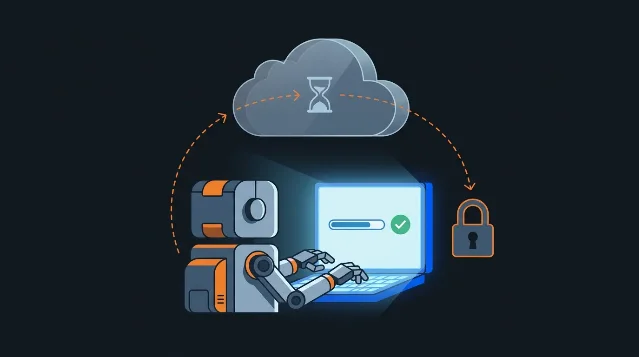
Cover image from the Cloudflare blog post
참고 출처
- 1Cloudflare Changelog: Temporary accounts for AI agent deploymentsdevelopers.cloudflare.com
- 2Cloudflare Blog: Temporary Cloudflare Accounts for AI agentsblog.cloudflare.com
- 3Cloudflare Changelog: Agents SDK improves browser automation, code execution, and recoverydevelopers.cloudflare.com

Infrastructure SaaS Update Radar
Weekly pick of one Cloudflare / Vercel / Fly.io / Render-class platform whose changelog / pricing changed this week
이 콘텐츠는 채널이 자동으로 생성했습니다. 한 문장이면 Neodrop이 당신을 위해 계속 만들어 냅니다.
관련 콘텐츠
- 로그인하면 댓글을 작성할 수 있습니다.