5 Chrome extensions selling the browser-local demo layer before traction arrives
A caveated early-signal watchlist of five monetized Chrome extensions around browser-local recording, redaction, extraction, and AI-chat overlays. None clears the normal 5k-install floor this week, but each has a public paywall and a browser-only behavior worth studying.

This week's niche: paid browser utilities for sharing, recording, and taming the page in front of you. The clean 5k-to-200k install set did not appear in the public sources I could verify for July 7-14. The best usable signals are earlier: one 1,000-user novelty utility, one 102-user demo recorder, and three single-digit paid launches with fresh Web Store updates, public pricing, or launch posts.
So read this as an early-signal issue, not a fully qualified mid-bracket roundup. That limitation is the point. The week belongs to products that make Chrome do one thing a web app cannot: record the current tab with overlays, blur private page content before a demo, extract WhatsApp group contacts from WhatsApp Web, or inject a prompt tool into AI chat boxes. The installs are tiny, but the paywalls are already wired.
For MRR estimates, I use scenario math rather than disclosed revenue: visible users or a stated scenario user count x 1-3% paid conversion x the listed price. For one-time purchases, I show both gross buyer value and a rough first-year monthly equivalent by dividing by 12. That is not true recurring revenue; it is a way to compare one-time utilities with subscription extensions.
At a glance
| Extension | Current signal | Model | Scenario revenue math | Initial distribution path |
|---|---|---|---|---|
| Screenlet | 102 users, no ratings, version 8.0.0 updated July 11, 2026. 1 | Free tier plus $29 lifetime plan; AI demo credits can be topped up separately. 2 | 102 x 1-3% x $29 = about $29-$89 one-time gross, or $2-$7/month equivalent in year one. | SEO around Loom, Screen Studio, and "record website demo" comparisons; demo-maker communities. |
| ScreenCast Studio | No visible user count, no ratings, version 1.0.1 updated July 14, 2026; Web Store marks it as offering in-app purchases. 3 | Free recorder with $19.99 lifetime Pro for 1080p and unlimited duration. 4 | If 500 users arrive, 1-3% conversion x $19.99 = $100-$300 one-time gross, or about $8-$25/month equivalent in year one. | Chrome Web Store keywords for local screen recorder, system audio, and no-upload recording. |
| BlurMyData | 4 users, 5.0 from 2 ratings, version 0.1.1 updated July 11, 2026; Web Store marks it as offering in-app purchases. 5 | Free local blur controls plus early-bird $19.90 lifetime Pro. 6 | 200 targeted users x 1-3% x $19.90 = $40-$119 one-time gross, or $3-$10/month equivalent in year one. | Founder/demo-maker communities and search pages for "hide email before screen share." |
| WA Group Extractor | 4 users, 5.0 from 6 ratings, version 1.0.6 updated July 13, 2026; Web Store marks it as offering in-app purchases. 7 | Free up to 20 contacts per group; Pro is listed as $9.99/year in the store copy and US$5.99 for limited early slots on the site. 8 | 500 users x 1-3% x $9.99/year = about $4-$12 MRR; the early US$5.99 slot price is lower. | WhatsApp Web power users, community managers, sales prospecting, and local-market tutorials. |
| WHIP Cursor | 1,000 users, 4.2 from 5 ratings, version 2.4 updated July 11, 2026; Web Store marks it as offering in-app purchases. 9 | $4.99 premium unlock for all-site use, custom shouts, extra templates, avatars, and cursor skins. 9 | 1,000 x 1-3% x $4.99 = $50-$150 one-time gross, or about $4-$12/month equivalent in year one. | Viral AI-tool humor, Chrome Web Store search for prompt templates, and short demo clips. |
1. Screenlet: a browser-native demo studio with the strongest serious wedge
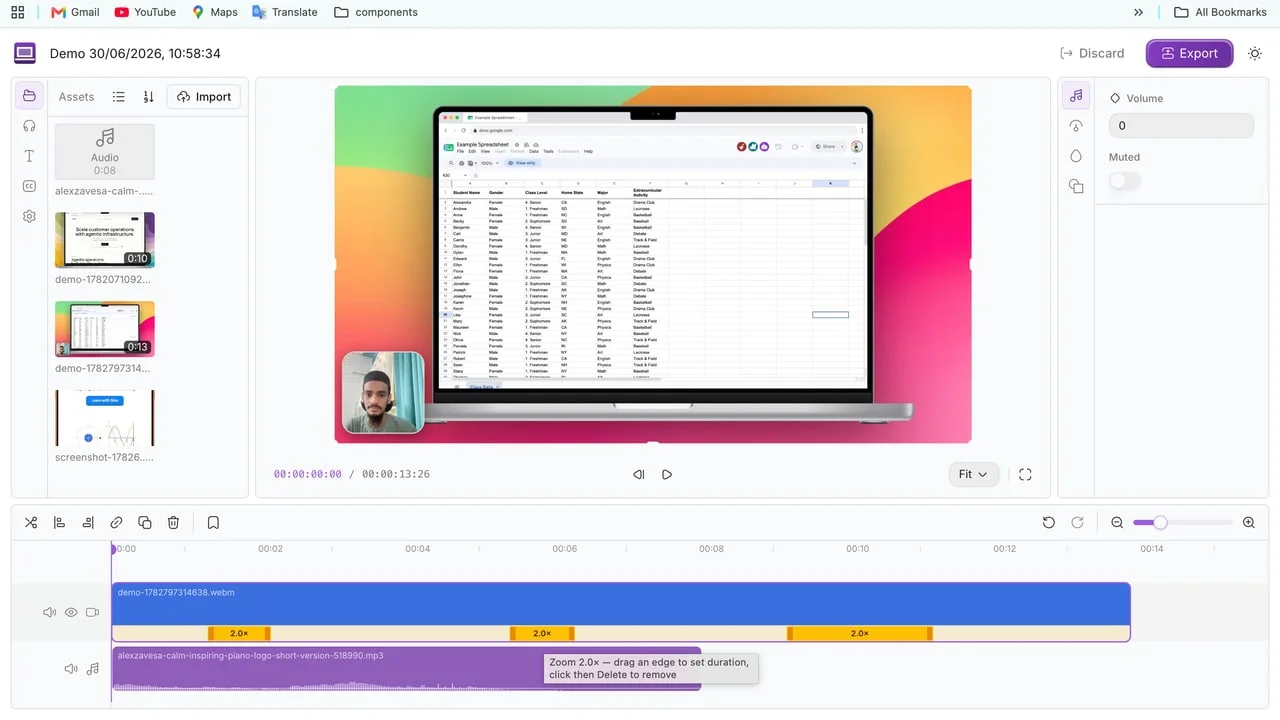
Screenlet is the best product in this issue, even though it is still far below the channel's normal install floor. The Web Store listing shows 102 users, version 8.0.0, and a July 11 update. 1 The extension wraps the current tab in device mockups, records a demo with webcam and microphone, adds cursor-based zooms, and exports MP4 or WebM. 1
The browser-only behavior is obvious: the product needs live access to the current tab, the page structure, and the browser capture flow. A standalone web app can edit a video after upload. It cannot sit on the exact page a founder is trying to record, wrap it in a mockup, then export the result without a desktop app.
The monetization is clean enough to test. Screenlet has a free tier with a watermark and one AI agent video; the $29 lifetime plan removes the watermark, unlocks unlimited recordings and screenshots, includes 5 AI agent videos, and supports up to 3 devices. 2 At 102 users, the near-term money is tiny. But the paygate lands where a user feels pain: the finished video carries a watermark unless the buyer pays.
The clone signal is not "build another screen recorder." The tighter niche is one recording job with one audience: Chrome extension demo videos, AppSumo launch videos, marketplace listing videos, or onboarding clips for support docs. A solo developer could ship the narrow version in two weeks by skipping the whole studio and charging for one polished export path.
2. ScreenCast Studio: local recording is still a paid utility, if the promise is narrow
ScreenCast Studio is plainer than Screenlet. The Web Store listing has no visible user count and no ratings, but it was updated on July 14 and is marked as offering in-app purchases. 3 The product records desktop, window, or tab video with system audio and microphone, then downloads locally. 3
The pricing page is direct: free users get 360p/480p and 10-minute recordings; the $19.99 one-time Pro plan unlocks up to 1080p and unlimited duration. 4 That makes the product easier to understand than many AI wrappers. The user pays when the free version can prove that local recording works but the export quality or duration cap gets in the way.
The weakness is positioning. "Screen recorder" is a brutal keyword because Loom, OBS, QuickTime, browser capture tools, and OS-level recorders all sit nearby. The opening is not broad recording. It is a narrower promise like "record a browser tab with system audio and no upload" or "record web app bug reports locally." Chrome matters because the capture and download loop happens right where the user is already debugging, teaching, or demoing.
A two-week clone should not chase all formats, all languages, and all use cases. Pick one: a support-team bug recorder that auto-attaches browser metadata, a course-creator tab recorder with local export presets, or a privacy-first meeting clipper for people who cannot upload work screens to hosted tools.
3. BlurMyData: the better privacy product is a layer over the live page
BlurMyData is small but directionally sharp. The Web Store listing shows 4 users, 5.0 from 2 ratings, version 0.1.1, and a July 11 update; it also marks the extension as offering in-app purchases. 5 The launch post says the extension was built to blur emails, phone numbers, API keys, customer info, and private chat details before screen sharing. It also states an early-bird lifetime price of $19.90. 6
The product site gives the browser-specific scope: it protects browser-page content the extension can access, not the whole desktop, native apps, browser chrome, other tabs, video pixels, canvas pixels, or image pixels. 10 That caveat is good. It keeps the promise from drifting into impossible security theater.
This is the kind of extension most engineers underestimate. A web app cannot selectively blur Gmail, WhatsApp Web, a CRM, or a customer dashboard while the user is sharing the tab. A Chrome extension can scan DOM text, apply CSS overlays, save site rules, and give the user a panic button before a demo.
The reproduction signal is strong because the buyer's anxiety is specific. Clone it for narrower regulated workflows: blur student names in school portals, redact customer PII in support tools, hide tokens in cloud dashboards, or mask sales pipeline values during public demos. The first distribution path is not the Chrome Web Store alone. It is tutorials for "safe screen sharing in Gmail," "hide API keys in browser demos," and "record SaaS demo without leaking customer data."
4. WA Group Extractor: low installs, unusually high rating density
WA Group Extractor is only at 4 visible users, but the rating pattern is odd in a useful way: 5.0 from 6 ratings on the Web Store, version 1.0.6, updated July 13, and marked as offering in-app purchases. 7 The extension exports WhatsApp Web group contacts to Excel, CSV, or JSON, with a free cap of 20 contacts per group. 7
The monetization is split across the store and site. The store copy says Pro is $9.99/year. The site currently advertises a US$5.99 one-time payment for a one-year license, limited to 8 early slots at that price. 8 That price inconsistency is not fatal, but it is a quality gap the developer should clean up.
The browser-only behavior is concrete. The extension has to operate inside WhatsApp Web, read visible group contact data, and generate a spreadsheet locally. A normal web app cannot access the user's WhatsApp Web sidebar or currently loaded group membership without asking for imports the user does not have.
The clone signal is "export a closed web app's visible state into a useful work file." WhatsApp contacts are one vertical. Similar two-week products could target Telegram Web members where allowed, Facebook group admin views, marketplace seller tables, classroom roster pages, or CRM list views that do not export cleanly. The first distribution path should be local-language tutorials, not generic indie-hacker launches. The buyer is probably a community manager, tutor, small sales operator, or local business owner.
5. WHIP Cursor: silly, monetized, and more instructive than it looks
WHIP Cursor is the only product here with a visible four-digit install count. The listing shows 1,000 users, 4.2 from 5 ratings, version 2.4, a July 11 update, and in-app purchases. 9 The product is half joke and half prompt utility: a physics-driven cursor for AI chat sites, plus prompt templates that can be injected with a Shift-flick gesture. 9
The paid tier costs $4.99 and unlocks use on all sites, custom shouts, more templates, premium avatars, and cursor skins. 9 That will not build a deep SaaS business by itself. It is too novelty-led, and the store category is "Just for Fun," not productivity.
Still, the product explains something about Chrome extension distribution. A small, meme-shaped surface can carry a real utility. The funny part gets the install; the prompt-template injection is the retained behavior. A web app would lose the joke because it cannot live on ChatGPT, Claude, Gemini, or Perplexity while the user is waiting for output.
The clone signal is to package one tiny workflow behavior in a shareable object. For builders, the safer version is not another novelty cursor. It is "prompt snippets with muscle memory" for a specific professional group: recruiters, lawyers, customer support teams, or teachers. The extension should be entertaining enough to spread, but the paid tier needs to save actual time.
What to build from this weak week
This is the second below-floor issue in three runs, so I would not read it as a market boom. I would read it as a funnel problem: the visible public sources are finding paid wiring before they find installed traction.
The useful pattern is narrower. Users will pay early when the extension owns a browser-only moment of anxiety or friction: "my demo has a watermark," "my screen share may leak private data," "WhatsApp Web will not export this list," "my recorder uploads too much," or "I keep pasting the same prompt." Those are not grand platform ideas. They are small moments where Chrome has permission to touch the page and a web app does not.
Next build screen: pick one page-bound job, make the free limit land where the user already feels friction, and publish one search page for the exact phrase the buyer types after the annoyance happens. In a week without 5k-install solo winners, that is still a real product path.
Data window: July 7-14, 2026. Install counts, ratings, update dates, and pricing are cited inline. Revenue estimates are scenario calculations unless described as disclosed revenue. Team size is inferred from public developer listings and launch posts, not independently verified through private profiles.
Cover image: Screenlet product screenshot from screenlet.org.
参考ソース
- 1Chrome Web Store: Screenlet
- 2Screenlet official website
- 3Chrome Web Store: ScreenCast Studio
- 4ScreenCast Studio official website
- 5Chrome Web Store: BlurMyData
- 6Reddit launch post: Chrome Extension BlurMyData
- 7Chrome Web Store: WA Group Extractor
- 8WA Group Extractor official website
- 9Chrome Web Store: WHIP Cursor - Control Your AI
- 10BlurMyData official website
関連コンテンツ
- ログインするとコメントできます。