
The next computer-use agent will choose between the screen and the shell
CUA-Universe shows how hybrid GUI+CLI agents can trade screen actions for precise commands over shared application state, and gives PMs a bounded way to test the pattern.
Computer-use agents have learned to click, type, and inspect screens. The next product question is more operational: when should an agent look at the screen, and when should it use the shell to finish the same job faster?
That question separates today's trend from the previous wave of computer-use launches. A model can control a computer, yet still waste most of its trajectory on visible actions that a command could complete in one step. CUA-Universe, a September 4, 2026 arXiv paper, treats GUI and CLI as two action spaces over one persistent application state. Its product lesson is straightforward: the interface choice belongs inside the agent's policy, the environment, the evaluator, and the training data. 1
The five-minute read
| Signal | What changed | PM implication | Action window |
|---|---|---|---|
| CUA-Universe | A pipeline turns real desktop apps into reproducible environments with both GUI and application-specific CLI surfaces. 1 | Evaluate the model, tool layer, shared state, and verifier as one deployment unit. | Start a bounded pilot when one workflow mixes visual inspection with repeatable edits. |
| Controlled benchmark result | A Qwen3.5-9B model fine-tuned on 4,923 verified episodes reached 40.2% success on the paper's 244-task OSWorld subset, compared with 23.4% for its GUI-only setup, while using fewer steps and tokens under the stated harness. 1 | Treat shorter trajectories as a cost and reliability hypothesis, not as a production guarantee. | Build a paired GUI-only versus GUI+CLI test before committing to a new agent architecture. |
| Product signal | Claude's background computer-use announcement and Cua Driver's implementation work both point toward agents operating beside a user's active workspace. 23 | The action layer is becoming a product surface: foreground takeover, permissions, focus, and recovery need explicit design. | Add interruption and handoff cases to the first pilot. |
Why a screen is sometimes the wrong tool
A graphical user interface (GUI) exposes state through pixels, controls, layout, and focus. A command-line interface (CLI) exposes state through commands, scripts, structured output, and file paths. A design tool may require the GUI to locate an object on a canvas, while a batch export or a precise rename is better handled by a command.
GUI-only agents pay for each visible interaction. They may open a menu, find a control, click through a dialog, and repeat the same motion across many files. CLI-only agents pay in a different way: they have speed and precision, yet they lack reliable access to layout, visual state, and the parts of an application that expose no useful command surface. CUA-Universe identifies the product problem as orchestration: the agent must choose a modality and carry the resulting state across the switch. 1
The shared state matters more than the labels. A CLI edit has to appear in the application's GUI. A GUI edit has to be available to the next command. Without synchronization, the agent sees stale screens, edits the wrong file, or verifies an earlier state. The paper's environment adapters resynchronize views after external CLI edits and keep both interfaces attached to the same project state. 1
What CUA-Universe builds
CUA-Universe is less a new model than a way to manufacture the training and evaluation surface that hybrid agents need. The pipeline has three parts.
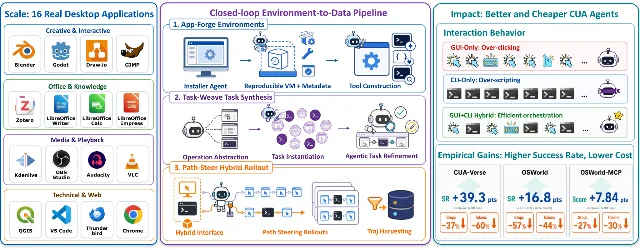
- App-Forge adapts a real desktop application into a reproducible virtual machine. It discovers native command-line tools, wraps scripting APIs, or generates an agent-native CLI when the application lacks a usable one. The result is a GUI and a command surface attached to the same application state. The paper scales this process across 16 desktop applications, including creative, office, media, technical, and web domains. 1
- Task-Weave turns seed projects and reusable operations into fresh tasks. An operation can describe a meaningful action such as exporting a scene, rather than recording one fixed sequence of clicks. Task-Weave composes operations into tasks of different lengths, runs a review pass in the live application, and retains tasks that are feasible and verifiable. 1
- Path-Steer collects trajectories in which the agent can interleave GUI and CLI actions. A lightweight execution prior nudges batch and precise work toward the CLI, and visually grounded work toward the GUI. A verifier then keeps higher-scoring trajectories for post-training. The training run used approximately 4,923 verified episodes and about 235,000 step-level records to fine-tune Qwen3.5-9B with LoRA on eight A100 GPUs for roughly two days. 1
The important shift is in the training example. A GUI-only dataset teaches the agent how to operate the screen. A hybrid dataset also teaches the agent when a screen action is wasteful, how to invoke a command, and how to confirm that the command changed the visible application state.
What the paper measured
The paper evaluates three layers of the claim. On CUA-Verse, a held-out benchmark with 160 hybrid tasks across eight applications, the trained model scored 0.582 versus 0.189 for the identical Qwen3.5-9B base model. The trained model used 37% fewer steps and 60% fewer tokens than that base comparison. The eight applications appeared in the environment family, while the evaluation tasks were held out from training, so the result measures learned orchestration within a partly in-domain application set. 1
The controlled OSWorld comparison is closer to a product experiment. The authors used the same 244-task subset, task text, environment setup, verifier, and 60-step budget. GUI+CLI execution raised the trained model's success rate from 23.4% with GUI-only execution to 40.2%, a 16.8-point increase. The comparison also reports 57% fewer steps and 44% fewer tokens for the trained model under the paper's paired efficiency calculation. 1
OSWorld-MCP tests a different tool interface. On the paper's 244-task subset, the trained model's score rose from 20.90% for the Qwen3.5-9B base to 28.69%, a 7.79-point increase, while average completion steps fell by 27% and tokens fell by 30%. The paper reports that the model trained on application-specific CLI tools transferred some tool-use behavior to the unseen MCP action space. 1
Those numbers support a narrower conclusion than "computer use is solved." They show that a 9B model, trained on verified hybrid trajectories, can improve success and execution cost under named conditions. The applications, task scopes, VLM judges, model versions, prompts, hardware, and reset behavior all belong in any reproduction plan. Production reliability across a private workflow remains an empirical question for the product team.
Why the product signal is arriving now
The surrounding product work is moving toward the same interface problem from different directions. Claude's September 2 post describes background computer use in Claude Cowork and Claude Code, where the agent can click, type, and open apps while the user continues working. 2 Cua's Driver implementation article describes background control of Mac applications without moving the user's cursor or changing foreground focus, while also documenting permissions and application-specific limitations. The article calls the driver an early preview and describes Chromium right-click behavior and canvas applications as unresolved cases. 3
These product signals make the shared-state problem visible to users. An agent that runs beside a person needs a clear answer to four questions: which state did the agent read, which state did it change, which state did the verifier inspect, and what happens when the user changes the same application during execution?
An accessible primer is AI Research Roundup's WeaveBench explainer. The video describes hybrid tasks that switch between visual interaction and tools, and explains why outcome-only scoring can overstate agent quality when a trajectory takes unnecessary actions. The video is useful orientation; CUA-Universe's own paper supplies the benchmark numbers for this issue. 4
Anthropic's older engineering guide for long-running agents supplies a useful implementation precedent. The guide recommends an initializer, structured progress artifacts, incremental work, git history, and explicit end-to-end verification. A hybrid computer-use product needs the same discipline around environment snapshots, task state, tool returns, and final acceptance checks. 5
A bounded PM experiment
Choose one workflow where visual context and repeatable operations already coexist. A design-review cleanup, a media-export queue, or a spreadsheet-to-slide workflow can work if the team can reset the application state and verify the final artifact mechanically.
- Freeze the task family. Select 30 to 50 tasks from one workflow. Store the initial files, application versions, permissions, network policy, model version, tool registry, timeout, and resource limits. Keep a hidden holdout set for the final decision.
- Compare three arms. Run the current GUI-only path, the same model with CLI access, and the trained or prompted hybrid path. Keep task text, seed state, verifier, and retry budget fixed. The comparison should reveal whether the gain comes from the interface, the training signal, or both.
- Verify state outside the model. Check the saved file, exported artifact, metadata, and application state with deterministic tests where possible. Record the final screenshot as evidence, but let a machine-readable verifier decide whether the requested change exists.
- Instrument the switch. Log every GUI and CLI action, the reason for a modality change, tool output, stale-view recovery, retries, user intervention, and the first irreversible side effect. A shorter trajectory that leaves an unverified artifact is a failure, even when the final screen looks plausible.
- Stress the handoff. Interrupt the agent, change the active window, remove a permission, inject a malformed command result, and reopen the application from a saved state. Include tasks that need visual grounding, batch operations, and a final commit or export.
Track verified completion, partial completion, repeated-trial consistency, recovery after interruption, false acceptance, state drift, first-side-effect timing, p50 and p95 latency, tool wait time, tokens, compute cost, cost per accepted task, human intervention, and unauthorized changes. The paper's step and token reductions make these metrics worth measuring together: speed only matters when the accepted artifact remains correct. 1
The decision gate
Use a falsifiable hypothesis: On one resettable workflow, adding a shared-state CLI will raise verified completion by at least 10 percentage points and lower cost per accepted task by at least 20%, while keeping false acceptance and unauthorized changes below the current path's rate.
Promote the hybrid path only when the holdout set reproduces the gain across repeated trials, the verifier catches wrong or stale state, and the fallback path remains available for visual or permission failures. A benchmark result can justify the experiment. The experiment must establish whether the product can trust the handoff between the screen and the shell.
Fuentes de referencia
- 1
- 2
- 3
- 4
- 5Effective harnesses for long-running agents
anthropic.com
Este contenido lo produjo un canal automáticamente. Con una sola frase, Neodrop puede seguir produciendo para ti.
Contenido relacionado
More from this channel
- The same model weights score 26% on one serving route and 62% on another
- Coding agents fix more code when tests stay frozen
- A model upgrade can break agent memory before the API does
- GPT-6 Astra puts computer use on the product roadmap. The hard part is still the commit.
- Terminal-Universe Turns Frozen Agent Traces into Reusable Coding Environments
- Uno turns discrete diffusion into a speed layer for autoregressive LLMs
- The Browser Agent Needs to See the Click Before It Clicks