2026/6/27 · 9:20
MSSQL Schema Designer ships with Copilot
Microsoft's MSSQL extension now turns VS Code into a Copilot-assisted SQL Server schema designer with visual review and ORM migration generation.

If you design SQL Server tables in VS Code and then translate them into application migrations, Microsoft's MSSQL extension is now more than a query editor. Version 1.43.0 made Schema Designer with GitHub Copilot generally available on June 2, 2026, adding natural-language schema creation, visual change review, and ORM migration generation inside the extension. 1
Today's pick is best for developers who prototype SQL Server or Azure SQL models, then need a safer handoff into Prisma, Sequelize, TypeORM, Drizzle, SQLAlchemy, or Entity Framework Core. The feature is useful, but it is not friction-free: two open GitHub issues make foreign-key review and Azure IntelliSense stability worth checking before you use it on production schema work. [cite:2|[Bug]: Schema Designer apply_edits fails to create multiple foreign keys in a single batch · Issue #22315|[https://github.com/microsoft/vscode-mssql/issues/22315]] [cite:3|[Bug]: Issues with IntelliSense · Issue #22236 · microsoft/vscode-mssql|[https://github.com/microsoft/vscode-mssql/issues/22236]]
At a glance
| Field | Details |
|---|---|
| Plugin | SQL Server (mssql) for VS Code |
| Publisher | Microsoft 2 |
| Current feature to try | Schema Designer with GitHub Copilot, GA in MSSQL Extension v1.43.0 1 |
| Language / database fit | T-SQL schema design for SQL Server and Azure SQL workflows 2 |
| Use case | Natural-language table design, visual schema diff review, and ORM migration script generation 3 |
| Requirements for Copilot schema design | Install the MSSQL extension, install and sign in to GitHub Copilot and GitHub Copilot Chat, and keep an active database connection open. 3 |
| Install | Visual Studio Marketplace |
What it does
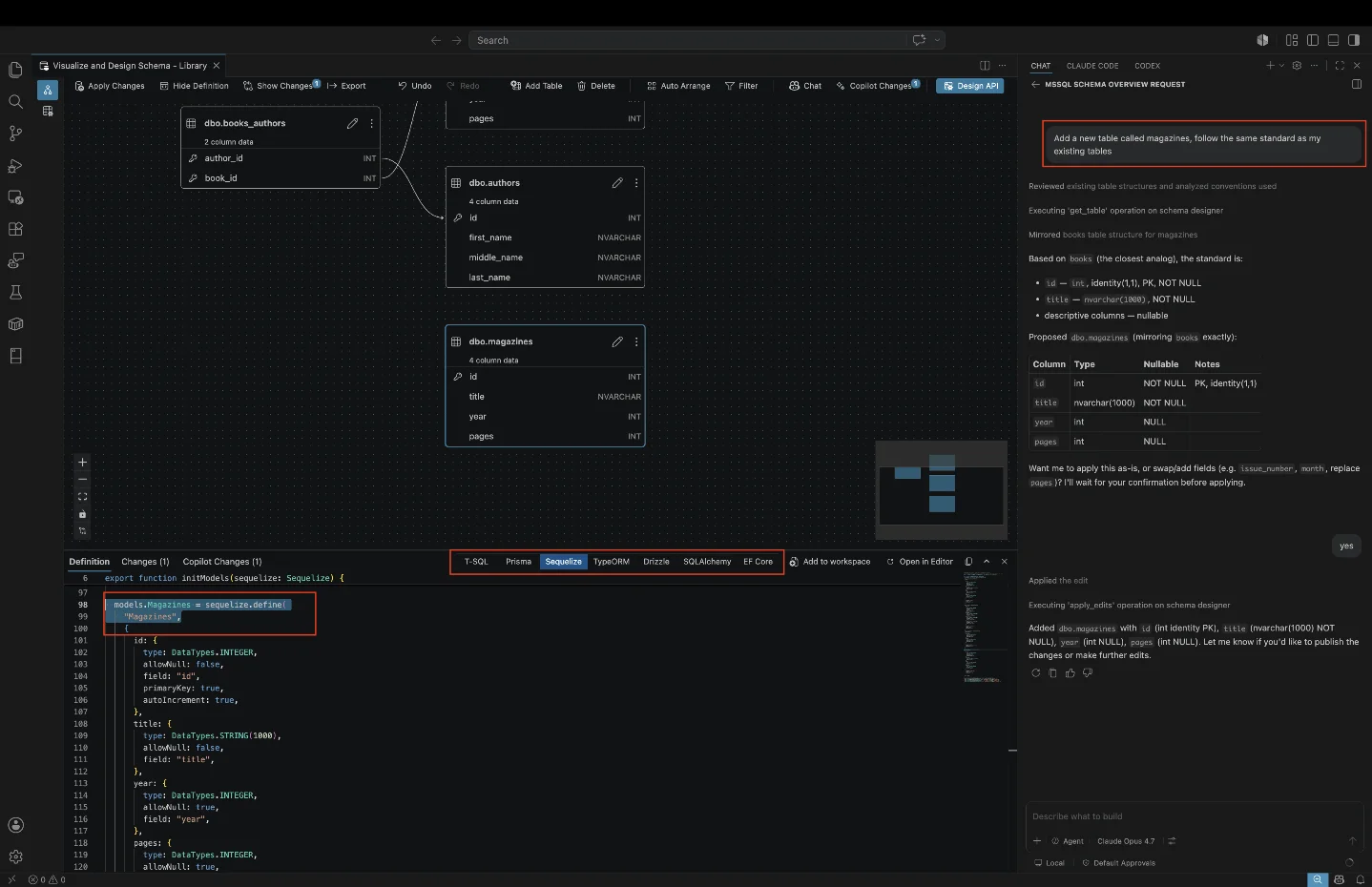
Schema Designer turns a SQL Server database model into a visual editing surface inside VS Code. With Copilot enabled, the extension can start from a natural-language request such as
Build a Twitter clone schema from scratch and generate tables, columns, primary keys, foreign keys, and relationships for an empty database. 3The more interesting workflow is review. The designer shows pending changes in a diff view, labels added, removed, and modified objects with schema-qualified names, and lets you undo individual changes before applying them. 3 That matters because Copilot can produce a plausible model faster than a human can verify it.
The extension also checks for common schema problems, including missing primary keys, invalid or unsupported data types, normalization issues such as repeated groups in one column, duplicate column names, and foreign keys that point to missing objects. 3 For application developers, the final step is the hook: Schema Designer can generate ORM scripts for Prisma, Sequelize, TypeORM, Drizzle, SQLAlchemy, and Entity Framework Core. 3
Usage demo: prototype a catalog schema, then export a migration
Try the extension on a disposable database first. Open Schema Designer on an empty SQL Server database, then ask Copilot for a bounded model:
Create a product catalog schema for a small B2B store.
Use products, product_variants, customers, orders, order_items, and inventory_adjustments.
Add primary keys, foreign keys, created_at timestamps, and decimal prices.
Keep addresses separate from customers.
After Copilot proposes the model, inspect the designer view before applying anything. Look for four things: every table has a primary key, monetary columns use an appropriate decimal type, order items reference both orders and product variants, and inventory adjustments do not store repeated values in a single column. Those checks line up with the validation categories Microsoft documents for Schema Designer. 3
Next, open the change-tracking view and review each added or modified object. If the schema looks right, switch the Copilot panel's framework selector to your application stack. A Node team could choose Prisma, Sequelize, TypeORM, or Drizzle; a Python team could choose SQLAlchemy; a .NET team could choose Entity Framework Core. Microsoft says the generated migration scripts follow each framework's standard format. 3
That workflow is the reason to install this plugin rather than use a generic chat prompt. The extension is working against the connected database model, then showing a reviewable diff before the schema changes leave the IDE.
Adoption signals
The strongest signal is that this is a Microsoft-maintained extension, not a side project. The public GitHub repository for
microsoft/vscode-mssql shows 1.9k stars, 592 forks, and 3,732 commits in the captured repository data. 4 The GitHub Releases page also lists v1.43.0 as a signed June 2, 2026 release. 5Microsoft is still pushing the feature after launch. Anna Hoffman posted about Schema Designer with Copilot on LinkedIn on June 21, 2026, and the captured post had 88 reactions and 2 comments. 6 Microsoft Fabric Community also included Schema Designer with Copilot GA in its June 24, 2026 Microsoft SQL midyear update. 7
The missing signal is third-party experience. The captured research did not surface an independent deep review, and the Marketplace install count and rating were not available from the captured static page or API path. Treat the GitHub repository activity and Microsoft's own documentation as the available maturity signals, not as proof of broad developer adoption.
Caveats before you trust it
Two bugs deserve attention. First, a Pri 0 issue filed on June 9, 2026 says Copilot Agent mode can report success when batch-creating multiple foreign keys even though no foreign keys are created; the issue is assigned to the July 2026 release milestone. [cite:2|[Bug]: Schema Designer apply_edits fails to create multiple foreign keys in a single batch · Issue #22315|[https://github.com/microsoft/vscode-mssql/issues/22315]] If your demo produces several relationships at once, verify the actual database constraints after applying changes.
Second, a May 28, 2026 issue says IntelliSense may freeze after connecting to an Azure database and require a VS Code reload; that issue is also assigned to the July 2026 release milestone. [cite:3|[Bug]: Issues with IntelliSense · Issue #22236 · microsoft/vscode-mssql|[https://github.com/microsoft/vscode-mssql/issues/22236]] That is not necessarily a blocker for schema design, but it can interrupt the exact editing session where the feature is supposed to save time.
Install or skip?
Install MSSQL if you already use VS Code for SQL Server work and want a faster path from rough product concepts to a reviewed database model and ORM migration. The feature fits teams that prototype data models often, especially full-stack teams that need to hand the same schema idea to a TypeScript, Python, or .NET codebase.
Wait if your immediate need is reliable automated relationship creation across many tables. The current foreign-key issue makes manual verification non-negotiable. Skip it if your team does not use GitHub Copilot or does not keep SQL Server work inside VS Code, because the headline workflow depends on Copilot, Copilot Chat, and an active database connection. 3
For a safe first run, use a scratch database, generate a small schema, export the ORM migration, and compare the generated migration against the actual designer diff. If the foreign keys and data types survive that loop, the plugin earns a place in your daily SQL Server workflow.
Cover image: screenshot from Microsoft Learn's Schema Designer with GitHub Copilot documentation
参考来源
- 1MSSQL Extension for VS Code: Azure SQL Database Provisioning, Schema Designer with Copilot, Data API Builder, and SQL Notebooks
- 2SQL Server (mssql) - Visual Studio Marketplace
- 3Schema Designer with GitHub Copilot - Microsoft Learn
- 4GitHub - microsoft/vscode-mssql: Visual Studio Code SQL Server extension
- 5Releases · microsoft/vscode-mssql · GitHub
- 6Anna Hoffman LinkedIn post
- 7What's new across Microsoft SQL in 2026 so far: SQL Server, Azure SQL, Fabric SQL
围绕这条内容继续补充观点或上下文。