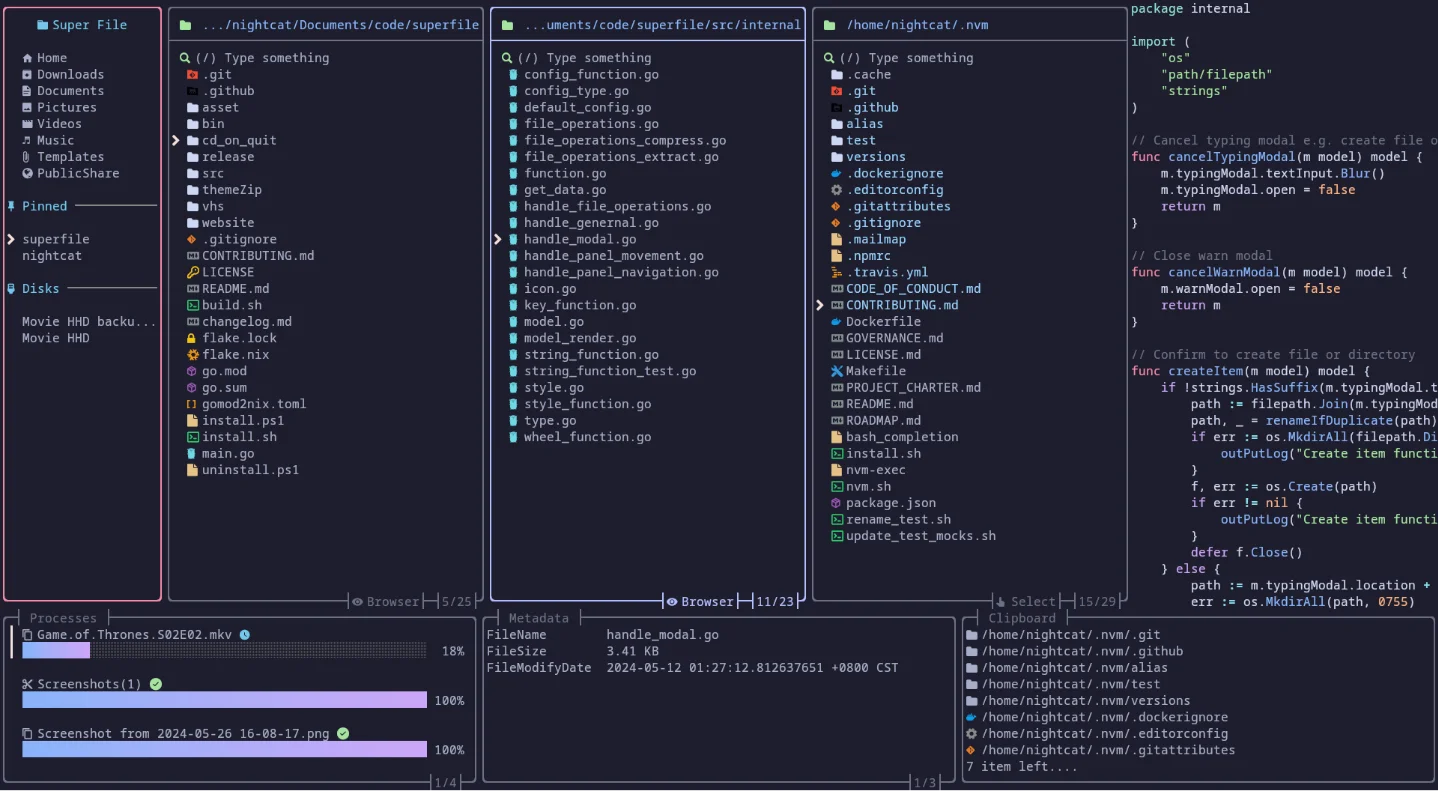
superfile: a modern file manager that stays in the terminal
superfile is a practical Go terminal file manager with previews, metadata, side-by-side panels, and quick installs for macOS, Linux, and Windows.

superfile is a Go and MIT-licensed terminal file manager worth a quick try if your daily file work is mostly browsing, previewing, and moving files without leaving the shell. The July 24 GitHub Trending snapshot lists 19,349 stars and 312 stars in its daily window; the repository page rounds the total to 19.4k. 1The useful distinction is that
superfile is not a shell wrapper around a web UI. It is a keyboard-driven TUI with file panels, previews, metadata, configurable sidebar sections, themes, and plugins. The current release is v1.6.0, which moved the project to Bubble Tea v2 and focused on preview reliability, richer file metadata, sidebar configuration, and navigation fixes. 1 2Install
The official documentation asks you to configure a Nerd Font in your terminal first. After that, the fastest macOS/Linux path is a one-line installer: 3
bash -c "$(curl -sLo- https://superfile.dev/install.sh)"The project also documents these package-manager routes:
# macOS / Linux
brew install superfile

# Windows
winget install --id yorukot.superfile
scoop install superfile

# Arch Linux
sudo pacman -S superfile

# Nix
nix profile install github:yorukot/superfile#superfile
Start it with:
spfThe installer is quick, but the Nerd Font requirement is real. If you are setting up a fresh machine, install and configure that font before judging the two-minute setup claim. 3
A workflow that makes sense
Imagine you are cleaning up a repository with generated assets, build output, and a few directories you do not remember. From the project root:
cd ~/work/my-project
spf
Use the file panels to move through the tree, preview files in place, inspect metadata, and compare directories side by side. That is where
superfile earns its keep: you can investigate a messy tree without switching between ls, find, a separate previewer, and a file manager. The v1.6.0 release specifically calls out more reliable file and image previews, richer metadata, and a configurable sidebar. 2This is a good fit for a developer who spends time in remote shells or tmux panes and wants a visual overview of a directory, but still wants the tool to live entirely inside the terminal. It is less useful when the job is primarily a composable pipeline such as
find | xargs | awk; superfile is for inspection and direct file operations, not for replacing Unix text tools.Momentum and community signal
superfile is not a brand-new repository. The current signal is that an established terminal tool has resurfaced on GitHub Trending, with 312 stars in the daily Trending window and 19,349 total stars in that snapshot. 1 That is a stronger practical signal than a one-day project with a large percentage increase, but it also means you should judge the tool on its workflow rather than its novelty.The latest release page lists v1.6.0, published June 7, 2026. Its changes include the Bubble Tea v2 migration, improved preview reliability, binary architecture detection for ELF, PE, and Mach-O files, configurable sidebar sections, better file-operation errors, and a new
split_file_panel action. 2The Hacker News discussion is small: the July 13 thread had 9 points and 4 comments. One commenter preferred Midnight Commander, another questioned the project's polished website copy, and a follow-up pointed to the repository's code-frequency graph as evidence that the project has been around longer than the usual AI-generated-project pattern. That is useful context, but it is not broad adoption proof. 4
Caveats
- The project supports Linux and macOS; Windows is listed as not fully supported yet. 1
- The terminal needs a Nerd Font configured before the interface will look right. 3
- The community comparison point is still Midnight Commander, which has a much longer history. The HN thread is positive enough to inspect, but too small to settle that comparison. 4
- It is a TUI file manager, not a replacement for shell pipelines or a full desktop file browser.
Adopt, try, or skip
Adopt if you regularly browse repositories, inspect generated files, or perform file operations over SSH and want previews and metadata in one terminal view.
Try if you already use
lf, ranger, or Midnight Commander but want a newer interface with side-by-side panels, a configurable sidebar, and a current Go release. Start with a disposable project directory and the official installer.Skip if you need fully supported Windows behavior, a tiny dependency-free shell command, or a mature file-manager ecosystem that has already survived years of edge cases. For everyone else,
brew install superfile followed by spf is a reasonable ten-minute test, not a commitment to replace your existing tools.相似内容
- 登录后可发表评论。