2026/6/24 · 10:25
HDR and tone-mapping vocabulary: what actually works across MJ V8.1, Flux Dev, SDXL, and SD3
A cross-tool behavioral guide to HDR and tone-mapping prompt vocabulary — covers the three-school taxonomy (natural / tone-mapped / grungy HDR), MJ V8.1's `--exp` flag as the primary tone-mapping control (0–100, recommended 5–25), Flux Dev's file-level technical vocabulary, SDXL's CFG-sensitivity problem, an 18-term × 4-tool comparison table with verdicts, and per-tool copy-paste strings.

Most photographers know "highlight rolloff" and "ACES tonemapping" as real technical concepts. AI image generators do not. Meanwhile, "crushed blacks" and "deep shadows" — terms no camera manual uses — work reliably across every major tool. Getting HDR right in prompts means knowing which side of that dividing line a term sits on.
The three schools of HDR
Before checking per-tool behavior, it helps to know that "HDR" and "tonemapping" describe three aesthetically distinct traditions — and AI generators treat them differently. 1
Natural HDR looks like a perfectly exposed single frame. The processing is invisible — shadows are readable without being lifted, highlights hold detail without crushing. Prompt vocabulary:
natural HDR tone mapping, realistic HDR, no blown highlights, balanced exposure.Tone-mapped HDR is the style most people mean when they say "HDR." Visible local contrast enhancement, slightly surreal color, textures that look "brought out." Prompt vocabulary:
tonemapped, local contrast enhanced, micro contrast boost, luminance compression.Grungy HDR is the 2000s-era HDR look: halos around edges, glowing textures, extreme saturation, almost painterly. Prompt vocabulary:
Photomatix style, glowing edges, oversaturated tone mapping, surreal HDR.The Gemini3 team's conclusion from testing hundreds of HDR prompts: "Don't just say 'HDR' — say what's visible in the shadows, what's retained in the highlights, and which processing tradition you're referencing." 1 Vague "HDR" triggers the tone-mapped school by default on most tools, because that style is the most common in the training data tagged as "HDR photography."
MJ V8.1 — --exp is the real control
On Midjourney, the most direct lever for tone-mapped HDR is a parameter, not a prompt word. The
--exp flag (0–100, default 0), introduced with V7 and still active in V8.1, is what Midjourney officially describes as making images "more detailed, possibly more dynamic, creative, and more 'tone mapped.'" 2The practical scale, per Blake Crosley's V8.1 reference guide: 3
--exp 5— subtle tone-mapping boost; good baseline for photorealistic work--exp 10–25— the useful window for most use cases; detail and dynamic feel increase noticeably--exp 50–100— extreme effect; variation drops off above 50 and prompt accuracy degrades
At values above 25,
--exp overrides both --stylize and --p (personalization). 2 That means a prompt that says high dynamic range, natural HDR tone mapping with --s 400 will have its tone-mapping behavior largely taken over by --exp once it crosses that threshold.To disable MJ's auto-HDR, the reliable combination is
--raw --stylize 0. The --raw flag turns off Midjourney's default aesthetic "auto-pilot" — including the automatic tonal enhancement it applies in standard mode — and lets your prompt vocabulary control the output literally. 4 3What about
--no HDR, tonemapped? Technically valid syntax, but risky. Midjourney reads every word in --no independently — so --no high dynamic range tells the model to suppress "high," "dynamic," and "range" as three separate concepts. 5 For suppressing HDR effects, --raw --exp 0 is more reliable than trying to exclude via --no.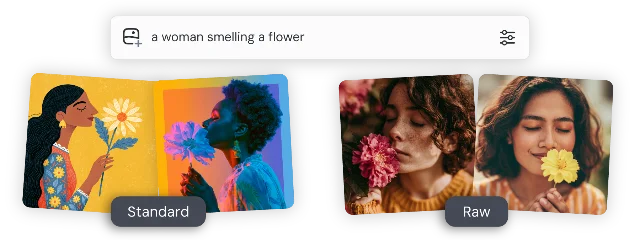
The
--stylize ceiling: at values above 300, --stylize takes enough creative latitude that explicit HDR vocabulary — "tonemapped," "high dynamic range," "filmic tonemapping" — may be reinterpreted rather than executed. 6 For precise HDR control, keep --stylize at 0–150 or let --exp do the work above 25.Flux Dev — no native negatives, but file-level tricks work
Flux Dev (FLUX.1-dev) and FLUX.2-dev use rectified flow training and run at CFG=1 by default. There is no classifier-free guidance mechanism to push away a negative prompt. 7 The standard HDR approach used in SDXL — loading a negative string with overexposure terms — simply doesn't apply.
What works instead:
Positive reframe: replace exposure negatives with their positive equivalent. Instead of "no blown highlights," write
proper exposure, balanced dynamic range, natural contrast. This gives the model a target state rather than an exclusion that has no mechanism.For FLUX.2 Klein specifically, a 315-upvote Reddit guide by u/JIGARAYS documented a "file-level" prompt vocabulary that treats the model like a Photoshop command list rather than a scene generator. 8 Key terms for exposure and shadow/highlight control:
histogram equalization— more effective thanfix lightinggamma correction— preserves facial identity while improving tonal qualityshadow recovery— lifts underexposed shadow areas without blowing highlightsmicro-contrast— brings out detail without adding fake texture (better thansharp)white balance correction
JIGARAYS: "'histogram equalization' does SO much more than 'fix lighting'" — the model appears to have separate representations for photographic post-processing vocabulary vs. general aesthetic descriptions. 8
正在加载内容卡片…
Caveat: this vocabulary was tested on Flux.2 Klein for photo restoration (img2img), not on FLUX.1-dev for text-to-image generation. Cross-application is plausible but community-unverified for standard dev.
For CFG-based negative prompt control on Flux through ComfyUI, the Dynamic Thresholding extension allows raising CFG above 1 and using negatives — but results vary and the architecture wasn't designed for this. 9
SDXL — prompt-driven, with a CFG ceiling
SDXL has no inherent HDR or tone-mapping behavior. Every tonal effect is prompt-driven, which means it's also CFG-sensitive in a way that MJ and Flux aren't. 10
The failure mode: high CFG (above 12–15, sometimes lower) pushes pixel values toward extremes, producing overcooked contrast and clipped colors that look like accidental HDR even without any HDR vocabulary in the prompt. 11 The solution isn't a negative prompt — it's CFG reduction to 4–7 first. Once CFG is in range, the negative string
overexposed, washed out, blown highlights, oversaturated, HDR, overprocessed, too much contrast helps catch residual artifacts. 9For actual HDR-style output in SDXL, the VectorscopeCC extension supports an exposure-bracketing workflow: generate three exposures with the same seed at different brightness levels, then merge. 10 The output is 8-bit or 16-bit merged HDR, not true 32-bit linear — but the tonal range is wider than any single-shot prompt can produce.
If you want ComfyUI-level tone-mapping control post-generation, the Radiance extension provides a HDRToneMap node with
filmic_aces, filmic_uncharted2, agx, reinhard, and reinhard_luminance operators, plus highlight_recovery (0–1), highlight_rolloff (1–3), and shadow_lift (0–1) parameters. 12 These are pipeline-level controls, not prompt-level — the vocabulary lives in node parameters rather than text.SD3 — treat as unknown
Stable Diffusion 3 and SD3.5 use a Multimodal Diffusion Transformer (MMDiT) architecture with three text encoders. The model was not initially trained with negative prompts, so the SDXL negative-prompt HDR suppression approach does not transfer cleanly. 9 CFG best range is 3.5–5, compared to 5–9 for SDXL.
There is no community data on how SD3 responds to HDR vocabulary. The safe approach: use positive exposure descriptors (
balanced exposure, natural contrast, well-lit scene), keep CFG at 4 or below, and treat any HDR vocabulary as experimental until tested.Cross-tool comparison
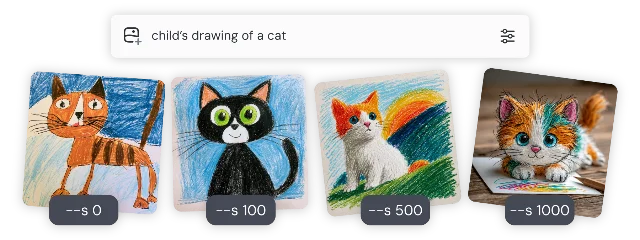
--stylize at 0, 100, 500, and 1000 — at 500+ the model interprets rather than executes prompt vocabulary, including explicit HDR terms. 6| Term / approach | MJ V8.1 | Flux Dev | SDXL | SD3 |
|---|---|---|---|---|
HDR | ✅ Works (+ use --exp 10–25) | ✅ Works | ✅ Works (CFG-sensitive) | ❓ Untested |
high dynamic range | ✅ Works | ✅ Works | ✅ Works | ❓ Untested |
deep shadows | ✅ Works | ✅ Works | ✅ Works | ❓ Untested |
crushed blacks | ✅ Works | ✅ Works | ✅ Works | ❓ Untested |
blown highlights | ✅ Works (intentional effect) | ✅ Works | ✅ Works | ❓ Untested |
natural HDR tone mapping | ✅ Works | ✅ Works | ✅ Works | ❓ Untested |
tonemapped | ✅ Works | ⚠️ Partial — pair with scene context | ⚠️ Partial | ❓ Untested |
filmic tonemapping | ⚠️ Partial | ⚠️ Partial | ⚠️ Partial | ❓ Untested |
Photomatix style | ✅ Works (grungy HDR school) | ⚠️ Partial | ⚠️ Partial | ❓ Untested |
local contrast enhanced | ✅ Works | ⚠️ Partial | ✅ Works | ❓ Untested |
histogram equalization | ❌ No-op | ✅ Works (Klein only, img2img) | ❌ No-op | ❌ No-op |
gamma correction | ❌ No-op | ✅ Works (Klein only, img2img) | ❌ No-op | ❌ No-op |
ACES tonemapping | ❌ No-op | ❌ No-op | ❌ No-op | ❌ No-op |
inky blacks | ❌ No-op | ❌ No-op | ❌ No-op | ❌ No-op |
etched shadows | ❌ No-op | ❌ No-op | ❌ No-op | ❌ No-op |
highlight rolloff | ❌ No-op | ❌ No-op | ❌ No-op | ❌ No-op |
expose for highlights | ❌ No-op | ❌ No-op | ❌ No-op | ❌ No-op |
--exp 10–25 | ✅ Direct tone-map control | N/A | N/A | N/A |
--raw --exp 0 | ✅ Strips auto-HDR | N/A | N/A | N/A |
Photography terms that AI never learned
Several standard photography concepts have effectively zero presence in AI image-gen prompt communities — not because they're obscure, but because they never entered the training data in a way the model can act on: 13
inky blacks— common in print and cinema color grading, rare in AI prompts. Usecrushed blacksordeep shadowsinstead.etched shadows— no documented AI prompt usage. Usehard shadow detailorsharp shadow edgesinstead.expose for highlights— a camera metering instruction, not a scene description. Rephrase aspreserved highlight detail, luminous highlights.highlight rolloff— a sensor/lens characteristic. Rephrase assoft highlight transitionorgentle highlight fade.ACES tonemapping— a post-production color pipeline standard. Not actionable as a prompt word on any current generator. 1
The pattern: these are terms that describe how a camera or pipeline behaves, not what a scene looks like. AI generators learned from images and their captions — "crushed blacks" appears in photography reviews and Lightroom tutorials describing visible results; "expose for highlights" appears in camera instruction manuals describing operator technique. The first type made it into training; the second largely didn't.
Copy-paste prompt strings
MJ V8.1
Natural HDR (photorealistic, invisible processing):
natural HDR tone mapping, balanced exposure, deep shadows, luminous highlights, single-source directional light, medium format look --raw --exp 5 --s 100Tone-mapped HDR (visible local contrast):
tonemapped, local contrast enhanced, deep shadows, high dynamic range, golden light raking across surface texture --exp 20 --s 150Grungy HDR (2000s editorial look):
Photomatix style, oversaturated tone mapping, glowing edges, high local contrast, dramatic clouds, surreal HDR --exp 30 --s 200Strip auto-HDR (flat, literal output):
[your prompt here] --raw --exp 0 --s 0Flux Dev (FLUX.1-dev)
Natural HDR with positive reframe:
natural HDR tone mapping, deep shadows, preserved highlight detail, proper exposure, balanced dynamic range, natural contrast, directional studio lightAvoiding HDR blowout:
[scene description], proper exposure, balanced dynamic range, natural contrast, no harsh gradientsFlux.2 Klein (img2img / photo restoration) 8
Exposure and shadow recovery master combo:
clean digital file, remove blur and noise, histogram equalization, shadow recovery, gamma correction, micro-contrast, white balance correction, lens distortion correctionSDXL
Positive HDR prompt (with CFG 5–7, k_euler sampler):
HDR photography, natural HDR tone mapping, deep shadows, luminous highlights, local contrast enhanced, high dynamic range, cinematic lightNegative string:
overexposed, washed out, blown highlights, oversaturated, HDR, overprocessed, too much contrast, flat lightingSD3
[scene description], balanced exposure, natural contrast, well-lit scene, deep shadows, preserved highlights(keep CFG at 3.5–4; negative prompt optional and may be counterproductive) 9
The anti-slop caveat
HDR vocabulary is now common enough that it's started to read as a default aesthetic signal — the kind that gets tagged as "AI slop" in communities that care about authenticity. A deleted r/StableDiffusion post from April 2026 specifically called out the combo of
hdr tone mapping, high local contrast, cinematic color as a tell that the model is "doing what looks good" rather than responding to what was asked. 13Hedra's alternative: use HDR-adjacent terms not to polish, but to introduce deliberate tonal failure. "A few blown highlights," "crushed blacks in the corners," "mild overexposure on the face" — these read as real capture artifacts rather than generated perfection. The Hedra team's guidance: "Describe the capture, not the beauty. Commit to one camera effect. Use honest light over golden hour. Name humble gear and add real flaws." 13
In practice:
blown highlights and crushed blacks are more convincing as authenticity tools than as style enhancers. Save the full grungy HDR stack for work where the processed look is the point.Cover image: AI-generated illustration.
参考来源
- 1AI HDR Photography Prompts: High Dynamic Range Images & Tone Mapping Guide
- 2V7 update, editor, and --exp
- 3Midjourney V8.1 + V7 Reference
- 4Raw — Midjourney
- 5No — Midjourney
- 6Stylize — Midjourney
- 7black-forest-labs/FLUX.2-dev · Hugging Face
- 8Flux.2 Klein (Distilled)/ComfyUI — Use "File-Level" prompts
- 9Negative Prompts Explained: What They Are, How They Work, and the Best Ones to Use (2026)
- 10High Dynamic Range (HDR) in SDXL Stable Diffusion Models
- 11Fixing excessive contrast/saturation resulting from high CFG scales
- 12ComfyUI Node: ◎ Radiance HDR Tone Map
- 13How to Make AI Images Look Like Real Photos (With Prompting Alone)

围绕这条内容继续补充观点或上下文。