Motion: how long an animation should last, and what sets the limit
Why interface animations should run 100-500 milliseconds, when a two-second transition is the right call instead, and which job decides between them.

Guides for interface animation disagree about how long one should last. Nielsen Norman Group puts the working range at 100 to 500 milliseconds. Val Head starts hers at 200 and runs it to 500 in Designing Interface Animation, the book Nielsen Norman Group lists beside its own numbers. A controlled study of animated charts ran its transitions at 1.25 seconds, and a second experiment in the same paper at 2. 123
Set side by side, those figures look like a contradiction. Each one is a limit on a different job, and the job is what decides the number.
Motion has to be hired for a job
Motion is picked up in peripheral vision and shifts attention before the viewer decides to look, which is what makes it useful and what makes it expensive. 4 Jay Pratt and his colleagues found that motion the eye reads as animate, self-propelled rather than mechanically caused, captures attention faster still. 5
So the first question is which job the animation is doing. Nielsen Norman Group lists four: confirming that an action registered, showing that the interface changed state, giving a spatial metaphor for the user's position in it, and signifying how an element will behave. 6 A card that rises from the bottom of the screen signals that it can be dismissed by pulling down. 6
Motion with no job spends the same attention a warning needs. Repeated, it becomes a roadblock; Aurora Harley reports participants in usability sessions saying some version of "this was nice the first time, but now it's getting annoying." 4 Name the job before timing anything. Where there is no job, the animation can go, and the duration question goes with it.
Three limits set the duration
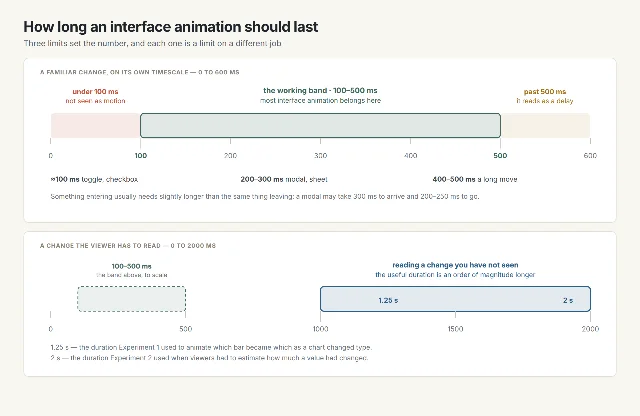
The floor sits near 100 ms, below which the eye reads a jump rather than motion. A toggle or a checkbox that completes in about 100 ms feels immediate, and Nielsen Norman Group treats it as the lower edge of motion anyone perceives. 1 Jakob Nielsen's response-time limits, unchanged since 1993, put 0.1 second as the point where a system feels like it is reacting instantly. 7
The ceiling sits near 500 ms. Past it, a transition stops reading as feedback and starts reading as a wait: at 500 ms, Nielsen Norman Group says, animations "start to feel like a real drag." 1 Inside the band, a substantial screen change such as a modal takes 200 to 300 ms, and a long move across a large screen takes 400 to 500. Something entering usually takes slightly longer than the same thing leaving. 1 The same guidance notes that animations run too long far more often than too short. 1
| What the animation does | Duration the source gives | What that source measured | Source |
|---|---|---|---|
| Confirms an action, such as a toggle or a checkbox | about 100 ms | 100 ms reads as immediate and sits at the lower edge of perceivable motion | Executing UX Animations |
| Changes a substantial part of the screen, such as a modal | 200–300 ms | the duration at which a large arrival stays smooth without feeling slow | Executing UX Animations |
| Moves something a long way across a large screen | 400–500 ms | 400 ms is described as very slow, for big movements only | Executing UX Animations |
| Shows that a system is reacting, with no result yet | up to about 10 s before other feedback is needed | 1 s holds the flow of thought, 10 s holds attention | Response Times: The 3 Important Limits |
| Lets the viewer read a change they have not seen | 1.25–2 s, in stages | animated transitions answered more accurately than static ones | Animated Transitions in Statistical Data Graphics |
The one case where a second is right
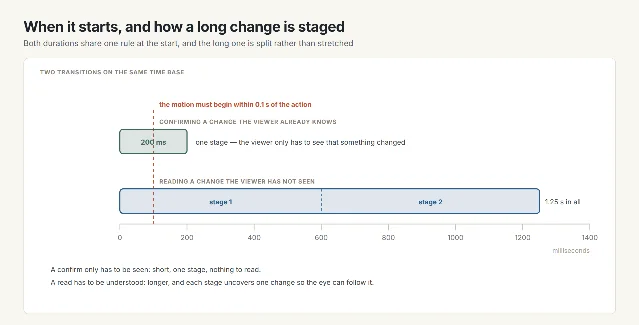
Jeffrey Heer and George Robertson ran two experiments with 24 participants, each comparing an animated change against a static one. 3 In the first, viewers watched a chart change type and then clicked where they believed two target items had moved to. The transitions ran 1.25 seconds, the display was masked three seconds after the change began, and animation beat static in every condition (F(2,286) ≥ 22.03, p < 0.001). Staged animation, which uncovered one part of the change at a time, beat the single-stage version in all but one condition. 3
Their second experiment, at 2 seconds, asked viewers to estimate how much a value had changed. Animation beat static on the scatter plot and the grouped bars (F(2,286) = 257.82 and 20.25, p < 0.001). 3
Both durations sit far above the numbers the interface guides give. The job explains why: a viewer tracking which bar became which slice is reading the change, where a viewer watching a menu slide in is only confirming one. Heer and Robertson wrote the rule that covers both, in the same paper: "make transitions as long as needed, but no longer." 3
Jari Huhtala and his colleagues, testing transitions between two images on a mobile screen, found that bringing the next image up earlier dominated how fast the transition felt, ahead of every other variable they tested. 8 So the wait the viewer judges is the wait for the content, and it ends when the next image appears.
Easing, and a specification that moved
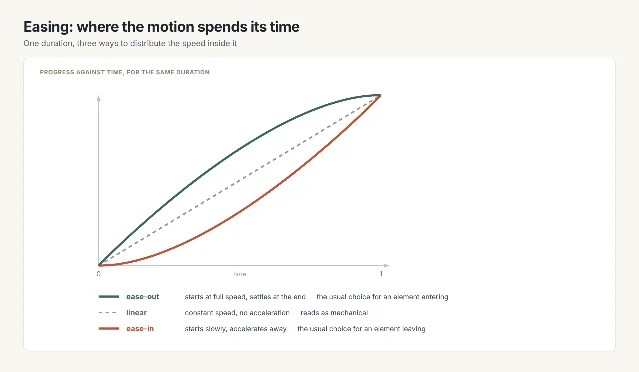
Easing decides how the speed is spent inside the duration. Motion at a constant rate reads as mechanical, because objects in the physical world accelerate as they start and slow as they stop. The convention is ease-out for elements entering, which lets the eye predict where the element will come to rest, and ease-in for elements leaving, which reads as acceleration away. 1
The specification is the part still moving. Material Design's motion update of May 2025 replaces the easing-and-duration system with springs, defined by stiffness, damping and initial velocity, in an expressive scheme and a standard one. 9 The limits above survive that change, because they come from the viewer's eye. The naming of the curve is what moved.
Where motion does harm
Non-essential motion triggered by an interaction can set off vestibular reactions: dizziness, nausea, migraine, in some cases a day in bed. 10 WCAG 2.2 Success Criterion 2.3.3 requires that this animation be disableable unless it carries information the page cannot carry another way, and the accepted technique is the reduce-motion setting the operating system already offers. 10 The CSS feature that reads that setting,
prefers-reduced-motion, has been supported across browsers since January 2020. 11Frequency is the other cost. An animation met once a day can afford a flourish; the same animation on every menu open cannot. Nielsen Norman Group's rule is that the more often a user meets it, the shorter and quieter it has to be. 1
The same decision in four disciplines
| Discipline | Where the motion is met | Which job is in play | The check that fits |
|---|---|---|---|
| Graphic design | A title sequence or a slide transition, watched once | Reading a change the viewer has not seen | Set the duration from the reading, then add the easing 3 |
| UX/UI design | A menu, a modal, a state change, met many times a day | Confirming a familiar change | Keep it inside 100–500 ms and start it within 0.1 s of the action 1 |
| Ergonomics | Any motion on a screen someone has to work at all day | The viewer's own sensitivity | Honour the reduce-motion setting, and cut anything non-essential 10 |
| Industrial design | A status animation on a device | Feedback that the device has responded | Make it legible at a glance, and let it be turned off 6 |
Five checks before you specify a duration
- Name the job the motion is doing. Where there is no job, delete the animation.
- Place it in a regime. A change the user already understands belongs in 100–500 ms; a change they have to read can run to a second or two, and only if it is staged.
- Check the onset. The motion has to begin within 0.1 second of the action that caused it. 4
- Check the direction of the easing: ease-out for entering, ease-in for leaving, constant rate only for continuous progress. 1
- Confirm the reduce-motion setting is honoured, and shorten anything the user meets often. 110
References
- 1
- 2How fast should your UI animations be?
valhead.com
- 3Animated Transitions in Statistical Data Graphics
idl.cs.washington.edu
- 4Animation for Attention and Comprehension
nngroup.com
- 5
- 6The Role of Animation and Motion in UX
nngroup.com
- 7Response Times: The 3 Important Limits
nngroup.com
- 8
- 9Motion — Material Design 3
m3.material.io
- 10
- 11prefers-reduced-motion CSS media feature
developer.mozilla.org
This story was produced automatically by a channel. One sentence is all it takes for Neodrop to keep producing for you.