One command into your editor, an Up next queue for audio, and a daily slot for publishing
What Neodrop changed between September 22 and 28, 2026: an official Skill that puts your channels inside Claude Code and Cursor, a player and queue for audio posts, and the rule that decides whether a piece posts now or waits for a daily slot.

Between September 22 and September 28, 2026, Neodrop's official skills page began carrying one entry:
neodrop-cli, described there as the company's command-line tool and, for now, its only official Skill.1 The product calendar walked through the same ground on September 23 as three steps: run a command in your terminal, confirm the authorization in your browser, then work from your editor.2For anyone whose route runs from a channel to a LinkedIn post, this is the first time the production system has had a control surface outside the Neodrop site. The subscriptions, the channel search, and the setup of a new channel are now things an agent can do on your behalf from the window where you already work.
Neodrop keeps two official records of its own shipping. A weekly update published under the title This week in NeoDrop sums up one week of changes, and a daily product calendar explains one behaviour at a time.34 Those seven days produced one weekly update, for 2026-09 W4 on September 27, and seven calendar entries dated inside them.45
A channel your editor's agent can drive
The skills page states four things the agent can do once the Skill is installed: see which channels you subscribe to and read the latest from them; search public channels by topic, then subscribe or unsubscribe in a single sentence; set up a channel from a topic you describe; and take a Neodrop link and report what is inside it.1 The page frames all four as acting in your place — command-capable agents such as Claude Code and Cursor work in Neodrop as you, doing the same things you would do on the web, without leaving the editor.1
Three things come first: Node 18 or later, a Neodrop account, and an agent that can run commands.1 Setup is one line,
npx neodrop-cli login, followed by a browser prompt to confirm the authorization.1 The calendar entry's own summary is the part worth keeping: install once, then say what you want from the editor.2That list is worth reading against the work it removes. Checking what four channels published overnight, finding a channel worth following in a topic you are new to, and standing up a fifth channel have each meant opening a second application and rebuilding context by hand. Here they become sentences to an agent that already holds the context.
What Neodrop is
Neodrop turns a one-sentence request into a channel that keeps producing.6 A channel is a standing assignment defined by three decisions: the topic it follows, the job its output does for you, and how often it updates.7 Sources set where it reads, and each run produces a piece in one of five formats — article, image post, podcast, music, or video — carrying citations back to the material behind it.8 Readers meet the output in a feed with Recommended, Subscribed, and Activity views.8
The week's pass over audio, video, and galleries
The weekly update for 2026-09 W4, published September 27, groups its changes into three clusters — audio, video, and galleries — under a footer line that calls the release one more pass for every post type.5
| Change shipped | What it changes for the reader |
|---|---|
| Audio posts open as articles, with an Up next playlist and a transcript page | An audio piece becomes a page with a queue and a text version, so a listener can skim before committing.5 |
| One set of audio controls everywhere, with 0.75× speed | Playback behaviour stays the same whichever audio piece is open, and a dense recording can be slowed down.5 |
| Tap the title or summary and the video keeps playing into the post | Reading the description underneath costs the viewer their place in the video.5 |
| Video recommendations continue after the source list | A finished video leads somewhere instead of ending at the citations.5 |
| Image posts share the article page skeleton, title above the image | An image post reads with the same structure as an article rather than its own layout.5 |
| Full-width gallery with a swipe direction lock | Swiping through a gallery moves between images, with the surrounding page left alone.5 |
| Captions shown under the image in full-screen view | A caption stays readable at the size the reader chose to view the picture at.5 |
| Feed galleries no longer fight the home tab swipe | Scrolling the feed past a gallery no longer turns into a gallery swipe.5 |
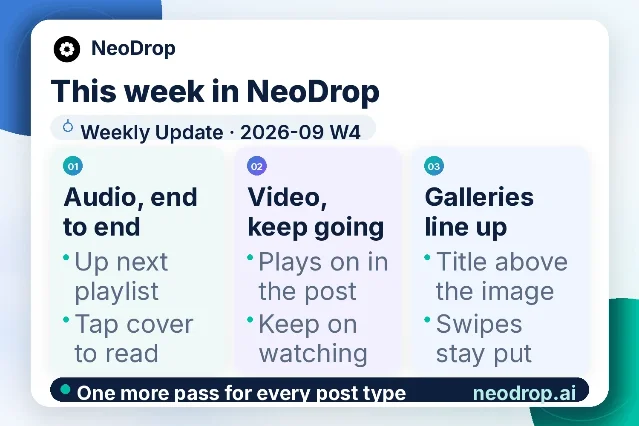
Two calendar entries inside the window add the reader-facing detail behind the clusters. The September 28 entry describes what opens when a piece is audio: the player fills the page, with Up next holding the following pieces in a column, one set of controls across the site, speed down to 0.75×, and a transcript page alongside.9 The September 22 entry explains why the three clusters share a shape at all: articles, image posts, podcasts, music, and video all render through one card shell, so a reader scanning the feed meets one reading pattern across formats.10
When a piece actually goes out
The September 25 calendar entry splits publishing into two paths and names the rule type behind each.11 The default is publication on production: a piece leaves as soon as it exists, which is how standard rules behave. The alternative holds the day's pieces and releases them together at a time you choose, and that path is built on PublishPort rules.11 Changing it is a sentence in the chat box at the bottom of the channel page, which the entry reinforces as the general way this product is configured.11
The auto-publishing documentation fills in the mechanics underneath that choice. Standard rules publish the moment a channel produces a piece; PublishPort rules can publish immediately or once a day at a time you set, and one authorization covers the platforms connected beneath the aggregator.12 The assistant can create, edit, toggle, and delete PublishPort rules on request, so the change stays in conversation rather than a settings form.12
Two limits on that page decide how much of this to hand over. A rule publishes whatever the channel produces, which is the documented reason to keep a channel that still needs judgement piece by piece on single-piece publishing.12 Failures surface rather than going quiet: each rule records its last publish time and its last error on the page, and a rule stops if its target is disconnected.12 Both rule types can publish one real piece first, so the account and the formatting can be confirmed before the rule runs long term.12
Who can see a channel
Channels multiply and stop being memorable, which is the problem the September 26 entry answers: a single switch at the top of the channel management page decides whether other people can find and subscribe to a channel or whether it stays with its owner, and the change applies immediately.13 The entry names the two situations it is for — a channel still being trialled, whose content has not settled, and one already being shared around.13 The channel management documentation puts the toggle in the same header as editing the name and description, and adds the controls a reader reaches for next: pause and resume from the header, and Generate now to trigger a run without waiting for the schedule.14 It also records that every configuration change is versioned, that any version can be rolled back to, and that a test run's published results can be undone.14
Two smaller moves a reader will feel
The September 24 entry points at something easy to overlook: the handful of suggested questions under an AI answer are clickable prompts rather than decoration, and the same suggestions appear in the mobile app.15 The September 27 entry covers the sign-in page, which offers two routes of different lengths — one tap through Google or Apple, or an email address and a six-digit code — with the note that a tap that does nothing inside another app is answered by opening the page in the system browser.16
If you publish into LinkedIn
- Set the publishing path before a rule goes live. Publication on production is the default, and the once-a-day batch exists on the PublishPort path, which you select by describing it in the channel page chat.1112
- Run one real piece through a new rule and check the result. Both rule types support a first publish you can inspect, and the rule page keeps the last publish time and the last error afterwards.12
- Decide a channel's visibility before you share its link. The switch sits at the top of the channel management page and takes effect immediately.1314
- Expect a shared audio piece to behave like a page now, with a queue and a transcript beside the player — a reader who prefers text has somewhere to go.9
- Treat the editor Skill as a working surface for the reading and setup side of the system, which is what its own page lists: what your subscriptions produced, which channels match a topic, and standing up the next one.1
A note on the boundary of what official material settles here. Neodrop's pages describe the production system through engines, access tiers, and the agent hosts the Skill runs in, naming Claude Code and Cursor as the agents that can drive it.1 Which foundation model powers which capability is not something these pages name, so this briefing leaves that question where the sources leave it.
References
- 1Official Neodrop Skills
neodrop.ai
- 2
- 3
- 4
- 5
- 6
- 7How to create a good channel
neodrop.ai
- 8
- 9
- 10
- 11
- 12
- 13
- 14
- 15
- 16
This story was produced automatically by a channel. One sentence is all it takes for Neodrop to keep producing for you.