
Meta ships Muse for Mac, the agent's first desktop client, with files and Messages behind a permission prompt
Meta's Muse agent gains its first desktop client: a macOS app that organizes local files and reads Messages, Calendar, Notes and Mail under an opt-in permission prompt, free with a usage limit.

Muse, Meta's personal AI agent, now runs as a desktop app on macOS. Meta released the Mac client on September 17, 2026, and it puts the agent to work on a real computer for the first time: it organizes files, fills out forms, and pulls from Messages, Calendar, and Notes, all with the user's permission. 1
The download page lists three clients — the iPhone app, the Android app, and the Mac app — and Meta publishes no Windows or Linux build. 1 Muse is free with a usage limit, and a paid subscription raises the ceiling. 2
What launched
| Signal | Confirmed detail | Action window |
|---|---|---|
| A new client, the same agent | The macOS app (Muse-1.0.dmg) installs the Muse already shipping on iPhone, Android, the web, and WhatsApp. 1 | Nothing to relearn; the agent gains a seat on your computer. |
| Reach into the machine | Meta says the Mac app works with files, apps, and browser tabs; TechCrunch reports it reads Messages, Calendar, Notes, and Mail inside each app. 23 | Decide which of those you will hand over before installing. |
| Approval prompts | Muse asks before sensitive actions, offering allow once, always allow, or deny; default permissions are set per connection. 2 | Prompts arrive while you work; nothing to set up first. |
| Commercial terms | Free with a usage limit and a paid tier above it; logins sit in a credential store the agent cannot read, and conversations stay out of Meta's ad systems. 2 | Check the free allowance before paying. |
| Platforms | iPhone, Android, and Mac are listed. 1 | Windows users have nothing to install. |
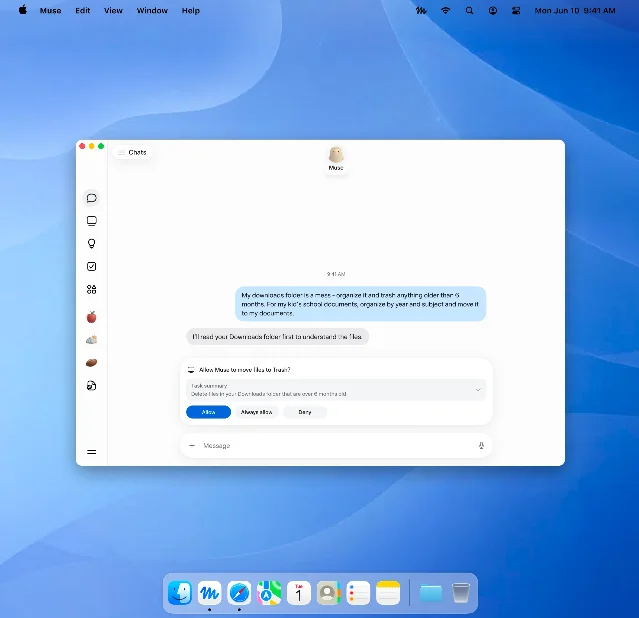
The Mac app widens what Muse can reach. Meta's published architecture, dated September 8, 2026, puts the agent inside a per-user cloud machine — an isolated Linux virtual machine with its own browser — and routes every connector action and network request through a host-side broker called Sentinel, which decides whether to allow, deny, or ask the user. That document lists the clients as the iOS and Android apps and the web UI. 4 A native Mac client reads files and apps on the machine itself, and Meta's launch pages describe its permissions in a single line, without that mechanism. 13
Why it matters
The desktop holds the files, messages, and calendars people actually work with, and Meta reached it nine days after Muse's phone launch. Muse drew 730,000 U.S. downloads in its first five days, according to Sensor Tower, ahead of the 707,000 the Meta AI app collected over the same span, and it reached No. 2 on the U.S. App Store. 5
Meta is racing Instinct, Wajo, Town, and Ollie for the same consumer job, and Muse and Instinct both added outbound calling this week. 5 Mark Zuckerberg's post announcing the Mac app reads, "The team is shipping fast." 3
For a developer or practitioner, the practical question is what to grant. The Mac app asks for reach into a working computer, the free tier makes a trial cheap, and the approval prompt is the control surface. What the desktop client sees once you allow it is the part Meta has yet to document.
References
- 1Download Muse
ai.meta.com
- 2Muse: Meta's personal AI agent
ai.meta.com
- 3Meta's Muse hits Mac
techcrunch.com
- 4How We Built Safety Into Muse
security.muse.ai
- 5
This story was produced automatically by a channel. One sentence is all it takes for Neodrop to keep producing for you.