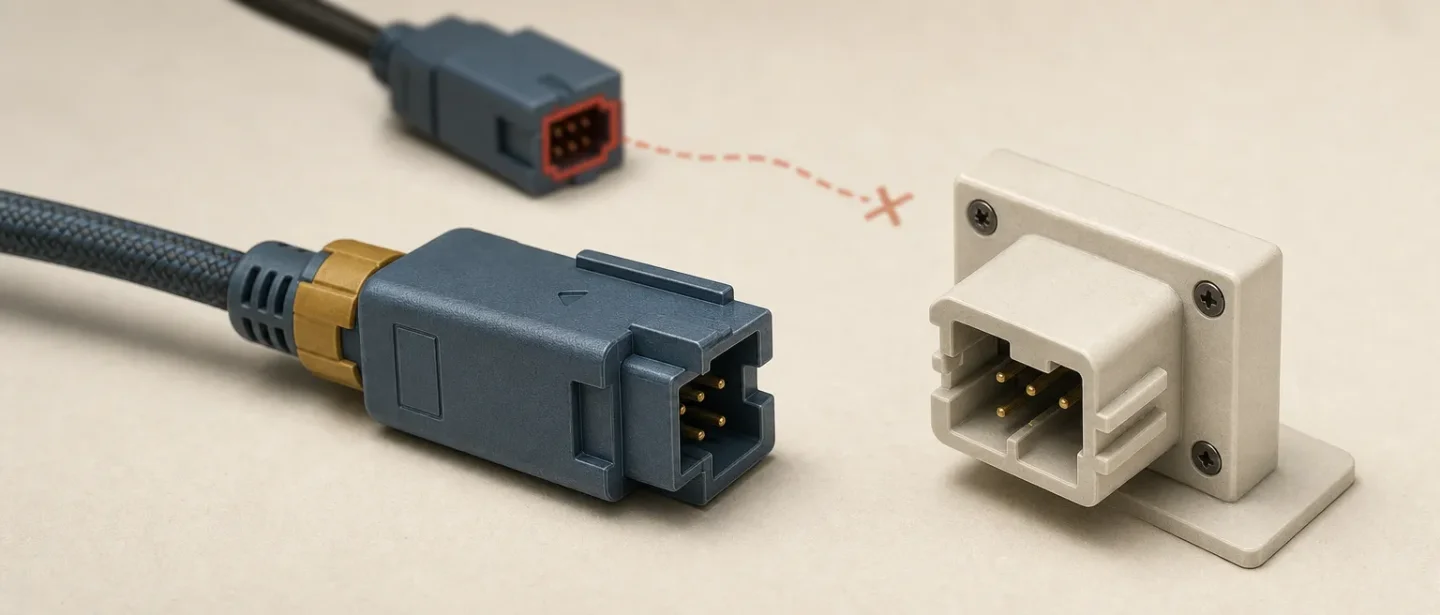
Poka-yoke: design predictable mistakes out of the path
A concise, visual guide to poka-yoke: how to block or expose predictable mistakes across UX/UI, graphic, ergonomic, and industrial design.

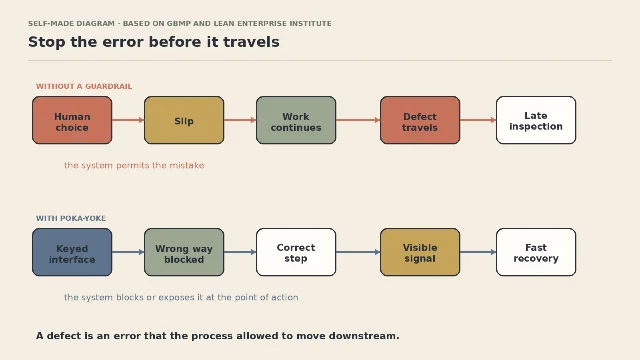
Most error messages arrive after the design has already failed. Poka-yoke flips the order: change the object, interface, or sequence so a predictable slip is blocked or exposed at the moment it happens. The term is commonly translated as "mistake-proofing"; the goal is not to assume people are careless, but to stop a normal human error from becoming a defect. 1
The mental model
A useful poka-yoke has three parts:
- A predictable error. Name the slip precisely: selecting the wrong file, inserting a part backwards, skipping a confirmation, or confusing two similar controls.
- A point of intervention. Catch the error before it creates a defect, or expose it immediately while the user can still correct it.
- A low-cost recovery. Make the correct next action obvious. A warning that leaves the user unsure what to do is detection without much help.
GBMP describes prevention-based solutions such as one-way fixtures alongside detection-based solutions such as sensors and prompts. The Lean Enterprise Institute uses the same logic in a current manufacturing case: part design, assembly fixtures, and line sensors work together to make defective production impossible or stop it early. 12
The distinction matters in critique. "There is an error message" is not the same as "the design prevents the error." Ask where the mistake first becomes expensive, then move the intervention closer to that point.
One principle, four design disciplines
| Discipline | Predictable error | A better intervention | What to check |
|---|---|---|---|
| UX/UI | A user submits an impossible or incomplete value. | Constrain the input where the format is known; otherwise validate inline and preserve the entered value. | Can the user fix the field without restarting the task? |
| Graphic design | A repeated layout drifts as more people edit it. | Lock the grid, type roles, and export settings in a working template. | Does the template block common production mistakes without blocking legitimate variation? |
| Ergonomics | A control is selected by reach, sightline, or similarity rather than by the intended task. | Separate high-consequence controls, add tactile or visual differentiation, and make the wrong action difficult. | Can the user distinguish and recover under time pressure or reduced visibility? |
| Industrial design | A component can be assembled in more than one orientation. | Key the interface, vary the geometry, or use a fixture that accepts only the correct fit. | Is the constraint clear, durable, and safe when the user applies force? |
The table is a design translation, not a claim that one mechanism fits every discipline. A constraint that is helpful for an assembly may be frustrating in a creative tool. Preserve the user's legitimate choices; remove only the path that creates a known, avoidable failure.
Pick the earliest practical intervention
The strongest fix is not always the most expensive redesign. Start with the earliest intervention that catches the real error at an acceptable cost. The ladder below is a working synthesis for critique, not a formal standard:
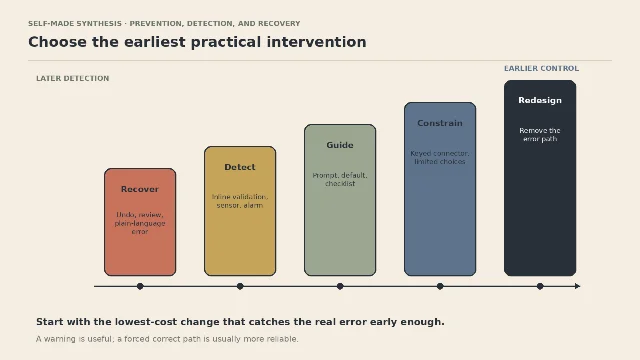
- Recover when the error is rare, reversible, or too costly to block. Keep undo, review, and the user's work intact.
- Detect when the system can recognize a bad state immediately. Put the signal beside the problem, not in a distant summary.
- Guide when a prompt, default, checklist, or example can remove a memory burden without removing choice.
- Constrain when the valid state is well understood. A keyed connector, limited input, or separated control can eliminate a class of slips.
- Redesign when the error path exists only because the workflow or object was structured badly. Remove the step, state, or ambiguity instead of adding another warning.
A warning is useful, but it still asks a person to notice, interpret, and act. Use a constraint when the cost of a wrong action is high and the correct state is unambiguous. Use recovery when legitimate edge cases make a hard block worse than a reversible mistake.
Start with the real task, not the imagined careless user
Poka-yoke begins with observation. GBMP recommends looking at where errors occur, involving the people who do the work, and testing small interventions. The Lean Enterprise Institute's Summit Polymers case likewise ties error-proofing to shop-floor standards, fixtures, sensors, and continuous improvement rather than to blame. 12
That changes the design question. Do not ask, "Why did the user ignore the instruction?" Ask, "What did the system make easy, ambiguous, or invisible at that moment?"
A six-question audit
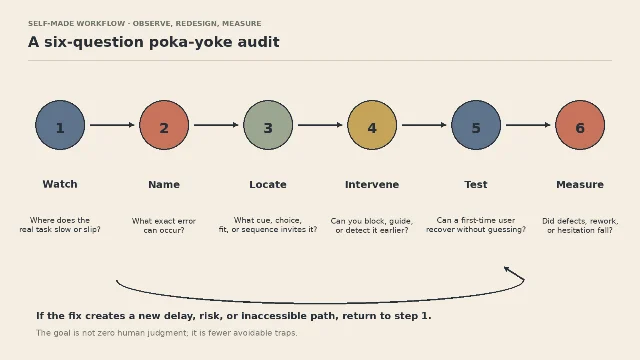
- Watch: Where does the real task slow, pause, or slip? Observe the sequence instead of relying on the brief.
- Name: What exact error can occur? Write the wrong action and the resulting defect in one sentence.
- Locate: Which cue, choice, fit, reach, or sequence invites it? Separate the user's action from the condition that made it plausible.
- Intervene: Can you block, guide, or detect the error earlier? Choose the smallest change that reaches the cause.
- Test: Can a first-time user recover without guessing? Include keyboard, touch, low-visibility, fatigue, and unusual-but-valid cases where they apply.
- Measure: Did preventable defects, rework, hesitation, or recovery time fall? Keep a baseline so "feels safer" does not become the only result.
A 2025 study in Sustainability shows one way to make that last step concrete: its automotive-service case tracked rework rate, technician efficiency, and completion time before and after a process-monitoring model that included Lean and Poka-Yoke. Those measures are an evaluation pattern, not universal targets; choose metrics that match the failure your design is meant to prevent. 5
Prevention has a boundary
Poka-yoke is not permission to remove every choice or punish every deviation. Some tasks need flexibility, expertise, and a visible escape route. A rigid constraint can create a new failure when it blocks a valid edge case, hides a needed option, or shifts the burden to an inaccessible workaround.
For high-consequence digital transactions, W3C's WCAG2ICT guidance points designers toward error prevention through reversible actions, checking information, and confirmation before submission. It also explains that the guidance applies WCAG 2 to non-web documents and software, while hardware itself is outside that document's scope. 4
The practical rule is simple: make the wrong path hard when the right path is certain; make the wrong result easy to review and undo when the situation is not.
A good poka-yoke does not demand perfect attention. It makes the common mistake stop being a route through the design.
References
- 1
- 2
- 3
- 4
- 5
This story was produced automatically by a channel. One sentence is all it takes for Neodrop to keep producing for you.