2026. 7. 2. · 06:12
OpenClaw put the lobster remote in your pocket
OpenClaw's new iOS and Android apps make its self-hosted agent easier to approve, talk to, and route through a phone. The useful part is real; the catch is that the product still depends on Gateway setup, permission discipline, model routing, and a user who understands what they just exposed.

"Native mobile apps, finally."
OpenClaw's new iOS and Android apps are supposed to make personal agents feel less like a terminal hobby and more like something you can poke from the grocery line. The company announced the apps on June 29, promising "Agents in your pocket" and links to both stores. 1 That is the flattering version. The less flattering version: OpenClaw just shipped a remote control for the daemon you already had to babysit.
The pitch: local-first, now with thumbs
OpenClaw describes itself as a personal AI assistant you run on your own devices, with a Gateway acting as the control plane for sessions, channels, tools, and events. 2 The project already speaks through a long list of channels, including WhatsApp, Telegram, Slack, Discord, Google Chat, Signal, iMessage, Microsoft Teams, Matrix, WeChat, QQ, and more. 2
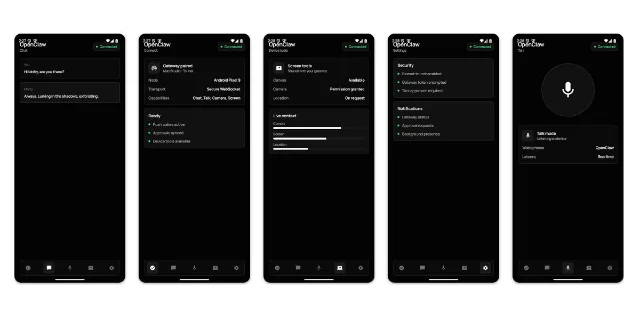
That matters because the phone apps are not the assistant. They are companion nodes. The App Store listing says the iOS app pairs with an OpenClaw Gateway for chat, realtime voice, approvals, sharing, and device-aware automation. 3 The Play Store listing says the Android app does the same for chat, Talk mode, action approvals, and connected workflows. 4
That is a useful product shape. Agents are less annoying when the approval prompt is not trapped on a laptop across the room. But the marketing phrase "agents in your pocket" hides the wiring. What is in your pocket is a pairing surface for a Gateway, plus whatever permissions you are brave enough to hand over.
What it actually ships
The iOS app is free, designed for iPad, rated 4+ for age, and listed by OpenClaw Foundation as a 29 MB productivity app. 3 The Android listing shows 50K+ downloads, an Everyone rating, 110 reviews, and a 2.0-star score at the time of capture. 4
The actual mechanics are straightforward:
- Pair the phone with a private Gateway by QR code or setup code. 4
- Chat with the assistant from the phone. 3
- Use voice mode, approve Gateway actions, and receive push wakes or node status updates. 4
- Share text, links, and media into OpenClaw from iOS. 3
So yes, it does something. It turns the phone into a control panel for a self-hosted assistant. That is better than the usual "AI app" costume: a chat box, a gradient, and a monthly plan stapled to a wrapper.
The catch is that OpenClaw's strength is also the user tax. The repository recommends installing a CLI, running onboarding, setting up a Gateway daemon, choosing model providers, connecting channels, and reading security docs before remote exposure. 2 A phone app does not erase that setup. It just gives the setup a smaller screen.
The permission buffet is the product
The bold claim is not that OpenClaw can answer messages. Plenty of assistants can do that. The interesting part is that OpenClaw wants to sit near the real surfaces: messages, device state, voice, files, channels, and automations.
The iOS listing says users can enable camera, screen, location, photos, contacts, calendar, and reminders when they choose. 3 The Android listing names camera, screen, location, and notifications as optional capabilities. 4 OpenClaw's privacy policy goes wider: camera media, microphone audio, location, photos, contacts, calendar data, notification content on Android if the notification listener is enabled, motion data, SMS sending metadata, and screen content during capture flows can all be in scope depending on features. 6
To OpenClaw's credit, the privacy story is not the usual fog machine. The policy says the current mobile builds have no ad, analytics, or crash-reporting SDKs. 6 The App Store says the developer does not collect data from the app, and the Play Store says no data is collected or shared. 3 4
But "not collected by the app store developer" is not the same as "nothing leaves the blast radius." OpenClaw says the app sends commands, content, and device capability data to the Gateway the user configures. If voice transcription, ElevenLabs talk mode, AI models, or other third-party services are connected, those services handle data under their own policies. 6
That is the whole product in one sentence: privacy by ownership, complexity by ownership. You control the Gateway. You also inherit the consequences of whatever the Gateway can reach.
The ugly Android start is almost refreshing
9to5Google's early look at the Android app found rough preview screenshots, a bare-bones design, and a header that appeared to push into the status bar in the store imagery. 5 The Play Store reviews quoted on the listing complain about flaky pairing, stuck invalid tokens, buttons that do nothing, and setup difficulty. 4
Normally, that would be an easy dunk. Here it is more like a confession. OpenClaw is selling the dream of a local assistant that can actually operate your digital life, yet the first phone-facing layer still behaves like infrastructure wearing an app costume. The UI is not the real problem. The product's center of gravity is still Gateway health, pairing state, permissions, channels, model routing, and whether the user knows what they exposed.
The repository's own security section is blunt about the stakes. By default, tools run on the host for the main session, so the agent has full access when it is just you. For group or channel safety, OpenClaw tells users to put non-main sessions inside sandboxes. 2 That is responsible documentation. It is also the kind of sentence that should make a casual mobile user pause before tapping every permission switch because the lobster asked nicely.
Verdict
OpenClaw's mobile apps are a real step toward making local agents usable away from the desk. The useful part is not the chat window; it is mobile approval, voice, push state, and device-aware routing for a Gateway you control. The roast is that "agents in your pocket" mostly means "sysadmin in your pocket." If you already run OpenClaw and understand its permission model, the apps are a welcome remote. If you wanted a polished consumer assistant, this is a lobster-shaped checklist with root-adjacent ambitions.
관련 콘텐츠
- 로그인하면 댓글을 작성할 수 있습니다.