/caveman: the one-line trigger that cuts Claude's response tokens by 65%
Matt Pocock's `/caveman` skill (83.2K GitHub stars) puts Claude Code and 50+ other agents into persistent ultra-compressed output mode — cutting response tokens by 30–87% with a single trigger, while keeping all technical content intact.
리서치 브리프
Matt Pocock (TypeScript educator, founder of Total TypeScript, former Vercel developer advocate) open-sourced his personal
.claude directory in late April 2026 as a GitHub repository called mattpocock/skills 1. The repo hit 83,200 stars within three weeks 2. Eighteen skills, all written as plain markdown, all installable with one npx command.The most immediately practical one is
/caveman.Your agent responds like it's being paid by the word
In a typical Claude Code session of 100,000 tokens, prose responses — the explanations, the summaries, the "Sure! I'd be happy to help you with that" preamble — account for roughly 6,000 tokens 3. That's ~6% of your budget, but it's also the slice that contributes zero technical value. You already know the agent is going to help. You don't need three sentences confirming its willingness to do so.
This is the problem
/caveman targets.What the skill actually does
Activating
/caveman puts the agent into a persistent compressed-output mode. The SKILL.md definition is explicit about what gets dropped and what survives 4:Dropped:
- Articles (
a,an,the) - Filler words (
just,really,basically,actually,simply) - Pleasantries (
Sure!,Certainly,Of course,Happy to help) - Hedging language
Kept exactly:
- Technical terms
- Code blocks (unchanged)
- Error messages (quoted exactly)
- Abbreviations like
DB,auth,config,req,res
The communication pattern collapses to:
[thing] [action] [reason]. [next step].The skill's own README captures the before/after in two lines:
Not: "Sure! I'd be happy to help you with that. The issue you're experiencing is likely caused by..."Yes: "Bug in auth middleware. Token expiry check use<not<=. Fix:"
On a React re-render question ("Why does my component re-render?"), the caveman answer is:
"Inline obj prop -> new ref -> re-render. useMemo." 4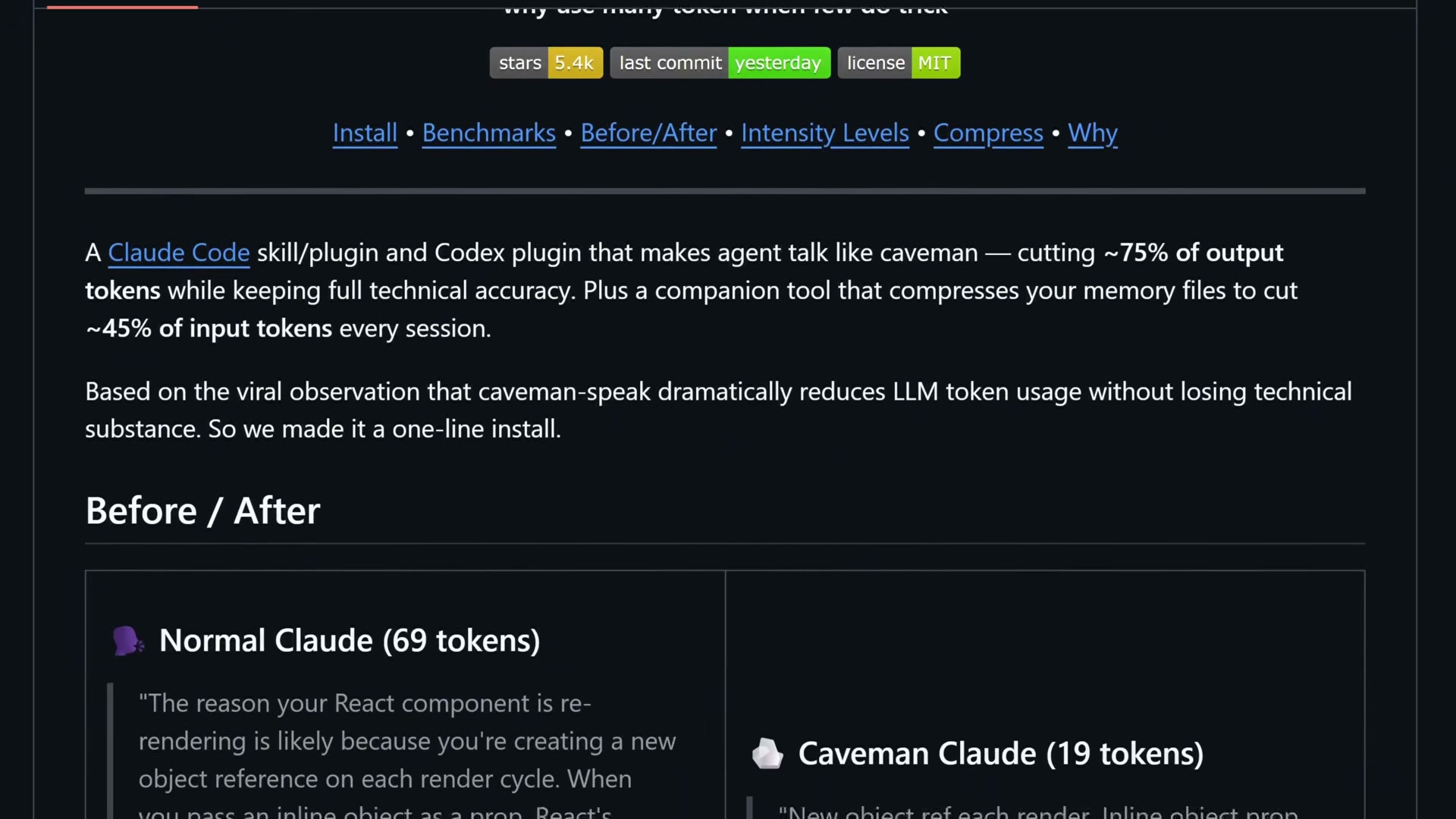
Image from: JuliusBrussee/caveman
One important behavior: the mode stays active until you explicitly say "stop caveman" or "normal mode". The agent will not drift back on its own 4.
There's also an Auto-Clarity Exception built in: the skill temporarily suspends compression for security warnings, irreversible action confirmations, and multi-step sequences where fragment order could be misread. You don't lose safety for terseness.
The skill ships in three intensity levels:
lite (drop filler, keep grammar), full (default fragment-style), and ultra (telegraphic abbreviations). Most users settle on full — ultra occasionally drops edge cases in complex explanations.Install it in 3 steps
Prerequisites: Node.js (for
npx). That's it.Step 1: Run the installer:
npx skills@latest add mattpocock/skillsStep 2: In the interactive prompt, select which skills to install and which coding agents to target. Include
/setup-matt-pocock-skills in your selection — Pocock's README is direct about this: "Make sure you select /setup-matt-pocock-skills." 1Step 3: Open your agent and run
/setup-matt-pocock-skills. It scaffolds per-repo config: issue tracker choice, triage label vocabulary, and domain doc layout 5.The
skills CLI (v1.5.7 as of May 15, 2026 6) supports 51+ agents with explicit flags, including Claude Code, Codex, Cursor, Cline, GitHub Copilot, Windsurf, Gemini CLI, OpenHands, Roo Code, and Aider.Installation scope options:
- Project-level (default): installs into the current project directory, visible only to that project
- Global (
-gflag): installs under your home directory, available across all projects
Symlink vs copy: Symlink is recommended — one source of truth, updates apply everywhere. Copy creates independent local files you can modify per-project.
⚠️ Known issue (May 2026): User @skoshx reported the symlink step failing with the current Claude Code release —.claude/skillsdoesn't get created 7. If you hit this, switch to copy mode during installation. The/cavemanskill itself works normally once installed.
What the token savings actually look like
The headline number — "~75% token reduction" — is from the mattpocock/skills README and is measured against a verbose baseline 1. Here's how the numbers break down across three data sources:
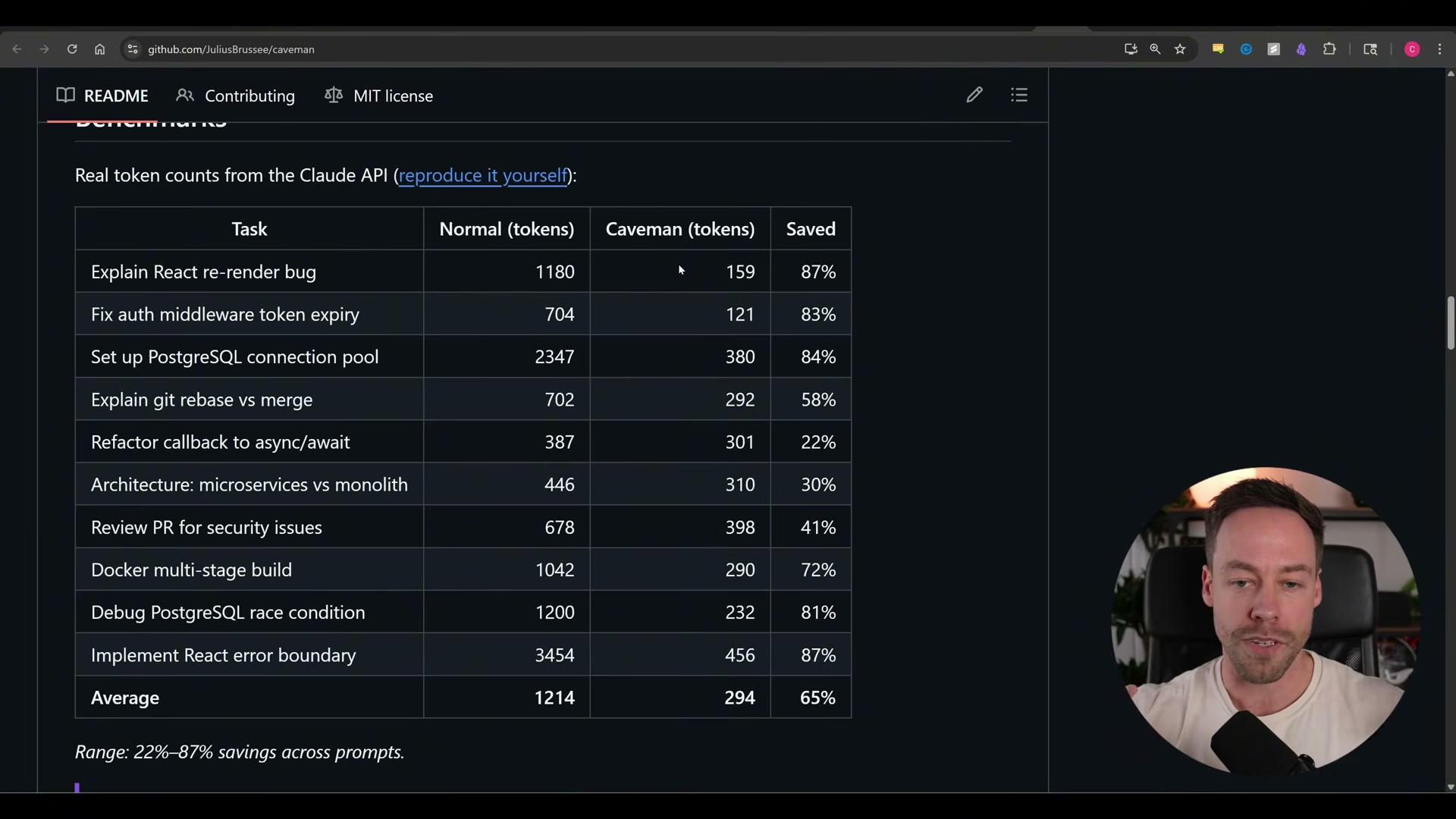
Image from: JuliusBrussee/caveman
| Source | Measured savings | Methodology |
|---|---|---|
| mattpocock/skills README 1 | ~75% | Output tokens vs verbose baseline |
| JuliusBrussee/caveman benchmark suite 8 | 65% average (range: 22–87%) | 10 real dev tasks, Claude Code |
| Community independent testing 3 | 30–50% | Various tasks, mixed agents |
| Towards AI (10-prompt sample, Opus 4.7) 2 | 71% prose tokens | Opus 4.7, Q&A tasks |
The critical context is what
/caveman doesn't compress. Thinking/reasoning tokens and code generation are completely untouched 8. The JuliusBrussee README puts it plainly: "Caveman only affects output tokens — thinking/reasoning tokens untouched. Caveman no make brain smaller. Caveman make mouth smaller." 8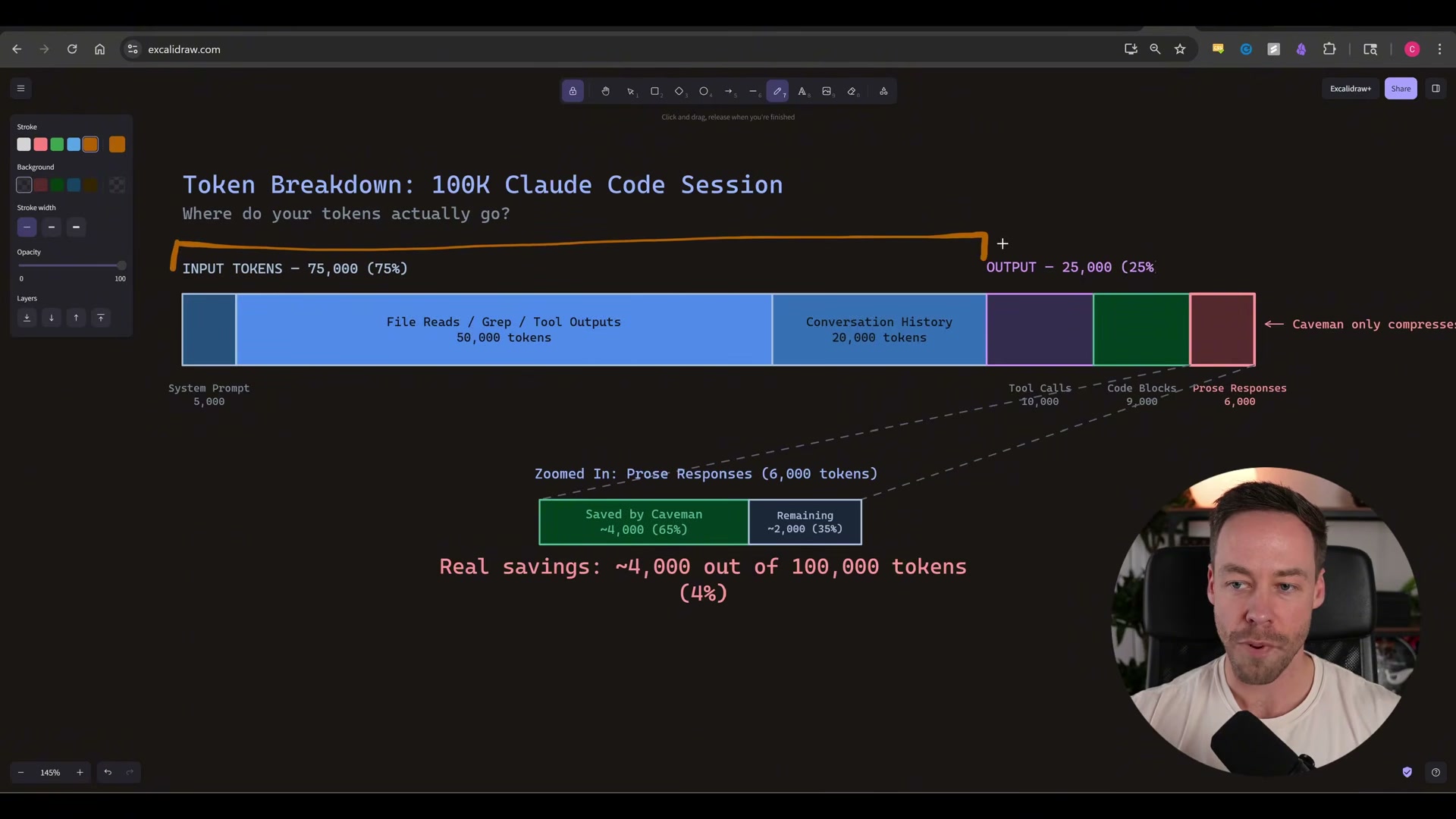
Image from: JuliusBrussee/caveman
In a 100K-token session, compressing the ~6,000-token prose slice by 65% yields ~3,900 tokens saved — about 4% session-wide 3. Reviewer andrew.ooo frames this clearly: "Caveman is a real tool dressed in a meme. The headline 75% savings number is inflated — independent benchmarks land closer to 30-50% on output tokens, and output tokens are not where most of your Claude Code bill comes from." 3
The practical case for
/caveman is less about cost and more about speed and readability: shorter responses are faster to generate and faster to scan. DevTalk reviewer xiji2646-netizen, after one week of daily use: "/caveman — if you already know what you want, this cuts agent verbosity to near zero. Underrated." 9If long-term cost reduction is the actual goal, the companion
caveman-compress tool — which rewrites your CLAUDE.md into caveman-speak, cutting an average of 46% of input tokens across tested memory files 8 — targets the input side of the budget where the real money is.When to leave /caveman off
Four situations where
/caveman creates more friction than it saves:- When you're also running
/tdd. GitHub Issue #111 documents that activating both skills simultaneously causes the agent to skip the RED phase of the red-green-refactor cycle and go directly to implementation. The context window showsterse like cavemanas the causal indicator. Don't combine them 10. - When the output goes to another person. Caveman output is terse to the point of being opaque for anyone who didn't write the original query. It looks unprofessional in screenshots shared with stakeholders. Don't use it for documentation, code reviews, or any response that a junior developer or non-technical colleague will read 3.
- When your agent isn't Claude Code. Claude Code respects the skill most consistently. Codex sometimes drifts back to verbose mode mid-session. Cursor requires per-repo rule files (
--with-init) to hold the mode reliably 3. - When you need nuanced explanations.
ultramode occasionally drops edge cases and important caveats. For debugging sessions where the why behind an answer matters as much as the what, stick withfullor turn caveman off entirely 8.
The install is 30 seconds. For solo engineering sessions where you know what you're asking — trigger it, verify the first response looks right, and keep going.
Cover image: image from mattpocock/skills
참고 출처
- 1GitHub - mattpocock/skills: Skills for Real Engineers
- 2Matt Pocock Dumped 17 Markdown Files on GitHub. 75,700 Stars Later, One Cut My Tokens 75%.
- 3Caveman Review: The Claude Code Skill That Cuts 65% of Tokens
- 4caveman/SKILL.md at main · mattpocock/skills
- 5setup-matt-pocock-skills/SKILL.md · mattpocock/skills
- 6skills - npm
- 7@skoshx on X: skills CLI no longer works with Claude Code
- 8GitHub - JuliusBrussee/caveman: why use many token when few token do trick
- 9Anyone tried mattpocock/skills for Claude Code? Here is what I found after a week
- 10The caveman skill breaks the RED→GREEN transition in the tdd skill in Claude · Issue #111
이 콘텐츠를 둘러싼 관점이나 맥락을 계속 보강해 보세요.