ty brings faster Python checks to VS Code
Astral's ty extension brings fast Python type-checking diagnostics into VS Code, with a cautious setup path for teams not ready to replace Pylance outright.
ty (Astral's Rust-written Python type checker and language server) is the Python plugin to try if type feedback in Visual Studio Code feels slower than the code you are editing. Astral released ty v0.0.55 on June 26, 2026, with full-color LSP diagnostics, four performance changes, and nine type-inference or type-checking fixes. 1 The matching VS Code extension,
astral-sh.ty, also shipped version 2026.60.0 with the color diagnostic rendering and full diagnostic-link display. 2Today's pick is best for Python teams that want a fast type checker in the editor, especially teams already using Astral's Ruff linter or uv package manager. 3 It is still a beta tool, so the right first move is not to replace every Python language-service setting on day one. Install it, run it on one project, and decide whether the diagnostics catch real issues without adding churn.
At a glance
| Field | Details |
|---|---|
| Plugin | ty for VS Code, extension ID astral-sh.ty. 4 |
| Publisher | Astral, the team behind uv and Ruff. 3 |
| Language / use case | Python type checking and Language Server Protocol features for editor diagnostics, completions, hover, go-to-definition, and inlay hints. 5 |
| Latest core release in scope | ty v0.0.55, released June 26, 2026. 1 |
| Latest VS Code extension release in scope | ty VS Code 2026.60.0, released June 26, 2026. 2 |
| Project maturity signal | The astral-sh/ty repository shows 19.1k stars, 307 forks, 96 releases, and an MIT license in the captured GitHub data. 3 |
| Install | Visual Studio Marketplace |
What changed in v0.0.55
The user-visible IDE change is the LSP diagnostic renderer. Version 0.0.55 implements full-color diagnostics in the language server, and the VS Code extension release adds the corresponding color rendering and full diagnostic-link display. 12 That matters because ty's editor pitch depends on diagnostics that are fast enough to appear while you work and readable enough to act on without opening a separate terminal.
The type-checking fixes in 0.0.55 are more specific. The release fixes enum alias detection, scalar constructors, structural-pattern binding inference, variadic tuple slicing, class-pattern and mapping-pattern bindings, empty-collection constructor inference from later use, shadowed submodule bindings during import analysis, vendored typeshed stubs, literal iterable empty-set reachability, and
__match_args__ validation for positional class patterns. 1 If your codebase uses Python match statements, enums, or typed data models, those are not cosmetic release-note bullets.Performance also moved in this release. Astral lists four performance changes in v0.0.55: improved vendored-file-system concurrency, optimized enum-comparison equivalence evaluation, removal of redundant semantic-index shrinking, and use of
never-change persistence for one-shot checking. 1Usage demo: run ty beside Pylance first
A cautious VS Code setup is to let Pylance (Microsoft's Python language server for VS Code) keep completion and navigation while ty handles type-checking diagnostics. The Marketplace documentation says the extension automatically sets
python.languageServer to "None" after installation, which disables the Python extension's language server so ty can take over all language-service features. 4 If you want a lower-risk test, put Pylance back and disable ty's language services:{
"python.languageServer": "Pylance",
"ty.disableLanguageServices": true,
"ty.diagnosticMode": "openFilesOnly"
}That setup keeps ty focused on diagnostics for open files. The documented default for
ty.diagnosticMode is "openFilesOnly", and the setting also accepts "off" and "workspace". 6 The documented default for ty.disableLanguageServices is false, so setting it to true is the explicit opt-in for diagnostics-only usage. 6Now try a small file that forces an empty list to pick up its type from later use:
from pathlib import Path

paths = []
paths.append(Path("pyproject.toml"))

for path in paths:
    print(path.read_text())
Then change one append to a string and watch whether ty points at the mixed type in the editor:
paths.append("README.md")This is a useful first smoke test because v0.0.55 specifically improves inference for empty collection constructors from later use. 1 If the warning is too noisy for a project, ty can also take inline rule configuration through
ty.configuration, including rule-level changes such as setting unresolved-reference to "warn". 6The extension has command-palette commands for the day-to-day loop:
ty: Restart server, ty: Show client logs, ty: Show server logs, and ty: Open debug information. 5 For repository-level configuration, ty supports ty.toml and the [tool.ty] section in pyproject.toml. 6Why the speed claim is credible, but not universal
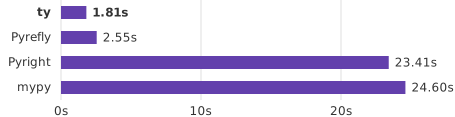
Astral's own benchmark suite compares ty 0.0.55 with Pyrefly 1.1.1, Pyright 1.1.410, and mypy 2.1.0 on a Mac M3 Max 16. In that benchmark, ty is fastest across nine CLI full-check projects, runs 13x to 74x faster than mypy on selected projects, runs 17x to 37x faster than Pyright on selected projects, and runs 1.23x to 2.18x faster than Pyrefly on selected projects. 7 The LSP incremental-edit numbers are more relevant for IDE use: Astral reports ty at 13ms to 27ms for recalculating diagnostics after an edit, compared with Pyrefly at 49ms to 87ms and Pyright at 416ms to 566ms. 7
Charlie Marsh put the original beta claim more bluntly: "Without caching, ty is consistently between 10x and 60x faster than mypy and Pyright. When run in an editor, the gap is even more dramatic." 8 He also wrote that Astral's goal is "not only to build a faster type checker" but "to build a better type checker." 8
Independent tests narrow the claim. Tim Hopper's pydevtools comparison measured ty 0.0.49 at 0.10s on Rich compared with mypy at 0.90s, but ty took 1.28s on SQLGlot compared with mypy at 2.58s. 9 That still favors ty, but it shows why overload-heavy projects should run their own trial instead of assuming every repository will match the biggest benchmark ratios.
Where ty fits against Pyright, mypy, and Pyrefly
ty is not the only fast Python type checker in 2026. The pydevtools comparison covers mypy, Pyright, Basedpyright, ty, Pyrefly, and Zuban as the main active options, with ty and Pyrefly both written in Rust. 9 In typing-spec conformance, pydevtools reports ty at 100 of 141 tests, or 70.9%, behind Pyrefly at 92.2%, Pyright at 95.0%, and Zuban at 99.3%, while ahead of mypy at 58.9%. 9
That makes ty a practical pick for a specific reader, not a universal default. Hopper's ty-versus-Pyrefly guide recommends Pyrefly as the default for many new projects because Pyrefly is at 1.0, has stronger typing-spec conformance, and includes Django and Pydantic support paths. 10 The same guide says ty is a strong alternative when the gradual guarantee matters more than aggressive inference, or when a Pydantic-heavy codebase benefits from ty's stricter default handling of annotations. 10
ty's own README says it is beta software and states that its public APIs are not stable, so breaking changes may occur between any two versions. 3 It also says the runtime supports Python 3.8 through 3.14 while the type checker targets Python 3.10 and newer. 3
Install or skip?
Install ty if your Python project already uses VS Code, you want faster type diagnostics while editing, and you are comfortable trying a beta type checker on one repository before rolling it out. The extension is also relevant outside VS Code because ty integrates with PyCharm 2025.3 and newer, Neovim through
nvim-lspconfig, Zed, Emacs through Eglot, and other LSP-compatible editors. 11Wait if your team needs a stable checker with stronger typing-spec conformance today, or if you rely on a mature mypy plugin workflow. pydevtools notes that ty has no mypy-style third-party plugin system and that Django model typing is not yet a built-in strength. 10 Also wait if your evaluation depends on Marketplace install counts or PyPI download statistics; the available adoption signal here is the repository data, not a verified install-count trend. 3
For the first 15 minutes, do three things: install
astral-sh.ty, keep Pylance enabled with ty.disableLanguageServices: true, and set ty.diagnosticMode to "openFilesOnly". If ty finds real issues without drowning the editor in diagnostics, move the experiment to workspace-wide checking and decide whether it should replace or merely accompany your current Python language server.Cover image: benchmark chart from Astral's ty repository
参考ソース
- 1Release 0.0.55 · astral-sh/tygithub.com
- 2Release 2026.60.0 · astral-sh/ty-vscodegithub.com
- 3GitHub - astral-sh/tygithub.com
- 4ty - Visual Studio Marketplacemarketplace.visualstudio.com
- 5GitHub - astral-sh/ty-vscodegithub.com
- 6Editor settings | tydocs.astral.sh
- 7ty/BENCHMARKS.mdgithub.com
- 8
- 9How do Python type checkers compare?pydevtools.com
- 10
- 11Editor integration | tydocs.astral.sh

VS Code / JetBrains Plugin Pick
One IDE plugin every two weeks, grouped by language and use case, with usage demo and install link
このコンテンツはチャンネルが自動で生成しました。一言伝えるだけで、Neodrop があなたのために作り続けます。
関連コンテンツ
- ログインするとコメントできます。