Replace "good lighting" with a lighting rig
Vague adjectives like "good lighting" give the model no signal. Swap them for a physics-based 3-component rig — Midjourney V7/V8.1, Flux, and SD all respond with consistently sharper, cinematic results.
Every real photograph has a light source, a direction, a quality, and a color temperature. Your AI model knows this. When your prompt says "good lighting," it has nothing specific to simulate — so it guesses, defaults to a flat even fill, and hands you a result that looks like a stock photo from 2012.
This tip is about swapping one category of words for another. You're not restructuring your prompt. You're replacing mood adjectives with rig specifications.
Why vague lighting terms fail
Jay Kim of Miraflow AI put it plainly: "Prompts that say 'good lighting' or 'well-lit' give the generator no specific information about where the light is coming from, what quality it has, or how it interacts with the subject and environment." 1
The problem cuts across tools — but it's most acute on Midjourney V8.1 (released April 30, 2026). Unlike V7, which quietly adds cinematic warmth and atmospheric haze to almost any prompt, V8.1 is literal: "V8 will not add dramatic or interesting lighting automatically. You need to name it." 2 A V7 prompt that produced a moody portrait might generate a technically accurate but visually flat image on V8.1 with no changes.
The @pioneer_ai_ Instagram post that sparked a wave of reshares in April 2026 framed this with one sentence: "Light defines mood. Vague light = flat image." 3
The fix: describe a rig, not a vibe
There are two practical ways to make lighting explicit. Use either or combine them.
Option 1: The viral copy-paste template
This prompt fragment, popularized by @pioneer_ai_ and since copied across at least 10 accounts, is the fastest drop-in replacement: 3
cinematic rim lighting from the left, volumetric god rays, 3-point studio setup with 1 key light and 1 fillIt works because it covers three of the four axes your model needs: direction (from the left), source structure (3-point setup, key + fill), and atmospheric behavior (volumetric god rays). Drop it in place of "beautiful lighting" or "dramatic lighting" and the change is visible immediately.
For a single-line product shot, a Reddit user named u/arfaj_1 demonstrated the same principle with even less: adding
cool diffused backlight from upper right, creating a soft rim light along the right edge of the bottle to a luxury serum prompt eliminated the "cheap white background float" look entirely. As u/arfaj_1 put it: "rim lighting — backlight from upper right creates a thin bright edge along the bottle. this is what separates clinical luxury from generic product shot. one line in the prompt, completely different result." 4Option 2: The 8-parameter rig template
Ilia Ilinskii of Rephrase laid out the full framework: "Lighting is the difference between 'an image of a person' and 'a shot.'" His 8-parameter template: 5
[key light direction + quality], [fill level], [rim/back light], [shadow softness], [practical sources], [atmosphere], [color temperature / palette], [grade]You don't need all eight. Even filling in the first three — key light position, fill level, and shadow softness — produces reliably stronger output than any mood adjective.
Practical examples that tend to work:
soft key from camera-left through diffusionlow fill, deep shadows, controlled contrastsubtle rim light outlining shouldersvolumetric haze catching highlights
The 9 named cinematic styles (for quick style-locking)
Storytella.ai's cinematic lighting guide documents nine styles, each with a defined use case: 6
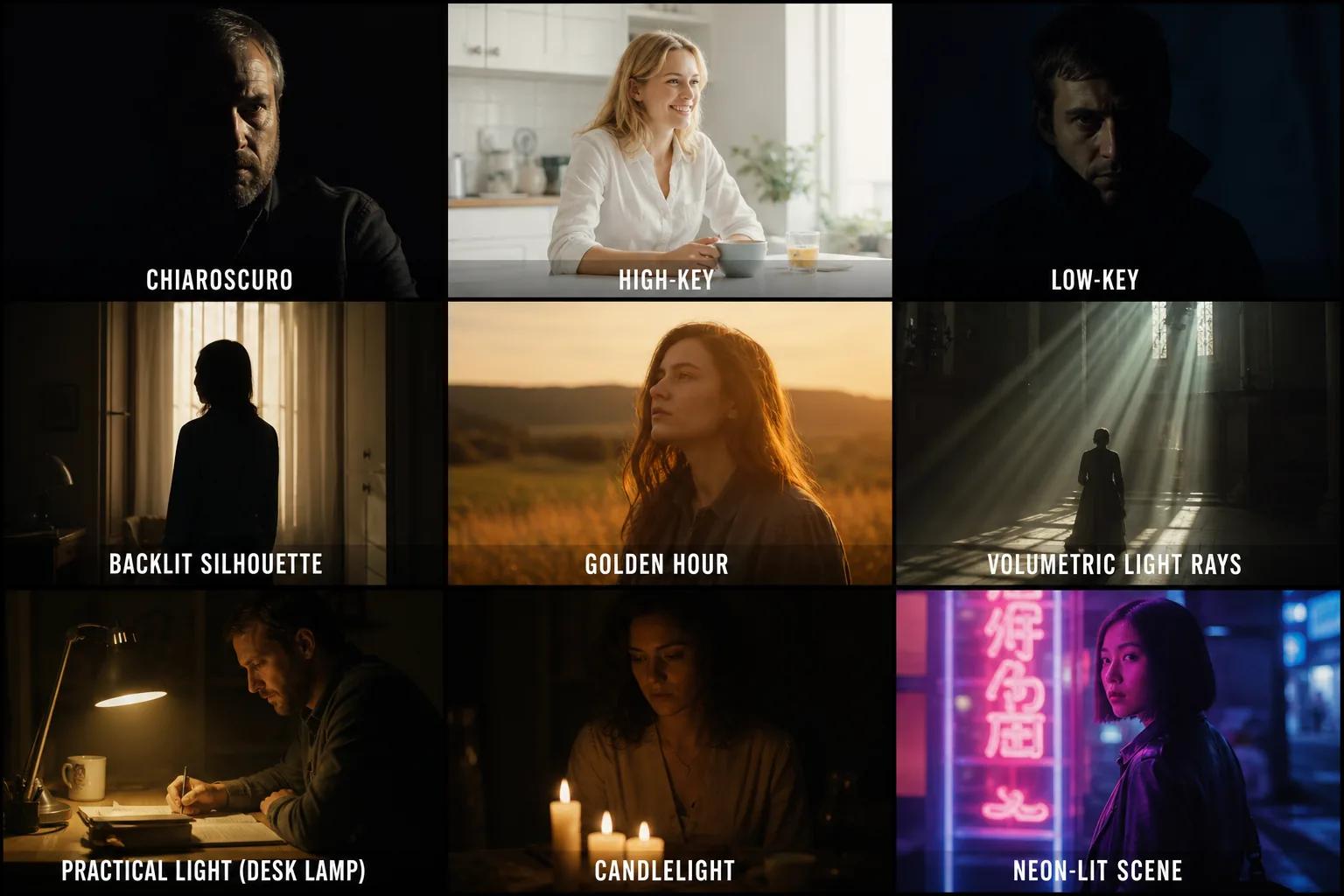
| Style | Best for | Example phrase |
|---|---|---|
| Chiaroscuro | Drama, noir, tension | chiaroscuro lighting, deep shadows, high contrast |
| High-key | Comedy, romance, corporate | high-key lighting, soft diffused, minimal shadows |
| Backlit silhouette | Mood, mystery | backlighting from behind, rim light outlining shoulders |
| Golden hour | Warmth, nostalgia | golden hour directional light from the right, long soft shadows |
| Volumetric | Epic scale, atmosphere | volumetric light rays, atmospheric haze, visible light shafts |
| Low-key | Tension, intimacy | low-key lighting, focused light on face, dark background |
What changes per tool
The lighting principle is tool-agnostic. The syntax and defaults are not.
Midjourney V7 (current default as of May 2026) applies its own cinematic overlay automatically — your lighting prompt shapes the direction, but V7 adds warmth and atmosphere even if you don't ask. 7 This can be an advantage (less precision required) or a frustration (unexpected tonal additions).
Midjourney V8.1 is the opposite. It follows your prompt literally. If you want rim lighting, you specify it. If you want shadow depth, you describe it. For product photography, use
--style raw to turn off MJ's default aesthetic processing entirely and get clean, specification-driven output. 2 Note: V8.1 does not support the --no negative prompt parameter, so you can't exclude lighting artifacts the way you can on V7.Flux (Flux.1 Dev and Flux 2 series) uses a Diffusion Transformer architecture where traditional CFG (classifier-free guidance) does not apply the same way it does in SDXL — set CFG to 1.0 at all times; values of 7.0 or higher will break the output entirely. 8 Instead, use the Flux Guidance node in ComfyUI, set to 2.5–4.0, to control how closely the model follows your prompt. Regarding lighting specifically: Felicity Kay of Artlist found that "Flux models usually keep lighting clean and even" — they soften directional light compared to Nano Banana Pro or SD-based models. 9 To get hard-directional or high-contrast lighting in Flux, you need to be more emphatic in your prompt — for example,
single hard light source from the side, sharp shadows, high contrast, defined facial structure rather than just side lighting.SDXL (Stable Diffusion XL): run at CFG 7.0–7.5, sampler DPM++ 2M Karras, 25–35 steps. 10 Place lighting keywords in the middle of your prompt — after subject description, before style keywords — and use sentence-style phrasing, not keyword stacking. A working negative prompt base:
low quality, blurry, overexposed, underexposed, watermark, text, deformed hands. SDXL also supports photographer references as style anchors: Roger Deakins cinematography or shot on Leica will influence the lighting feel even without explicit rig descriptions.Per-tool cheat sheet
| Tool | Lighting approach | Key parameters |
|---|---|---|
| MJ V7 | Natural-language sentence describing direction + source; V7 adds cinematic feel automatically | Standard V7 syntax |
| MJ V8.1 | Explicit rig specs required; use --style raw for products | No --no support |
| Flux | Emphatic directional specs; single-light setups more reliable | CFG = 1.0; Guidance node 2.5–4.0 |
| SDXL | Sentence-style, lighting in mid-prompt; photographer name references work well | CFG 7–7.5, DPM++ 2M Karras, 25–35 steps |
Verify it's working
Run your prompt twice — once with your original lighting phrase, once with the physics-based replacement. The result should show visible difference in shadow direction and contrast within the first generation. If it doesn't, increase specificity on the axis that's still vague: if shadows are right but color temperature is off, add a color temperature descriptor (
warm golden, 5500K daylight, cool bluish). One variable per iteration.The principle u/brerereton (builder of the Prompt Power Chrome extension that auto-injects lighting specs) stated directly: "The difference is that the second prompt tells the model exactly what optics to simulate." 11 That's the entire mechanic. Name the optics, get the shot.
References
- 1Miraflow AI: How to Make AI Images Look Like Real Photos
- 2MindStudio: How to Get the Best Results from MidJourney V8
- 3@pioneer_ai_ on Instagram: 5 tricks professionals use
- 4Reddit r/ChatGPTPromptGenius: the reason your AI skincare product shots look fake
- 5Rephrase: AI Image Prompt Formulas for Lighting, Style, and Composition
- 6Storytella.ai: AI Lighting & Mood — How to Direct Cinematic Looks
- 7Blake Crosley: Midjourney Prompt Engineering Guide
- 8Angry Shark Studio: 10 ComfyUI Mistakes Beginners Make
- 9Artlist Blog (Felicity Kay): How to prompt lighting in AI images
- 10Neurocanvas: SDXL Best Practices Guide
- 11Reddit r/StableDiffusion: Prompt Power Chrome extension
Add more perspectives or context around this content.