Linear Releases: the scheduled pipeline view teardown
A deep teardown of Linear's Scheduled Release Pipeline Detail View (April 30, 2026) — dissecting the four-zone layout, two-level status architecture, progressive disclosure patterns, and the "Status Grounding" design pattern PMs can apply immediately.
Linear's Releases feature, which shipped on April 30, 2026, is the most structurally interesting new screen from any of the six target products in recent months. It is also easy to misread. On the surface it looks like a list view with a sidebar — familiar enough that you might scroll past the design decisions embedded in it. Those decisions are the whole point of this teardown.
The screen under the lens: the Scheduled Release Pipeline Detail View — the main workspace you land on when you open a scheduled release in Linear.
The problem the screen is solving
Every issue tracker has a "Done" status. The problem is that "Done" means at least three different things depending on who you ask: code merged to the main branch, deployed to staging, or live in production and visible to customers. Those are not the same event. In most teams, the gap between them is invisible inside the tracker — and that invisible gap erodes trust in the system over time.
Linear's CEO Karri Saarinen articulated the design premise in the launch changelog: 1 "See what's live to customers, not just what's been merged."
The Scheduled Pipeline Detail View is the primary surface where that premise becomes a concrete interface. It brings the full release lifecycle — included issues, deployment stages, status automations, and release notes — into one panel instead of splitting the information across the issue tracker, the CI/CD dashboard, and a separate release doc.
Layout anatomy: four zones, one hierarchy
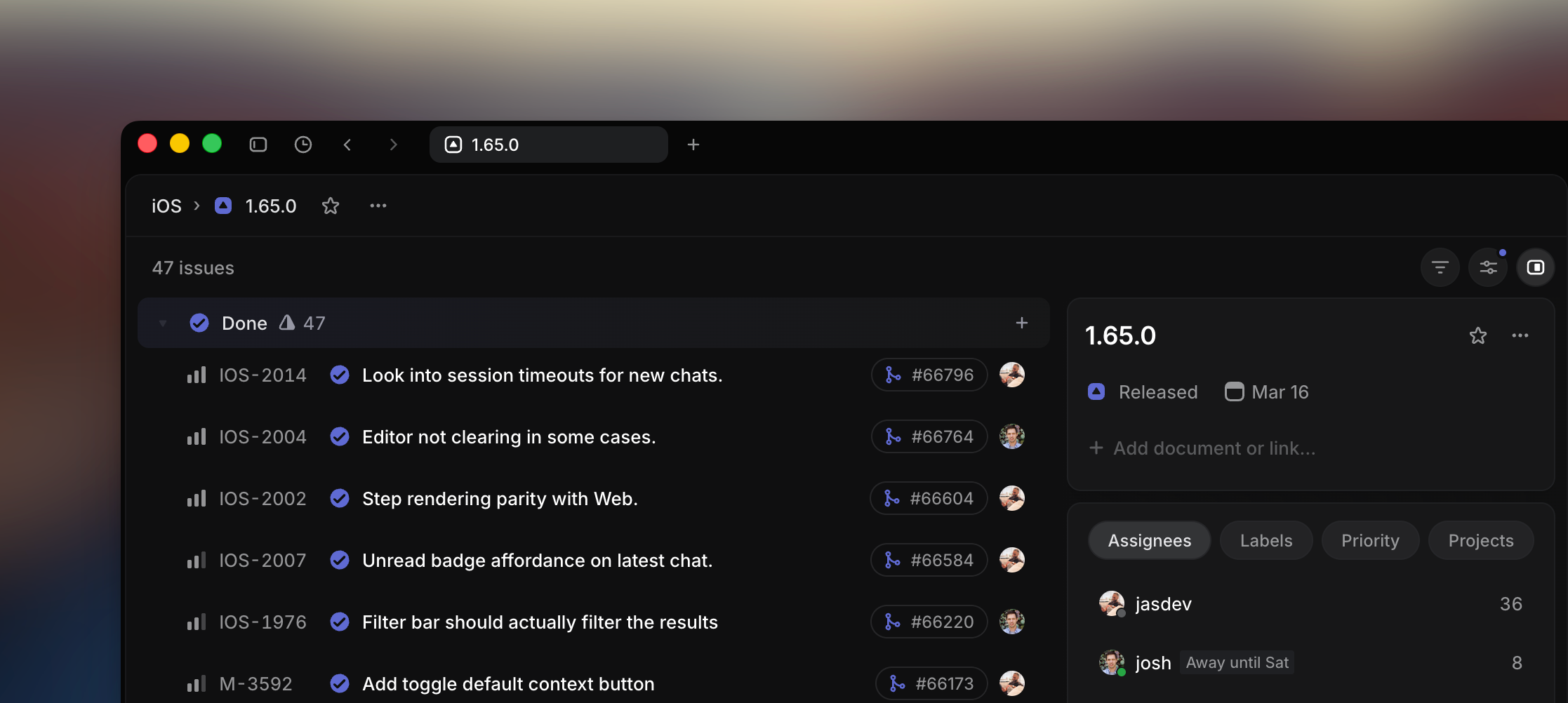
Image from Linear Releases — Docs
The layout divides into four zones, each with a distinct job: 2
- Pipeline header — release name, version number, and pipeline context sit at the top. This is the identity layer: it answers "what release am I looking at?" before anything else loads visually.
- Issue list — the central, widest column. This is the heaviest content zone. Every issue included in this release lives here, with its status, assignee, and labels visible inline.
- Right sidebar — release properties: target date, associated stages, team, and action buttons (generate notes, complete release). This is deliberately narrower than the issue list, which signals that properties are reference information, not the primary object of attention.
- Context panel — the bottom area reserved for release notes generation, activated on demand rather than always visible.
The information hierarchy follows the same logic: release identity → current stage and status → included issues → properties and actions. What is most prominent is what the reader needs to orient themselves. What is least prominent is what they need to act on occasionally.
Linear's visual language throughout is minimal: high-contrast text on dark backgrounds, a purple accent color for interactive and selected states, no decorative dividers between zones. Borders appear only when they carry information (a stage boundary, a frozen state indicator). 2
One structural choice worth noting: Linear ships two distinct interface types for two distinct deployment philosophies. Continuous pipelines get a feed-style view designed for constant flow. Scheduled pipelines get the zoned layout described above, with explicit stage progression and freeze controls. As the docs state: 2 "When you choose continuous, the pipeline uses a specialized interface designed for the constant flow of changes in continuously deployed environments." The interface is not a single design forced onto two different workflows — it bifurcates at the point where the workflows diverge.
State changes: the two-level status architecture
The state change design in Releases is where the thinking is sharpest. Most issue trackers conflate two semantically different events into one status transition. Linear separates them explicitly. 2
The recommended configuration:
- Git automation moves an issue to a "Merged" status when the associated pull request merges to main.
- Release automation moves the same issue to "Done" when its release completes and the code lands in production.
Linear's documentation puts it plainly: 2 "Consider setting your Git automation to update issue status to a started 'Merged' status on merge, and let a release automation mark the issue done once the change has landed."
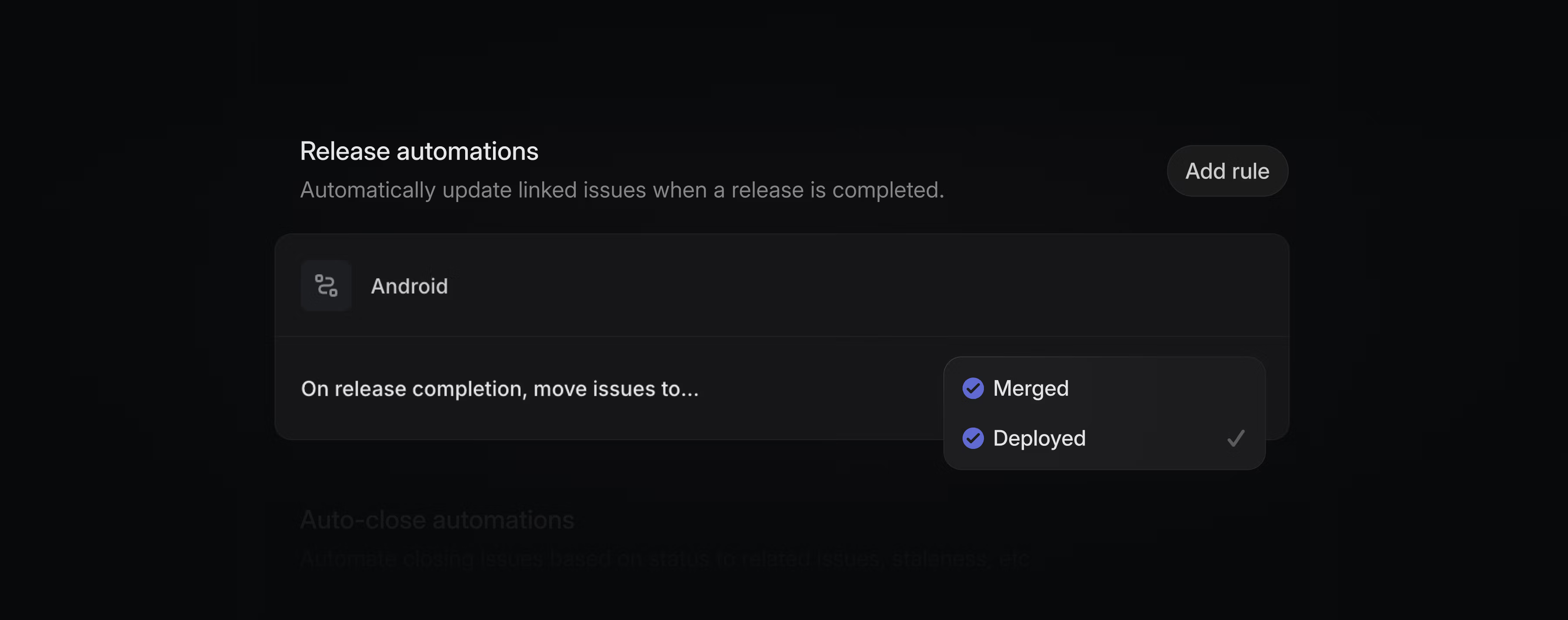
Image from Linear Releases — Changelog
This two-level architecture has a downstream effect that is easy to underestimate: it aligns automation triggers with customer-facing reality rather than with engineering process milestones. Tools like Intercom or Linear Asks fire their notifications when code reaches customers, not when a PR merges. That distinction matters for any team that uses status changes to drive customer communications.
The pipeline detail view also lets teams freeze a stage — locking it so no new issues can be added automatically. This surfaces a state that previously existed only implicitly (the informal "we're locked down for the release") and makes it explicit and visible to the whole team without a standup announcement.
Each issue can appear in multiple pipelines simultaneously, creating what is effectively a deployment matrix rather than a single binary flag. A single issue might show iOS Internal, iOS Nightly, and iOS Production as three separate progression points. The sidebar displays this as a compact chronological timeline — readable in seconds without drilling into the issue itself.
Micro-interactions: progressive disclosure done with discipline
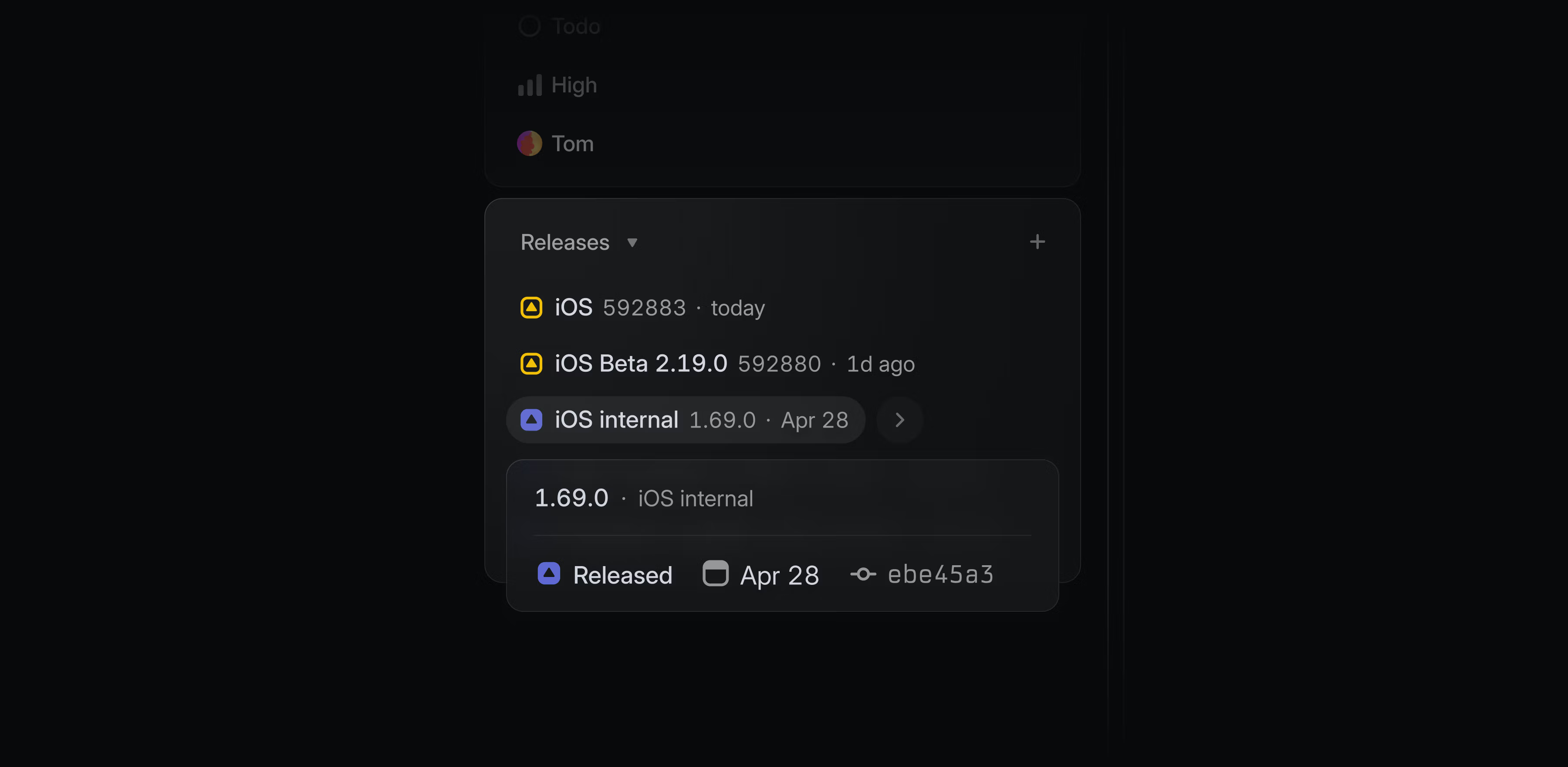
Image from Linear Releases — Changelog
The issue sidebar's release history is the sharpest example of progressive disclosure in this screen. The deployment matrix for an issue — potentially three or four pipeline stages across multiple platforms — is compressed into a small timeline component in the sidebar properties area. It answers the immediate question ("has this shipped?") without forcing the reader to parse a table. The detail is available, but it does not compete with the issue content for attention.
Linear's sub-50ms response time applies throughout, including in Releases. 3 According to a Codegen product review, "every interaction responds in under 50ms. That speed compounds into hours saved across a team that lives in the tool all day." In the context of a release pipeline view that a PM or engineering lead might open multiple times per day during a release cycle, the absence of loading states is a design decision, not just a technical one — it reduces the friction cost of checking status frequently enough that people actually do it.
The Release Notes panel integrates Linear Agent directly into the release workflow. 1 "Write release notes for a single release or for a range of releases. Generate release notes with Linear Agent based on included issues." The panel appears in the context area at the bottom and does not load until the user initiates it — consistent with the principle that reference and occasional-use content stays out of the primary visual field until requested.
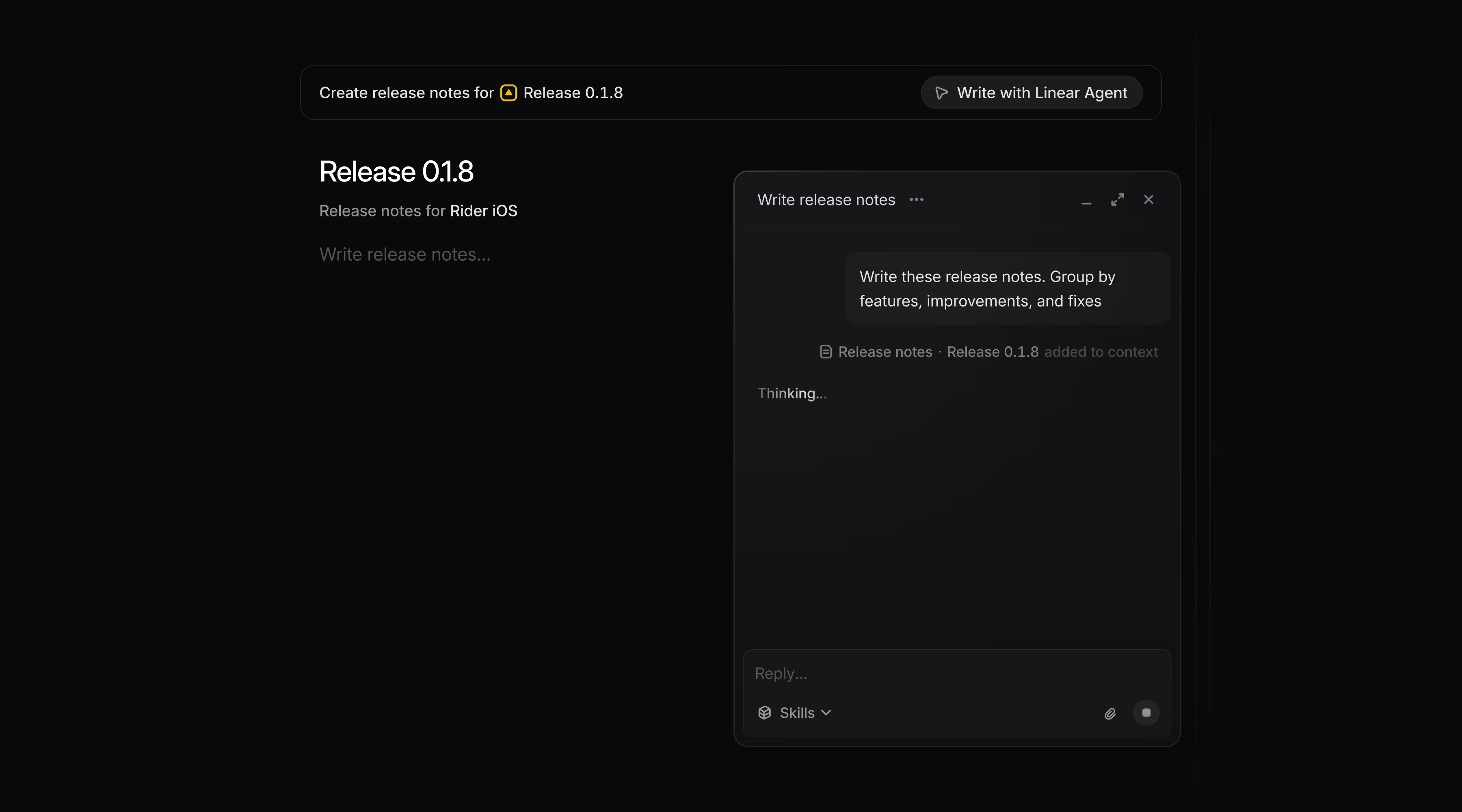
Image from Linear Releases — Changelog
On May 14, 2026, Linear added contextual menu actions for attaching documents and links to releases — 4 following its established pattern of surfacing infrequent actions through right-click context menus rather than adding buttons to the primary interface. The main surface stays clean; power features remain accessible.
Design intent and the "Status Grounding" pattern
The design philosophy behind Releases can be named as a reusable pattern: Status Grounding.
Status Grounding means attaching abstract workflow states to verifiable external events rather than relying on manual human updates. "Done" in the Releases model is not a declaration — it is a consequence of code reaching a specific deployment environment, confirmed by the CI/CD pipeline.
The failure mode this pattern prevents is well documented in practice. A Reddit r/Linear user described it directly: 5 "The only setups that started feeling sustainable for us were the ones where visual flow mattered more than filling forms all day. Less 'complete this metadata before moving task,' more 'can the team quickly understand where work is stuck and why.'" Manual status updates are the forms they're talking about. When engineers are required to manually move issues to "Done" after deploying, a meaningful fraction of those moves never happen — the issue says "In Review" and the feature has been live for a week.
The design choice to build two-level status automation rather than one-level is what makes the pattern actually work at the integration level. As Linear's docs note, 2 this approach "adds the benefit of triggering integration automations (in tools like Asks and Intercom) when changes are available to customers, not just when a PR merges" — the downstream automations fire against a signal that corresponds to something real in the customer's world.
The Design Language newsletter (Jeremy Belcher and David Issa) frames the broader strategic context: 6 "When agents are reading the system, configurability is surface area for confusion. Strong defaults stop being a limitation and start being a quality signal." The Releases design — two pipeline types, predefined stage progression, automated status transitions — is opinionated by design. The interface removes the decisions that add friction without adding judgment.
The PM takeaway
Status Grounding is portable. It applies anywhere a workflow contains an event boundary where the meaning of a status changes from "done by the team" to "live for the customer."
A few places it could land in your product:
- Billing flows: an invoice status of "sent" vs. "delivered" vs. "viewed" vs. "paid" are four semantically different states. Most billing UIs collapse them into two.
- Content publishing: "approved" vs. "scheduled" vs. "published" vs. "indexed" — each is triggered by a different external event and drives different downstream notifications.
- Infrastructure provisioning: "requested" vs. "provisioning" vs. "live" — the gap between the second and third is where support tickets live.
The pattern's prerequisite: the external event must be machine-readable. Releases works because the CI/CD pipeline can emit a webhook or GitHub Action output. If your equivalent of "deployed to production" is a Slack message from a DevOps engineer, Status Grounding cannot automate it — and that's useful information about where your process debt sits.
Cover image from Linear Releases — Docs
Add more perspectives or context around this content.