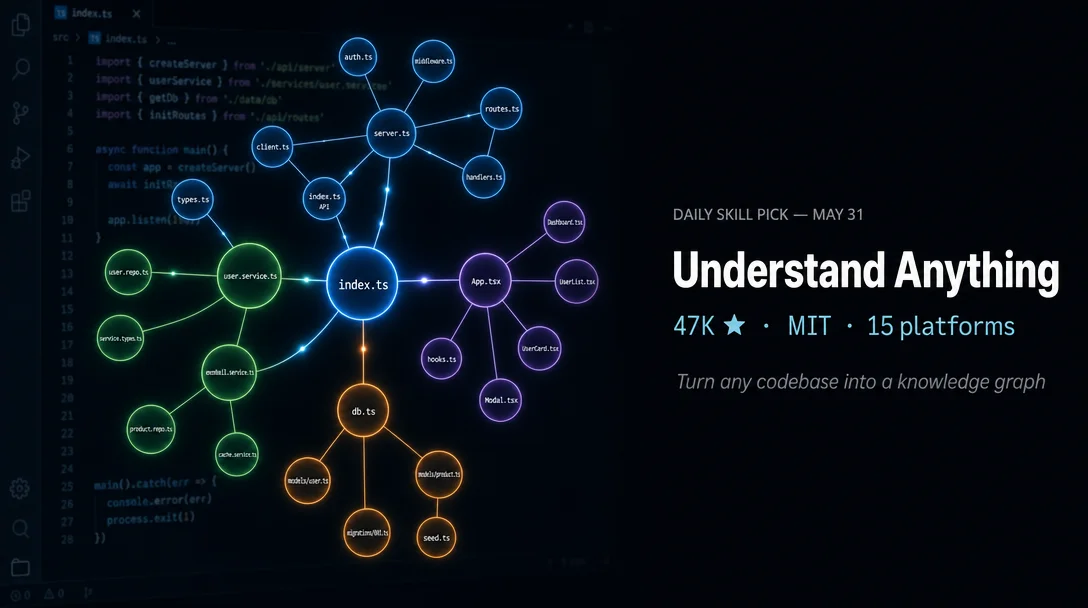
`Understand-Anything`: give your agent a map before it touches the code
`Understand-Anything` (Lum1104, 47K stars, MIT, v2.7.3, May 19 2026) is a Claude Code plugin that runs a 7-agent Tree-sitter + LLM pipeline on any codebase and produces a committed JSON knowledge graph. The article covers: the hybrid architecture, install commands for all 15 platforms, the 8 slash commands (with the under-rated `/understand-diff` highlighted), real community feedback from Better Stack (126K-view walkthrough), Eric Tech's head-to-head token comparison (~200K vs Graphify's ~100K), and a frank limitations section covering OpenCode's 14% structural-only output, Windows breakage, `pnpm` hard dependency, dashboard freeze bug (#330), stateless `/understand-explain`, and the absence of local LLM support. Closes with a "when NOT to use" section covering 5 concrete scenarios.

Research Brief
Understand-Anything (47K stars, MIT, v2.7.3) fixes that at the pre-session layer: run one command, get a queryable JSON knowledge graph that any subsequent agent session can reference before touching a single line of code. 1How the pipeline works
project-scanner— file discovery, language and framework detectionfile-analyzer— extracts functions, classes, imports; produces graph nodes and edges (up to 5 concurrent workers, 20–30 files per batch)architecture-analyzer— identifies layers (API / Service / Data / UI / Utility)tour-builder— generates dependency-ordered guided learning toursgraph-reviewer— validates completeness and referential integritydomain-analyzer— extracts business domains and flows for/understand-domainarticle-analyzer— handles Karpathy-pattern LLM wikis for/understand-knowledge1
.understand-anything/knowledge-graph.json. Once generated, the dashboard runs independently without further LLM calls. Commit the file once and teammates skip the pipeline entirely. 2/understand with --auto-update hooks into post-commit and only re-analyzes changed files.Install
/plugin marketplace add Lum1104/Understand-Anything
/plugin install understand-anythingcurl -fsSL https://raw.githubusercontent.com/Lum1104/Understand-Anything/main/install.sh | bash -s <platform>gemini, codex, opencode, pi, openclaw, antigravity, vibe, vscode, hermes, cline, kimi, trae. 2iwr -useb https://raw.githubusercontent.com/Lum1104/Understand-Anything/main/install.ps1 | iex~/.understand-anything/repo and creates symlinks for the chosen platform. Restart your CLI or IDE after install. 2./install.sh --update
./install.sh --uninstall <platform>The 8 slash commands
| Command | What it does |
|---|---|
/understand | Full scan → builds .understand-anything/knowledge-graph.json. Supports --language zh|ja|ko|ru, --auto-update, subdirectory scoping (/understand src/frontend) |
/understand-dashboard | Opens interactive React Flow dashboard, color-coded by layer (API / Service / Data / UI / Utility), with fuzzy + semantic search and guided tours |
/understand-chat "How does the payment flow work?" | Natural language Q&A against the graph — no additional LLM scan cost |
/understand-diff | Impact analysis of current uncommitted changes — what breaks if this file changes |
/understand-explain src/auth/login.ts | Deep-dive into a specific file or function |
/understand-onboard | Auto-generates onboarding guide for new team members |
/understand-domain | Extracts business domain knowledge (domains, flows, steps) |
/understand-knowledge ~/wiki | Analyzes Karpathy-pattern LLM wikis |
What the community actually says
GoogleCloudPlatform/microservices-demo repo and published a walkthrough (126K views, 3.6K likes). The narrator's conclusion was unambiguous: "This would have saved me my first 2 weeks in the job, because it breaks everything down, it connects everything, and it shows us how it's intertwined." 3Honest caveats
/understand-chat and /understand-explain queries do not re-trigger the full pipeline./understand-explain has no conversation memory. Each call is stateless — it cannot access context from a previous chat session. Follow-up questions require repeating your context. 9edge source handle id. 10pnpm is a hard dependency. If your host project's package.json pins a different package manager via packageManager (yarn, npm), the plugin's Phase 0 build fails on corepack conflict. Issue #315 is open but unresolved. 11~/.understand-anything-plugin/agents/) without a full absolute path (#340). If you are on Windows, budget for friction. 12 13When NOT to use it
Task tool — the mechanism Understand-Anything uses to dispatch its sub-agents. Without it, Phases 2–6 (the five LLM-dependent agents) cannot run. The result is a structural-only graph: 2,015 file nodes, 284 edges, 14% coverage — against an expected 1,500+ edges and 70%+ coverage when the full pipeline runs. Community member canomogollon documented this in Issue #317 and recommends Graphify + ast-bro as an OpenCode substitute. 15packageManager field. Until Issue #315 is resolved, install will fail at Phase 0 on corepack-enforced projects.Quick verdict
/understand-diff change-impact command alone justifies the initial token spend for teams actively refactoring.References
- 1GitHub — Lum1104/Understand-Anything
- 2Understand-Anything README.md
- 3YouTube — Better Stack: This AI Tool Maps Any Codebase Before You Touch It
- 4The Road to Enterprise — Onboarding to a New Codebase with AI Tools in 2026
- 5Reddit r/ClaudeCode — I built a Claude Code plugin that tries to teach a codebase
- 6explainx.ai — understand-anything-knowledge-graph
- 7Hacker News — Understand Anything
- 8YouTube — Eric Tech: Understand-Anything vs Graphify: I Tested Both on My SaaS
- 9GitHub Issue #325 — /understand-explain Cannot Access Previous Chat Context
- 10GitHub Issue #330 — Dashboard freezes after selecting login result
- 11GitHub Issue #315 — Plugin build fails under corepack
- 12GitHub Issue #262 — Windows incompatibility
- 13GitHub Issue #340 — Windows Codex path resolution
- 14dev.to — Understand Anything: Turn Any Codebase Into an Interactive Knowledge Graph
- 15GitHub Issue #317 — OpenCode integration limitations
Add more perspectives or context around this Drop.