marketplace.visualstudio.com
Unit Test MCP — Visual Studio Marketplace
v1.3.4 · Publisher: KennethHuang (Kenneth Huang, Microsoft) · License: MIT · VS Code 1.101.0+ · Supports Jest, Vitest, Pytest, .NET xUnit/NUnit
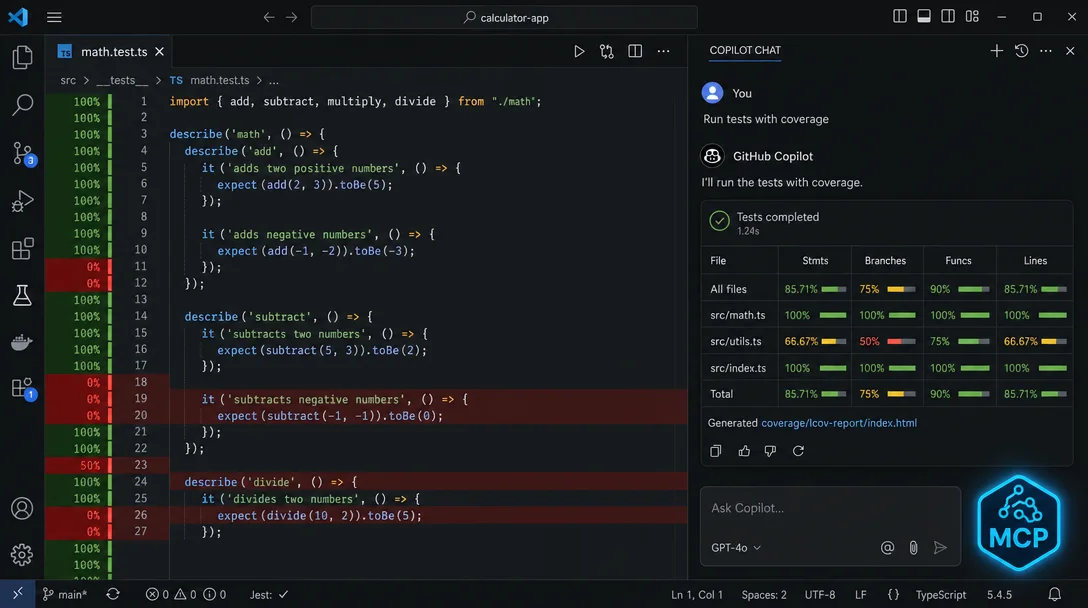
Unit Test MCP (v1.3.4, MIT) gives GitHub Copilot Chat five real test-execution tools via MCP — covering Jest, Vitest, Pytest, and .NET xUnit/NUnit — so Copilot can generate, run, inspect coverage, and fill testing gaps across your whole project, not just write a single test file.

/tests command will write a test file for you. What it won't do is run those tests, tell you which branches still aren't covered, or loop back and fill the gaps — you get a .test.ts file and then you're on your own. That handoff works fine when you already have a testing rhythm. It breaks down when you're trying to bootstrap coverage on a codebase that has almost none.KennethHuang.unittest-mcp, v1.3.4, MIT) closes that gap. It's a VS Code extension developed by Kenneth Huang, a Microsoft engineer, that registers a local MCP server and gives Copilot Chat five test-execution tools it would otherwise not have: generate a test file, run tests with coverage, scan a whole directory for missing tests, inspect existing coverage artifacts, and locate test files. The result is that Copilot can execute a real test run and report back the numbers — not just write code.gim-home/UnitTestMCP) is a Microsoft-internal repo and not publicly accessible — there is no community issue tracker open to external users. Feedback goes through the in-extension Unit Test MCP: Give Feedback button only.KennethHuang.unittest-mcpmcp.json required. To confirm it registered: open the Command Palette and run MCP: List Servers — "Unit Test MCP" should appear in the list.Ctrl+Alt+I) and use natural language — Copilot routes each request to the right tool automatically.Generate unit tests for src/components/Button.tsxgenerate_test and creates src/components/__tests__/Button.test.tsx. The test file is placed in the standard location for your framework (Jest/Vitest convention for JS/TS, tests/ for Pytest, etc.).Run tests with coveragerun_tests with include_coverage=true, executes the framework directly, and returns a summary of passes, failures, and coverage percentages. Each run writes its artifacts to coverage/.unittest-mcp/<project>/run-<n>/ — sequential runs don't overwrite each other. 2Generate tests for all files in src/services/generate_tests_batch, which scans the directory, identifies files with no test file or low coverage, and generates tests in priority order. This is the move /tests cannot make — it operates on the file currently open, not a folder scan.What files have low coverage?inspect_coverage, reads the most recent coverage artifacts (Istanbul JSON, LCOV, Cobertura XML, OpenCover XML, and coverage.py JSON are all supported), and surfaces the files with the worst line, branch, function, and statement coverage. 2
inspect_coverage tool surfaces per-file line, branch, function, and statement coverage in Copilot Chat. 1@UnitTestEngineer. It walks through the generate → run → inspect → improve cycle automatically, applying a target coverage threshold you configure in the sidebar.@UnitTestEngineer agent uses this as its stopping criterionpnpm jest or uv run pytest instead of the defaults, enter the exact command here rather than relying on environment-variable overrides.
.github/instructions/unittestMcp.instructions.md — synced every activation; Copilot reads it at runtime to understand your project's testing conventions.github/prompts/UnitTestMcp.UnitTestEngineer.agent.md — created once, never overwritten; safe to edit with project-specific guidance.gitignore if you'd rather not commit them.cargo test, Java/JUnit, PHPUnit, or RSpec. If your project uses any of these, the NO_FRAMEWORK_DETECTED error will surface in Copilot's response.npm list jest, pip list | grep pytest, or dotnet --version before expecting the first run to succeed.npx -y unittest-mcp/mcp add in Copilot CLI and set the command to npx -y unittest-mcp. Environment variables (UNITTEST_MCP_JEST_COMMAND, UNITTEST_MCP_VITEST_COMMAND, UNITTEST_MCP_PYTEST_COMMAND, UNITTEST_MCP_DOTNET_COMMAND) override the default test commands when running outside VS Code. 2v1.3.4 · Publisher: KennethHuang (Kenneth Huang, Microsoft) · License: MIT · VS Code 1.101.0+ · Supports Jest, Vitest, Pytest, .NET xUnit/NUnit
Add more perspectives or context around this Post.