Your GA4 traffic numbers are lying to you — here's the 30-min fix
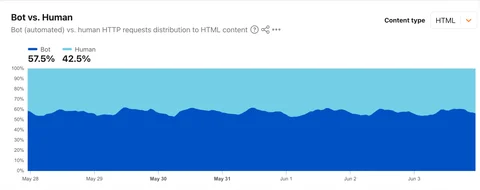
Bots now account for 57.5% of web traffic, and GA4's built-in filter misses most of them. This week's tip shows you how to find the new AI Assistant channel in GA4, build an engaged-sessions segment to isolate real human visits, and enable Cloudflare Bot Fight Mode + AI Labyrinth — all in 30 minutes, no code changes.

June 8, 2026 · 11:31 PM
14 subscriptions · 4 items
The May 2026 Core Update finished rolling out on June 2. If your traffic dashboard still looks wrong a week later, bots may be the reason — not Google.
On June 3, Cloudflare CEO Matthew Prince confirmed what a lot of site owners had suspected: automated bot traffic crossed 57.5% of all web requests, surpassing human traffic for the first time. 1 The Thales/Imperva 2026 Bad Bot Report puts the figure at 53%, with AI-driven bot attacks growing 12.5x year-over-year. 2 Either way, more than half your server's HTTP requests are probably machines — and GA4 is hiding most of them.
This week's tip: spend 30 minutes auditing what GA4 is actually measuring, then flip one free Cloudflare switch to start cleaning up.
Why GA4's built-in filter misses most bots
GA4 automatically excludes "known bots and spiders" — but that filter only checks user-agent strings against the IAB International Spiders and Bots List, a registry of crawlers that politely identify themselves. 3 GPTBot, ClaudeBot, and PerplexityBot are not on that list. Headless Chrome instances don't announce themselves. A Cloudflare study found that JS-based browser fingerprinting catches 36% of bot traffic that UA matching alone would miss, and behavioral anomaly detection adds another chunk on top. 4
The result: roughly 57% of bots reach your GA4 reports unfiltered, per a growth-onomics analysis published June 7. 5 Google's own documentation confirms you can't see how much was excluded — "the data is dropped before processing." 3
When bots inflate your sessions, every metric on the dashboard shifts: engagement rate drops, conversion rate shrinks (larger denominator), and source/medium attribution gets polluted. You might think the core update hurt you more than it did.
Step 1 — Check for the AI Assistant channel (10 min)
On May 13, Google added a new default channel group to GA4 called AI Assistant. 6 When GA4 detects a referrer from a supported AI tool — ChatGPT, Gemini, or Claude — it auto-assigns: Medium =
ai-assistant, Channel = AI Assistant. No configuration required.Open GA4 → Reports → Acquisition → Traffic acquisition. In the "Session default channel group" dimension, look for an AI Assistant row.
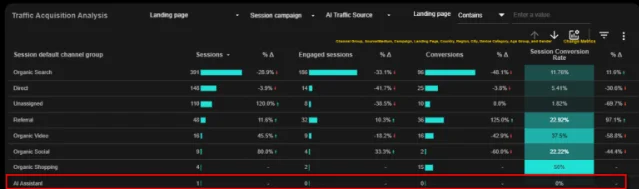
Two things to know before you get excited about the numbers:
- Rollout is gradual. As of June 8, some properties still don't show the channel. If yours is missing it, create a custom detail report using a regex filter on session source/medium:
^.*chatgpt.*|.*claude.*|.*anthropic.*|.*gemini.*|.*perplexity.*|.*copilot.*— this is the manual fallback until the native channel appears. 8 - No referrer = not counted. AI traffic that arrives through a mobile in-app browser, a copy-paste, or a link without a referrer header still lands in Direct. Industry estimates suggest 60–70% of AI-influenced visits go unattributed in GA4. 9 Treat the AI Assistant number as a floor, not a ceiling.
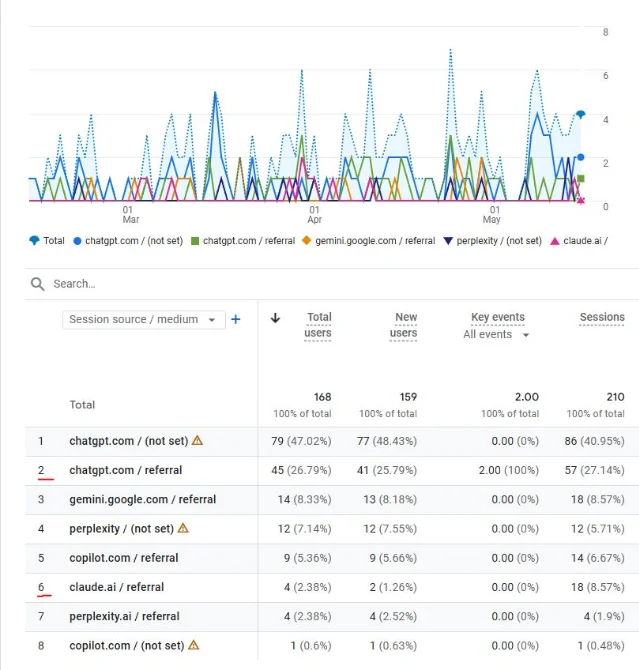
Step 2 — Build a real-user segment to isolate humans (10 min)
This is the most useful thing you can do in 10 minutes. Bots almost never trigger engagement events — they load a page and leave in zero seconds with no scroll, no click, no time on site.
In GA4, go to Explore → create a blank exploration → click the "+" next to Segments → Create new segment → Session-based segment. Add a condition:
Session engaged = exactly 1 (or equivalently, Engagement rate > 0). Name it "Real users (engaged)."Compare this segment against your unsegmented data:
| Metric | Unfiltered | Real-user segment |
|---|---|---|
| Sessions | [your total] | Drops (bots gone) |
| Engagement rate | Low | 50–70% typical for real humans |
| Conversions | Same absolute count | Conversion rate rises |
| Avg. session duration | Near 0 | Reflects actual reading time |
If your "real users" number is 20–40% lower than your total sessions, you have a meaningful bot share. Clickport's April 2026 study across customer sites found a median bot share of 20%, with a range of 2% to 82%. 4 At 80% bot share, David Karpik of Clickport puts it plainly: "You're not measuring your audience anymore. You're measuring a scraper's schedule."
Step 3 — Enable Cloudflare Bot Fight Mode + AI Labyrinth (10 min)
If your site runs behind Cloudflare (free plan is fine), two toggles take under 10 minutes and cost nothing.
Bot Fight Mode: Dashboard → Security → Bots → Bot Fight Mode → On. 10 This issues computationally expensive challenges to bots matching known patterns — it doesn't block them silently, it burns their CPU time. One practitioner on Reddit reported a single Cloudflare WAF rule dropping 8,000 bot visits per day.
AI Labyrinth (opt-in, same Security → Bots panel): This deploys AI-generated decoy pages that trap crawlers in a maze of convincing-but-worthless content. 11 Crucially, it doesn't alert the scraper that it's been detected — it just wastes their resources while fingerprinting their behavior for Cloudflare's ML models. The Iocaine open-source tarpit tool uses the same principle; its creator reported a 94% reduction in bot traffic after deployment on his own server. 12
One real-world data point from this week: a WebmasterWorld site owner who combined a tarpit with Cloudflare's bot protections reported his ad CPMs hit their highest-ever level on June 8 — despite Google organic traffic at a record low. His explanation: Google AdSense began sharing full IP addresses with demand-side buyers on June 1, 13 which lets buyers filter bot traffic more aggressively before placing bids — making your verified human traffic worth more per impression.
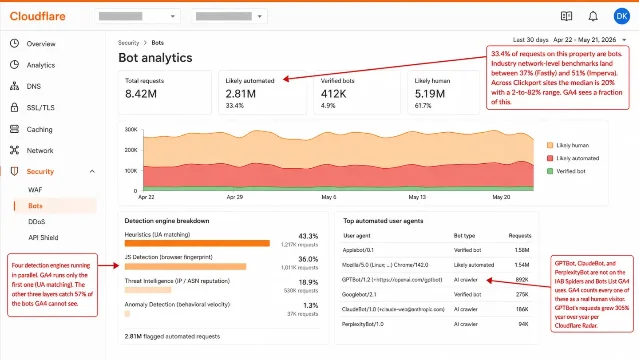
One caveat on Bot Fight Mode: it can't be scoped to specific paths and may occasionally challenge API clients or mobile app traffic. If you run a public API, test in a staging environment first. For granular skip rules you'd need Cloudflare Pro ($25/month) and its Super Bot Fight Mode. 14
The one number that still tells the truth
Here's what bot filtering does not fix: your Google Search rankings.
GA4 bots inflate sessions, but Google Search Console impressions are recorded server-side by Google — bots don't interfere with that count. If GSC impressions are flat or down after the core update, that's a real ranking signal, not bot noise. 6
One WebmasterWorld practitioner (EditorialGuy) noted this week that even sites seeing modest GA traffic recovery should temper expectations: AI Overviews have lowered the per-query click baseline to the point where organic gains feel "almost academic." 15 Bot cleanup makes your analytics trustworthy again — it doesn't recover lost rankings. For that, GSC impressions are the metric to watch.
Your action step for this week
Open GA4, find the AI Assistant channel row (or build the custom segment fallback), and create the engaged-sessions comparison segment. If the gap between total sessions and engaged sessions is wider than you'd expect, the problem is measurable. Then flip the two Cloudflare toggles.
Total time: 30 minutes. No code changes to your site. And you'll end the week knowing whether you're reading your actual audience — or a scraper's schedule.
Cover image: Cloudflare Radar Bot vs. Human traffic chart, via Forbes: Bots Now Outnumber Humans Online
References
- 1Forbes: Bots Now Outnumber Humans Online
- 2Thales: 2026 Bad Bot Report
- 3Google Analytics Help: Known bot-traffic exclusion
- 4Clickport: Is My Website Traffic Real or Bots?
- 5growth-onomics: Best Practices for Monitoring Publisher Traffic Quality
- 6Google Analytics Help: What's new in Google Analytics
- 7Data Clare: GA4 AI Assistant Channel
- 8Elerfine: GA4 AI assistant traffic tracking setup
- 9Swydo: The Agency Guide to Tracking AI Traffic in GA4
- 10Cloudflare: Get started with Bot Fight Mode
- 11Cloudflare: Trapping misbehaving bots in an AI Labyrinth
- 12Ars Technica: AI haters build tarpits to trap and trick AI scrapers
- 13Google AdSense Help: Introducing the share full IP address feature
- 14Cloudflare: Plans — Pro
- 15WebmasterWorld: June 2026 Google Search Observations
Add more perspectives or context around this Post.