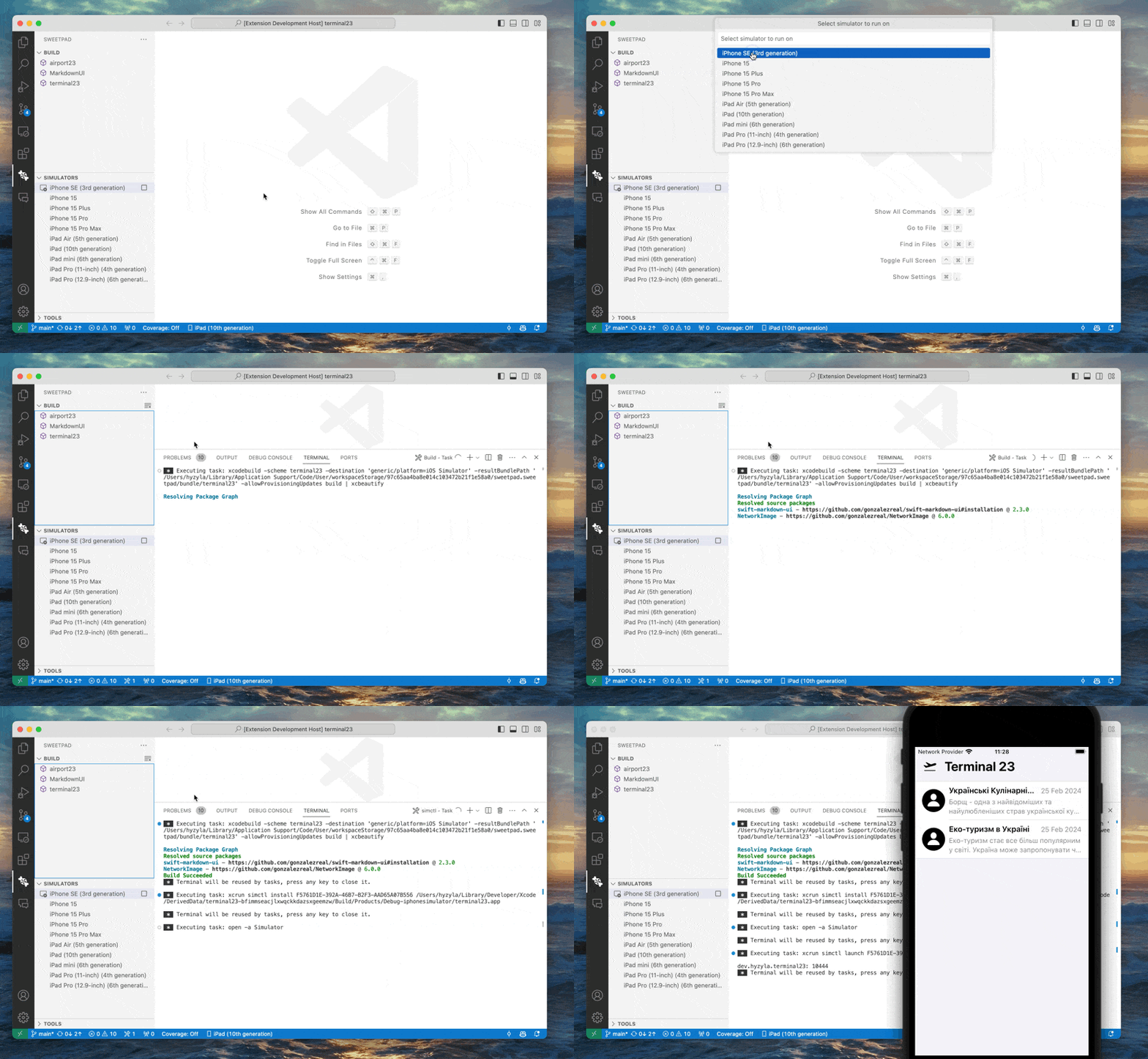
SweetPad — build, debug, and test iOS apps in VS Code
SweetPad (sweetpad.sweetpad, v0.1.94, MIT) wraps the full xcodebuild pipeline inside VS Code — build, debug, test, and simulator/device management for iOS/macOS/tvOS/watchOS/visionOS. Covers setup, launch.json config, hot reload via InjectionNext, the DoorDash case study (60% CI speedup), and four open issues to watch.

If you're an iOS developer who wants VS Code's AI tooling (Copilot, Cursor, Claude Code) without giving up
xcodebuild, SweetPad (sweetpad.sweetpad) is the missing piece. The extension wraps the full xcodebuild CLI pipeline — build, run, debug, test, and device deployment — and surfaces it through VS Code's native sidebar panels and task system. 155,979 installs, 4.75/5 rating, 1.8k GitHub stars. Five releases in the last 14 days (v0.1.90 through v0.1.94) added hot reload via InjectionNext, a bundled Rust binary for faster project reads, and an Agent CLI that lets AI agents trigger builds over a Unix socket. 2 DoorDash shipped a production case study in May 2026 showing SweetPad + Cursor cut their CI test time by 60% and total build time by 40% after migrating from XCTest to Swift Testing. 3
What it does (and what it doesn't)
SweetPad handles Xcode project management. As hyzyla (the extension's author) put it: "This extension doesn't replace Xcode, because it's built on top of the xcodebuild tool and doesn't have all the essential features." The things it covers well:
- Build & Run — launches any scheme to a simulator, macOS, or connected device; eight task actions (
launch,build,run,clean,test,resolve-dependencies,debugging-launch,debugging-run) are auto-registered as VS Code tasks - Debugging — LLDB via CodeLLDB (
vadimcn.vscode-lldb), which is a hard dependency; press F5 after a one-timelaunch.jsonsetup - Testing — integrates the VS Code Testing panel; runs XCTest and Swift Testing with gutter ▶ buttons
- Simulator & device management — lists all simulators and connected iOS devices in a Destinations panel, including iOS 17+ physical device tunneling via
pymobiledevice3 - Format on save — delegates to
swift-formatfrom the active Xcode toolchain (or a custom formatter path)
What still requires opening Xcode: Interface Builder, SwiftUI Preview, Instruments, App Store archive and upload, and complex build settings management.
SweetPad complements yesterday's pick
swiftlang.swift-vscode (the official Swift language extension): that extension handles SourceKit-LSP (code completion, diagnostics, go-to-definition); SweetPad handles Xcode project management. The two share xcode-build-server as a BSP bridge. 4Setup in five steps
Prerequisites: macOS only. Xcode must be installed (SweetPad shells out to
xcodebuild). VS Code ≥ 1.85.0. 1# 1. Install system dependencies
brew install xcode-build-server xcbeautifyThen in VS Code:
- Install swiftlang.swift-vscode (language services)
- Install sweetpad.sweetpad (Xcode project management)
- Open your
.xcworkspaceor.xcodeprojfolder — SweetPad auto-detects it and shows a Build panel in the sidebar - Run SweetPad: Generate Build Server Config from the Command Palette → creates
buildServer.jsonin the project root - Run SweetPad: Build (without Run) once to populate SourceKit-LSP's index (clears import-not-found errors)
For debugging, open the Run and Debug panel, click Create a launch.json file, and select Sweetpad (LLDB). The generated
.vscode/launch.json looks like this: 5{
"configurations": [
{
"type": "sweetpad-lldb",
"name": "Debug — SweetPad",
"request": "launch",
"preLaunchTask": "sweetpad: launch",
"continueOnAttach": true
}
]
}preLaunchTask: "sweetpad: launch" builds and launches the app before LLDB attaches. Set breakpoints in your Swift source files and press F5 — no further configuration required.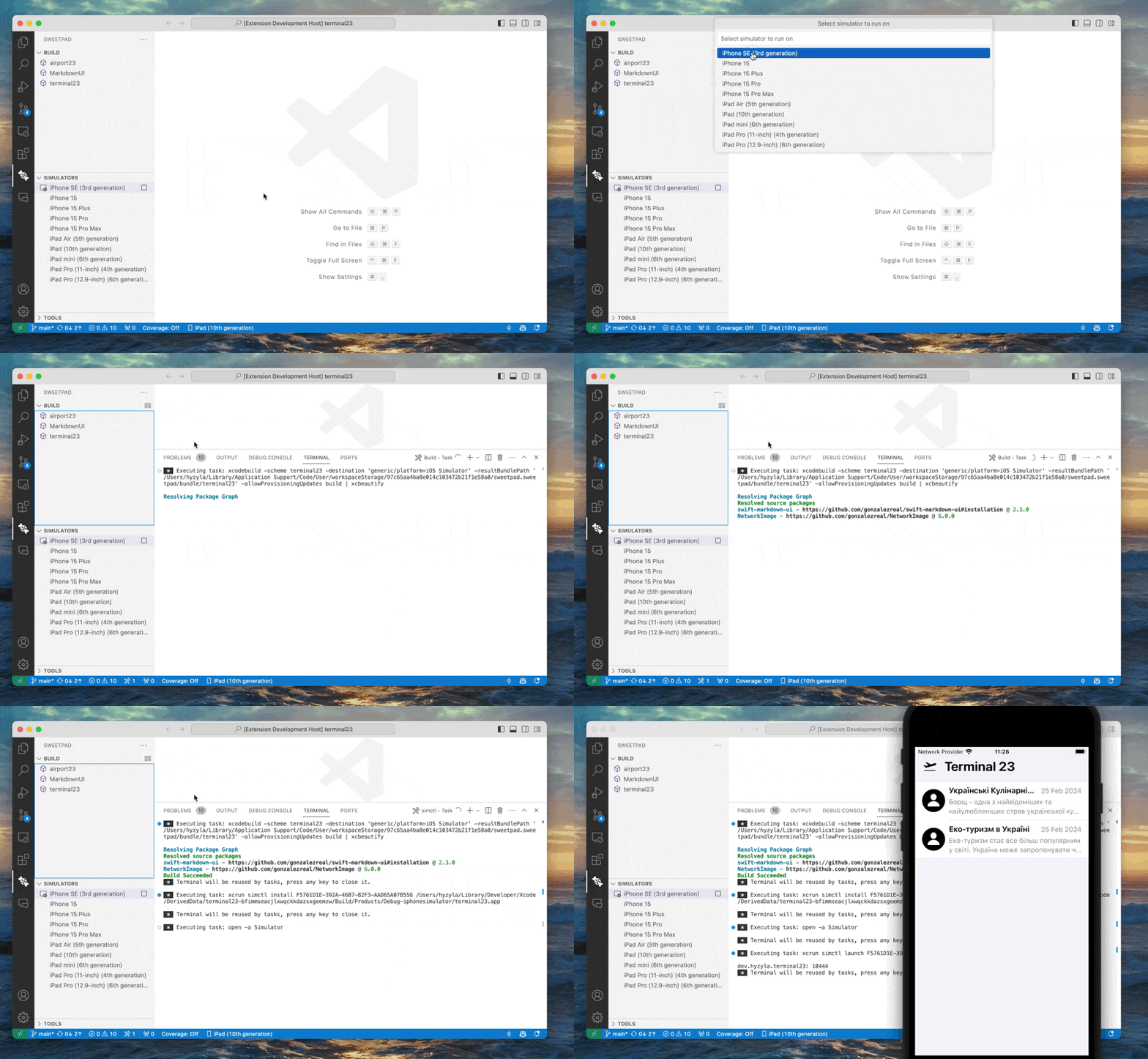
Scheme management and useful settings
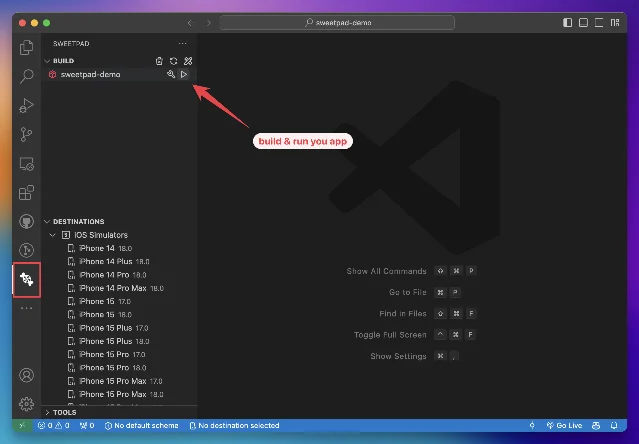
The Build panel lists all schemes in the workspace. A magnifier button filters by glob pattern — useful when a large project exposes dozens of schemes. Key
settings.json entries: 6{
// Filter noisy auto-generated schemes
"sweetpad.build.schemes.include": ["MyApp*", "MyLib*"],
"sweetpad.build.schemes.exclude": ["*-Debug-*"],
// Pin a specific Xcode version (useful for CI parity)
"sweetpad.build.xcodebuildCommand": "/Applications/Xcode-16.3.app/Contents/Developer/usr/bin/xcodebuild",
// Custom DerivedData location (keep out of project root)
"sweetpad.build.derivedDataPath": "${workspaceFolder}/../.build/DerivedData",
// Pass extra xcodebuild flags
"sweetpad.build.args": ["-skipMacroValidation"],
// Enable build output beautifier (requires: brew install xcbeautify)
"sweetpad.build.useXcbeautify": true,
// Format Swift on save
"[swift]": {
"editor.defaultFormatter": "sweetpad.sweetpad",
"editor.formatOnSave": true
}
}For large projects, v0.1.94 added an opt-in Rust binary that replaces
xcodebuild for read-only operations like listing schemes and reading build settings: 7{
// Experimental: routes -list/-showBuildSettings/-version to a bundled Rust binary
// "Significantly faster for large projects" — package.json setting description
"sweetpad.system.useSweetpadLib": true
}
What's new: hot reload and Agent CLI
Two features landed in the last two weeks that go beyond the core Xcode-in-VS-Code pitch.
Hot reload (v0.1.93, opt-in). SweetPad integrates InjectionNext to inject code changes into a running simulator or macOS app on file save, without a full rebuild. Enable it in settings (
sweetpad.hotReload.enabled: true). This works for simulator and macOS builds only — physical devices are not supported yet. 7Agent CLI / JSON-RPC server (v0.1.91, opt-in). An in-process JSON-RPC server exposes SweetPad commands over a Unix socket. A bundled
sweetpad CLI binary lets external scripts and AI agents trigger builds and read project state without a VS Code UI interaction. DoorDash used this to let Cursor drive XCTest → Swift Testing migration autonomously: their MCP server exposed execute_vscode_command, accepting command IDs like sweetpad.build.build and sweetpad.build.test. Matheus Gois (DoorDash engineer) described the result: "It does not matter whether the tests are triggered from a local terminal or through SweetPad and Cursor. The same targets run, the same ten-run rule applies, and every package is held to the same standard." 3Loading content card…
Known limitations
Four open issues are worth knowing before committing to this setup: 8
| Issue | Status | Condition |
|---|---|---|
| Empty simulator list with Xcode 26 (#191) | Open | xcrun simctl list -j returns empty JSON under Xcode 26 |
| Large project crash after build (#206) | Open | Projects with hundreds of targets + SwiftPM deps; TypeError: c.map is not a function in output parsing |
| ObjC header false positives (#238) | Open | Mixed ObjC/Swift projects; UIKit.h not-found diagnostics appear but code compiles fine |
| Physical device breakpoints (#211) | Open | Breakpoints don't hit on physical devices in some configurations |
For Xcode 26 users: the simulator list bug (#191) is a blocker — use the
xcrun text output as a workaround to identify device UDIDs manually, or stay on Xcode 16.x. For large projects: if your workspace has hundreds of Swift targets and you hit the crash, the sweetpad.system.useSweetpadLib flag (v0.1.94) may help, as it bypasses the xcodebuild output parsing path that triggers the bug. For ObjC codebases: diagnostics are cosmetic-only — builds and debugging work correctly.Install
Plugin: SweetPad (iOS/Swift development) · Publisher: sweetpad (verified, hyzyla.dev) · Extension ID:
sweetpad.sweetpad · Version: v0.1.94 1
Language: Swift/Objective-C · IDE: VS Code ≥ 1.85.0 · OS: macOS only · License: MIT · Installs: 55,979 · Rating: 4.75/5
Required dependencies: Xcode + xcodebuild, CodeLLDB (vadimcn.vscode-lldb), xcode-build-server
Optional: xcbeautify (build output), pymobiledevice3 (iOS 17+ physical device tunneling)
Install: sweetpad.sweetpad on VS Code Marketplace · GitHubCover image: build-demo.gif from the sweetpad-dev/sweetpad repository, MIT license
References
- 1SweetPad — Visual Studio Marketplace
- 2GitHub: sweetpad-dev/sweetpad
- 3InfoQ: DoorDash Used Copilot to Convert Its XCTest-Based iOS Test Suite to Swift Testing
- 4SweetPad Documentation — Introduction
- 5SweetPad Docs — Debugging
- 6SweetPad Docs — Build & Run
- 7sweetpad CHANGELOG.md
- 8GitHub Issues: sweetpad-dev/sweetpad
Add more perspectives or context around this Drop.