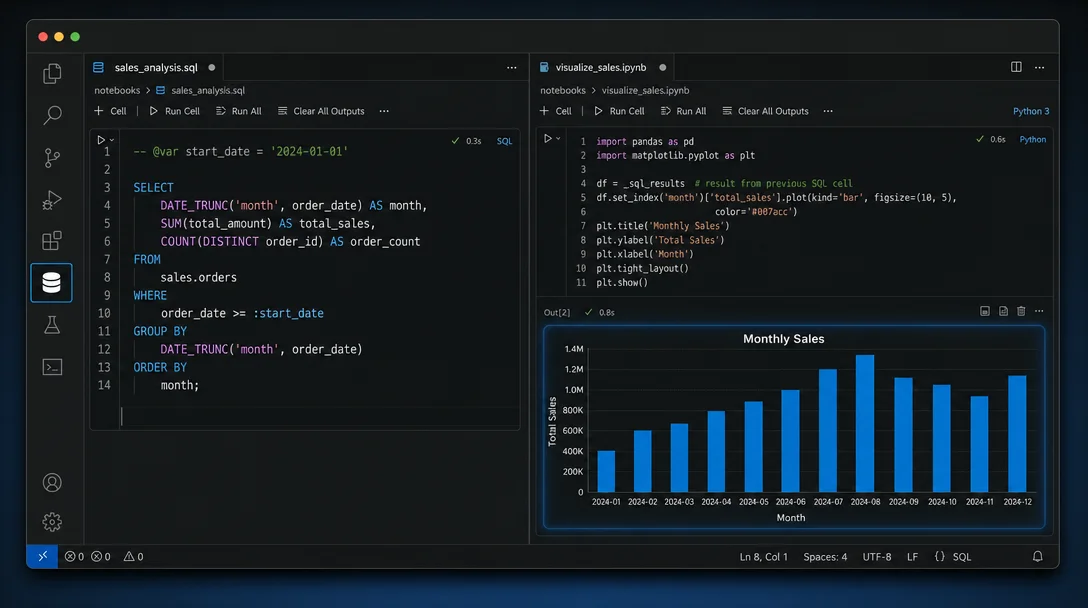
DBCode v1.33.0 — a full SQL client inside VS Code, with Copilot and MCP built in
DBCode v1.33.0 (700K+ installs, 4.7★) is a complete multi-database SQL client that runs inside VS Code — no alt-tabbing to TablePlus or DataGrip. Its SQL Notebooks let you annotate a SQL cell with `-- @var sales`, run it, and the result set lands in the next Python cell as a ready-to-use pandas DataFrame with zero boilerplate. Copilot Tools, a zero-config MCP server, and an AI Query Builder are included; Core Edition is permanently free.

Most developers already have a separate database GUI open in another window — TablePlus, DBeaver, DataGrip, or some equivalent. Every time a query needs tweaking, you alt-tab out, adjust the SQL, copy the results back. DBCode makes that workflow unnecessary: it's a complete multi-database client that runs as a VS Code extension, not a standalone app. 1
700K+ installs and a 4.7-star rating point to a tool that's past "interesting experiment" territory. 1 Version 1.33.0 shipped June 5, 2026, adding Couchbase, CouchDB, Druid, Exasol, and Vertica drivers on top of 79+ already-supported engines. 2
Extension ID:
dbcode.dbcode · Publisher: Recut LLC (Verified) · Install on VS Code Marketplace · dbcode.ioGetting connected in under two minutes
Install from the Extensions panel (search "DBCode"), and a cylinder icon appears in your Activity Bar. Click it, hit New Connection, choose your database type, and fill in the credentials. 3
If you're working on a project that already has a
.env file, you may not need to fill in anything at all. DBCode scans your workspace root for connection strings on startup — including DATABASE_URL=postgres://... patterns and framework-specific key-value pairs for Laravel, Django, Spring Boot, and Node.js. 4 If the scan finds a match, the connection appears in the sidebar automatically. Cloud databases on Neon or Supabase get one-click discovery as well.Minimum VS Code version: 1.95.0. Supports Windows, macOS, Linux, and all VS Code forks including Cursor, Windsurf, Trae, and Kiro. 1
Today's trick: SQL Notebooks with -- @var Python injection
This is the feature worth installing DBCode for if nothing else convinces you. It works like a Jupyter notebook, except the cells alternate between SQL and Python — and there's a direct injection mechanism that turns SQL results into pandas DataFrames with zero boilerplate.
Here's the complete workflow:
Step 1 — Create a notebook. Open the Command Palette → type
DBCode: New Notebook. A .dbcnb file opens. Each cell has a type selector (SQL, Python, or Markdown). 5Step 2 — Write a SQL cell with a
-- @var annotation. The annotation names the DataFrame that will receive the results:-- @var sales
SELECT
to_char(d, 'Mon') AS month,
(100 + extract(month FROM d) * 15) AS revenue,
(20 + extract(month FROM d) * 3) AS orders
FROM generate_series(
'2024-01-01'::date,
'2024-12-01'::date,
'1 month'
) d;Execute with
Ctrl+Enter. Results appear inline as a data grid. The status bar shows a "Python: sales" badge — confirming the variable is ready for injection. 5Step 3 — Use the DataFrame in a Python cell (requires Microsoft's Jupyter extension,
ms-toolsai.jupyter, installed separately, and a Python kernel selected):import matplotlib.pyplot as plt
fig, ax = plt.subplots(figsize=(10, 4))
ax.bar(sales['month'], sales['revenue'], color='#6366f1', label='Revenue')
ax.plot(sales['month'], sales['orders'] * 10, color='#f59e0b',
marker='o', label='Orders (×10)')
ax.set_title('Monthly Sales Performance')
ax.legend()
plt.tight_layout()
plt.show()The
sales variable is already a pandas DataFrame — no pd.read_sql(), no connection string duplication. Hit run and the chart renders inline.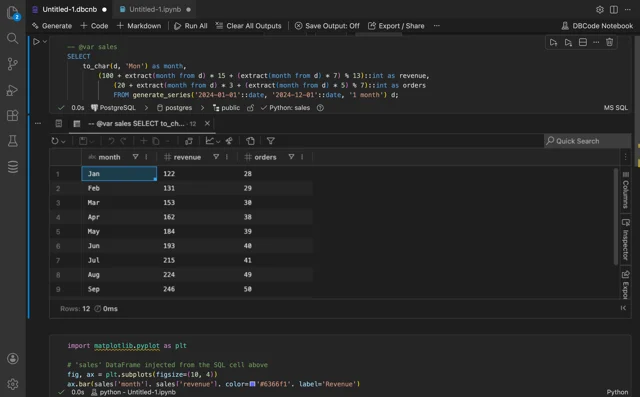
-- @var sales injects results directly into the Python kernel as a DataFrame. 5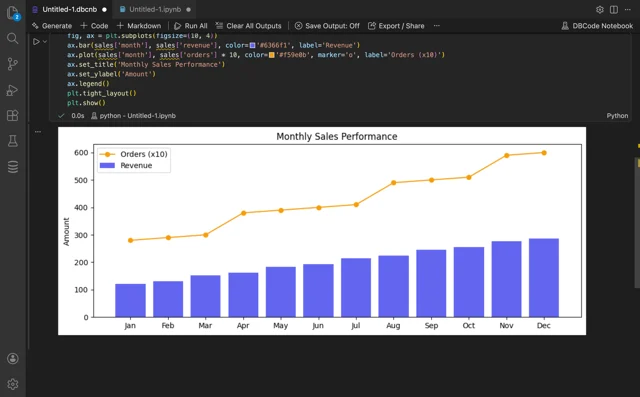
You can chain multiple
@var annotations in one SQL cell if it returns multiple result sets — each named variable arrives in the Python kernel independently.Two more features worth knowing
Copilot natural-language queries. If you have GitHub Copilot installed, DBCode registers 9 language model tools with it automatically. Open Copilot Chat in agent mode and ask in plain English. The catch: ask Copilot to read your schema first — "What tables are in my PostgreSQL connection?" — before asking data questions. Without that step, Copilot guesses table names from common patterns, which rarely matches your actual schema. 6
For Cursor, Claude Desktop, or Claude Code, the MCP server is the better path. DBCode registers itself with VS Code and Cursor's MCP host automatically since v1.31.0 — no
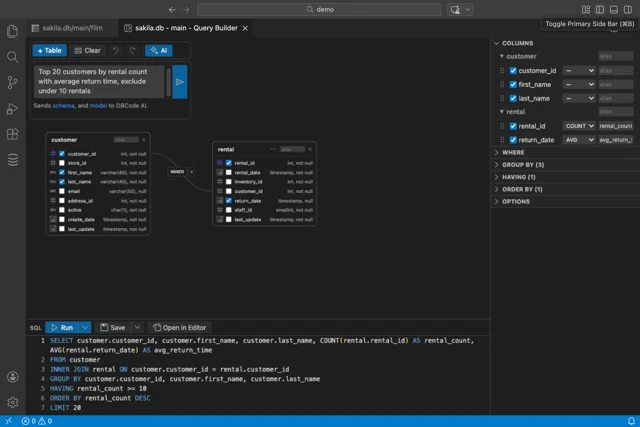
mcp.json editing required. Five tools are exposed: list connections, list databases, get table schema, execute SELECT/DML/DDL, and disconnect. 7 External clients use an HTTP server on localhost:5002/mcp (off by default; start it via the Command Palette → DBCode: MCP Start HTTP Server). 7AI Query Builder. For complex queries without writing raw SQL, the visual Query Builder has an AI input field. Type a plain-language description and it assembles the JOIN conditions, GROUP BY, HAVING, and ORDER BY for you. The generated SQL appears in the editor below the canvas and is fully editable before you run it.
Known limitations
The developer has acknowledged on Reddit that the SQL autocomplete still has significant room for improvement: "I still have a lot of work to do on the autocomplete functionality." 9 On some machines, DBCode has caused VS Code to hang — the reported fix is clearing the
%appdata%\Code\Service Worker\ directory. 9The extension is closed source (GitHub hosts only an issue tracker, not the extension code). 10 As of June 6, 2026, the public tracker has 49 open issues, including an ERD export crash when exporting to PNG (Issue #1092) and a PostgreSQL introspection failure in some environments (Issue #1104). 10
Several database drivers added recently — Couchbase, CouchDB, Druid, ChromaDB, Milvus, Qdrant — are marked Preview, meaning they may have incomplete introspection or missing features. 2
Pricing
The Core Edition is permanently free and covers the SQL editor, notebooks, ER diagrams, data visualization, SSH tunnels, Copilot chat integration, and all 79+ database connections with unlimited devices. 11 Free tier limits: query history capped at 5 entries, 2 saved favorites, 2 library items.
Pro unlocks visual data editing, execution plans, data import/export, data compare, backup/restore, the MCP server, and AI inline completion. Pro is $4/month, $36/year, or $120 for a lifetime license — after 12 consecutive months of subscription it converts to a permanent license automatically. A 7-day free trial requires no credit card. 11
Quick reference
| Extension ID | dbcode.dbcode |
| Version | 1.33.0 (released 2026-06-05) |
| Publisher | Recut LLC (Verified) |
| Installs | 700,000+ |
| Rating | 4.7 ★ (VS Code Marketplace) |
| Minimum VS Code | 1.95.0 |
| Database support | 79+ engines |
| License | Proprietary (Core Edition free) |
| Supported IDEs | VS Code, Cursor, Windsurf, Trae, Kiro, Antigravity + all VS Code forks |
Cover image: AI-generated illustration.
Add more perspectives or context around this Post.