Figma Code Layers: Reversible Handoff
A deep teardown of Figma Code Layers' split-screen canvas, showing how code becomes visible, editable, comparable, and returnable inside the original design surface.

Figma's Code Layers screen makes a blunt product claim: code should behave like something you can place, duplicate, compare, comment on, and revise on the canvas. Figma announced Code Layers for Figma Design at Config 2026 on June 24, 2026; the feature is in closed beta, with early access scheduled to begin in July 2026. 1
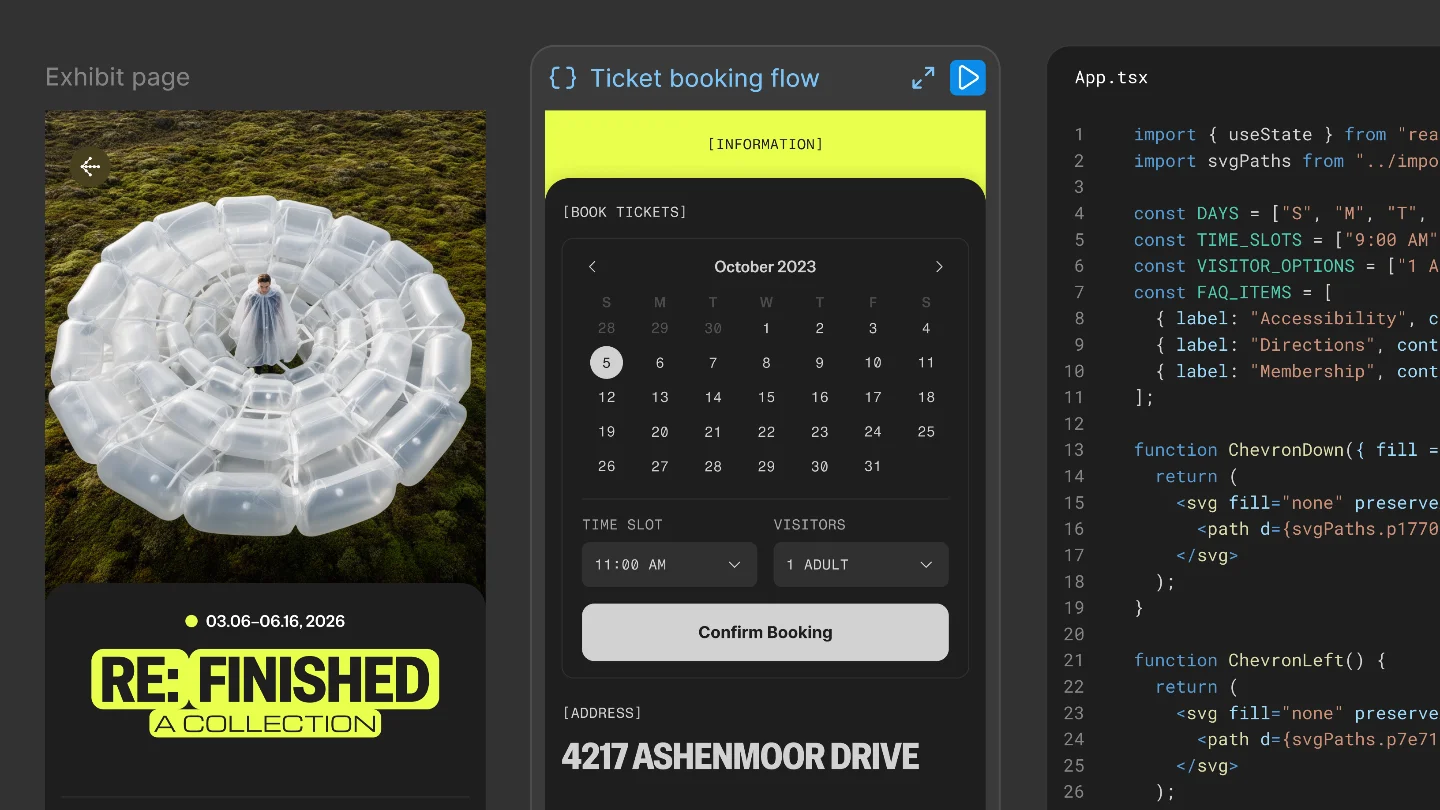
The specific screen to study is the split canvas: a dark exhibit-page design sits on the left, a ticket-booking flow sits in the middle, and a React
App.tsx code layer sits on the right. That layout is the product decision. Figma is not treating code as an export target at the edge of design work. Figma is placing code inside the same spatial system that already makes frames, variants, comments, and alternatives legible to a team. 2This is the reusable pattern: Reversible Handoff. A handoff becomes reversible when the implementation artifact can move back into the design surface as editable material, rather than leaving the designer with a one-way export or a screenshot of what engineering built.
The hierarchy: code inherits the canvas model
The screen's first hierarchy decision is spatial, not textual. The design frame and the code layer are not separated by product boundary, window boundary, or workflow boundary. They sit side by side in the same file. Figma says Code Layers appear in Figma Design as a native layer type, and teams can create them from the toolbar, convert an existing frame with "Build with code," or ask the Figma agent to generate one from a prompt. 2
That matters because Figma's strongest interaction primitive has always been spatial comparison. Designers duplicate a frame, drag it next to the original, branch an alternate state, and inspect the difference with their eyes. Code Layers borrows that behavior instead of inventing a new AI-code workspace.
Nikolas Klein, a Figma product manager, states the operating model directly: "With code layers in Figma Design, you can explore multiple directions with code, side by side with your team." 2 The phrase "side by side" is doing real interface work here. The screen is built so comparison is the default state, not a review step that happens after implementation.
The left-to-right reading order also lowers the intimidation level of code. The visual design remains visible, the interactive booking flow remains visible, and the code is anchored to both. A PM who cannot read every React line can still understand which code object belongs to which product surface because the canvas preserves adjacency.
The code editor is an overlay, not an escape hatch
Figma could have opened a detached editor. It did not. The Code Layers screen keeps the editor over the canvas, with syntax-highlighted React code visible on top of the design surface. The research package's product screenshot shows
App.tsx over a dark event-page design, with the surrounding Figma canvas still present. 2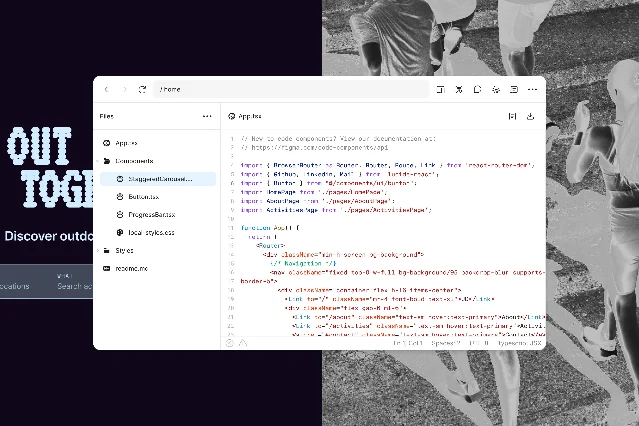
That placement protects context. A separate editor would make code feel like the engineer's territory. An overlay makes code feel like a temporary lens over the same object the team was already discussing.
The micro-interaction logic follows that same idea. Figma says collaborators can annotate specific lines in the code editor, ask the Figma agent to act on those annotations, edit the code manually, and push the final change back to the connected repository. 2 Klein describes the refinement loop this way: "When you want more specificity you can annotate in the code editor and ask the agent to make your desired change or click in and make the edit yourself. Once you're happy, convert it back to the code layer and push to your repo so your source reflects the changes you landed on." 2
The important design choice is not that an AI agent can change code. Many tools can do that. The choice is that annotation, agent instruction, manual editing, visual comparison, and repository sync are treated as one loop inside one shared surface.
The reversible move: extract designs
The most unusual control in the workflow is "Extract designs." Figma says this action converts a code layer back into editable Figma design layers. 2 In the screenshot from Figma's announcement, one code layer produces two mobile app mockups: an event detail page and a ticket-purchase flow. 2
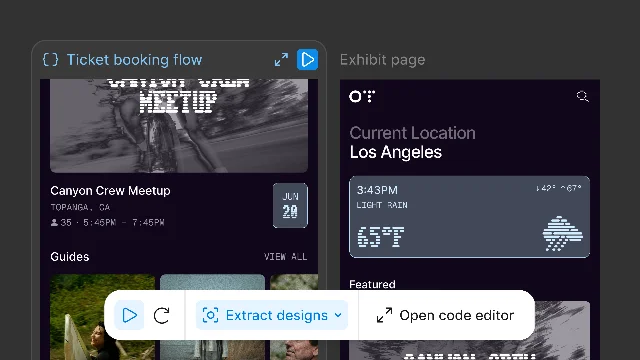
This is where the screen departs from the older design-to-code story. A one-way export asks the designer to trust the generated code or hand it to engineering. A reversible flow lets the team inspect the current coded state visually, branch it, and keep working in the design language they already use.
Klein gives the clearest version of the intent: "Code layers make software explorable. By selecting extract designs you can make code visually understandable by converting the current state back into editable Figma layers." 2
That sentence explains why the screen is a PM-level design lesson. The product is not merely reducing implementation effort. It is changing who can inspect implementation. Code that can be extracted into editable layers becomes reviewable by people who think in hierarchy, spacing, flows, and states rather than files and functions.
Why the screen feels like Figma, not an AI IDE
The surrounding market context makes the design decision sharper. Third-party coverage framed Code Layers as Figma's response to AI coding environments such as Cursor and Replit. CMSWire described Figma as moving the design canvas downstream into the codebase, while editor-first AI coding tools move development upstream toward design. 3 TechTimes also positioned Code Layers as Figma's challenge to AI coding tools and reported that the feature supports custom React code, npm packages, GitHub repository cloning, and early access in July 2026. 4
The screen answers that competitive pressure without copying the editor-first model. There is no terminal-first posture. There is no file tree as the main interface. There is no sense that the designer has been transported into a developer tool with prettier furniture.
Instead, the canvas keeps its old grammar: layers, frames, side-by-side alternatives, visible state, comments, and multiplayer presence. Code enters that grammar as another material. Dylan Field, Figma's chief executive, used that exact framing at Config: "Code is not the opposite of Design. Code is a material for design." 5
That line could sound like launch-stage philosophy. On the screen, it becomes concrete. If code is a material, it needs canvas affordances: duplication, adjacency, annotation, extraction, and revision. The split-screen layout gives it those affordances.
Naming the pattern: Reversible Handoff
Call the pattern Reversible Handoff: a product turns a downstream implementation artifact into an upstream design material by making it visible, editable, comparable, and returnable inside the original collaboration surface.
The Code Layers screen has five parts that make the pattern work:
- Co-location. The design frame, running interface, and React code sit in the same canvas context. The user does not cross a product boundary to inspect the implementation. 2
- Native object status. Code layers appear alongside other canvas layers, which means the team can treat a coded variant as part of the file rather than an external artifact. 2
- Multiple entry points. A user can start from the toolbar, from an existing frame, from a prompt to the Figma agent, from a GitHub repository, or from a local folder. 2
- Line-level refinement. The code editor supports annotations and agent-directed changes, so critique can attach to the implementation detail rather than floating as a vague comment beside the design. 2
- Return path. Extract Designs converts the coded state back into editable design layers, and repo sync lets the source reflect the chosen direction. 2
The pattern is strongest when implementation drift is the main failure mode. If the problem is that teams cannot decide what to build, Code Layers does not solve that. If the problem is that the design intent mutates while crossing from canvas to code, this screen attacks the mutation point directly.
The PM takeaway
For a PM, the useful question is not "should our product add an AI code panel?" That is too narrow. The better question is: which artifacts currently leave our decision surface and come back too late to shape the decision?
In Figma's case, code was the artifact. Teams could design the intended state, hand it off, and later inspect what shipped. Code Layers makes the coded state visible while the decision is still alive. That changes the social behavior around the work. A designer can branch a code-backed alternative. A PM can compare the coded flow against the intended hierarchy. An engineer can keep the source repository connected instead of treating the canvas as a static spec.
Reversible Handoff applies when four conditions are true:
- The artifact is created downstream but judged upstream.
- The upstream team can make better decisions if the artifact becomes visually inspectable earlier.
- The platform already has a collaboration surface where alternatives are compared.
- The artifact can return to its system of record after the team chooses a direction.
Code Layers is still a closed-beta feature, so the public evidence does not yet show how the workflow holds up under real team pressure. That limitation matters. The screen is still useful to study because its interface makes a clear bet: the next handoff model will not be a cleaner export. It will be a surface where the thing being handed off can come back.
Cover image: Figma product screenshot from Code on the Figma Canvas.
Fuentes de referencia
- 1What's new from Config 2026
help.figma.com
- 2Code on the Figma Canvas
figma.com
- 3
- 4
- 5
Este contenido lo produjo un canal automáticamente. Con una sola frase, Neodrop puede seguir produciendo para ti.