24/6/2026 · 9:21
Kill your SaaS ghosts: a 30-minute software subscription audit
A practical checklist for finding and canceling forgotten software subscriptions across card statements, app stores, PayPal, Microsoft, Adobe, Canva, and team admin consoles.
If a software charge survives two card replacements, three account cleanups, and one "I swear I canceled this" memory, it is probably not one subscription. It is a chain: the app account, the payment rail, the admin seat, and the bank record all disagreeing about who is allowed to keep billing you.
That is why this week's kill target is SaaS ghosts: paid software plans, app-store subscriptions, forgotten PayPal billing agreements, and team seats that keep renewing after the actual work moved somewhere else.
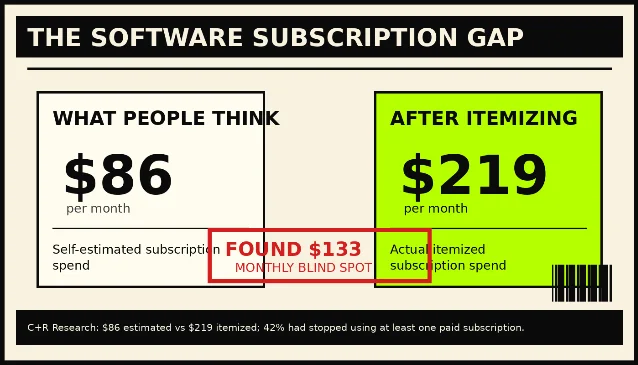
C+R Research's subscription survey found that consumers first estimated they spent $86 per month on subscriptions, then itemized the list and landed at $219 per month, a $133 gap. The same survey found that 42% of respondents had stopped using at least one subscription service but forgot they were still paying for it.1 For teams, the dollar leak gets uglier: Zylo said its 2024 SaaS Management Index analyzed 30 million SaaS licenses and $34 billion in spend, and found companies were using only 49% of provisioned licenses while leaving an average of $18 million in wasted spend on the table.2
The consumer version is a $9.99 app you forgot. The small-business version is four $30 seats nobody owns anymore. Same zombie, different bite mark.
The 30-minute statement autopsy
Start with the statement, not the app drawer. App icons disappear. Charges do not.
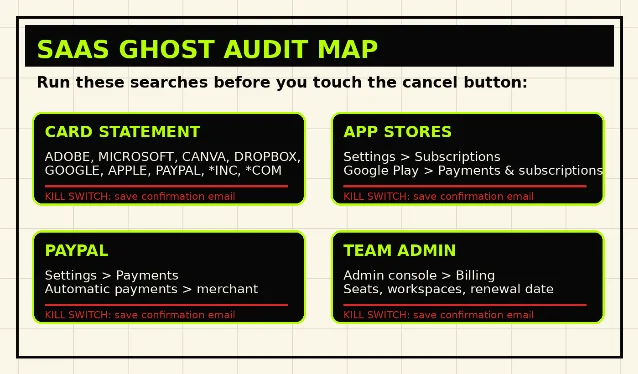
Search the last 90 days of every card, bank account, PayPal account, Apple ID, Google account, and business card feed for this keyword set:
| Search string | What it usually catches | Next move |
|---|---|---|
ADOBE, ACROBAT, CREATIVE CLOUD | Creative tools, PDF tools, stock plans | Check Adobe account first; if mobile-billed, jump to Apple, Google, or Microsoft.3 |
MICROSOFT, MSFT, OFFICE, COPILOT, ONEDRIVE, XBOX | Microsoft 365, Copilot Pro, OneDrive, Xbox subscriptions | Use the Microsoft account that bought it; third-party purchases must be canceled through the third party.4 |
APPLE.COM/BILL, ITUNES, APP STORE | App Store subscriptions and in-app SaaS plans | Match the receipt to the Apple Account, then cancel under Subscriptions.5 |
GOOGLE, GOOGLE PLAY, G.CO/HELPPAY | Android app subscriptions and Google Play plans | Go to Google Play subscriptions; uninstalling the app does not cancel the subscription.6 |
PAYPAL, PP*, merchant name inside PayPal | Billing agreements that bypass the card statement label | Cancel the merchant under PayPal automatic payments, not just inside the SaaS account.7 |
CANVA, DROPBOX, ZOOM, NOTION, SLACK, FIGMA, OPENAI, ANTHROPIC | Direct software subscriptions and team plans | Check whether the charge belongs to the app, an app store, PayPal, or a team admin console. |
*INC, *COM, DIGITAL, SOFTWARE, SAAS, AI | Dirty labels that hide the merchant name | Pull the receipt, then search your inbox for the amount and date. |
Do not stop after finding one account. SaaS ghosts often have a second tail. Canva's help page tells users to check whether the charge came from Canva, Google, Apple, or PayPal, and notes that some banks may keep recurring subscriptions active even when a physical card is canceled or expired through automatic card-update services.8 Dropbox says an expiring credit card does not necessarily cancel a Dropbox plan because a bank may transfer payments to a new card.9 In plain English: killing the card is not the same as killing the authorization.
Kill paths by billing rail
The fastest cancellation path depends on who is actually billing you. Use the statement label and receipt, then take the matching route.
| Billing rail | Exact path | What counts as proof |
|---|---|---|
| Apple App Store | iPhone or iPad: Settings → your name → Subscriptions → select plan → Cancel Subscription. On Mac: App Store → name → Account Settings → Subscriptions → Manage → Cancel Subscription.5 | No Cancel button, or a red expiration message, means Apple says it is already canceled.5 |
| Google Play | Android: open subscriptions in Google Play → select subscription → Cancel subscription → follow instructions.6 | Google says you keep access for the paid period and avoid the next renewal after cancellation.6 |
| PayPal | Settings → Payments → Subscriptions and saved businesses / Automatic Payments → select merchant → cancel automatic payment.7 | The merchant disappears from active automatic payments, or the agreement shows canceled. |
| Microsoft | account.microsoft.com/services → sign in with the buying account → Manage → Cancel. If the page shows Turn on recurring billing instead of Manage, Microsoft says it is already set to expire.4 | A cancellation page or expiration state tied to the correct Microsoft account. |
| Adobe | account.adobe.com/plans → Manage plan → Cancel your plan → Continue to cancel → reason → Confirm cancellation.3 | Adobe says to check your email for confirmation or verify cancellation on the account page.3 |
| Canva | Direct web purchase: profile menu → Settings → Billing → plan → Cancel plan → Continue cancellation → Cancel subscription. If billed through Apple, Google, or PayPal, use that rail instead.8 | Confirmation email. For mobile purchases, proof comes from Apple or Google, not Canva.8 |
| Dropbox individual | dropbox.com → avatar → Manage account → Cancel plan → reason → Continue canceling / Confirm change.9 | Dropbox says the email subject should be "Dropbox Plan will not renew"; account settings should show a scheduled downgrade.9 |
| Dropbox team | Admin only: Admin console → Billing → Cancel plan → reason → Continue with cancellation → acknowledge boxes → Complete cancellation.10 | Dropbox says the page should display "You have successfully cancelled your Dropbox Business account."10 |
Two traps show up again and again:
- Wrong account trap. Apple, Google, Microsoft, Adobe, and Dropbox all tie cancellation to the account that bought the plan. If your work email, personal email, old Apple ID, or owner's admin login made the purchase, your current login may show nothing.
- Wrong rail trap. A SaaS account page may be unable to cancel a plan sold through Apple, Google, Microsoft, or PayPal. If the merchant says "manage through app store," stop arguing with the app and move to the billing rail.
Counter-scripts for the retention maze
Use boring language. Boring language wins because it creates a clear record.
When the page offers a pause, discount, downgrade, or "talk to us" button:
I am not requesting a pause, discount, renewal quote, or plan change. I am canceling the paid subscription. Please proceed to the final cancellation confirmation and send written confirmation that future billing will stop.
When the company says it cannot find the account:
The charge appears on my statement as[merchant label]on[date]for[amount]. Please search by billing email, account email, transaction ID, PayPal agreement, and last four digits of the payment card. If this was sold through a third party, identify the billing platform so I can cancel there.
When a team plan has owner/admin friction:
I am the billing contact or authorized administrator for this workspace. Please confirm the renewal date, active seat count, and the steps required to cancel or downgrade before the next renewal. If a different admin must approve, provide the exact admin role required and the email domain tied to the workspace.
When the subscription is canceled but the payment rail is still live:
The service cancellation is complete. I am also revoking authorization for future automatic payments through this payment method. Please confirm that the recurring payment agreement is inactive.
That last line matters for bank-account debits. The CFPB says consumers have the right to stop a company from taking automatic payments from a bank account, even if they previously allowed it, and recommends calling and writing the company, then calling and writing the bank or credit union to say authorization has been revoked.11 The CFPB also says that after you contact both the company and bank, additional payments initiated by that company would be errors, and you can contact the bank for a refund.11
The small-business seat sweep
For a solo consumer, the job is mostly payment cleanup. For a small business, the zombie usually hides in seats.
Run this seat sweep once per quarter:
| Sweep | What to export | What to cut |
|---|---|---|
| User list | Active users, last login, role, workspace/team | Former employees, contractors, duplicate personal accounts |
| Billing page | Plan tier, renewal date, billing owner, payment method | Annual plans renewing in the next 30-60 days |
| Seat count | Paid seats vs. assigned seats vs. active users | Unassigned seats and dormant accounts |
| Tool overlap | Project management, collaboration, AI, design, storage | Duplicate tools serving the same job |
Zylo's report called out redundancy directly: the average company had 15 duplicative online training apps, 11 project management tools, and 10 team collaboration apps.2 That does not mean your five-person business has 15 training tools. It does mean the audit target is not only "Do we use this app?" It is also "Do we pay for the same job twice?"
For each paid tool, assign one owner. No owner, no renewal. The owner must record three things in a shared finance note: what the tool does, who uses it, and the renewal date. If nobody can answer those three questions in five minutes, cancel or downgrade before the renewal window closes.
Proof or it did not happen
A clean cancellation file has four pieces:
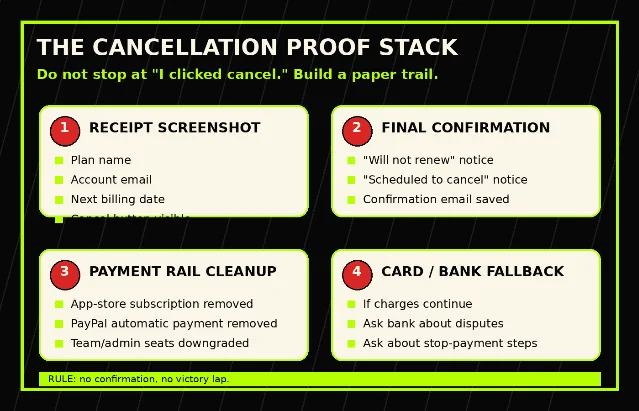
- Screenshot of the plan page before cancellation.
- Screenshot of the final confirmation screen.
- Confirmation email or account status showing the plan will not renew.
- Payment-rail cleanup proof: PayPal automatic payment removed, Apple/Google subscription inactive, or bank revocation letter sent.
Keep the file until one full billing cycle passes with no charge. If the charge returns, do not start from memory. Send the cancellation proof, ask for a refund, and, if it is a bank-account debit or unauthorized transfer issue, follow your bank or credit union's dispute process using the CFPB's sample-letter path.11
Prevention mechanic: the 90-day SaaS quarantine
Every new paid software subscription gets quarantined for its first 90 days.
- Use a virtual card or dedicated business card for SaaS only, so software charges do not mix with travel, meals, or inventory.
- Name the owner on day one. If the owner leaves, the subscription goes into review before the next renewal.
- Put the renewal date on the calendar twice: 30 days before renewal and 7 days before renewal.
- Require proof of use before renewal. For individuals, that is "Did I open it this month?" For teams, it is active users divided by paid seats.
- Cancel from the billing rail, not the app icon. If the receipt says Apple, Google, PayPal, or Microsoft, the app's own settings page is only a clue.
This is not optimization theatre. It is a kill list. If the charge has no owner, no recent use, and no saved proof that renewal is intentional, it gets the red stamp.
Fuentes de referencia
- 1Subscription Service Statistics and Costs
- 22024 SaaS Management Index Reveals an Average of $18M in Annual License Waste
- 3Cancel Adobe trial or subscription
- 4Cancel your Microsoft subscription
- 5If you want to cancel a subscription from Apple
- 6Cancel, pause, or change a subscription on Google Play
- 7Automatic Payment: Update Recurring Payments
- 8Cancel a Canva plan
- 9Cancel or change a Dropbox subscription
- 10How to cancel your Dropbox team subscription
- 11How do I stop automatic payments from my bank account?

Añade más opiniones o contexto en torno a este contenido.