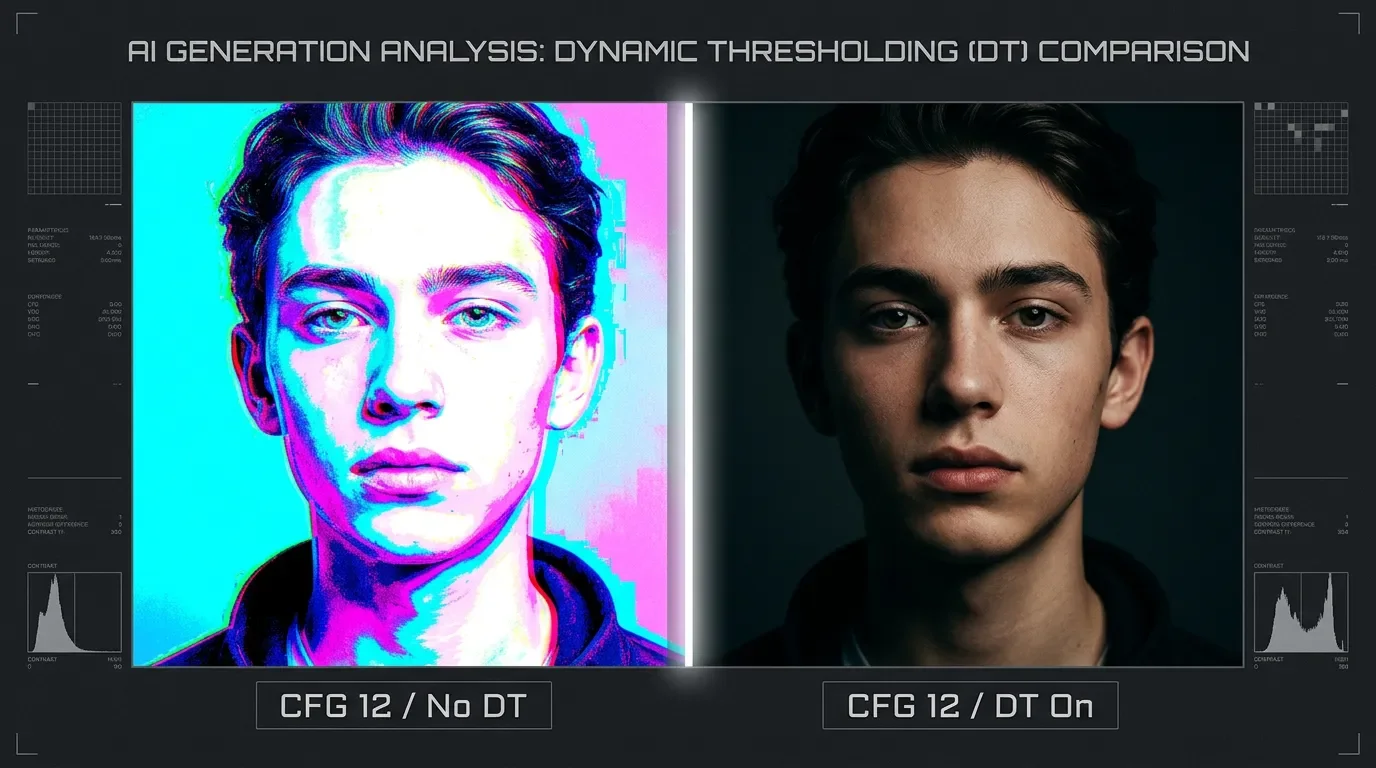
Dynamic Thresholding: push SDXL CFG past 8 without color blowout
Dynamic Thresholding (DT) fixes SDXL color blowout at high CFG by clamping latent spread each sampling step — copy-paste settings for ComfyUI and A1111/Forge across four use cases (portrait, landscape, product, extreme CFG), plus a bonus Flux hack.

Crank SDXL's CFG above 8 and something goes wrong fast. The image brightens, the palette turns acid, and by CFG 12–15 you're looking at neon highlights, blown-out midtones, and colors that have nothing to do with your prompt. This isn't a bug — it's what the latent diffusion math does when guidance is amplified that far. Dynamic Thresholding (DT) is the extension that fixes it by intervening in the sampling loop itself, not by asking the model to behave differently.
With DT active, CFG 10–15 is routinely usable on base SDXL, and CFG up to 30 becomes possible with the right scheduler. Without it, anything above 7–8 produces garbage on most SDXL checkpoints. 1
Why high CFG blows out colors
Classifier-free guidance (CFG) works by subtracting the unconditional prediction from the conditional one and scaling the difference. A CFG of 7 applies a modest push in the semantic direction your prompt specifies. A CFG of 15 applies a much larger push — but the latent values can only encode so much signal before their absolute spread exceeds what the VAE decoder expects, and the decoder maps those extreme values to saturated, clipped colors.
The conceptual fix came from Google's Imagen paper in May 2022: apply a percentile threshold to the sampled values at each step, clamping the outliers back into a usable range. 2 Imagen operated in pixel space so the threshold transferred directly. Latent diffusion models are different — their latent space doesn't map linearly to pixel values, and a naive clamp produces flat brown images (one community experiment found white-background latents have large negative values near −3, so clamping to (−1, 1) destroys the encoding). 3
Birch-san (@Birchlabs) solved the latent-space version in October 2022. The key insight: instead of clamping raw latent values, measure the statistical spread of the high-CFG latents versus a reference generated at a safe CFG ("mimic scale"), then rescale the high-CFG latents so their spread matches the reference. Color direction is preserved; color magnitude is controlled. 4 mcmonkey4eva packaged this into a standalone extension in February 2023, and it now supports A1111, Forge, ComfyUI, and SwarmUI. 1
What DT actually does each sampling step
Every denoising step, DT runs five operations before handing the latents back to the sampler:
- Compute
mimic_target— what the latents would look like atmimic_scale(the safe reference CFG) - Compute
cfg_target— what the latents look like at your actual high CFG - Center both by subtracting their mean (
MEANmode) or keep them at zero (ZEROmode) - Measure the spread of
mimic_centeredandcfg_centeredusing absolute deviation (AD) or standard deviation (STD); clampcfg_centeredso its spread doesn't exceedmimic_centered, then rescale to match - Add the mean back, then blend the result with the original
cfg_targetaccording tointerpolate_phi
The net effect: your prompt's semantic direction at CFG 15 stays intact, but the latent values are no longer free to grow so large that the decoder clips them. mcmonkey's description of the two core mechanisms: "Compensates for high CFG scales to make them work better, via Scale Mimicking and Dynamic Percentile Clamping/Thresholding." 5
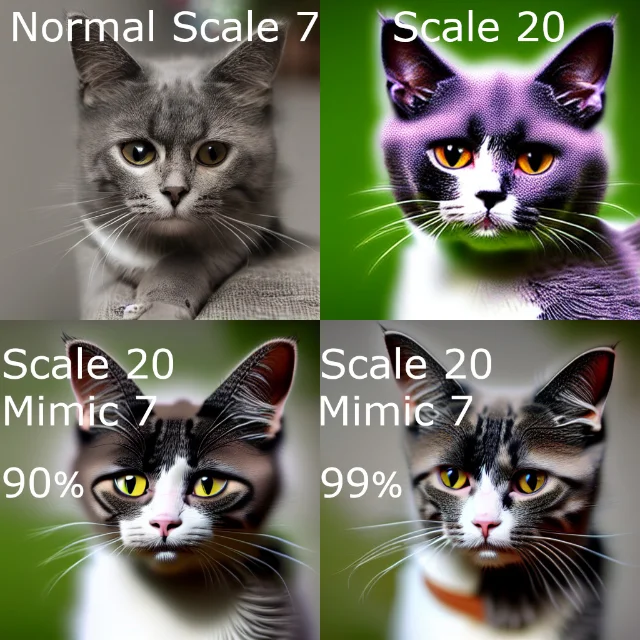
mimic_scale=7 + percentile tuning rescues the output from neon blowout. 1ComfyUI: the DynamicThresholdingFull node
Installation: clone or use ComfyUI Manager to install
mcmonkeyprojects/sd-dynamic-thresholding. The node appears under advanced/mcmonkey as DynamicThresholdingFull. 6Wire it between
Load Checkpoint (MODEL output) and KSampler (model input). The node hooks into the model's forward pass and intercepts latents after each denoising step — the KSampler drives steps normally and never knows DT is running.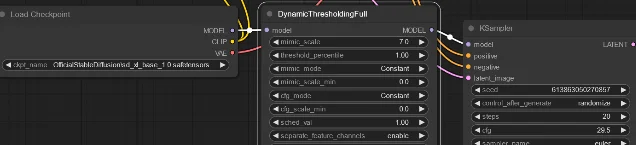
DynamicThresholdingFull node wired between checkpoint and KSampler. Default values shown. 7Key parameters and what they actually do:
| Parameter | Default | What it controls |
|---|---|---|
mimic_scale | 7.0 | The "safe" reference CFG. Keep latents within the spread you'd get at this value. |
threshold_percentile | 1.0 (= 100%) | How aggressively to clamp. 1.0 = no clamp on positive values. 0.95 cuts the top 5% of outliers. |
mimic_mode | Constant | How mimic_scale evolves across steps. Half Cosine Up ramps smoothly from low to high. |
cfg_mode | Constant | How your actual CFG scale evolves across steps. |
mimic_scale_min | 0.0 | Floor for the mimic_mode scheduler. Set to 3–4 when using any non-Constant mode. |
interpolate_phi | 1.0 | Mix ratio: 1.0 = full DT result, 0.0 = original high-CFG result. |
separate_feature_channels | enable | Whether each latent channel is clamped independently. Leave enabled. |
variability_measure | AD | AD uses percentile / max absolute deviation (robust to outliers); STD uses standard deviation. |
scaling_startpoint | MEAN | MEAN is conservative; ZERO is more aggressive. |
One critical edge case: if
cfg_scale in your KSampler equals mimic_scale exactly, DT disables itself — there's nothing to correct. 8A1111 / Forge: the extension UI
Installation: Extensions tab → Available → Load from → search "Dynamic Thresholding (CFG Scale Fix)". Alternatively: Extensions → Install from URL → paste
https://github.com/mcmonkeyprojects/sd-dynamic-thresholding. Restart WebUI. The panel appears as an accordion labeled "Dynamic Thresholding (CFG Scale Fix)" in txt2img and img2img. 9Forge requires the same manual install — DT is not bundled.
A1111's slider labels map directly to ComfyUI parameter names:
- Mimic CFG Scale =
mimic_scale(1.0–30.0, default 7.0) - Top percentile of latents to clamp =
threshold_percentile(90–100%, default 100%) — note: A1111 uses percentage form, ComfyUI uses 0–1 decimal - Mimic Scale Scheduler =
mimic_mode - CFG Scale Scheduler =
cfg_mode
Sampler restrictions: DT does not work with DDIM, PLMS, or UniPC + Hires Fix. Use DPM++ 2M Karras — it's the convergent sampler most community members report best results with. Euler a is unpredictable at high CFG: it's stochastic by nature, so images drift between runs even with a fixed seed. 10
Reddit user nickdaniels92 on getting started: "Dynamic thresholding is arguably essential, but can be overwhelming. What I recommend first is selecting half-cosine up for both settings, keep mimic on 7, top percentile just less than 100." 10
Copy-paste settings for four use cases
These cover the three major CFG tiers plus the extreme high-end scenario. All assume base SDXL (not distilled), DPM++ 2M Karras sampler, 30–40 steps. 5 11
| Use case | CFG | mimic_scale | threshold_percentile | mimic_mode / cfg_mode | mimic_scale_min |
|---|---|---|---|---|---|
| Portrait (safe, natural tones) | 10 | 7 | 0.999 (A1111: 99.9%) | Half Cosine Up / Half Cosine Up | 3.5 |
| Landscape / concept art (punchy detail) | 12 | 7 | 0.999 | Half Cosine Up / Half Cosine Up | 3.5 |
| Product shot (crisp, controlled) | 10 | 7 | 1.0 (A1111: 100%) | Constant / Constant | 0 |
| Extreme high CFG (structure lock at 30) | 30 | 30 | 1.0 | Cosine Down / Constant | 7 |
For the first three, both schedulers use
Half Cosine Up — mcmonkey's official recommendation as "the best scheduler mode for most usages." 5 The minimum of 3.5 prevents the scheduler from bottoming out near zero at early steps.The extreme-CFG row is a different strategy documented by Reddit user TheMasterCreed: set
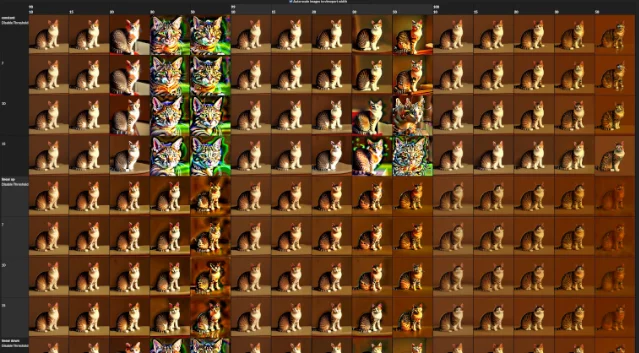
mimic_scale equal to CFG (both 30), use a Down scheduler to ramp the mimic correction from high to low across steps, and set a minimum of 7 so the correction never fully releases. The result is a CFG-30 composition with CFG-7 color behavior. 10 Reddit user darkeagle03 found that mimic_scale=30 still burned on some checkpoints and that dropping to 12–15 worked better — the effective value is model-dependent. 10The XY grid below shows the wider CFG × mimic parameter space, useful for dialing in a specific checkpoint:
What DT does and doesn't apply to
DT is for base SDXL and SD 1.5 — models that use standard multi-step sampling (20–40 steps) with a conventional CFG mechanism.
Skip DT entirely for distilled variants: SDXL-Turbo (Stability AI, Nov 2023), SDXL-Lightning (ByteDance, Feb 2024), and LCM all run at CFG ≈ 0–2 with 1–4 steps. The guidance formula at CFG=1 reduces to the conditional prediction alone — there's no amplified high-CFG spread to correct, and DT has no space to operate in a 1–4 step process. 12 13
One community exception: a user reported using DT with Turbo + InstantID at CFG=2 to remove burn-in when identity conditioning pushed the effective guidance above comfortable range. That's a narrow edge case, not a general use pattern. 10
Bonus: DT works on Flux too
In August 2024, Reddit user Total-Resort-3120 found that the same extension enables CFG>1 on Flux models — unlocking negative prompt support as a side effect, since the negative branch only has meaning when CFG>1. 14 The post earned 350 upvotes and has been confirmed by multiple follow-up testers.
Settings for Flux via XY plot testing (ComfyUI, A1111, or Forge):
mimic_mode:  Half Cosine Up
cfg_mode:    Half Cosine Up
variability_measure: AD
scaling_startpoint:  MEAN
interpolate_phi:     0.7
interpolate_phi=0.7 rather than 1.0 is the key difference from the SDXL workflow — on Flux, a 30% blend back toward the original high-CFG result produces better saturation balance. Adjust this value if the output looks washed out or over-contrasty. 14The core hierarchy to carry forward:
mimic_scale sets the target color behavior; the scheduler (Half Cosine Up for most uses) controls how aggressively that target applies across steps; and threshold_percentile sets the ceiling on how much latent spread you'll tolerate at all. Start with mimic=7, Half Cosine Up, min=3.5, run at CFG 10–12, and tighten from there.正在加载内容卡片…
参考来源
- 1GitHub — mcmonkeyprojects/sd-dynamic-thresholding
- 2Photorealistic Text-to-Image Diffusion Models with Deep Language Understanding (Imagen)
- 3Fixing excessive contrast/saturation resulting from high CFG scales
- 4Birchlabs on X: "think I got dynamic thresholding working..."
- 5Usage Tips — Dynamic Thresholding Wiki
- 6DynamicThresholdingFull — ComfyUI Cloud
- 7dynthres_comfyui.py — ComfyUI Node Definitions
- 8Issues — mcmonkeyprojects/sd-dynamic-thresholding
- 9dynamic_thresholding.py — A1111 WebUI Script
- 10Does Dynamic Thresholding actually work for anyone? : r/StableDiffusion
- 11How To Use Dynamic Thresholding In Webui Forge
- 12Introducing SDXL Turbo
- 13ByteDance/SDXL-Lightning
- 14Here's a "hack" to make flux better at prompt following
围绕这条内容继续补充观点或上下文。