GLM 5.2 is now in Notion's model picker — and its 1M context window changes what Custom Agents can actually process
GLM 5.2 (Z.ai / Zhipu AI) arrived in Notion's Custom Agents model picker on June 17, 2026 — the first open-weight model in the picker. The practical differentiator for PMs is its 1M-token context window, which lets a single agent run ingest a full sprint database, spec documents, and a changelog without truncation. The article explains what the model is (744B MoE, 40B active, MIT license), defines its lane in the picker vs. Auto mode, walks through a 5-step weekly sprint report setup with a copy-paste instruction block, and documents five gotchas — including the undocumented Notion credit multiplier, which remains the key unknown before committing to it at scale.
内容来源:...

研究速览
Notion added GLM 5.2 to the Custom Agents model picker on June 17, 2026. 1 It's the first open-weight model in the picker — previously, every option was a closed-weights commercial model (Claude, GPT, Gemini, Grok). 2 The practical difference that matters for PMs isn't the open-weight status. It's the 1 million token context window.
Every other model in the picker caps out well below that. A typical sprint database with a full quarter of tickets, plus three spec documents, plus a changelog — that's the kind of combined payload that forces Claude or GPT to either truncate or run multiple chained calls. GLM 5.2 takes it in a single pass.
正在加载内容卡片…
Prerequisites
| Requirement | Details |
|---|---|
| Notion plan | Business or Enterprise — Custom Agents are exclusive to these tiers 2 |
| Custom Agents setting | Settings & Members → Workspace settings → Notion AI → Custom Agents: On |
| AI credits | Custom Agents consume credits per run; GLM 5.2's per-run credit cost is not yet documented by Notion 3 |
| Inference provider | GLM 5.2 is served to Notion via Baseten 4 |
What GLM 5.2 actually is
GLM 5.2 is a 744B-parameter Mixture-of-Experts model from Z.ai (Zhipu AI), with only 40B parameters active per token via sparse routing. 5 The 1M context window is sustained by a sparse attention mechanism called IndexShare, which Z.ai reports cuts FLOP requirements by 2.9× at maximum context versus a dense attention baseline. 5
MIT license — the weights are downloadable from HuggingFace and ModelScope if you want to run it outside Notion. 5
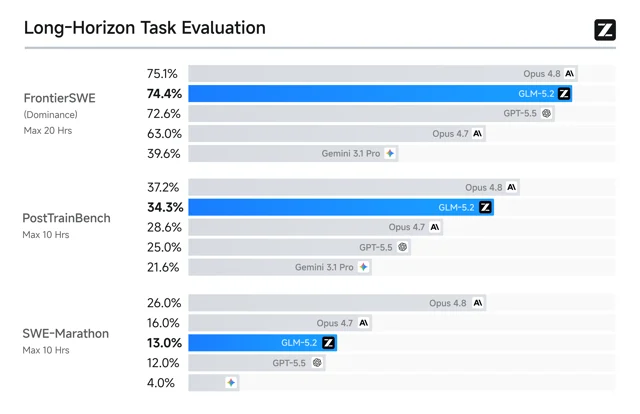
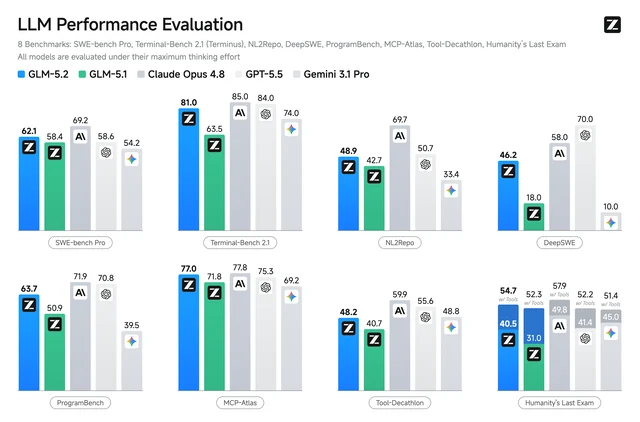
Benchmark position: On FrontierSWE (a 20-hour multi-step software engineering benchmark), GLM 5.2 scores 74.4% dominance — trailing Claude Opus 4.8's 75.1% by 0.7 percentage points, and ahead of GPT-5.5's 72.6%. [cite:6|[AINews] GLM-5.2: the top Frontend Coding model in the world — Latent Space|[https://www.latent.space/p/ainews-glm-52-the-top-frontend-coding]] It ranks #1 among open-weight models on the Design Arena and #1 among open-weight models on Agent Arena. [cite:6|[AINews] GLM-5.2: the top Frontend Coding model in the world — Latent Space|[https://www.latent.space/p/ainews-glm-52-the-top-frontend-coding]]
Two reasoning effort modes are exposed:
high (balanced speed and quality) and max (full capability, slower). 5 The model picker in Notion Custom Agents does not currently expose this setting directly — the agent runs at Notion's default reasoning level.When to use GLM 5.2 over other models in the picker
The model picker covers three broad use cases, and GLM 5.2 has a clear lane:
Use GLM 5.2 when the input payload is large. If your agent needs to read an entire sprint database (hundreds of items), one or more product spec documents, and a changelog in a single run — that's the job this model handles without truncation. The 1M context window is why. The prior default (Auto mode) routes to smaller models that cannot fit this payload, which means either silent truncation or agent chains that pass summaries instead of full data.
Stick with Auto for short-horizon classification tasks. Auto mode routes to faster, cheaper models for single-record enrichment, status classification, or category labeling on individual rows. GLM 5.2's MoE architecture makes it efficient relative to its parameter count, but for tasks where a 10k-context model is sufficient, Auto remains the practical choice.
No clear winner yet on cost. GLM 5.2's raw API pricing is $1.40 per million input tokens and $4.40 per million output tokens — significantly cheaper than Opus 4.8 at its raw API rate. 5 But Notion applies its own credit multiplier on top of raw API cost, and that multiplier for GLM 5.2 is not publicly documented anywhere. 3 Until Notion updates its credits help center or community data surfaces, you cannot predict whether a 500k-token GLM 5.2 run will cost more or fewer credits than an equivalent Opus 4.8 run at shorter context.
Setting up: weekly sprint report with GLM 5.2
This is the most direct PM use case: a scheduled Custom Agent that reads the full sprint database — every ticket, every field, full history — and writes a structured weekly summary back into a report page.
Step 1 — Create the Custom Agent
In your Notion workspace: Settings → Notion AI → Custom Agents → New agent.
Give it a name like "Weekly sprint digest" and set the trigger to Weekly on Monday morning before your standup.
Step 2 — Set the model to GLM 5.2
In the agent's model picker (gear icon or model selector in the agent editor), choose GLM 5.2 from the model list. 2 If you do not see it listed, verify you are on a Business or Enterprise plan and that Custom Agents is enabled in workspace settings.
Step 3 — Grant database access
Add your sprint database as a data source for the agent. Include your product spec pages if you want the agent to cross-reference spec changes against ticket status. There is no hard cap on data source size — the 1M token context is the limit, not the number of pages.
Step 4 — Write the instruction block
You are a sprint report agent. Every Monday, read all items in the Sprint Database.
Produce a structured report covering:
1. Items completed since the last report (Status = Done, updated in the past 7 days)
2. Items currently blocked (Status = Blocked) — for each, include the blocker note and assignee
3. Items added this week (Created in the past 7 days)
4. Any spec pages that were edited in the past 7 days — list the page title and a one-sentence summary of the change

Write the report to the page titled "Weekly Sprint Report" in the Reports database.
Use today's date as the page title suffix.
Do not summarize or truncate ticket titles — write them verbatim.
The final instruction — "do not summarize or truncate" — is load-bearing. Without it, agents on context-limited models silently abbreviate long lists. GLM 5.2 has enough context to include every item verbatim; forcing verbatim output makes the benefit concrete.
Step 5 — Run manually to verify, then enable the schedule
Run the agent once with Run now and confirm the output page matches what you expect. Check that completed items, blockers, and spec changes are all present. Once the output looks right, enable the weekly schedule.
Gotchas
| Issue | What happens | What to do |
|---|---|---|
| Credit cost is undocumented | Notion has not published a per-model credit multiplier for GLM 5.2; the community has no data yet 3 | After the first scheduled run, check your credits dashboard (Settings → Plans & billing → Credits) to observe actual consumption before scaling to multiple agents |
| Model not visible in picker | Notion's official help page still lists only Claude, GPT, Gemini, and Grok 2 — the UI has been updated but the docs haven't | Scroll past the documented models in the picker; GLM 5.2 is available in the product regardless of docs |
| No explicit reasoning mode control | The high/max reasoning modes in GLM 5.2's native API are not exposed as a setting in Notion Custom Agents 5 | Notion determines the reasoning level; instruct the agent to "reason carefully before writing" as a prompt-level substitute |
| Changelog not updated | Notion's developer changelog is frozen at June 16, 2026 6 — no API-level changes accompany this addition | No integration changes needed; GLM 5.2 is accessed via the same Custom Agents UI as all other models |
| Large-context runs take longer | A 500k-token input takes more wall-clock time than a 10k-token run | Set agent schedule buffers — if your standup is at 9:00 AM, trigger the agent at 7:30 AM |
The model picker addition makes GLM 5.2 the right choice specifically for agents whose value depends on full-corpus access — everything in the sprint database, not a windowed sample of it. The unknown credit multiplier is the one variable to resolve before committing to it as your default for large-context runs.
Cover image: AI-generated illustration.
围绕这条内容继续补充观点或上下文。