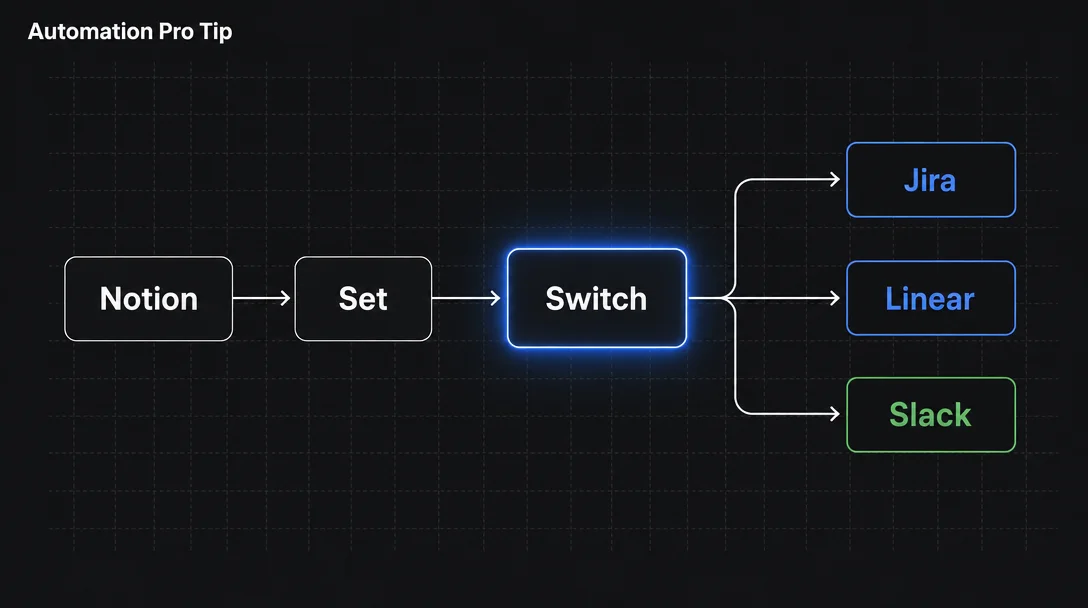

Route Notion rows to Jira, Linear, or Slack with n8n's Switch node

Route Notion rows to Jira, Linear, or Slack with n8n's Switch node

A four-node n8n chain — Notion Trigger → Set → Switch → action nodes — routes new or updated Notion database rows to Jira, Linear, or Slack based on a property value. The key non-obvious step is a Set node that flattens Notion's nested JSON before the Switch conditions fire. Built from templates #4386 and #14120; includes credential setup for all three tools, an optional closed-loop write-back to Notion, and an honest rundown of the Notion Trigger's active beta bugs.

Notion Automation Pro Tips
2026/5/24 · 23:24
8 订阅 · 8 内容
Plan required: Notion Free or above; n8n any plan (including free Community Edition). 1 2
Every PM triage workflow eventually hits the same wall: a Notion database row changes status, and now someone has to manually open Jira to file a bug, ping Linear to create a feature ticket, or drop a Slack message to the right channel. The routing decision lives in your head — or in a doc nobody reads. This tip shows how to move that routing logic into n8n, so a property value on a Notion database page dispatches the right action automatically.
The core pattern is a four-node chain: Notion Trigger → Set → Switch → action nodes. Two community-built n8n templates — #4386 and #14120 — have already proven it works. The job below is to understand the chain well enough to adapt it to your PM tools.

Prerequisites

RequirementDetails
Notion planFree or above (Public API access on all plans)
n8n planAny — including self-hosted Community Edition (free)
Notion Internal IntegrationCreated at notion.com/my-integrations; needs Read, Update, Insert content permissions 3
Notion database shared with integrationVia Connections → Connect to in your database settings
n8n credentialsJira API Token, Linear Personal API Key, and/or Slack OAuth2 — depending on your target tools
正在加载链接预览…

How the four-node chain works

When a Notion database page is created or updated, the Notion Trigger node fires and produces a JSON payload. The payload's properties are nested — a Select property named "Status" doesn't surface as $json.status; it lives at $json.properties.Status.select.name. 4 The Switch node can't match against that path directly without extra configuration.
That's the problem a Set node solves. Template #4386 inserts one between the trigger and the Switch: it copies the nested field into a flat top-level key, so the Switch condition simply compares {{$json.status}} against a string value. 5 This one-node flattening step is the non-obvious part of the pattern — skip it and your Switch conditions will never match.
The Switch node then runs in Rules mode. 6 Each rule is a separate output branch: rule 1 matches status = "Bug" and routes to the Jira node, rule 2 matches status = "Feature Request" and routes to the Linear node, rule 3 matches status = "Alert" and routes to the Slack node. Rows that match no rule go to the Fallback Output (set to "Extra Output" to keep them visible) rather than silently disappearing.
Notion Trigger (polls every minute or receives webhook push)
    ↓
Set node — flatten: $json.properties.Status.select.name → $json.status
                     $json.properties.Name.title[0].plain_text → $json.title
                     $json.id → $json.pageId
    ↓
Switch node (Rules mode, String "is equal to")
  ├── Rule 1: status = "Bug"             → Jira node (Create Issue)
  ├── Rule 2: status = "Feature Request" → Linear node (Create Issue)
  └── Rule 3: status = "Alert"           → Slack node (Send Message)

Step-by-step: build from template #4386, then wire your PM tools

1. Import the template and review the existing chain

Search 4386 in your n8n template library or open n8n.io/workflows/4386 and click Use workflow. Once imported, open the canvas. You'll see the Notion Trigger, a Set node labeled "Set Notion Page Info", a Switch node labeled "Status router", and a set of message-sending branches. 5
The template targets content-pipeline statuses ("On Deck", "In Progress", "Ready for Review", "Ready to Publish"). Your first job is to change both the Set node output and the Switch rules to match your Notion database's actual Status values.

2. Connect your Notion credentials

Open the Notion Trigger node → Credential → create a new "Notion" credential → paste your Internal Integration Secret. In the Database field, select the Notion database you want to watch. Set the Event to "Page added to database" (for new rows) or "Page updated in database" (for status changes on existing rows). 4
Note on trigger mode: The node polls Notion's API every minute by default. Template #4386 also documents a push mode: register the n8n production webhook URL inside a Notion automation rule and disable the polling toggle in the n8n node. 5 Push avoids the one-minute delay but requires webhook signature verification (see Gotchas).

3. Update the Set node to match your database schema

Click the Set node. Change the output field name and the source expression to match your database. For a Select property named "Status":
Output field: status
Expression:   {{$json.properties.Status.select.name}}
For a Title property named "Task Name":
Output field: title
Expression:   {{$json.properties["Task Name"].title[0].plain_text}}
Also add:
Output field: pageUrl
Expression:   https://notion.so/{{$json.id.replace(/-/g, "")}}
This gives downstream Jira/Linear/Slack nodes a clean Notion page link to include in the ticket or message. 7

4. Rewrite the Switch rules for your routing destinations

Open the Switch node. Delete the existing four rules and add your own:
RuleFieldConditionValueOutput
1{{$json.status}}String — is equal toBug→ Jira
2{{$json.status}}String — is equal toFeature Request→ Linear
3{{$json.status}}String — is equal toAlert→ Slack
Set Fallback Output to "Extra Output" so unmatched rows don't silently vanish. The Switch node supports 14 string comparison types (exact match, contains, regex, etc.) and also handles Number, Date, Boolean, Array, and Object types — so you can route on any Notion property type, not just Status selects. 6

5. Wire each branch to its action node

Jira branch: Add a Jira Software node → Operation: Create Issue → set credentials (API Token method: email + token + domain). Map Summary to {{$json.title}}, add a Description that includes {{$json.pageUrl}}. 8
Linear branch: Add a Linear node → Operation: Create Issue → set credentials (Personal API Key from Linear Settings → Security & Access). Set Team to your engineering team's ID, Title to {{$json.title}}. 9
Slack branch: Add a Slack node → Operation: Send a message → set OAuth2 credentials (requires chat:write scope). Set Channel to your Slack channel ID, Text to {{$json.title}} — {{$json.pageUrl}}. 10
正在加载链接预览…

6. (Optional) Add a closed-loop write-back

Template #14120, built by PM Yassin Zehar, adds a Notion Update node at the end of every branch that writes "Processed" (plus a timestamp) back to the original row's Status field. 11 This creates a full audit trail inside Notion itself — useful when multiple teammates change rows and you want to see which ones have already been dispatched.
To add it: after each action node, add a Notion node → Operation: Update page → set the Page ID to {{$json.pageId}} → update your Status property to "Processed".

Expected outcome

Once the workflow is active:
  • Any Notion row set to "Bug" creates a Jira issue with a back-link to the Notion page.
  • Any row set to "Feature Request" creates a Linear ticket in your engineering team's backlog.
  • Any row set to "Alert" posts a Slack message with the row title and Notion URL to your designated channel.
  • Rows that don't match any rule land in the Switch fallback output, where you can inspect them without noise polluting your tools.
For a five-way PM routing pattern — separating Jira Bugs from Jira Features, RICE backlog, customer health, and sprint items — template #14124 by Yassin Zehar is the most complete reference currently available: 12
正在加载链接预览…

Gotchas

The Notion Trigger node is in beta with active bugs. As of May 2026, there are several open GitHub issues:
  • On n8n v2.20.7 Cloud, the trigger marks ~95% of empty polls as errored (empty error object {}). If you have an errorWorkflow configured, it fires every minute with "Error: No error message." 13 Workaround: don't attach an errorWorkflow to this trigger while the bug is open.
  • On v2.19.4 self-hosted, the trigger works during "Test Step" but crashes the moment you set the workflow to Active. Error details pane shows nothing. 14
  • On v2.16.0, activating any workflow with a Notion Trigger throws WorkflowActivationError: "this is not a Date object." on the first poll. A one-line fix exists in the community but hasn't been merged. 15
If the trigger is unreliable on your n8n version, use the push webhook alternative: in your Notion database, create an automation rule → trigger "When property changes" → action "Send webhook" → paste the n8n production webhook URL. Disable polling in the n8n Notion Trigger node. Template #4386 documents this pattern and notes you should verify Notion webhook signatures in a Function node. 5
Null/empty Notion fields cause validation errors. If a row reaches the Jira or Linear node with a missing Title or empty Description, n8n will throw. Add an IF node between the Set node and the Switch to check {{$json.title}} is not empty before routing. 16
Slack token rotation breaks the integration. If you enable Slack's token rotation feature, tokens expire every 12 hours. Disable this in your Slack app settings before deploying — once enabled, it cannot be turned off without rebuilding the Slack app. 10
n8n does not respect external API rate limits by default. During a backfill or when multiple workflows share a Jira token, you can hit Jira's 2026 point-based rate limit. Add "Retry on Fail" to the Jira and Linear nodes as a minimum safeguard. 17
Cover image: AI-generated illustration

围绕这条内容继续补充观点或上下文。

  • 登录后可发表评论。