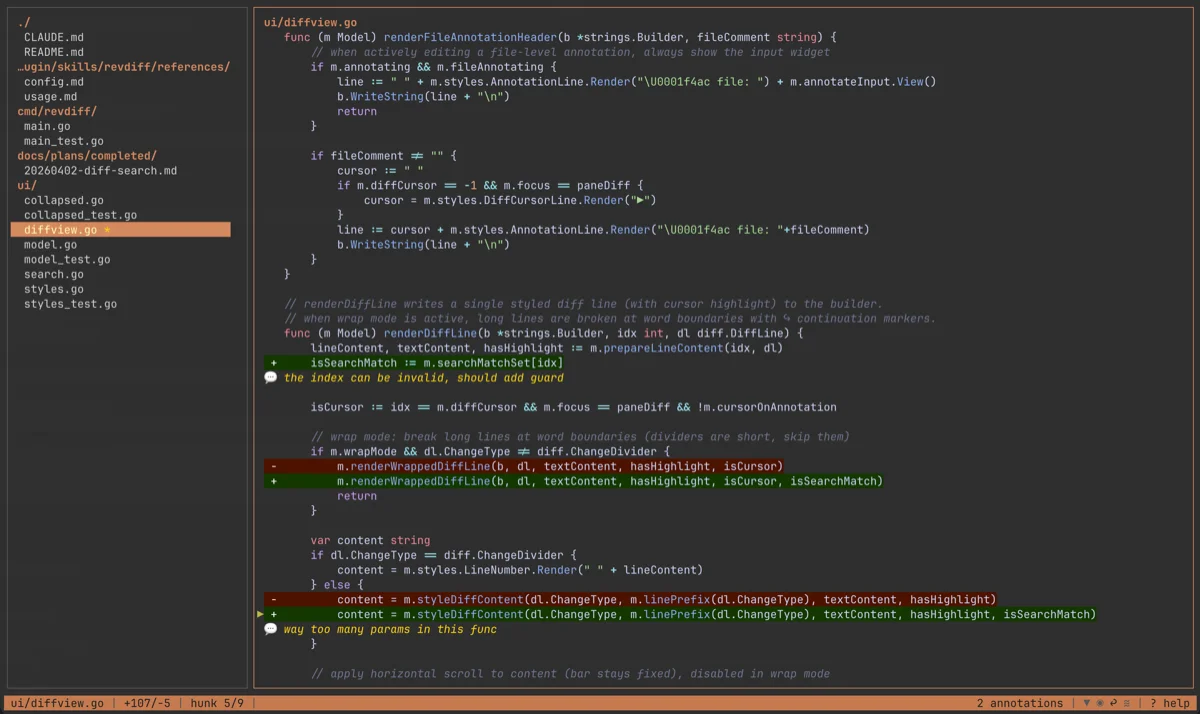
revdiff: review AI-generated diffs without leaving the terminal

revdiff is a Go TUI diff reviewer (MIT, 459★, v1.3.0) that runs as a terminal overlay inside your AI coding agent session — Claude Code, Codex, or OpenCode. You annotate changed files with plain-text notes; when you close revdiff, the structured annotations pipe straight to stdout and back to the agent. Five versions shipped in five days (May 8–13). Install: `brew install umputun/apps/revdiff`.

编者话

You're in a Claude Code session. The agent just rewrote three files. You need to actually read those changes, mark what's wrong, and send corrections back — but the moment you switch to a GUI diff tool, you've broken the flow and now have to re-establish context in two places at once.
That handoff cost is exactly what revdiff was built to eliminate 1.
revdiff is a terminal-native TUI diff reviewer written in Go by umputun (also the author of reproxy and remark42). It runs as an overlay inside your existing terminal session — tmux pane, Zellij, kitty, wezterm, and six others — shows a split view of changed files with syntax-highlighted diffs, and lets you annotate any line or hunk directly. When you exit, the structured annotations go straight to stdout, ready to pipe back into the agent.
The author described the motivation plainly 2:
"I built a terminal diff viewer for a workflow I couldn't do comfortably with existing tools: reviewing AI-generated code changes without leaving the terminal session where the agent runs, annotating what needs to change, and feeding those annotations straight back to the agent."

Install

# Homebrew
brew install umputun/apps/revdiff

# Arch AUR
paru -S revdiff

# deb / rpm — download from releases page
# https://github.com/umputun/revdiff/releases
Single Go binary, MIT license, no runtime dependencies 1. Homebrew install takes under 30 seconds on a typical connection.

How it works

The interface has two panels: a file tree on the left, a syntax-highlighted diff on the right. Navigation is Vim-style — j/k to move, / to search, n/N to jump between matches, and dedicated hunk-jump keys 3.
Annotations attach to individual lines or hunks. You describe what needs to change in plain text, and when you close revdiff, all annotations serialize to stdout as structured JSON. That output is what the agent reads.
revdiff detects the active version control system automatically — Git, Mercurial, and Jujutsu are all supported 1. The Claude Code plugin knows which terminal multiplexer you're running and opens revdiff as an overlay inside the existing session rather than a separate window; nine terminal environments are covered 1.
Other integrations: Codex CLI, OpenCode, and the pi package manager 3.

A real scenario

Your agent is running in plan mode. It generates a 200-line plan spread across four files. You open revdiff inside the same tmux pane, annotate the three sections that need more detail and the one that has an architectural mistake, then close it. The annotations pipe directly back to Claude Code. No clipboard, no separate window, no pasting.
HN commenter r13v described exactly this 2:
"I use it with Claude Code, mostly in plan mode to comment on a plan and then return to CC for further work. It allows me to point out things in the plan that we need to elaborate on without leaving the terminal."
The same workflow applies outside of AI coding: reviewing a coworker's PR locally, walking through a large rebase, or auditing a generated migration file before it runs. The annotation output is useful anywhere you'd otherwise leave a review comment.

Momentum

MetricValue
GitHub stars459 1
Release cadence5 versions in 5 days (v1.1.0 → v1.3.0, May 8–13) 1
Latest versionv1.3.0 (May 13, 2026)
Last commitMay 19, 2026 1
LanguageGo
LicenseMIT
459 stars is modest. The signal worth tracking is the release velocity: five versions in five days points to a tool in active daily use by its author and early adopters, not a side project being polished for a launch. The HN Show HN thread (17 points, 4 comments) was small but clean — all four comments were from people who had actually run it 2.

The honest caveat

revdiff earns its keep only if you're using AI coding agents that generate diffs you need to review iteratively. If your current workflow is "accept all changes and fix problems later," the annotation piping mechanism has no entry point.
The other constraint is terminal multiplexer dependency. The overlay mode — where revdiff appears inside your existing agent session rather than opening separately — requires tmux, Zellij, kitty, wezterm, or one of the other five supported environments 1. Without one of those, you're launching revdiff as a standalone window, which mostly defeats the context-switching argument.
If you meet both conditions (iterative AI-assisted development + a supported terminal multiplexer), there is no comparable tool in this specific slot. The other options are either GUI diff viewers that require switching applications, or raw git diff piped through a pager — neither of which gives you writable annotations that route back to the agent.
正在加载链接预览…
Cover image: revdiff TUI interface screenshot from umputun/revdiff on GitHub

围绕这条内容继续补充观点或上下文。

  • 登录后可发表评论。