42Crunch OpenAPI Editor: linting, security audit, and live API calls in VS Code
42Crunch OpenAPI Editor (v5.6.0) brings inline linting, a 300-check security audit, and spec-driven live HTTP requests into VS Code — free editing, token-based audit.

Most OpenAPI workflows involve at least three separate tools: an editor for writing the spec, a linter to catch schema mistakes, and a client like Postman or Insomnia to test endpoints. 42Crunch OpenAPI (Swagger) Editor rolls all three into VS Code — plus a security audit that scores your spec against 300+ checks before the API ships.
Extension ID:
42Crunch.vscode-openapi · Publisher: 42Crunch · Version: v5.6.0 (released 2026-05-19) · IDE: VS Code (also available for 19+ JetBrains IDEs and Eclipse) · Install on VS Code Marketplace 1What problem it solves
Writing OpenAPI specs by hand is fragile. A misplaced
$ref, a missing required field, or an undefined security scheme will compile silently and only surface when the API consumer tries to generate client code — or when a security reviewer flags it weeks later.The extension activates on any
.json or .yaml file containing a top-level openapi or swagger key. 1 From that point it provides a structural navigator in the sidebar, context-aware IntelliSense, Go to Definition for $ref jumps, and inline squiggles for spec violations — all without requiring an account or a network connection.The security audit layer adds something no generic YAML linter provides: a 0–100 score that separates security definitions (max 30 points) from data validation quality (max 70 points), driven by more than 300 static checks covering authentication, authorization, and schema constraints. 1
The editing loop
The OpenAPI Explorer panel on the left lists every
paths, components, and security node in your spec. Right-clicking any node opens a menu to add a new path or operation directly — useful when a spec grows long enough that scrolling to the right $ref target is slower than navigating the tree.IntelliSense fires on attribute names and property values. In YAML you press the first letter of a field and the dropdown appears; in JSON, opening a
" triggers it. The suggestions are context-aware: inside a securitySchemes block you get apiKey, oauth2, http, and openIdConnect — not the full vocabulary of the file. 2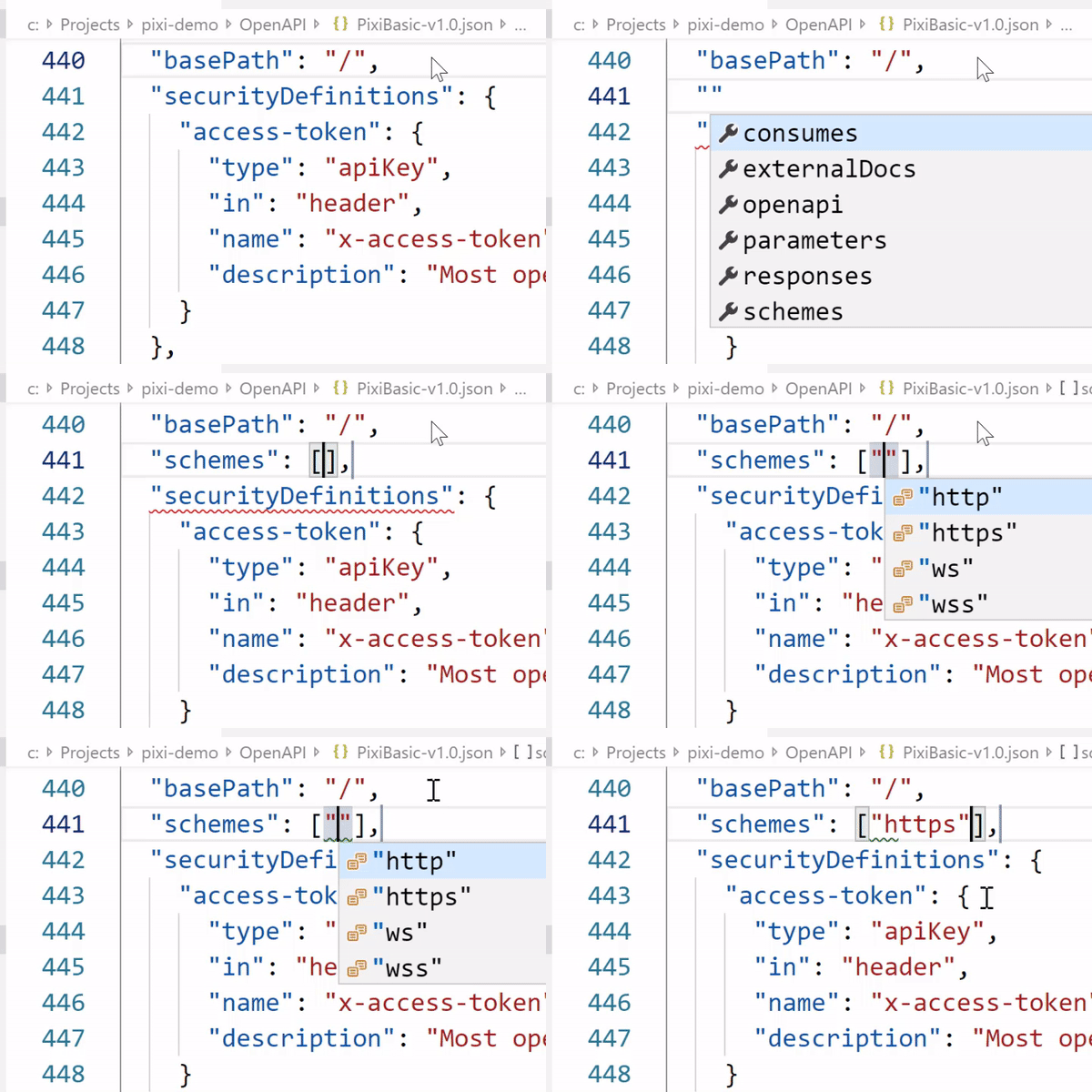
Ctrl+Click on any $ref jumps to the definition — including external HTTP/HTTPS references, which the extension resolves dynamically. 2 Split-screen SwaggerUI or ReDoc preview is one click away via the Preview button that appears in the editor toolbar when an OpenAPI file is active. Dark mode for the SwaggerUI preview was added in v5.1.0 (February 2026). 3Running the security audit
The audit command is available via CodeLens — each
paths operation in the spec gets a Scan | Try it | Audit codelens line above it. Clicking Audit triggers a static analysis pass against the full spec and opens a report panel alongside the code.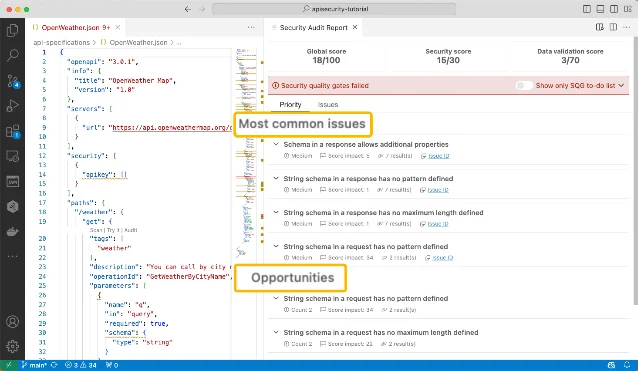
apikey security array. Each issue links back to the line in the spec. 1Issues are ranked by score impact. Many have Quick Fix actions: clicking one inserts the recommended snippet at the right location, then you fill in the actual value. The audit report also displays the split between security score and data validation score, so you know which dimension is dragging the overall number down. 1
The audit requires a token from the 42Crunch platform — free during a 14-day trial with no credit card required. 4
Try It: live API calls without leaving the editor
The Try It feature opens a request panel next to the spec when you click the codelens link on any operation. The URL, method, query parameters, and request headers pre-populate from the spec. The request body auto-generates from the JSON Schema of the
requestBody field, or from the first example if one is defined. 1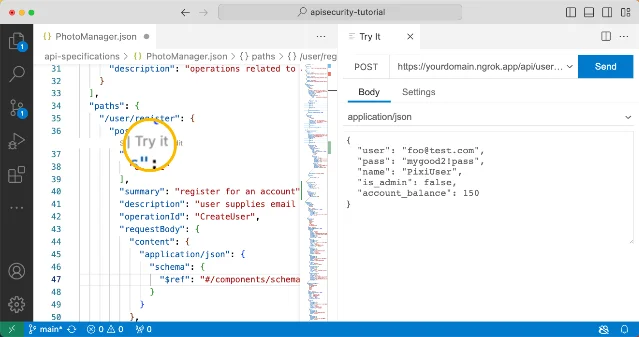
Two limitations worth knowing: Try It does not support file uploads, and binary or image responses display as raw text rather than a preview. 1 For most JSON APIs testing authorization headers and response shapes, neither limitation matters.
Pricing and the token model
The core editing features — Explorer, IntelliSense, preview, Try It, Go to Definition — are permanently free and need no account. 1
The security features (Audit, Scan, and the Contract Generator that builds a spec from a Postman Collection or HAR file) consume tokens. One audit run costs one token. 5 Paid plans start at $9/month for 1,000 tokens; a 14-day Starter trial gives full access at no charge. According to AppSecSanta's 2026 review, solo developers and small projects tend to stay on the free or Individual tier indefinitely — the security team pricing ($349/month for Team 10) is where the platform starts looking like infrastructure spend rather than a developer tool. 6
The Scan feature — which auto-generates malicious payloads to test OWASP API Top 10 vulnerabilities against a running API — is scoped to APIs you own. 1 The Scan report requires network access to
stateless.42crunch.com; teams behind strict outbound firewalls need to whitelist that host.The GitHub repository:
正在加载内容卡片…
The repo has 375 stars, 45 forks, 1,776 commits, and ships under AGPL-3.0. 2 Releases follow a monthly cadence — seven versions from v5.0.0 to v5.6.0 between January and May 2026. 3 Total users across VS Code, JetBrains, and Eclipse reached 1.6 million as of late 2025. 6
Compatibility at a glance
| Extension ID | 42Crunch.vscode-openapi |
| Current version | v5.6.0 (2026-05-19) |
| VS Code minimum | v1.37.1 |
| Supported specs | OpenAPI 2.0 (Swagger), 3.0.x, 3.1; GraphQL Audit/Scan (beta, v5.3.0+) |
| File formats | .json, .yaml |
| Platform | Windows / macOS / Linux |
| License | AGPL-3.0 (plugin); platform tiers separate |
| OpenVSX | Available (Cursor / Windsurf compatible) |
Who this is for: teams and solo developers who maintain OpenAPI specs and want linting, live testing, and a security score without switching out of VS Code. If your API has no OpenAPI definition and you have no plans to write one, the editing features have nothing to activate on — in that case, tools like Salt Security (traffic-level discovery) or APIsec (standalone DAST) fit better. 6
Cover image: AI-generated illustration
围绕这条内容继续补充观点或上下文。