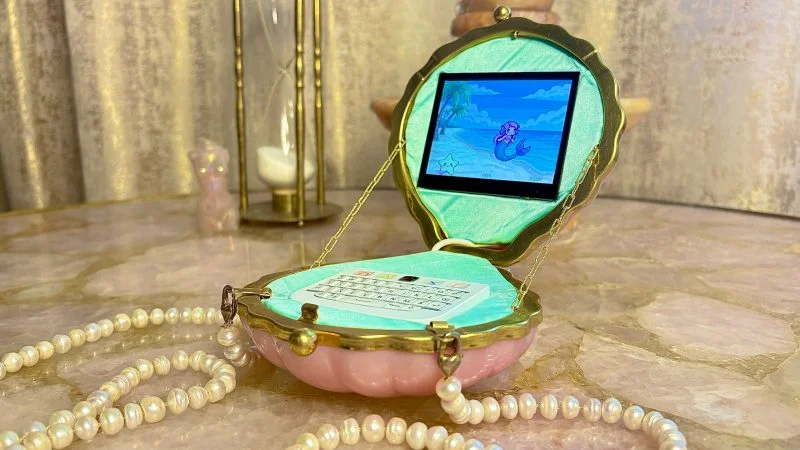
This weekend's build: Linux terminal inside a clamshell evening bag
Builder cc (bossbratox) packed a Raspberry Pi 3A+, touchscreen, and a full Python TUI OS into a pink clamshell purse — no soldering, $274 BOM, MIT-licensed, 1–2 day intermediate build.

Most cyberdecks announce themselves immediately — chunky aluminum enclosures, exposed PCBs, aggressive tactical aesthetics. The Mermaid Clutch-Purse Cyberdeck does the opposite. From the outside it looks like a pink clamshell evening bag on a pearl chain. Open it and there's a Raspberry Pi running a custom Linux TUI stack, a Bluetooth keyboard with a trackpad, and a live mermaid e-pet on the screen. 1
Builder cc (GitHub: bossbratox) was explicit about the design goal: 2
"my cyberdeck was going to be decidedly girly and high femme. the goal was maximally feminine, beautiful and in possession of a highly specialized skill set."
The purse's existing hinge and magnetic clasp become the lid mechanism for free. No custom enclosure design, no PCB to fab, no soldering iron required — just a well-chosen donor object and a lot of software work.
What the software stack actually does
The hardware is a Raspberry Pi 3A+ (512 MB RAM) running Raspberry Pi OS Lite Trixie 32-bit, with no desktop environment. 2 Everything runs in the framebuffer or over TTY. The MIT-licensed
cyberdeck-template repo on GitHub contains seven complete applications: 3- A bash terminal
- An AI chat interface using an OpenAI-compatible API with SSE (Server-Sent Events) streaming for real-time token display
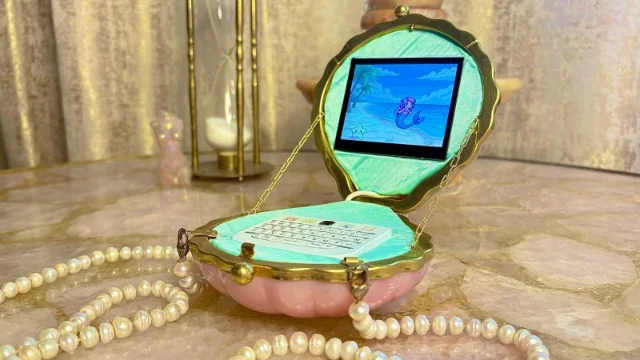
- A mermaid e-pet with a lifecycle system, rendered directly to the framebuffer
- A PDF-to-text reader
- A Markdown editor
- A server monitoring dashboard
- WiFi and Bluetooth managers
The stack is Python (86.8%) and Shell (13.2%), deployed via systemd service files and a single deploy script. Unit tests are included. 3
Two system-level choices carry practical weight for anyone replicating this.
overlayroot (a Linux kernel feature that mounts the root filesystem as a copy-on-write overlay) prevents SD card corruption when the power bank runs dry mid-session. The CPU governor is set to power-save mode to stretch battery runtime. Both are sensible defaults for any Pi-based portable that doesn't need peak CPU performance.Bill of Materials
Total estimated cost: $274 USD. 2
| Component | Approx. cost |
|---|---|
| Raspberry Pi 3A+ | $20 (Micro Center deal) |
| Waveshare 3.5" DSI capacitive touchscreen (640×480) | $40 |
| Clamshell clutch purse | $30 (Amazon) |
| ZitaoTech BB Q10 Bluetooth keyboard with trackpad | $110 |
| Attom 3,000 mAh mini power bank | $18 |
| Freshwater pearls | $35 |
| Chain | $6 |
| Neodymium magnets | $5 |
| Fabric, plastic card stock, tape | $0 (on hand) |
The ZitaoTech BB Q10 keyboard ($110, including shipping and import duties) is both the most expensive line item and the one most likely to cause a delivery delay — it ships from an independent manufacturer, not a distributor warehouse. Factor that into your timeline. Everything else is available from Amazon or standard Pi suppliers.
Physical construction
There is no schematic and no PCB. 2 The entire build is mechanical assembly: components are held in place with neodymium magnets, cardboard templates (cut from a shoebox), and corrugated plastic sheet for the final load-bearing parts.
The process runs in two stages. First, cc made paper and cardboard prototypes to verify fit before cutting the permanent plastic pieces. The purse's upper shell holds the Waveshare DSI touchscreen, which connects to the Pi via a single ribbon cable. The lower shell houses the Pi board, the BB Q10 keyboard, and the power bank — stacked flat. The purse's existing magnetic clasp closes the two halves; no latching mechanism needed.
The Waveshare 3.5" DSI (Display Serial Interface) screen draws directly from the Pi's dedicated display port, freeing up the USB and GPIO headers entirely. That keeps the interior clean and avoids USB hub power management headaches.
Firmware and software setup
Getting the software running requires a Linux command line and some patience with Bluetooth pairing. 3 The repo's README walks through flashing Raspberry Pi OS Lite Trixie 32-bit, enabling SSH, pairing the BB Q10 over
bluetoothctl, and running the deploy script that installs Python dependencies and registers the systemd services. No cross-compilation required; everything builds on the Pi itself.The AI chat interface expects an OpenAI-compatible API endpoint — you supply your own key or point it at a local model server. The e-pet's lifecycle system (it has states that evolve over time) is configured via a JSON file in the repo.
Difficulty rating and known gotchas
Rating: Intermediate. No soldering, no PCB work. You do need Linux CLI fluency — comfortable with
systemd, SSH, and Bluetooth pairing from the terminal. Physical construction requires a hobby knife, scissors, and the ability to cut corrugated plastic accurately. 2Estimated build time: 1–2 days.
Three builder-documented gotchas to know before starting:
- Don't use an iPhone charger. cc: "do not use your iphone charger to power your raspberry pi — it is the wrong voltage — I found this out the hard way." Use a proper 5V/3A USB-C supply.
- Battery life with the 3,000 mAh bank is roughly 4 hours. The builder recommends upgrading to a 10,000 mAh bank (same physical footprint is available) if you want ~12 hours of runtime.
- Iron the fabric panels before final assembly. Wrinkled material in the interior is hard to fix after everything is glued in place.
All files — Python source, systemd configs, deploy scripts, tests — are in the public GitHub repo under MIT license, so you can read through the full stack before committing to a build. 3
Cover image from: Mermaid Clutch-Purse Cyberdeck Is Unappologetically Girly
围绕这条内容继续补充观点或上下文。