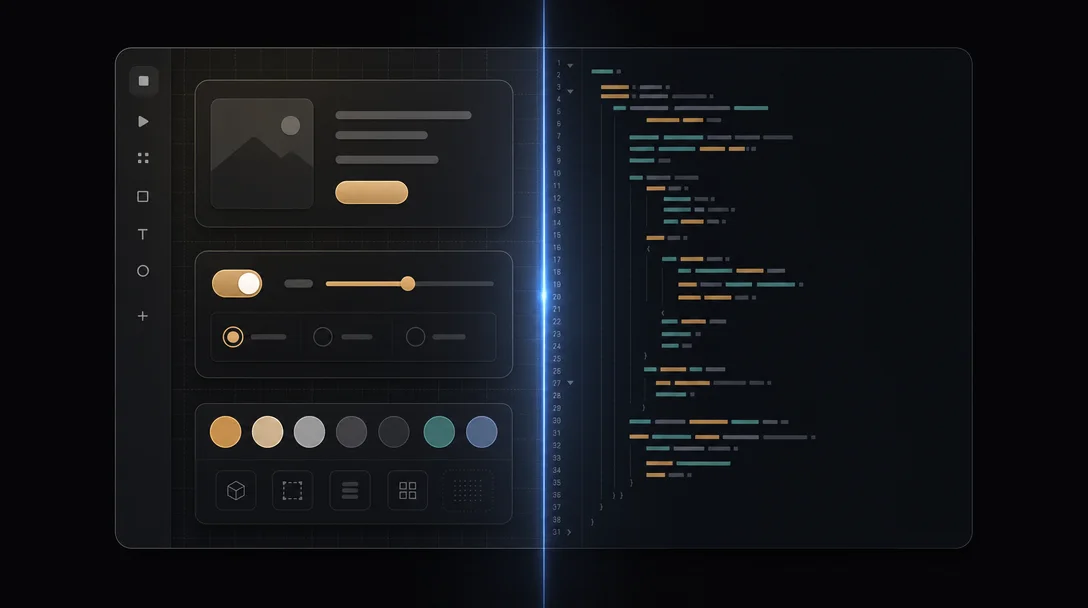
Figma Make: the Live Seam pattern
Figma Make treats the boundary between the visual canvas and the code panel as a synchronized, bidirectional surface — not a divider. This teardown covers the three-zone layout, real-time seam editing, diff visualization for diverged representations, component pinning, and state-scoped editing. Named pattern: Live Seam.

Every tool that tries to bridge visual design and code faces the same structural problem: the two representations are not the same thing. A button in Figma is a rectangle with constraints and a fill variable. A button in code is a component with props, a style sheet, and behavior. Keeping them synchronized is hard. Deciding which one the user is actually editing at any given moment is harder.
Most tools resolve this by picking a side. Design tools export to code (one direction). Developer tools import from design (one direction). The "handoff" is a ceremony where the representations are briefly reconciled and then allowed to drift.
Figma Make, announced in closed beta in May 2026, refuses that compromise. 1 Its foundational UI decision is to treat both representations as simultaneously live — and to make the boundary between them the active surface of the editor, not a neutral divider.
The screen anatomy
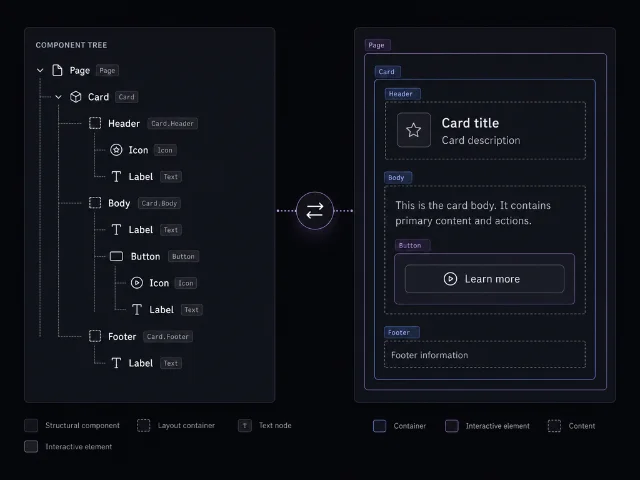
Figma Make opens as a three-zone layout. 1 Left rail: the component tree. Center: the live visual canvas. Right panel: the code editor.
The left rail deserves attention before anything else. It isn't a layer list. Figma's layer list organizes by visual stacking order — which layer is in front. The component tree in Make organizes by component identity: which component contains which children, and which component instance maps to which source component definition. The organizing principle has shifted from visual geometry to semantic structure.
This matters because the center canvas and the right code panel are both rendering the same tree. When you click a node in the component tree, both panels respond simultaneously. The canvas scrolls and highlights the element. The code panel scrolls to the corresponding JSX (or equivalent) and highlights the relevant lines. Selection is not "select in canvas" or "select in code" — it is "select in the shared model," and both views follow.
The seam as interaction surface
The visual divider between the canvas and the code panel is not decorative. It's a synchronization seam — and Figma Make exposes it as an interactive element rather than hiding it as implementation detail. 1
Dragging the seam resizes the two panels, which is table stakes. What makes Make's implementation non-obvious is what happens when you edit on either side.
If you change a spacing value on the canvas — drag a gap, resize a component — the code panel updates the corresponding CSS property in real time. The code panel doesn't reload; the specific line changes and gets highlighted briefly. The seam hasn't moved, but the right side has tracked the left.
If you change a prop in the code panel — rename a variant, change a size token — the canvas updates. Not on next save. Not on export. On keystroke, with a brief debounce.
This bidirectionality is the core product bet. Figma's hypothesis is that the workflow where a designer exports to code and then a developer works only in code has a critical failure point: the moment the developer changes the code, the Figma file becomes stale. The canonical source of truth has already drifted. Make bets that if you keep both panels live, neither representation goes stale because they're both reading from the same internal model.
Diff visualization: the seam under tension
The interesting question is what happens when the two sides disagree. If a developer has edited code outside Figma Make — in their local IDE, in a PR, in a paired coding session — and those changes haven't been reflected in the visual model, the seam is under tension. The representations have diverged.
Make surfaces this as an explicit diff state. 1 When external code changes are pulled in, affected components in the component tree get a diff indicator — a subtle badge or highlight, not a red error state. More like a "needs review" marker. The canvas renders the current visual state. The code panel renders the current code state. They may not match.
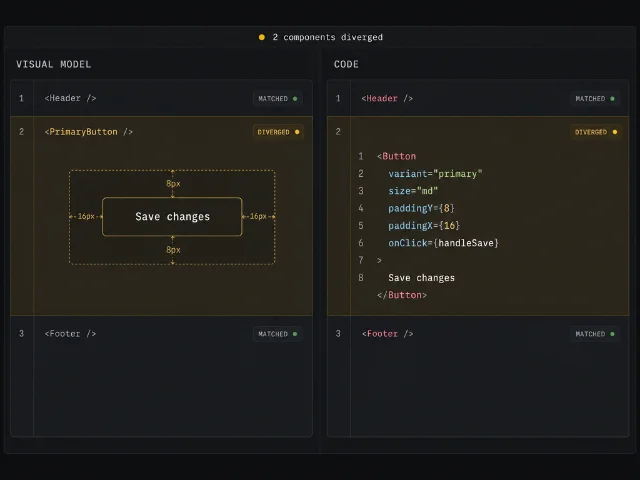
The resolution UI is minimal and deliberate. You can accept the code change (the visual model updates to match). You can revert the code change (the code updates to match the visual model). Or you can leave both and work forward, knowing the seam is flagged. The diff state doesn't block editing in either panel.
This is a strong opinion about handoff and ownership. Most visual-to-code tools resolve conflicts by declaring a winner: "the design file is the source of truth" or "the code is the source of truth." Make doesn't declare a winner upfront. It surfaces the divergence and asks the human to adjudicate — while allowing work to continue on both sides during the adjudication. The seam is live even when it's tense.
Component pinning: managing what the seam can touch
Not every component should be bidirectionally editable. Design systems typically have a core layer of primitive components — buttons, form inputs, typography scales — that have been carefully engineered and should not be casually restyled from a canvas drag. 1
Make handles this with component pinning. A pinned component is read-only on the visual side. You can see it on the canvas, inspect its properties, use instances of it in compositions — but dragging a dimension on canvas won't rewrite its underlying code. The code panel for a pinned component is also read-only. Changes have to go through the design system's own source.
The visual treatment of pinned components in the canvas is intentional: they render with a faint distinguishing border, different from the active-editable state. The difference is subtle enough not to interrupt composition work, but visible enough that a designer doesn't accidentally drag-resize a shared button and wonder why nothing changed. The affordance matches the constraint.
Pinning is not the same as locking in Figma's current layer model. A locked layer can't be accidentally moved but can be unlocked. A pinned component is constrained by semantic intent — it represents a component whose contract is owned elsewhere. The interaction model reflects the engineering reality.
State switching: how the seam handles component variants
Components with multiple states — hover, active, disabled, error — present a specific challenge for a synchronized editor. The visual state you're seeing in the canvas is one state. The code contains all states. If you're looking at the hover state on canvas and editing a color, which state's code gets updated?
Make's answer is an explicit state selector in the top toolbar, scoped per selected component. 1 When you select a component on canvas, the toolbar shows the current state rendering — Default, by default. Switching to Hover updates the canvas to render the hover appearance, and the code panel scrolls to and highlights the hover-state code block.
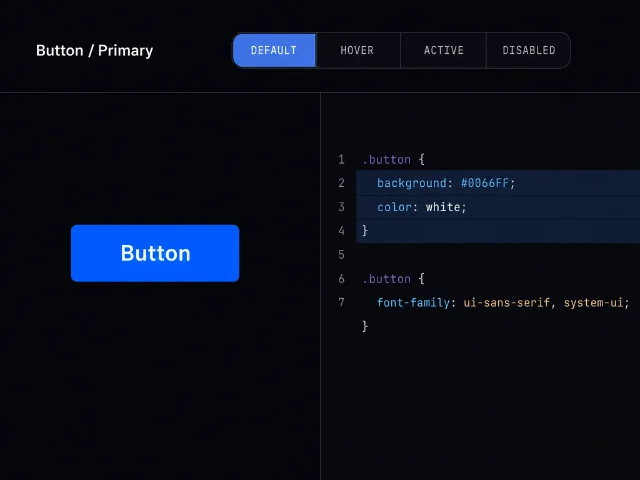
Edits to the canvas in Hover state are scoped to the hover state's visual rules. Edits to the code panel in Hover state are scoped to the corresponding code block. The two panels stay synchronized within state — neither panel is rendering a different state from the other.
This is a more specific version of the same core decision: the seam is shared state. Both panels always agree on what is being edited, because the component tree selection and the state selector together define the edit context, and both panels read that context from the same place.
The reusable pattern: Live Seam
Named pattern for today: Live Seam.
Live Seam is the design decision to expose the boundary between two live, independently-valid representations of the same underlying artifact as a synchronized, bidirectional interaction surface — rather than treating that boundary as a read-only viewport divider or a one-way export gate.
The key word is live. A read-only preview panel with a "copy code" button is not a Live Seam; it's a one-way projection. An export pipeline is not a Live Seam; it's a ceremony. A Live Seam means that edits on either side propagate to the other side in real time, that selection crosses the boundary (clicking in one panel locates the same element in the other), and that divergence is surfaced explicitly rather than silently allowed to accumulate.
Three conditions for Live Seam to be applicable:
The artifact has two genuinely valid representations that serve different workflows. Code and visual design are the obvious case — developers work in code, designers work in visual tools, both representations are first-class. A document editor that shows raw Markdown and a rendered preview is a weaker case because most users only care about one side. Live Seam adds cost (synchronization infrastructure, diff UI, conflict resolution); it only earns back that cost when both representations are genuinely in play.
The representations have enough structural correspondence to support reliable mapping. A Figma component maps to a React component because both have a clear concept of identity, children, and properties. The mapping is not perfect — code has behavior, Figma has visual overrides — but it's structurally coherent enough for bidirectional sync. If the two representations share no common model, the seam can't be kept live; you can only export (lossy, one-directional) or generate fresh (severed, not synchronized).
Users from both workflows need to stay in the same session. If designers and developers work at different times in different tools and reconcile asynchronously via a handoff document, Live Seam adds no value. The pattern earns its complexity when both parties are actively editing — in a design sprint, in a pairing session, in a shared review — and the cost of context-switching to a separate tool for every change is measurable.
PM takeaway: Live Seam is applicable wherever your product involves two representations of the same data that are currently kept synchronized by manual process — and where that manual synchronization is the main cause of drift, rework, or coordination overhead. Database schema editors and ORM model editors. API spec editors and mock server configs. Marketing asset templates and the live campaign configurations that instance them. The pattern is not "show both views in the same window." The pattern is "make the boundary between the two views a first-class interaction surface, with explicit synchronization state and divergence handling." The window layout is table stakes. The seam behavior is the product decision.
The three design decisions in Make that are hardest to copy — component tree as organizing spine, state-scoped editing, and pinned components with enforced read-only constraints — are all downstream of the same root choice: declare the seam live, then reason carefully about what "live" means when things don't perfectly align. Every ambiguous case (drift detection, state switching, locked design system components) gets resolved by extending that one root decision rather than by adding a separate mechanism. That's the tell of a coherent design: the edge cases fit the pattern instead of fighting it.
Cover image: AI-generated diagram
围绕这条内容继续补充观点或上下文。