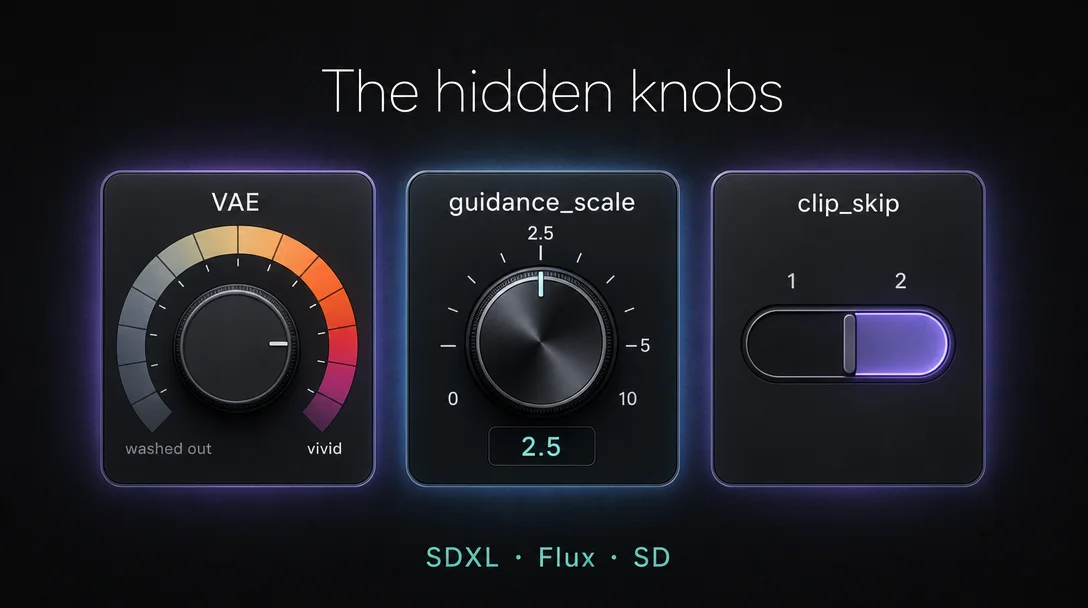
Hidden knobs: VAE, guidance_scale, and clip_skip
VAE, guidance_scale, and clip_skip are the three parameters most users leave at defaults — each one has a correct value per model family, and getting any wrong causes specific, diagnosable artifacts. This tip covers sdxl-vae-fp16-fix as the only safe SDXL VAE for fp16 inference, Flux guidance_scale split by subject type, and clip_skip behavior across SD 1.5 / SDXL / SD3 / Flux — with a unified cheat sheet.

VAE,
guidance_scale, and clip_skip each have a correct value per model family. Get any one of them wrong and you'll see washed-out color, plastic-looking skin, or degraded detail — without touching a single prompt word. Here's the per-family breakdown and a copy-paste cheat sheet at the end.VAE selection for SDXL: one file fixes the NaN problem
VAE (Variational Autoencoder) is the component that decodes the latent image into actual pixels. The wrong one produces specific, diagnosable artifacts.
The original
stabilityai/sdxl-vae generates NaN errors when running in fp16 precision — the network's internal activation values exceed what 16-bit floats can represent, so you get black regions, white blowout, or a fully corrupted image. 1 Most consumer GPUs run fp16 by default, which means this affects the majority of SDXL users.The fix:
madebyollin/sdxl-vae-fp16-fix. The author rescaled the network's internal weights to keep activations within fp16 range. Independent benchmark by Kubuxu (2023-07-30) puts the quality loss at effectively zero: LPIPS 0.056 vs 0.055 for the original fp32, SSIM 0.73 in both cases. 2 Speed roughly doubles, VRAM roughly halves, compared to the --no-half-vae workaround that forces the VAE to run in fp32.
Symptom → diagnosis table:
| Visual symptom | Likely cause |
|---|---|
| Purple or washed-out tones | Missing VAE or wrong VAE for the model family |
| Black patches / white blowout | SDXL-VAE running in fp16 (NaN) |
| Blurry detail despite high step count | VAE decode precision too low |
| Oversaturated / burnt colors | SD 1.5 VAE (ft-mse-840000) used on SDXL |
"If your image looks purple or washed out, the VAE is your problem 99% of the time," writes Angry Shark Studio's ComfyUI troubleshooting guide. 3
Cross-family compatibility is absolute. SDXL-VAE was retrained from scratch; its latent space has nothing in common with the SD 1.x/2.x VAE. madebyollin is direct: "SDXL-VAE was retrained from scratch, and it's not compatible with SD-VAE." 4 Mixing them — SDXL encode + SD decode, or vice versa — produces garbled output, not a graceful degradation. The same applies in reverse:
ft-mse-840000 belongs to SD 1.5 and should never be loaded into an SDXL workflow. 5 Flux has a built-in 16-channel VAE that is not user-replaceable. 6Installation: ComfyUI — drop
sdxl.vae.safetensors into ComfyUI/models/vae/, add a Load VAE node, connect to VAE Decode. 7 A1111 — place in stable-diffusion-webui/models/VAE/, select under Settings → Stable Diffusion → VAE, remove --no-half-vae if present. Diffusers — AutoencoderKL.from_pretrained("madebyollin/sdxl-vae-fp16-fix", torch_dtype=torch.float16). 1If a checkpoint already has a baked VAE and outputs look correct, leave it alone — loading an external VAE overrides what's baked in. 3
Flux guidance_scale per subject type: lower isn't always better
Before tuning, understand what this parameter actually does on Flux. Traditional CFG runs the denoising step twice — once with your prompt, once without — then amplifies the gap. Flux doesn't do that. It's guidance-distilled: the guidance behavior was baked into the weights during training, so
guidance_scale is a numeric hint to the model rather than a real two-pass computation. 8Because of distillation, the effective range is narrow. Moving from 3.5 to 7 on Flux dev doesn't produce the dramatic over-sharpening you'd see on SD 1.5 at CFG 15, but it does meaningfully affect how much the model sticks to your exact prompt versus interpreting it. 8
The practical split by subject type:
| Subject type | Recommended guidance_scale | Rationale |
|---|---|---|
| Portraits / realistic skin | 1.5–2.5 | Lower lets the model draw on its training priors for skin texture; the default 3.5 over-optimizes and produces the "Flux plastic" look |
| Artistic / painterly styles | 1.2–2.0 | Creative interpretation needs room to breathe; default is "way too high" for art |
| Strict prompt adherence (product, technical) | 5–8 | Forces close prompt following; trade some diversity for accuracy |
Community finding on portraits: r/FluxAI user u/AwakenedEyes reports "Flux dev in particular uses a distilled cfg scale and has more realistic skin around 2.5 than the default 3.5." 9 On the artistic side, r/StableDiffusion user u/JBulworth tested oil-painting and watercolor styles: "Every image here has been generated with a FluxGuidance between 1.2 and 2" — higher values push output back toward the model's photorealistic default. 10 These are community observations rather than controlled benchmarks.
The fal.ai Flux 2 Klein official guide formalizes the split: "Lower values grant the model more interpretive freedom for artistic concepts. Higher values enforce stricter prompt adherence for product photography or technical illustrations." [[cite:11|fal.ai — Flux 2 [klein] Prompt Guide|[https://fal.ai/learn/devs/flux-2-klein-prompt-guide]]](https://fal.ai/learn/devs/flux-2-klein-prompt-guide]])
Availability varies by endpoint:
| Flux variant | guidance_scale available? | Default |
|---|---|---|
| Flux.1 [dev] | ✅ | 3.5 |
| Flux.1 [schnell] | ❌ | — (1–4 steps only) |
| Flux Pro v1.1 / Ultra | ❌ | — |
| Flux 2 Dev | ✅ | 2.5 (range 0–20) |
| Flux 2 Flex | ✅ | 3.5 (range 1.5–10) |
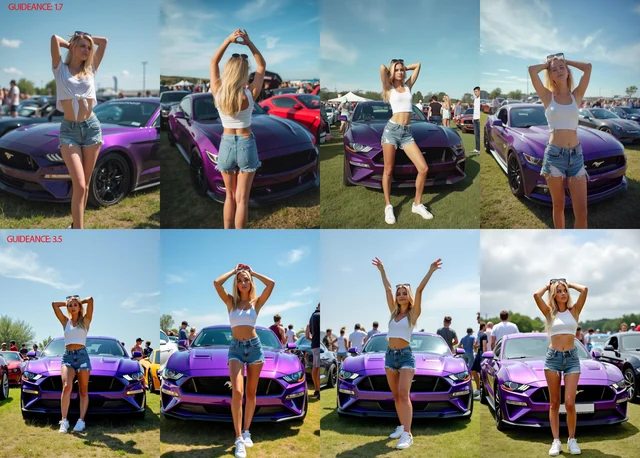
One edge case: if you've done a full finetune of Flux with
guidance_scale=1.0 during training, inference at CFG=1 produces washed-out output — CFG=4 restores normal results. LoRA training at guidance_scale=1 doesn't have this issue. 11clip_skip across model families: one setting is almost always wrong
clip_skip controls which layer of the CLIP text encoder feeds into the diffusion process. SD 1.5 uses a 12-layer CLIP ViT-L/14. The default clip_skip=1 uses all 12 layers — the most precise semantic output, tightest prompt adherence. clip_skip=2 exits one layer early (layer 11), producing a slightly coarser but more stylized interpretation. 12The
clip_skip=2 convention traces back to a specific historical event: the 2022 NovelAI model leak. That model was trained with clip_skip=2, and every anime-style fine-tune derived from it inherited the same assumption. For those models, clip_skip=2 is correct. For everything else on SD 1.5, clip_skip=1 is the right default. 12For SDXL, the correct value is always 1 — and the UI situation is confusing:
- A1111 (original): doesn't apply
clip_skipto SDXL at all; the setting is silently ignored - Forge: the SDXL clip_skip slider is what lllyasviel calls a "fake slider" — "No matter what value you set, it does not change anything." 13
- SD.Next: actually applies
clip_skipacross all model families, so setting it to 2 on SDXL genuinely degrades output. Supports fractional values likeclip_skip=1.5for fine-grained control. 12
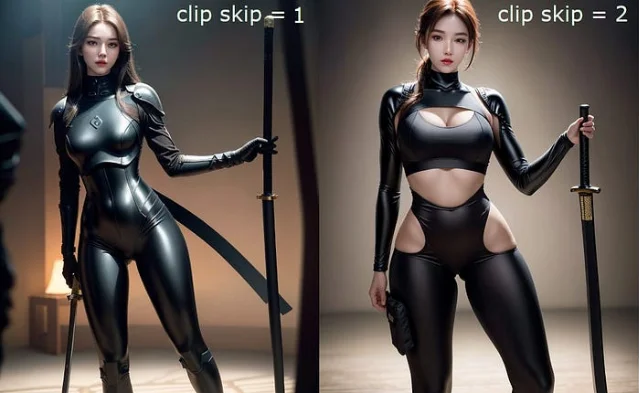
clip_skip=1 (left) vs clip_skip=2 (right) on an SD 1.5 anime-derived model — same prompt. The right result reflects the NAI training assumption; on a realistic SD 1.5 model, that same shift usually reads as softened detail rather than a stylization improvement. 14For SD3 and SD3.5,
clip_skip exists in the Diffusers API and applies to the two CLIP encoders. In practice, its effect is minimal because T5-XXL carries the dominant semantic load in SD3's triple-encoder setup — CLIP is a secondary signal. 15 For Flux, clip_skip can technically be applied to the CLIP portion, but the impact is negligible given T5-XXL's weight. Keep both at 1 and don't use them as a tuning lever for these architectures. 12SD 2.x uses OpenCLIP, not the original CLIP —
clip_skip doesn't apply at all.One more interaction worth flagging: if you're using a LoRA that was trained at
clip_skip=2, running inference at clip_skip=1 may underperform. The LoRA's learned associations are tied to a specific layer cutoff. Check the LoRA model card for the training config, and test both values if the output looks off. 16Cross-tool cheat sheet
| Parameter | SD 1.5 | SD 1.5 anime (NAI-derived) | SDXL | SD3/SD3.5 | Flux dev | Flux 2 Dev |
|---|---|---|---|---|---|---|
| VAE | vae-ft-mse-840000 | kl-f8-anime2 | sdxl-vae-fp16-fix | built-in (no replace) | built-in (no replace) | built-in (no replace) |
| guidance_scale / CFG | 7 (typical 5–9) | 7 | 7 (typical 5–8) | SD3: 7.0; SD3.5: 3.5 | 3.5 default; lower for skin (1.5–2.5) or art (1.2–2) | 2.5 default; 5–8 for strict |
| clip_skip | 1 | 2 | 1 (enforced) | 1 (T5 dominates) | 1 (negligible effect) | 1 (negligible effect) |
Midjourney: none of these parameters are user-accessible. VAE and text encoding are internal; guidance is handled via the
--stylize and --chaos flags, not guidance_scale. clip_skip has no equivalent.Cover image: AI-generated illustration
参考来源
- 1madebyollin — sdxl-vae-fp16-fix model card
- 2Kubuxu — independent benchmark, HuggingFace Discussion #7
- 3Angry Shark Studio — 10 ComfyUI Mistakes Beginners Make
- 4madebyollin — HuggingFace Discussion #6
- 5madebyollin — Notes on SD VAE (GitHub Gist)
- 6ZSky AI — 9 Common AI Image Artifacts: Spot & Fix
- 7ComfyUI Dev — sdxl_vae.safetensors documentation
- 8Runware — CFG Scale: Balancing creativity and prompt adherence
- 9r/FluxAI — Realistic photograph: how to get away from the flux-finish
- 10r/StableDiffusion — FLUX.1 is actually quite good for paintings
- 11kohya-ss/sd-scripts — CFG with full finetuning of Flux, Issue #1527
- 12SD.Next wiki — CLiP Skip
- 13Forge GitHub — Question about Clip Skip, Issue #1393
- 14Medium — CLIP Skip with the Diffusers Library
- 15HuggingFace Diffusers — Stable Diffusion 3 pipeline
- 16Graydient AI — What is Clip Skip and what does it do?
围绕这条内容继续补充观点或上下文。