openai.github.io
RunConfig — OpenAI Agents SDK 官方 API 参考
RunConfig dataclass 的完整字段定义,涵盖 ToolExecutionConfig、ToolErrorFormatterArgs、ModelInputData 等辅助数据类。
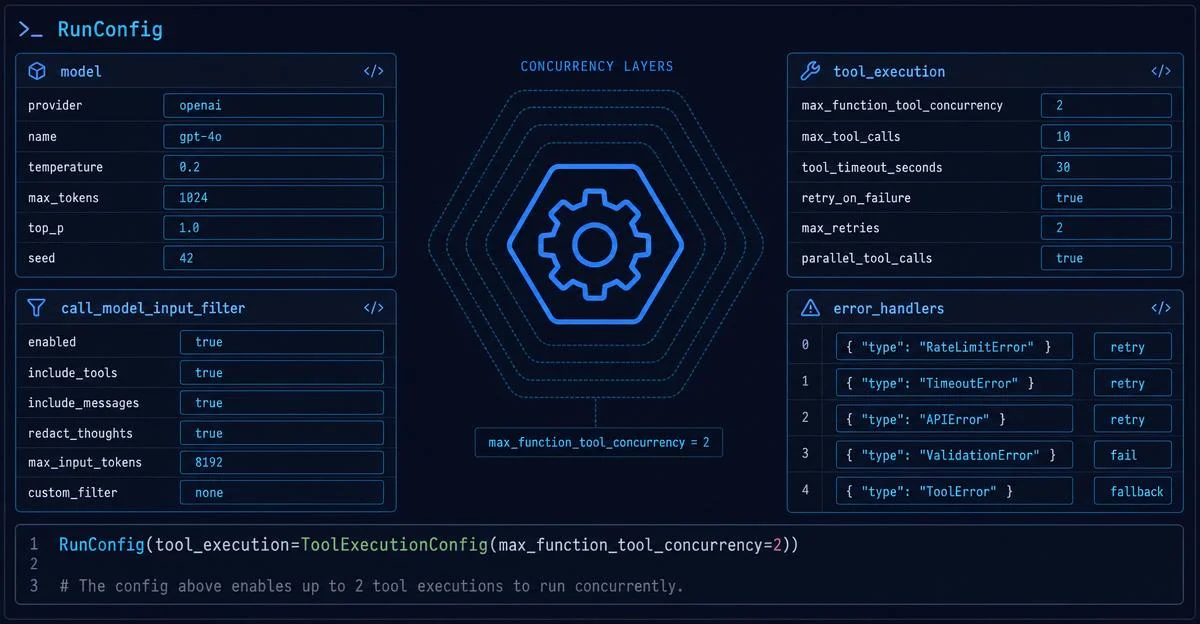
RunConfig 是 SDK 里最被低估的对象——20 多个字段涵盖五大功能域。本期完整拆解工具并发限流(ToolExecutionConfig.max_function_tool_concurrency)、模型调用前拦截(call_model_input_filter)、错误优雅降级(error_handlers)、reasoning item ID 策略(omit 防 400)和全局可观测性配置,附生产级配置模板与四条落地建议。

研究速览
Runner.run() 跑 Agent,但有没有想过:要限制工具并发、在模型调用前偷偷改一下输入、让 max_turns 到了不报错而是优雅降级——这些都该怎么做?RunConfig。RunConfig 是 SDK 里最被低估的对象。它不管 Agent 的逻辑,只管「这次运行怎么跑」。20 多个字段涵盖五大功能域:工具执行、模型输入拦截、错误处理、推理项策略、可观测性与会话设置。本期逐域拆解,重点放在几个最新加入却最少被讲到的字段。run_config 参数:from agents import Agent, RunConfig, Runner
result = await Runner.run(
agent,
"请执行任务",
run_config=RunConfig(
workflow_name="my-workflow",
tracing_disabled=False,
)
)run_config 时,Runner 自动使用全默认值。传了就覆盖对应字段,不影响其他字段。RunConfig 是 dataclass,所有字段默认 None(布尔字段有明确默认值),只需填你关心的。from agents import Agent, RunConfig, Runner, ToolExecutionConfig
result = await Runner.run(
agent,
"同时调用多个工具",
run_config=RunConfig(
tool_execution=ToolExecutionConfig(max_function_tool_concurrency=2),
),
)max_function_tool_concurrency:整数或 None。默认 None——模型一轮里发出几个 function tool call,SDK 就同时跑几个。设成 2 就意味着最多同时运行 2 个本地函数工具,其余排队等待。ModelSettings.parallel_tool_calls 是两回事,必须分清楚:| 配置 | 管什么 | 作用层 |
|---|---|---|
parallel_tool_calls | 模型是否允许在单次响应里发出多个 tool call | 模型侧(请求参数) |
max_function_tool_concurrency | SDK 接到多个 tool call 后,同时执行几个 | SDK 侧(运行时) |
tool_error_formatter 可以改写这条消息:from agents import RunConfig, ToolErrorFormatterArgs
def format_rejection(args: ToolErrorFormatterArgs[None]) -> str | None:
if args.kind == "approval_rejected":
return (
f"工具调用 '{args.tool_name}' 被人工拒绝。"
"请提出一个更安全的替代方案,或请求澄清。"
)
return None # 返回 None 用 SDK 默认消息
result = Runner.run_sync(
agent,
"请删除生产数据库",
run_config=RunConfig(tool_error_formatter=format_rejection),
)ToolErrorFormatterArgs 包含 6 个字段:| 字段 | 类型 | 含义 |
|---|---|---|
kind | Literal["approval_rejected"] | 当前只有这一种错误类型 |
tool_type | Literal["function", "computer", "shell", "apply_patch", "custom"] | 工具运行时类型 |
tool_name | str | 工具名称 |
call_id | str | 本次 tool call 的唯一 ID |
default_message | str | SDK 默认会发给模型的消息 |
run_context | RunContextWrapper[TContext] | 当前运行上下文,可读取自定义数据 |
None 就沿用默认。实际上 kind 目前只有 "approval_rejected" 一种,但结构设计留了扩展空间。call_model_input_filter 让你在这个列表真正发出去前,做最后一次干预。1from agents import Agent, RunConfig, Runner
from agents.run import CallModelData, ModelInputData
def drop_old_messages(data: CallModelData[None]) -> ModelInputData:
# 只保留最近 5 条输入,防止 context 过长
trimmed = data.model_data.input[-5:]
return ModelInputData(input=trimmed, instructions=data.model_data.instructions)
result = Runner.run_sync(
agent,
"解释一下递归",
run_config=RunConfig(call_model_input_filter=drop_old_messages),
)CallModelData,必须返回 ModelInputData,它有两个字段:input:list[TResponseInputItem],必填,发给模型的输入列表instructions:str | None,可选,System prompt 内容call_model_input_filter 在 Session 历史已经加载并合并之后运行——你拿到的已经是完整的「历史 + 当前输入」列表conversation_id / previous_response_id),filter 收到的是下一次 Responses API 请求的 payload,可能只是增量 delta,不是完整历史回放call_model_input_filter 管的是「合并之后」的最终输入列表。如果你想自定义「新输入怎么和历史合并」这个过程本身,用 session_input_callback——它在合并阶段执行,早于 call_model_input_filter。两者不冲突,可以同时配置。max_turns 会抛 MaxTurnsExceeded;模型拒绝输出则抛 ModelRefusalError。error_handlers 让你把这两种情况转成受控输出,而不是异常。from agents import (
Agent,
RunErrorHandlerInput,
RunErrorHandlerResult,
Runner,
)
def on_max_turns(data: RunErrorHandlerInput[None]) -> RunErrorHandlerResult:
return RunErrorHandlerResult(
final_output="我在轮数限制内没能完成,请缩小请求范围。",
include_in_history=False, # 这条降级输出不追加到对话历史
)
result = Runner.run_sync(
agent,
"分析这份超长文档",
max_turns=3,
error_handlers={"max_turns": on_max_turns},
)
print(result.final_output)error_handlers 是一个字典,当前支持两个 key:"max_turns" 和 "model_refusal"。model_refusal 的用法更有意思——可以配合 structured output 做兜底:from pydantic import BaseModel
from agents import Agent, ModelRefusalError, RunErrorHandlerInput, Runner
class Recipe(BaseModel):
ingredients: list[str]
refusal_reason: str | None = None
def on_model_refusal(data: RunErrorHandlerInput[None]) -> Recipe:
assert isinstance(data.error, ModelRefusalError)
return Recipe(ingredients=[], refusal_reason=data.error.refusal)
agent = Agent(
name="Recipe assistant",
instructions="返回一份结构化菜谱。",
output_type=Recipe,
)
result = Runner.run_sync(
agent,
"做一道危险的东西。",
error_handlers={"model_refusal": on_model_refusal},
)
# 不抛异常,拿到 Recipe(ingredients=[], refusal_reason="...")include_in_history=False 很关键:如果是降级消息,你通常不希望它出现在下一轮的历史里,避免污染后续对话。o 系列模型的 400 错误克星o1、o3 等带 reasoning 输出的模型在多轮对话中触发的 400 错误。Item 'rs_...' of type 'reasoning' was provided without its required following item.id,那个 id 对应的后续 item 也必须跟着传——但在某些场景下(session 持久化、streamed 后跟 non-streamed、handoff 后的 resume 等),SDK 构建的列表里可能只有 reasoning item 本身,没有配套的 following item。id,只保留内容:result = await Runner.run(
agent,
"一个需要推理的复杂问题",
run_config=RunConfig(reasoning_item_id_policy="omit"),
)| 值 | 行为 |
|---|---|
None 或 "preserve"(默认) | 保留 reasoning item ID |
"omit" | 去掉 reasoning item ID,只保留内容 |
call_model_input_filter 重新注入了 reasoning ID,那照样会带过去。| 字段 | 作用 | 常用场景 |
|---|---|---|
model | 覆盖所有 Agent 的模型 | 统一切换模型版本,不改 Agent 定义 |
model_provider | 模型名称解析器(默认 OpenAI MultiProvider) | 接第三方 LLM 时替换 |
model_settings | 全局覆盖 temperature / top_p 等 | A/B 测试、批量生产时统一参数 |
session_settings | 覆盖 Session 的默认设置(如历史条数限制) | 控制 Session 检索窗口 |
session_input_callback | 自定义新输入与会话历史的合并方式 | 滑动窗口、优先级排序 |
| 字段 | 作用 |
|---|---|
input_guardrails | 对所有运行的初始输入追加全局输入护栏 |
output_guardrails | 对所有运行的最终输出追加全局输出护栏 |
handoff_input_filter | 所有 handoff 的全局输入过滤器(被单个 Handoff.input_filter 覆盖) |
nest_handoff_history | 是否把 handoff 前的历史折叠成单条助手消息(opt-in beta,v0.15.0+,v0.17.1 修复历史丢失 bug) |
handoff_history_mapper | 自定义折叠历史的函数(nest_handoff_history=True 时生效) |
| 字段 | 作用 |
|---|---|
tracing_disabled | 关闭本次运行的 trace |
tracing | TracingConfig:覆盖 trace export 设置(如用不同 API key) |
trace_include_sensitive_data | 是否把 LLM 输入输出写入 trace(默认行为受全局设置影响) |
workflow_name | trace 里的工作流名(默认 "Agent workflow",强烈建议设置) |
trace_id | 自定义 trace ID |
group_id | 链接同一对话多次运行的 trace,填对话 thread ID |
trace_metadata | trace 里附带的额外 key-value 元数据 |
run_config = RunConfig(
    workflow_name="customer-support-v2",
    group_id=session_id,              # 把同一用户会话的多次 run 串成一组 trace
    tool_execution=ToolExecutionConfig(
        max_function_tool_concurrency=3,  # 限制第三方 API 并发
    ),
    call_model_input_filter=trim_history_to_budget,  # 按 token 预算裁剪历史
    error_handlers={
        "max_turns": graceful_max_turns_fallback,    # 优雅降级
        "model_refusal": structured_refusal_handler, # 结构化拒绝消息
    },
    reasoning_item_id_policy="omit",  # 如果用 o 系列模型,防 400 错误
)run_config = RunConfig(
workflow_name="debug-session",
trace_include_sensitive_data=False, # 不把 LLM 输入输出写进 trace
tracing_disabled=False, # trace 仍然开着,只是不带敏感内容
)workflow_name 必填。生产里跑了几十个不同 Agent 流,如果全都是默认的 "Agent workflow",trace 面板里根本没法区分。一行代码,trace 可读性直接上一个档次。max_function_tool_concurrency 设多少要结合你调用的 API 的速率限制来算,不是越低越好——限太死会把并行化优势全部消掉。先跑压测,看第三方服务的 429 频率,再决定值。reasoning_item_id_policy="omit" 是 o 系列模型的标配。只要你的 Agent 会跑多轮(有 handoff / session / 历史管理),就默认加上,能省掉很多奇怪的 400 排查时间。它只影响 SDK 自动构建的 follow-up input,副作用极低。call_model_input_filter 不要替代 Session 机制。它适合做最后一道 token 预算卡关,或在调用前注入动态系统上下文。如果你想管的是「历史怎么存怎么取」,那是 Session + session_input_callback 的活。RunConfig dataclass 的完整字段定义,涵盖 ToolExecutionConfig、ToolErrorFormatterArgs、ModelInputData 等辅助数据类。
官方文档完整介绍 RunConfig 各配置域的使用方式,包含 call_model_input_filter、tool_execution、error_handlers 代码示例。
控制 reasoning item ID 的处置策略:preserve(保留)或 omit(去除),用于解决 o 系列模型多轮对话中的 Responses API 400 错误。
围绕这条内容继续补充观点或上下文。