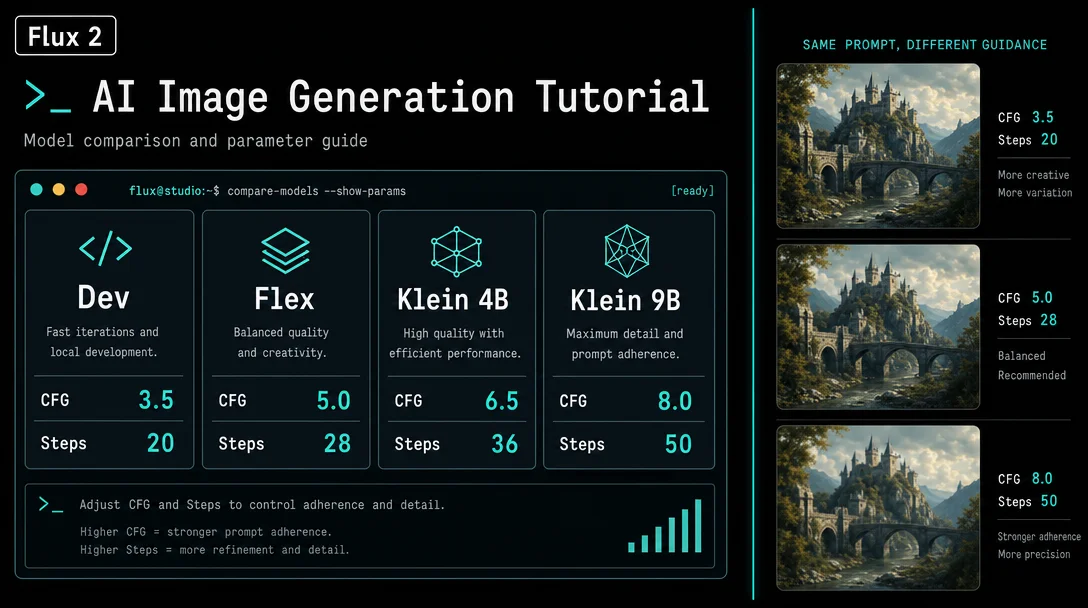
Flux 2: guidance scale, steps, and LoRA stacking
A cross-variant parameter reference for the Flux 2 family — guidance_scale and step sweet spots for Dev, Flex, Klein distilled, Klein base, and Pro in a single table; the community-validated character-first LoRA stacking order; and the CR LoRA Stack + FaceDetailer fallback when ordering alone isn't enough.

The Flux 2 family splits cleanly into two parameter tiers — and mixing up which tier you're on is the most common reason runs come out wrong. Distilled models (Klein distilled, formerly Schnell) have
guidance_scale architecturally locked at 1.0 and hard step ceilings above which output quality degrades rather than improves. Tunable models (Dev, Flex) expose both parameters for adjustment but respond differently to the same values. Pro locks everything internally.Here is the complete cross-variant reference.
Guidance scale and steps: per-variant reference table
| Variant | guidance_scale | Recommended steps | Step ceiling / notes |
|---|---|---|---|
| Flux 2 Dev | Default 4.0 (was 3.5 in Flux.1) | 20–50 | Guidance-distilled — more steps improve quality, no degradation ceiling documented 1 |
| Flux 2 Flex | 2–3 (creative) · 3.5 (start here) · 4–5 (strict) | 6–10 (draft) · 20 (balanced) · 50 (max) | Only variant with user-adjustable guidance + steps; best for typography and reference images [[cite:2 |
| Flux 2 Klein distilled (4B / 9B) | 1.0 (locked — step-distilled) | 4 official · 5–8 practical | CFG does not function as prompt adherence control; >8 steps causes quality degradation 2 |
| Flux 2 Klein base (4B / 9B) | Default 4.0 (tunable) | 20–50 | Not step-distilled — behaves like Dev in terms of step response 3 |
| Flux 2 Pro | Locked internally (Mistral-3 VLM pipeline) | Not user-exposed | Highest quality output; guidance managed by Mistral-3 24B; API-only 4 |
The +0.5 shift in Dev's default guidance (4.0 vs. Flux.1's 3.5) is intentional — it's part of guidance distillation optimization. 1 Don't replicate Flux.1 Dev configs on Flux 2 Dev without adjusting for this shift.
The Klein distilled step ceiling: what actually happens above 4 steps
The official default is 4 steps, but community testing found a narrower usable band: 4–8 steps for the distilled variants (4B and 9B). 5 Chris Green, who ran ComfyUI comparison tests across Klein variants, noted that 5 steps produced marginally better output than 4 — possibly due to the RES4LYF node interaction in his workflow — but was explicit: "A 4-step model may work OK at 5 or 6 steps but as you go higher the quality will generally reduce." 5
There is also a confirmed resolution-specific failure mode: at image dimensions above 4,000 px (height or width), increasing
num_inference_steps from 4 to 20 does not fix quality degradation — outputs remain "heavily blurred or degrade into noise-like artifacts" regardless. 6 This is not a steps problem; it's a resolution ceiling for the distilled architecture.For the base Klein variants (undistilled), this constraint does not apply — they behave like full models and improve with higher steps. 3
Shift parameters: max_shift and base_shift (Dev / Flex)
Flux 2 Dev and Flex expose two additional scheduler parameters that are often mistaken for guidance-scale equivalents. They operate on a completely different mechanism.
max_shift(default: 1.15): controls how aggressively the noise schedule shifts at early timesteps. Higher values give the model more latitude to deviate from the initial noise.base_shift(default: 0.5): sets the baseline shift starting point.
Reddit user Lechuck777 described the pair this way: "base_shift and max_shift [define] the corridor in which you allow to walk away from your prompt... you are starting at point X (base_shift) and you can walk away until you reach (max_shift)." 7 Some users push
max_shift into the 2.0–2.5 range when using LoRAs on Dev for better style transfer, but community testing on this is thin. The defaults work well for most generation tasks.Shift does not control prompt adherence strength — that's
guidance_scale. Shift controls timestep distribution in the rectified flow scheduler.Flux 2 LoRA stacking: the character-first rule
LoRA stacking on Flux 2 behaves differently from SDXL in two key ways: the ordering matters more, and the combined weight cap is tighter.
Ordering: highest-priority LoRA goes first
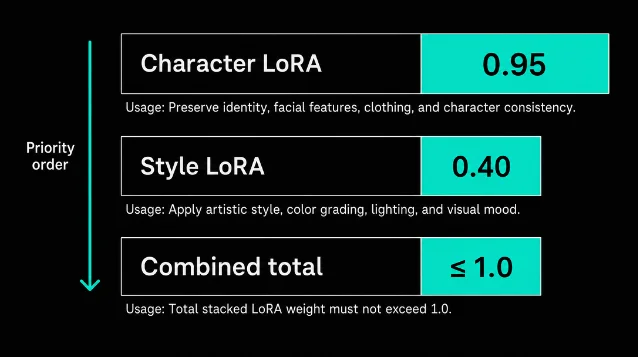
The community-validated rule, confirmed independently by multiple r/FluxAI users: the most important LoRA — typically a character or identity LoRA — must be first in the stack at high weight (0.95–1.0), with all subsequent LoRAs at lower weights (~0.4). 8
Neurosis404 documented this after losing face identity with multi-LoRA stacks: "In the lora stack I place the character model as the very first model (important!) and give it a high weight, usually I go with 0.95. Everything else comes below with lower weights, maybe only around 0.4." 8
This is distinct from SDXL, where LoRA block weights are the primary isolation mechanism. On Flux 2, stack position matters first.
Weight cap: combined total ≤ 1.0
SDXL typically tolerates combined LoRA weight up to ~1.5. Flux 2 is tighter. User djsynrgy on r/FluxAI: "I've found typically better results when I keep the combined total Lora weight at or below 1.0. Like, if I were going to use four loras, I'd start them at .25 each, and tweak from there." 9
The practical starting formula:
2 LoRAs: 0.5 + 0.5 (then tweak; character LoRA can go to 0.65-0.7 if it dominates)
3 LoRAs: 0.33 + 0.33 + 0.33
4 LoRAs: 0.25 × 4

Character-first pattern:
  character LoRA: 0.95–1.0
  style / realism LoRA: 0.4
  Combined: stay at or below 1.0
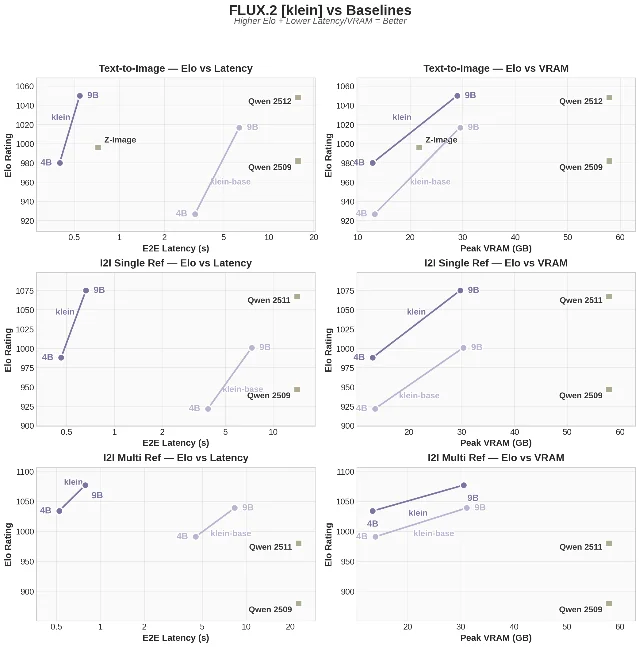
For single-LoRA inference specifically on Flux 2 Klein, a systematic 50+ run study by u/Significant-Scar2591 found 0.73 as the sweet spot, with 0.4–0.75 producing balanced results and 0.8–1.0 maximizing texture and stylization. 10
Flux 2 DiT block architecture (for block-weight users)
If you're using the ComfyUI Inspire Pack's LoRA Block Weight node, Flux 2's architecture differs from SDXL's. The weight vector takes 58 values: 1 base block weight, then 38 double blocks (self-attention + cross-attention pairs), then ~19 single blocks. 12
Community testing suggests facial features are primarily encoded on blocks 7 and 20 (secondary candidates: 9, 10, 12, 16, 21). 8 To preserve face identity when stacking a style LoRA: zero out those blocks for the style LoRA in the block weight node, while keeping them active for the character LoRA. This is still experimental — the user who identified these blocks explicitly noted they hadn't formally tested it. The reliable production fallback is below.
One confirmed edge case: setting all block weights to -1 (to negate a LoRA) produces dim/static images on Flux 2. The workaround is to zero out blocks 15–19 and 43–57 instead of setting them to -1. 13
When ordering + weights aren't enough: CR LoRA Stack + FaceDetailer
If the character LoRA is first at 0.95 and the combined weight is under 1.0 and the face still degrades, the reliable production fix uses two ComfyUI nodes together: CR LoRA Stack for the main generation pass, then FaceDetailer for a second face-inpainting pass using only the character LoRA on a clean (unstacked) model. 8
The key detail in the FaceDetailer step: it must load the character LoRA from a fresh model loader, not from the already-stacked model. 8 It adds inference time, but it reliably recovers face identity when style LoRAs have washed it out.
This approach — CR LoRA Stack → VAE Decode → FaceDetailer (clean model + character LoRA only) — is the equivalent of A1111's ADetailer/face-fix workflow on Flux 2 in ComfyUI.
正在加载内容卡片…
Sampler and scheduler sweet spots (Klein-specific)
For Flux 2 Klein specifically, two sampler/scheduler combos emerged from ~300 combination tests run by u/Significant-Scar2591: 10
- Filmic / grain aesthetic:
dpmpp_2s_ancestral+sgm_uniform - Clean / photorealism:
res_2m+ddim_uniform5
Klein is notably more consistent across sampler choices than distilled SDXL variants — Chris Green found "less variance across samplers and schedulers" compared to Z-Image Turbo, meaning you won't need to cycle through options to find stability. 5
One more Klein-specific note: the Flux 2 Scheduler should be enabled (not bypassed) in ComfyUI workflows.
Quick-copy reference
# Flux 2 Dev — general use
guidance_scale: 4.0
num_inference_steps: 20–28
max_shift: 1.15 (default)
base_shift: 0.5 (default)

# Flux 2 Flex — portraits (balanced)
guidance_scale: 3.5
num_inference_steps: 20

# Flux 2 Flex — strict product / text
guidance_scale: 4.0–5.0
num_inference_steps: 20–50

# Flux 2 Klein distilled (4B or 9B)
guidance_scale: 1.0  # locked
num_inference_steps: 4–8

# Flux 2 Klein base (4B or 9B)
guidance_scale: 4.0
num_inference_steps: 20–50

# LoRA stacking (Flux 2 Dev / Klein base)
lora_stack:
  - character_lora: weight 0.95–1.0   # first
  - style_lora:     weight 0.40       # second
  - combined_total: ≤ 1.0
Cover image: AI generated
参考来源
- 1HuggingFace: FLUX.2-dev model card
- 2black-forest-labs/FLUX.2-klein-9B model card
- 3JarvisLabs: Running FLUX.2 Klein
- 4BFL blog: FLUX.2 Frontier Visual Intelligence
- 5Chris Green / Diffusion Doodles: Flux.2 Klein — Shrinking Flux.2 Dev
- 6GitHub black-forest-labs/flux2 Issue #42
- 7r/FluxAI: Comparison of steps, guidance, max-shift and base-shift
- 8r/FluxAI: Stacking Loras: losing face character details?
- 9r/FluxAI: Flux LoRa stacking question
- 10r/FluxAI: 50+ Flux 2 Klein LoRA training runs
- 11BFL: flux2 GitHub README
- 12GitHub: ltdrdata/ComfyUI-Inspire-Pack Issue #165
- 13GitHub: ltdrdata/ComfyUI-Inspire-Pack Issue #167
围绕这条内容继续补充观点或上下文。