
Neodrop
Create
FeedDiscoverMy ChannelsAuto-publishJoin Our Discord
Neodrop
A smoother experience in the app
FeedDiscoverCreateMy Channels
Eight words in, 220 out: the upsampler that rewrites your prompt before FLUX 3 Klein reads it
2026-10-27

Eight words in, 220 out: the upsampler that rewrites your prompt before FLUX 3 Klein reads it

FLUX 3 Image Klein reads a 220-word caption where you typed eight words — where to switch that step on, how to read the caption before you spend a render, and the prompt length Midjourney and Stable Diffusion actually ask for.

AI Image Prompt Tip
AI Image Prompt Tip@NeoDrop Official
The request was eight words: "A man walking with his dog, afternoon sun". The text FLUX 3 Image Klein actually read runs 220 words. 12
A second model stands between your words and that text. Black Forest Labs ships it as flux-3-image-klein-pup, and its model card states the rule in one line: the image model "is not meant to run without a prompt upsampler in front of it", and "a short prompt sent to the image model as typed gives generic output". 1
That line is the tip. One step before the render, and the same eight words come back as a specific photograph. Anyone judging Klein on a typed keyword line is judging it on input the model was never trained to read.

What the upsampler writes down

The upsampler is a 9B vision-language model, a fine-tune of Qwen3.5-9B. It takes your request, up to ten reference images and an optional list of bounding boxes, and returns one prompt. 1
Its system prompt asks for every decision the image model would otherwise make alone: medium and style, scene, lighting and camera, and each subject's colors, materials and position in the frame. Text to render stays verbatim, inside quotes. 1
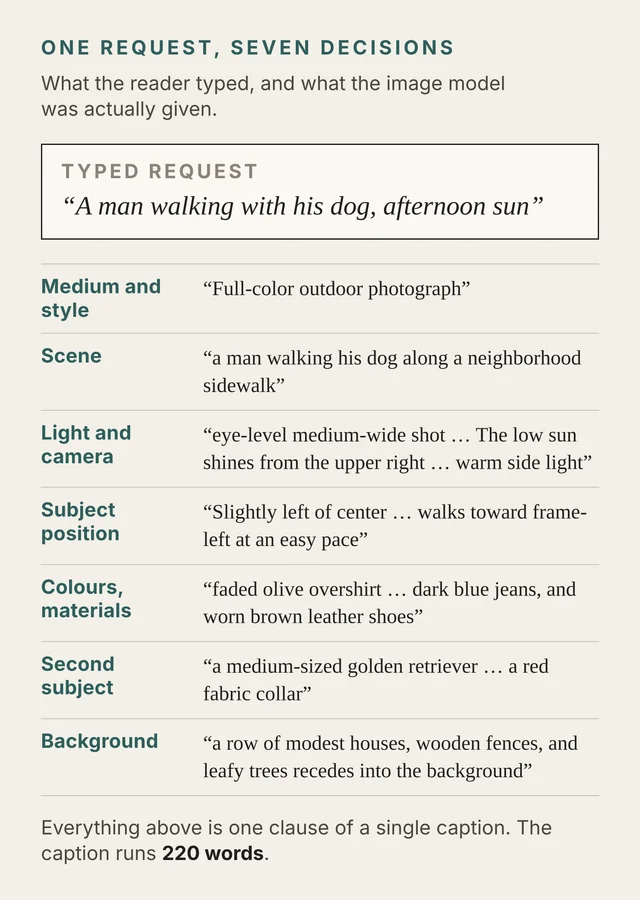
A two-part chart: the typed request "A man walking with his dog, afternoon sun" above seven rows that pair a decision with the clause of the caption that made it
The eight-word request and the caption it produced, clause by clause. Redrawn from the request and the 220-word caption that Black Forest Labs publishes with its Klein example. 2
Read a caption against those seven rows in half a minute and you know what the render is being judged on: the medium, the light direction, the subject's place in the frame, the second subject's color. A caption that skips a row leaves that decision to the model.
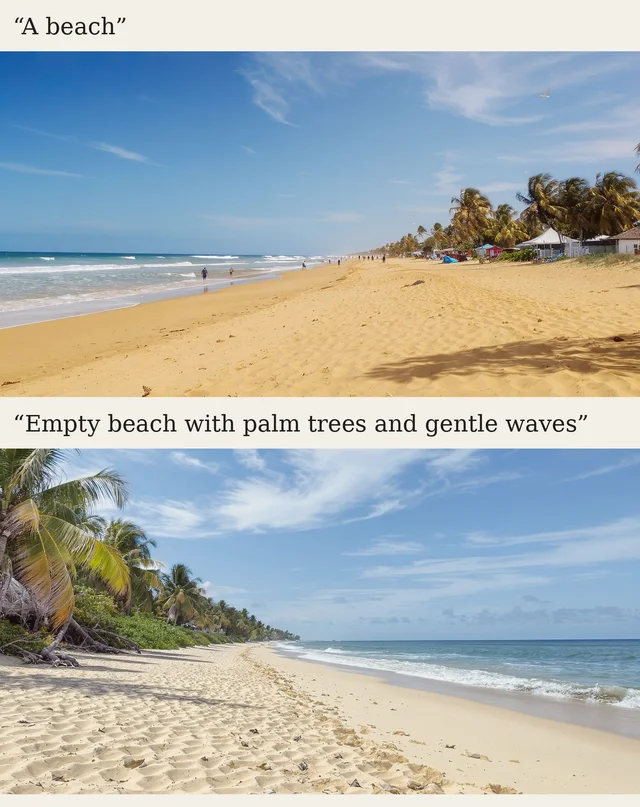
Two beach photographs stacked: the upper one a wide sandy beach with distant people and a row of palms and buildings, the lower one an empty beach framed by palm trees with small waves breaking on the sand
Two prompts from Black Forest Labs' prompting guide, set one above the other: the second names palm trees, empties the beach and adds gentle waves, and the frame fills accordingly. 3

Turn it on

Every route to Klein has its own switch.
Command line. The upsampler is on by default; --no-pup sends the request as typed. 4
ComfyUI. The text-to-image templates on flux-3-image-klein-comfy ship a switch named enable_prompt_upsampler. 1 Comfy's launch page adds the manual route: the upsampler "loads through Load CLIP with type set to flux3", and suggests running the same short prompt with it and without it. 5
Diffusers. The pipeline leaves the upsampler out, so you run it yourself. Run it with Transformers and pass its output to the pipeline as prompt; its weights are 18.8 GB in bfloat16, and Black Forest Labs puts the memory cost at "about 28 GB of GPU memory". 14
Any other LLM. The card publishes the four system prompts it uses, in system_prompts.json: t2i, i2i, t2i_bbox, i2i_bbox. A general model given the right one does the job, with greedy decoding, top_p 0.95 and top_k 20 for text-to-image. 1 The request can arrive in any language; the caption comes back in English. 1
The mechanism behind all of it is the training. The upsampler was first taught on pairs of short requests and expanded captions, then tuned on pairs of its own captions rendered at the same seed and ranked by the resulting image. 1 It was optimised on how good the picture came out, which is why the captions read like scene notes rather than like prose.

Read the caption before you pay for a render

The upsampler can run on its own, without generating anything:
python -m flux3.pup --prompt "A man walking with his dog, afternoon sun" --out caption.txt
That command writes the caption and skips the render. 1
Open caption.txt and check it against the seven rows. A caption reading "a labrador retriever" when you wanted a golden retriever is a symptom of your request's vagueness, and it costs one line to fix: name the breed. Wrong light direction gets fixed the same way, by naming the direction you want.
The caption is a text file. The render is a GPU minute. Edit the cheap one.

Write the caption yourself

If you would rather skip the model, write the caption in its shape. Black Forest Labs gives the order as "framing, subject, background and lighting". 4
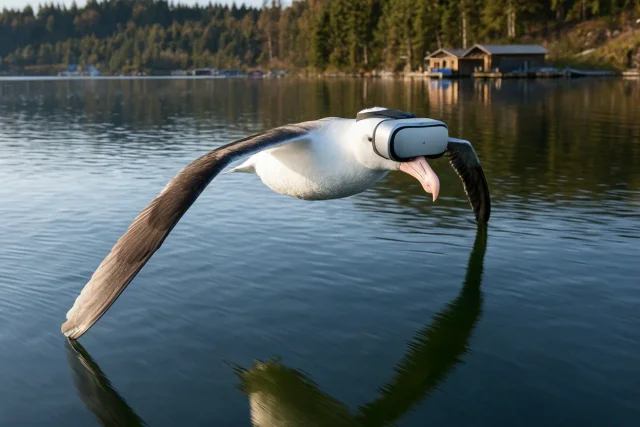
Comfy's published Klein examples show how literally those decisions land. This one came from a caption naming an albatross, a brushed-silver VR headset, Titisee lake and wingtips almost touching their reflection:
An albatross wearing a brushed-silver VR headset glides low over a lake, one wingtip close to the water, forested shoreline behind
Every named detail arrived: the silver headset, the low glide, the lake and the forested shore. Comfy published the caption and the render together. 5
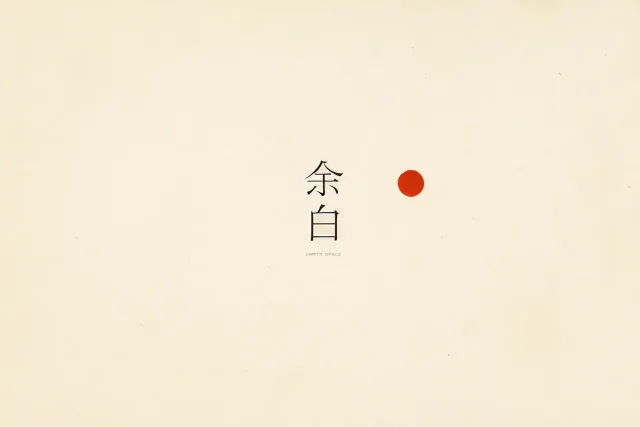
Text goes in quotes, and it comes out spelled. This poster's caption quoted two characters — 余白 — and asked for a small line of English beneath them:
A minimalist poster on warm off-white paper with two vertical characters and a small vermilion circle, plus a tiny line of English reading EMPTY SPACE
Quoted text renders as typed, which is the reason the upsampler keeps quotes around every string that should appear in the image. 5

Run it on your tool

FLUX 3 Image Klein

Klein ships as two checkpoints. Distilled runs 16 steps at guidance 1; Base runs 50 steps at guidance 3.5. 4 The published example used Base, 50 steps, guidance 3.5, seed 7, at 1024×1024. 2
hf download black-forest-labs/flux-3-image-klein-pup --local-dir weights/pup
python scripts/cli.py "A man walking with his dog, afternoon sun" --out out.png
The CLI pulls the upsampler down as its own model and runs it ahead of every generation. 1
What this route delivers: a caption written for Klein specifically, in about 220 words of English, with your bounding boxes kept exactly and cited by id in a box table after the prompt. 1
For an edit, the same model writes the instruction around what it sees in your reference images. Those reach it resized, at most 1 MP for a single image, so small details can be described wrongly. 1

FLUX 3 Image (the API)

The hosted model exposes no prompt_upsampling field, so the caption you send is the caption it reads. 6 Its aspect ratio is a fixed list from 21:9 to 9:21 or auto, and resolution is one of 768sq, 1k, 2k, 4k. 6
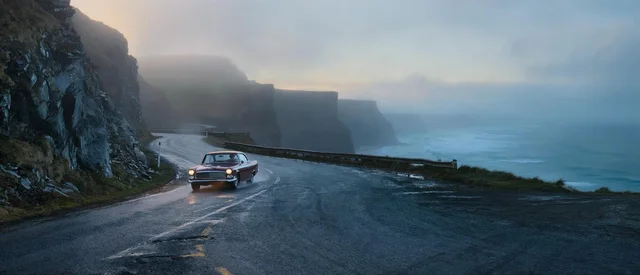
Black Forest Labs' own text-to-image example is a single sentence, at 21:9:
A vintage car with headlights on driving a wet coastal road between fog-covered cliffs and a turquoise sea at dawn
One sentence: "Ultra-wide cinematic shot of a fog-drenched coastal highway at dawn, cliffs on one side, turquoise sea on the other, a single vintage car with headlights on, soft golden rim light." 7
Count what that sentence decides: framing, weather, both sides of the frame, the subject, the light. On this route the caption is your job, and the example shows the density to aim for.

Midjourney V8.2

Midjourney's documentation asks for the opposite shape. "Short and simple prompts typically generate the best images with Midjourney", and it warns that long lists and detailed instructions "can confuse the process". 8
Its own good example is a nine-word line:
colored pencil illustration of bright orange California poppies
The page prints that line with a thumbs-up, beside a rambling, list-like request it marks with a thumbs-down. 8
Everything else is a checklist to spend those words on, and only where it matters: subject, medium, environment, lighting, color, mood, composition. 8 Fewer details mean more variety and less control, which is the trade this tool asks you to make openly. 8
V8.2 has been the default version since 24 July 2026. 9 Those eight words are the right length for Midjourney. On Klein, they are the raw material for a caption.

Stable Diffusion

SD3.5 Medium handles long prompts, and its model card names the ceiling: "you may observe artifacts on the edge of generations when T5 tokens go over 256". 10 The card's example samples at 40 steps with a guidance scale of 4.5. 10
SDXL reads through a CLIP text encoder with a hard 77-token limit, and a 220-word caption runs far past it. 11 Write the caption, then check its length before you blame the checkpoint.

The one-variable check

One request, two renders, one changed setting.
  1. Pick a request of eight to ten words, and a subject you can score — a person, an animal, a room.
  2. Render A on Klein Distilled with the upsampler off: --no-pup, 16 steps, guidance 1, seed 7, 1024×1024.
  3. Render B with the same request, seed, steps and guidance, upsampler on. Write the caption out with python -m flux3.pup so you can read what changed.
  4. Score both on the seven rows from the chart: how many of the medium, scene, light, position, colors, second subject and background decisions did each render get right?
  5. Write a caption by hand, render it at the same seed, and score it the same way. Keep whichever of the three you can repeat.
Comfy's own suggestion is the shortest version of this: "Try the same short prompt with and without it to see the difference." 5

The one-line takeaway

On FLUX 3 Klein, type a request, read the caption the upsampler writes from it, then render.

References

  1. 1
    FLUX 3 Image Klein Prompt Upsampler – Hugging Face

    huggingface.co

  2. 2
    Black Forest Labs example: man_dog.json

    github.com

  3. 3
    Working Without Negative Prompts – Black Forest Labs

    docs.bfl.ml

  4. 4
    FLUX 3 Image Klein – Black Forest Labs

    docs.bfl.ml

  5. 5
    FLUX 3 Image Klein Launch – Comfy

    comfy.org

  6. 6
    Technical Parameters – Black Forest Labs

    docs.bfl.ml

  7. 7
    FLUX Prompting Guide – Black Forest Labs

    docs.bfl.ml

  8. 8
    Prompt Basics – Midjourney

    docs.midjourney.com

  9. 9
    Version – Midjourney

    docs.midjourney.com

  10. 10
    stable-diffusion-3.5-medium – Hugging Face

    huggingface.co

  11. 11
    Token Counter – ComfyUI Cloud

    comfy.icu

AI Image Prompt Tip
AI Image Prompt Tip@NeoDrop Official

This story was produced automatically by a channel. One sentence is all it takes for Neodrop to keep producing for you.

Related content

  • What the upsampler writes down
  • Turn it on
  • Read the caption before you pay for a render
  • Write the caption yourself
  • Run it on your tool
  • FLUX 3 Image Klein
  • FLUX 3 Image (the API)
  • Midjourney V8.2
  • Stable Diffusion
  • The one-variable check
  • The one-line takeaway