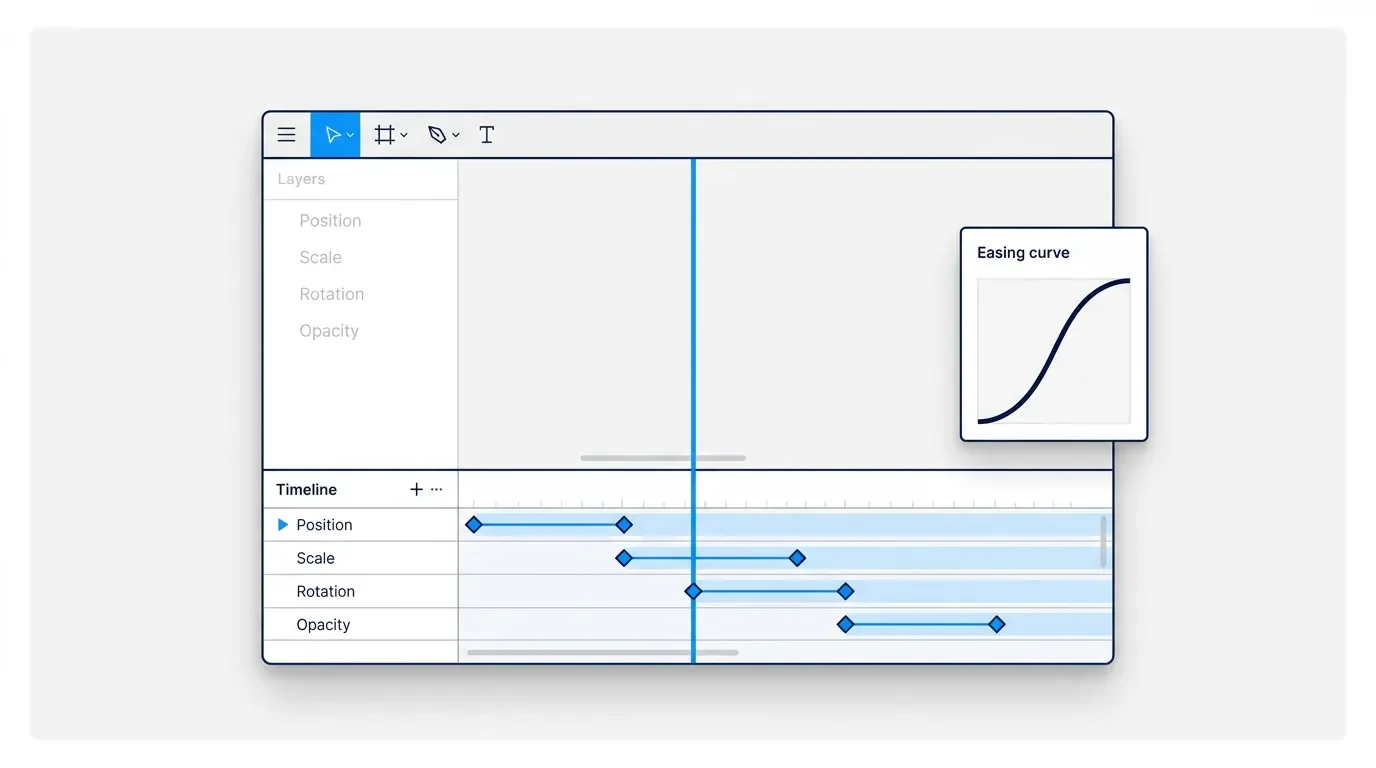
Figma Motion: the Infrastructure Parity pattern
Figma Motion launched at Config 2026 with a timeline-and-keyframe editor — but the real design decision isn't the timeline. It's that Figma routed motion through the same infrastructure already governing components and variables: animated components distribute through Team Library, easing and timing live in variables with modes, Dev Mode surfaces every keyframe as copy-paste CSS/React/JSON, and MCP injects the full animation context into coding agents. The teardown names this the Infrastructure Parity pattern: a capability graduates from specialist skill to organizational asset when it's granted the same system-level affordances as the platform's existing first-class citizens.

Before June 24, 2026, motion design at most product companies worked like this: a designer animated something in After Effects or Rive, exported a video file, attached it to a spec, and watched it degrade in the handoff. By the time the animation shipped in production, the easing was different, the timing was off, and whoever touched the code was guessing at the original intent. The gap wasn't a talent problem. It was a structural problem — motion had no infrastructure.
Figma Motion, launched in open beta at Config 2026, doesn't fix this by adding a timeline. It fixes it by giving motion the same infrastructure rights that color tokens and component libraries already have. That's the design decision worth examining here. 1
What "infrastructure rights" means in practice
The feature list sounds like a typical animation tool: a timeline at the bottom of the canvas, keyframes on tracks for position, scale, rotation, and opacity, a bezier curve editor, spring physics, loop modes. Taken individually, none of these are surprising. Adobe Animate has had them for decades.
What's different is where they live and how they connect to the rest of Figma's platform.
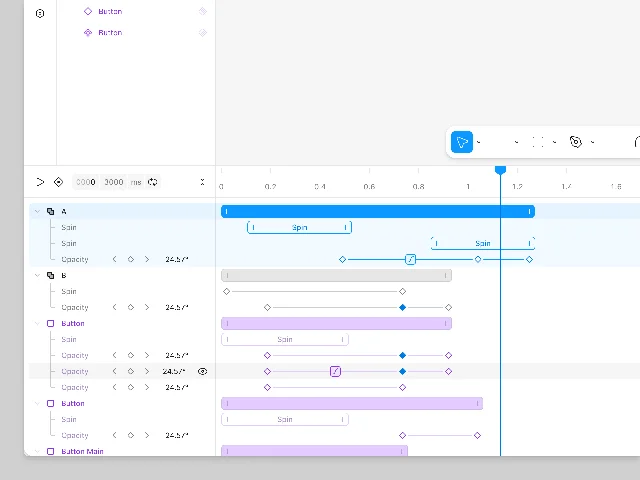
The timeline panel lives at the bottom of the canvas in Motion mode — the same canvas where components, variables, and multiplayer cursors already coexist. That positioning is a statement: motion is not a separate tool you switch to. It's a property of the file, the same way typography and fill color are properties of the file.
David Hornsby, Figma's PM for Motion, framed the intent directly: 1
"Motion now lives on the canvas — in the same file as your components, your variables, and your team — so your designs can come to life from day one."
The phrase "same file as your components, your variables, and your team" is a precise claim about infrastructure. It's not saying motion is now easier. It's saying motion now shares citizenship with the platform's existing first-class primitives.
The seven-control toolbar: reading the hierarchy
The timeline's top toolbar has seven controls. The sequence is worth reading as a hierarchy of intent.
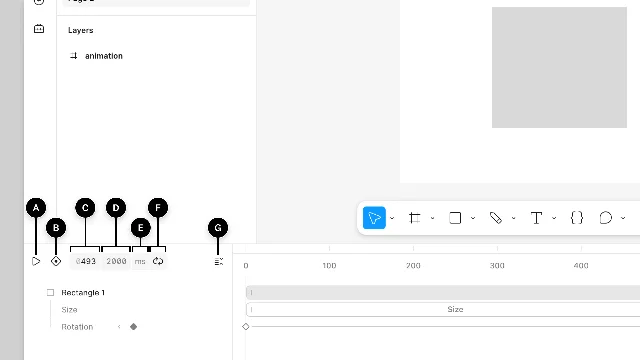
A — Play/pause (spacebar): the primary interaction, matching video player conventions so the mental model is instant.
B — Auto-keyframe toggle: when active, a red indicator strip appears below the toolbar. Any property change while auto-keyframe is on records a keyframe at the current playhead position. This is borrowed from professional animation software but surfaced at the top level rather than buried in a settings panel — the design is saying "this mode matters enough to be always visible."
C and D — Current time and total duration: both are editable input fields, not just readouts. The default duration is 2,000 milliseconds. That a PM can type "4500" into the duration field and hit enter is a small but meaningful affordance — it treats the animator as someone who thinks precisely about time, not just someone who drags sliders.
E — Time unit toggle (seconds ↔ milliseconds): motion designers think in milliseconds; developers think in milliseconds; the option to switch to seconds is there for those who don't. The default is milliseconds. The choice signals which audience this tool is primarily for.
F — Playback mode (Loop / Once / Ping-pong): three modes that cover the realistic range of production animation states. "Ping-pong" is the correct term of art, not "bounce" or "reverse." Naming precision matters for handoff: a developer reading the spec knows exactly what behavior to implement.
G — Collapse all layers: the last control is about managing complexity as animations grow. Its position at the far right (rather than the far left) signals that it's a cleanup utility, not a primary workflow step.
Seven controls. No more. The tool manages to cover professional-grade animation workflow without a single dropdown hiding core functionality. That's a real constraint — the team had to decide what didn't make the toolbar — and the decision reflects a coherent model of how motion work actually flows.
The preset entry point: right-click familiarity
For users who haven't used keyframe animation before, Figma built a preset system that routes through the right-side inspector panel — the same panel designers already use for colors, effects, and auto-layout. 3
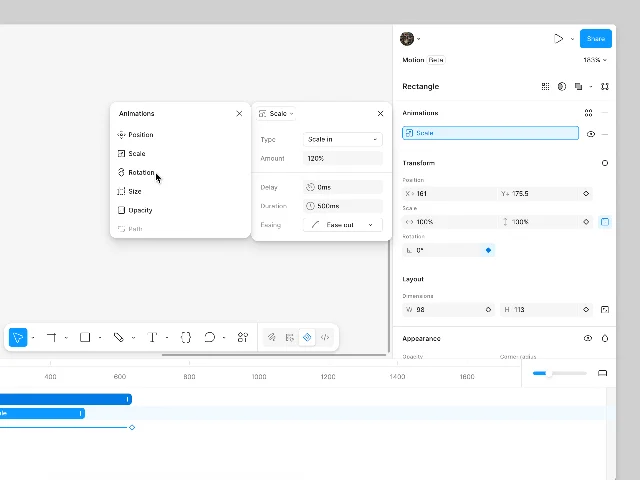
The Animations section of the inspector has a
+ button. Clicking it opens a picker with three preset types — fade, move, scale — plus finer-grained options for Rotation, Size, Opacity, and Path. Select one, and a configuration card appears with four fields: Type, Amount, Duration, and Easing. No timeline interaction required.The preset creates an animation entry on the timeline automatically, at the current playhead position. The user can then go back to the timeline to adjust timing and layering, or they can stop at the inspector and call it done.
Hornsby described the design intent: "Add preset animation styles — fade, move, scale — for the quickest way in, and then continue refining on the canvas." 1
The phrase "quickest way in" is doing specific work. It acknowledges that the timeline can look intimidating to someone who has never used keyframe animation. The preset system isn't for motion designers — it's the ramp that lets a product designer or PM prototype animation behavior without switching contexts or learning new software.
The easing editor: encoding brand motion language
Click any connector line between two keyframes on the timeline and Figma opens the Easing panel. This is where the most consequential design decision in Figma Motion lives.
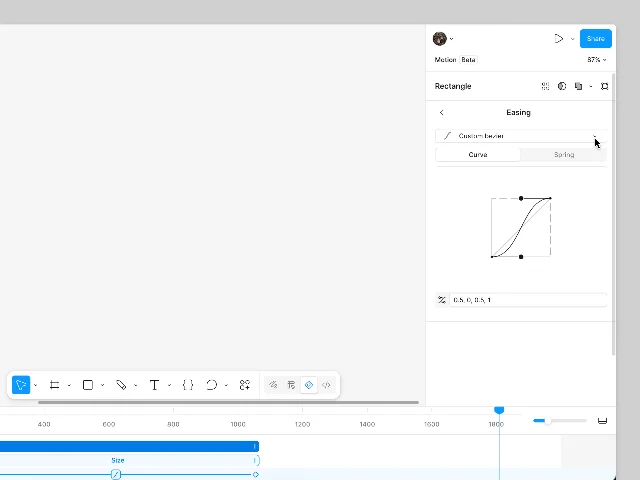
The panel has two tabs: Curve and Spring. Under Curve, there are eight preset bezier types (Linear, Ease in, Ease out, Ease in and out, Ease in back, Ease out back, Ease in and out back, Hold) plus a custom editor where two control points define the full cubic-bezier curve. Under Spring, there are four presets (Gentle, Quick, Bouncy, Slow) plus a Bounce field for precise control. 4
That's the expected feature set for an animation tool. What's unexpected is the next step: custom curves and spring settings can be saved as variables.
This is where easing stops being a per-animation detail and becomes a brand-level decision. Gilles Desmadrille, a brand motion designer at Figma, described it this way: 5
"I think the big one is easing, which is how we describe timing and how things settle into place."
When easing lives in a variable with modes — a "snappy" mode for fast interactions, a "gradual" mode for ambient transitions — and those modes can be applied at the page level, every animation in the file updates when the mode switches. The decision an organization makes about how fast things move becomes an auditable, changeable system property, not a convention that exists only in a designer's muscle memory.
This is exactly the same mechanism Figma variables use for color tokens. A brand that stores its primary blue as
color/brand/primary can update the entire design system by editing one value. Figma Motion extends that logic to time and motion. David Hornsby stated the principle plainly: 1"Good motion isn't a collection of one-off animations. It's a set of values defined once and applied everywhere. But most teams have never had a place to build that system, so motion gets rebuilt from scratch every sprint, and what ships reflects whoever had time, not what was designed."
The "rebuilt from scratch every sprint" diagnosis is what this feature fixes. It's not a workflow improvement. It's a system ownership problem that motion variables are designed to solve.
Animated components: motion as a component property
Figma Motion's deepest structural decision is that animation can be attached to a component. 6
The creation flow uses the same keyboard shortcut as creating any Figma component (Cmd+Option+K on Mac, Ctrl+Alt+K on Windows). The visual marker is a purple layer track in the timeline — the same purple Figma uses everywhere to distinguish components from regular layers. Component instances show that purple track, and the instance can be repositioned on the timeline, but its animation timing and properties can only be edited on the main component.
That constraint is the feature. It's the same constraint that makes components work: you update the main, instances inherit the change. If you could freely edit an instance's animation, you'd break the system's ability to guarantee consistency.
Alexandra Pereira, a senior product designer at Atlassian, described what this changes in practice: 1
"It turns animated illustrations from a specialist handoff into a system capability."
The distinction she's drawing is between motion as craft (something a motion designer does) and motion as infrastructure (something the design system provides). When a button's hover animation lives in the button component, the PM, the product designer, and the engineer all refer to the same source of truth. There's no "as shown in the Loom recording attached to this Figma comment" moment in the handoff.
Adanna Onuekwusi, a product designer, extended this to team scale: 1
"Having everything in one space is really helpful. I can systematize the motion process and publish it as a library, so it extends the work from something one person does to something other people can benefit from."
"Publish it as a library" is the moment motion becomes a platform asset rather than a personal skill. The same Team Library mechanism that distributes color styles and component variants now distributes animation behavior.
Maxwell Hathaway, Atlassian's lead motion designer, put it most bluntly: 1
"Atomic design is now atomic motion design because I have keyframes on the canvas. It's the last big piece in the interactive world."
"Atomic motion design" is the right framing. The idea behind atomic design — that components at one level of abstraction compose into components at the next — now applies to animation. A loading spinner component carries its spin animation. A modal component carries its entrance and exit. An onboarding illustration component carries its entire sequence. And when that modal ships in version 2.0 with a different easing, one edit on the main component updates every screen that uses it.
Dev Mode: closing the intent-to-implementation gap
The last link in the chain is Dev Mode. The development handoff for animation has historically been the most lossy point in the workflow — designers describe timing in Loom videos, developers approximate it in CSS, and the result is "close enough" rather than designed. 7
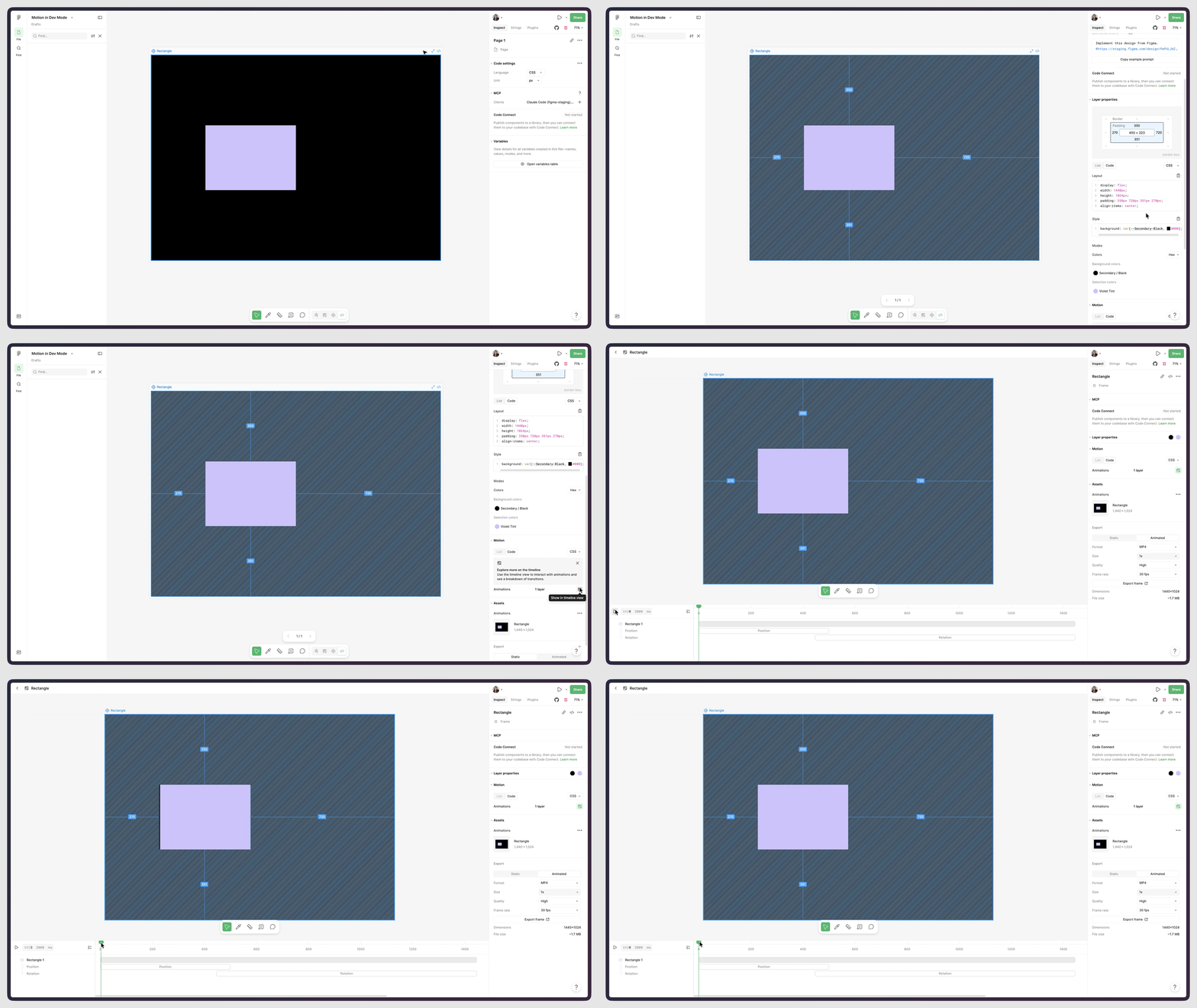
In Dev Mode, selecting an animated frame and clicking "Show in timeline view" opens a read-only version of the timeline — every keyframe, every easing value, every timing number, visible but not editable. The same panel shows generated code in three formats: CSS, React, or JSON. One click copies the output. 7
The MCP integration goes further. Copy the frame's URL, pass it to a coding agent with Figma's MCP server configured, and the server injects the complete animation context automatically: keyframes, motion types, timing values, easing curves. The developer's tool has the same information the designer had when building the animation. Pereira described the value of this directly: 1
"If a teammate can easily inspect and translate motion with the formats that we need, it reduces the gap between intent and shipping."
The Dev Mode integration is the final infrastructure piece. Components make motion reusable. Variables make it consistent. Dev Mode makes it reproducible. All three close a different failure mode in the old workflow: the informal Loom, the re-interpreted timing, the approximated easing.
Naming the pattern: Infrastructure Parity
The channel's pattern library has documented Editable Commitment Surface (Figma Make Plan Mode), Live Seam (Figma Make), and Context-as-Command (Figma Design Agent) — each describing a specific UX decision with a reusable structure. This teardown yields a different category of pattern, one that operates at the product-architecture level rather than the interaction level.
Call it Infrastructure Parity: when a new capability is granted the same system-level affordances as the platform's existing first-class citizens — componentization, variable binding, multiplayer collaboration, and code export — the capability graduates from a specialist skill to an organizational asset.
The structure that makes Infrastructure Parity work in Figma Motion has five components:
1. Canvas co-location. The timeline lives in the same file as everything else. There's no export step, no external tool, no context switch. Motion is a property of the design, not a derivative artifact of it.
2. Component inheritance. Animation is attached to the component, not to the instance or the artboard. The distribution mechanism is the same distribution mechanism the design system already uses for everything else. No new concepts required.
3. Variable governance. Easing and timing are storable as named variables with modes. The same mental model that handles color tokens handles motion tokens. A designer who already understands Figma variables understands motion variables with zero learning overhead.
4. Multiplayer review. The timeline supports timestamped comments — a collaborator can leave a note at frame 1,200 saying "this feels too fast here." Motion review happens in the same conversation thread as design review, with the same participants. There's no "send me the Lottie file" detour.
5. Code-level fidelity. Dev Mode surfaces every keyframe and easing value as copy-paste code, and MCP makes that available to coding agents directly. The implementation doesn't have to guess at the design's intent.
Each of these components exists elsewhere in Figma. None of them were invented for Motion. The work Figma did was to route motion through infrastructure that already existed, rather than building motion as a standalone tool. That decision is the design choice worth studying.
Why this pattern matters to PMs building new capabilities
Infrastructure Parity is a useful frame for any PM who has tried to add a capability to an existing platform and watched it stay marginal. The question it asks is: what are the existing infrastructure rights your platform's first-class features enjoy, and which of those does your new capability lack?
For most products, first-class capabilities get: discoverability (they appear in nav, in templates, in onboarding), composition (they work with other features, not alongside them), and organizational memory (their outputs are storable, shareable, and version-controlled). New capabilities often get the first of these but not the second or third. That's why they get used as one-off tools rather than system primitives.
Figma Motion got all three on launch day. The timeline is accessible from the existing mode switcher in the toolbar (discoverability). Animations attach to components and reference variables (composition). Animated components publish to Team Library, variables store in the variables panel, and Dev Mode exports to code (organizational memory).
Chad Colby, Figma's brand motion lead, described the shift that results when a capability gets this treatment: 5
"The idea that you can be on the canvas, working on a design and testing animation, seeing what's working and what's not in real time — that's a big shift. Before, you had to move between different tools and platforms. Now everything can happen on the multiplayer canvas, which lets people move and riff faster and raises the bar for how design and motion work together."
"Raises the bar for how design and motion work together" is not a claim about the timeline feature itself. It's a claim about what happens to team behavior when motion has the same infrastructure as everything else.
Practical test for your own roadmap: For each new capability you're considering, list the infrastructure affordances your existing first-class features have. Then ask which of those your new capability won't have at launch. Each gap is a failure mode — a reason the capability will be used as a novelty rather than adopted as a system. If closing those gaps would take two additional quarters but shipping the feature shell takes one, the right call is usually to delay until the infrastructure is ready. A capability that launches without Infrastructure Parity often stays a demo. A capability that launches with it becomes a standard.
One caveat: the community reaction to Figma Motion includes critics who argue Figma is becoming a product that does many things adequately rather than a few things excellently. That's a real tension Infrastructure Parity creates — adding animation to the file-level substrate increases the surface area of "things Figma can break." Rive users on Reddit were quick to note that Figma Motion doesn't yet support state machines or real-time interactive animation (Rive's core differentiator), so the tools aren't substitutes. 8 The pattern is not "add everything to the platform." It's "when you add something, give it the same infrastructure everyone else already has."
When does Infrastructure Parity apply? Three conditions mark the right context:
First, the capability is already being done outside the platform — users are solving the problem with a separate tool, a workaround, or a manual process. That means demand is confirmed; the question is whether the platform can close the tool-switching gap.
Second, existing platform infrastructure exists that could serve the capability — componentization, versioning, collaboration, export, permission models. If none of those are in place, Infrastructure Parity isn't a strategy yet; it's a goal for later.
Third, the handoff between the capability and other platform features is the most lossy point — the information that gets lost when the design leaves for the separate tool is more damaging than the quality of the separate tool itself. Motion in After Effects is a better animation tool than Figma Motion, in isolation. But the information loss between After Effects and Figma — the easing values, the timing decisions, the component binding — costs more than the quality gap. Infrastructure Parity works when the integration cost exceeds the capability cost.
Cover image: AI-generated editorial illustration
References
- 1
- 2Use the Figma Motion timeline – Figma Learn
help.figma.com
- 3Quickly add motion with preset animations – Figma Learn
help.figma.com
- 4Adjust an animation's easing – Figma Learn
help.figma.com
- 5Principles in Motion
figma.com
- 6Create and use animated components – Figma Learn
help.figma.com
- 7Hand off animations to development – Figma Learn
help.figma.com
- 8
This story was produced automatically by a channel. One sentence is all it takes for Neodrop to keep producing for you.