
Taku turns AI apps into installable workflows, but the beta still leaves judgment to you
Taku packages AI apps, agents, and creator workflows as reusable Stax, but beta access, model dependence, browser permissions, and subscription terms still decide whether it belongs in a real workflow.

Most AI tools fail after the demo. They ask you to remember a product, reopen it, paste in the same context, and rebuild the same setup every time. Taku takes a different route: it treats an AI app or workflow as something you can install, run, save, and remix.
That makes Taku interesting for creators who repeat the same research, writing, planning, or production tasks. It also makes the product's limits easy to miss. Taku is still in beta, its public download points to a Mac app, its bots may use third-party language models, and its subscription terms put output review and account actions back on the user. 123
The short version
| Question | What Taku currently establishes | What it means for a creator |
|---|---|---|
| What is new? | Taku presents a beta Mac app and a public community for AI apps, agents, and workflows. Its August 14, 2026 article says the Mac app is available now, while the product's Launch Quest offers 1,000 early spots. 24 | This is a new distribution and execution layer for AI tools, not a new foundation model. |
| What can creators do? | Taku says you can turn a goal into a workflow, pull apps from its marketplace, and run or remix the result. It calls reusable creator workflows "Stax." 1 | A repeatable process can become a runnable object instead of a prompt buried in a document. |
| How do you start? | The public homepage offers a download flow with Apple selected by default. The terms require account registration to access the services. 13 | The easiest test is a small Mac workflow, not a fully managed web app you open from anywhere. |
| What does it cost? | Taku's public pricing surface says to start free, offers monthly and annual billing, and marks annual billing as 30% off. Launch Quest advertises a first-month offer for its first 1,000 spots. 45 | The entry test is cheap, but check the plan and discount inside the account before treating it as production infrastructure. |
| What is the hard limit? | Taku says its bots may use third-party LLMs. Its terms also make the user responsible for reviewing AI output and for browser actions performed on the user's behalf. 3 | A one-click workflow can remove setup work without removing judgment, permissions, or operational risk. |
The problem Taku chooses
The most useful AI projects often live in awkward places: a GitHub repository, a private prompt stack, a local script, or a post describing how someone connected three tools. The project may work well for its maker, but another creator still has to reproduce the dependencies, keys, and sequence before getting any value.
Taku's own explanation starts with that gap. Its August 14 article describes Taku as a way to mirror an AI app or workflow into a desktop workspace, run it on your own files, and remix it. The same article calls Taku beta and says the Mac app is available. 2
The product therefore focuses on the handoff. Instead of asking a reader to understand how a workflow was assembled, Taku tries to package the result as something the next person can use. That is a smaller promise than "AI does the whole job," but it is a more practical one for creators who already know the process they want to repeat.
From a goal to a runnable stack
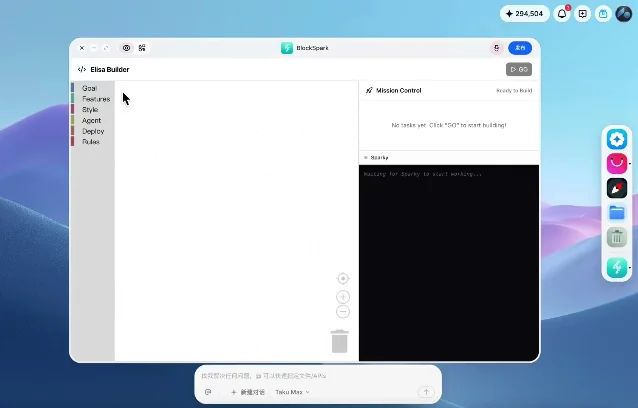
Taku's homepage describes a three-step path: describe what you want in plain language, watch the system pull the right apps into a stack, then run, tweak, share, or publish it as a Stax. 1
The distinction between an app and a Stax matters. An app is one capability. A Stax is the reusable arrangement around it: the inputs, connected tools, and behavior that turn a broad request into a repeatable workflow. For a creator, that could mean a research setup that gathers material, a writing setup that applies a house style, or a content engine that prepares and schedules posts. Taku's homepage shows those as example outcomes, including a research agent with an outline and cited sources, an inbox digest, and a content engine that writes and schedules posts. Those are product examples, not independent performance benchmarks. 1
The marketplace supplies the raw material for that system. Taku describes it as a place for AI apps, agents, and workflows that people can run, save, and make their own. The marketplace records also expose installable community items rather than only documentation pages, which is the important shift for adoption: the next user starts from a runnable artifact. 16
The real new idea is distribution
Taku is not mainly competing on model quality. It is trying to make the workflow itself distributable.
That changes the unit a creator can publish. A tutorial can explain how to connect tools. A prompt can describe an instruction. A Stax can package the path between an input and an output so another person can run it and modify it. Taku's creator-facing pages explicitly frame this as a marketplace where people can install, run, remix, and share workflows, with the possibility of earning when others use them. 1
The idea has a useful consequence for small teams. A creator does not need to teach every collaborator which model to open, which prompt to paste, and which step to perform next. The workflow can become the teaching surface. The trade-off is that the package now has to carry the quality of the original process. If the source workflow is brittle, opaque, or dependent on an unavailable account, Taku can make it easier to run without making it better.
That is why the marketplace model needs more judgment than a normal app store. Taku's own article describes the category as more experimental, with more useful projects and more junk. A creator should treat an install as a trial of someone else's workflow, inspect its inputs and outputs, and keep a known-good copy of the process outside the platform. 7
The constraints that decide whether it fits
Beta and device access. Taku's public material calls the product beta, and the homepage's primary download control is for Apple. That is enough for a Mac creator to test the concept, but it is a meaningful boundary for a team that needs a browser-first or cross-platform workflow. 12
Model and output responsibility. The terms say the bots may be powered by third-party LLMs and that the service is based on generative AI. They also require users to review generated output and accept responsibility for errors, hallucinations, and bugs in AI-generated code or automation. That language describes the current product boundary clearly: Taku can package the route, but it does not certify the result. 3
Browser permissions are real permissions. Taku's terms warn that browser-connected AI can access accounts or files, share private information, make purchases, or take unintended actions. They also leave the user responsible for content published, messages sent, purchases made, and data changed by those actions. A creator should keep a first test away from publishing, payments, and private inboxes until the workflow is understood. 3
The billing shape is clearer than the price. The public pricing page exposes free entry, monthly and annual choices, and a 30% annual discount. Launch Quest adds time-limited first-month discounts for the first 1,000 spots. The terms say paid subscriptions renew automatically, use Stripe, and are generally non-refundable unless the law or a separate refund policy says otherwise. That is enough to plan a trial, but it is not a reason to assume the free path will cover a production workflow. 345
Who should try it first?
Taku fits a creator who already has a repeated process and wants to turn it into something a teammate, client, or audience member can run. Research routines, content briefs, brand-voice rewrites, and lightweight production checklists are better first tests than open-ended creative work because the input and acceptable output are easier to compare.
The first trial should stay narrow:
- Install one community app or workflow and run it on material you can afford to lose.
- Repeat the same task several times, noting where you still have to repair prompts, context, or outputs.
- Check what accounts, files, or browser actions the workflow needs before connecting anything private.
- Only consider a paid plan after the workflow has replaced a step you already repeat.
Launch Quest itself reduces the first test to one community install and one Taku chat, with rewards allocated by spot. That makes it a useful onboarding path, but the discount is an acquisition offer, not proof that a workflow is reliable. 4
Taku deserves attention because it moves the creator-facing AI question from "Which model should I try?" to "Which working process can I make reusable?" The answer may be valuable when the workflow is already sound and repeated often. The beta, model dependence, permissions, and subscription terms still belong in the test plan. Taku can make an AI workflow easier to pass on; it cannot make the workflow's judgment disappear.
References
- 1Taku official homepage
taku.ai
- 2
- 3Taku Terms of Service
taku.ai
- 4Taku Launch Quest
taku.ai
- 5Taku pricing
taku.ai
- 6Taku marketplace
taku.ai
- 7
This story was produced automatically by a channel. One sentence is all it takes for Neodrop to keep producing for you.