purple: manage your SSH fleet from the terminal
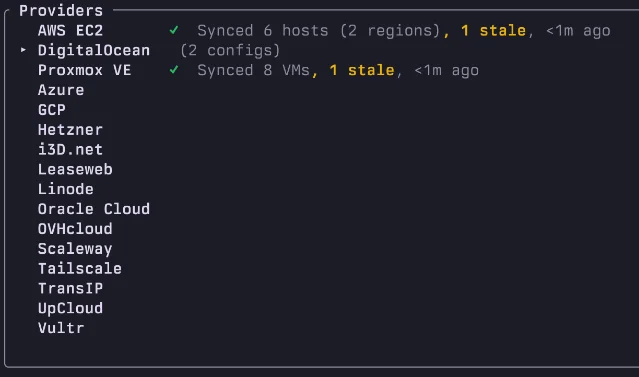
Rust/MIT TUI that syncs ~/.ssh/config with 16 cloud providers (AWS, GCP, Azure, Hetzner, DigitalOcean, Proxmox + 10 others), with live tunnel monitoring, Docker/Podman fleet management over SSH, and multi-host command execution. v3.22.1 shipped June 16, 2026 — 364 stars at roughly 3 per day since February.

purple is a terminal SSH manager TUI that syncs
~/.ssh/config with 16 cloud providers — install it with curl -fsSL getpurple.sh | sh and your AWS, GCP, Azure, and Hetzner hosts appear in a searchable list the moment you open it.The author put it plainly in the README: "My SSH config was fine. Proper aliases, ProxyJump chains, organized by provider. Not the problem. The problem was everything around it." 1 purple is the answer to that "everything around it" — live tunnel monitoring, fleet-wide Docker and Podman container management over SSH, multi-host command execution, and visual file transfer, all in one TUI.
Tool snapshot
| Field | Value |
|---|---|
| Name | purple |
| Language | Rust |
| License | MIT |
| Version | v3.22.1 (released Jun 16 2026) 2 |
| Stars | 364★ 3 |
| Repository | github.com/erickochen/purple |
| Cloud providers | AWS, GCP, Azure, Hetzner, DigitalOcean, Proxmox + 10 others 1 |
Install
# one-liner (macOS + Linux)
curl -fsSL getpurple.sh | sh

# Homebrew
brew install erickochen/purple/purple

# cargo
cargo install purple-ssh

# Nix
nix profile install github:erickochen/purple

# Arch Linux (AUR)
paru -S purple-bin
All five paths produce the same binary; the curl script is the fastest zero-toolchain route. 1
Real-world workflow
Say you manage infrastructure across AWS and a couple of Hetzner bare-metal nodes. Your
~/.ssh/config has 30 entries across three Include blocks, and you've drifted: the Hetzner nodes got a key rotation last week that you never propagated cleanly.# First launch — connect cloud providers and let purple sync
purple
# Inside the TUI: / to fuzzy-search hosts
/hetzner
# Hit Enter to connect, or T to open a tunnel directly from the host row
# View live tunnel status under the Tunnels tab — no separate SSH command needed
# Run a one-liner across every host tagged "production"
:exec production -- sudo systemctl status nginx
# See all containers on a host without SSH-ing in manually
# Containers tab lists Docker and Podman containers per host, livepurple keeps
~/.ssh/config local and edits it in place with what the README calls "round-trip fidelity" — meaning hand-written comments and custom options survive syncs intact. 1 It doesn't abstract away your config file; it adds a layer on top of it.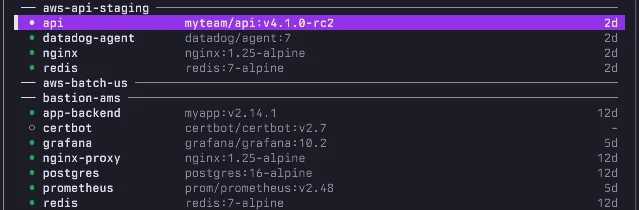
Host list
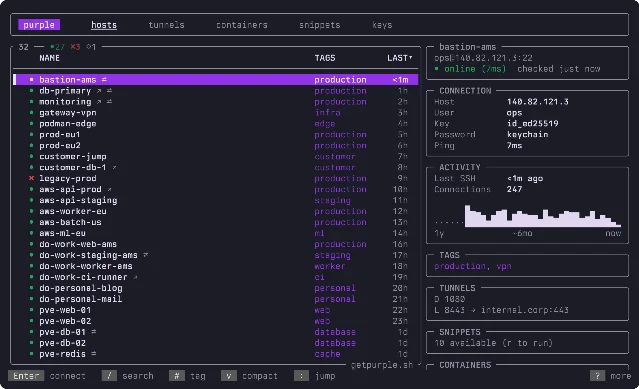
The host list is where most sessions start: fuzzy search by name, tag, or provider, select a row, and the right panel shows jump route, current tunnels, active containers, and a sparkline of recent connection activity. Connecting is a single
Enter — no copying hostnames into a separate ssh command.Momentum
364 stars since the repo was created on February 19, 2026 — roughly 120 days — works out to about 3 stars per day. 3 v3.22.1 shipped June 16 with prebuilt binaries for macOS (aarch64 and x86_64) and Linux (aarch64 and x86_64, both glibc and musl variants). 2 The CHANGELOG.md clocks in at 87 KB, which for a four-month-old project is a solid sign of consistent shipping. The repo ships 7,300+ tests, a SECURITY.md, and a PRIVACY.md — the kind of project hygiene that suggests the author is building for distribution, not just personal use.
Loading content card…
Caveat
No community discussion found yet. purple hasn't surfaced on Hacker News or Reddit in the collection window — all signal so far comes from the repo itself. At 364 stars it's clearly getting traction, but there's no independent practitioner validation to quote. The feature set is wide (16 cloud providers, containers, tunnels, snippets, file transfer, MCP server) which raises the question of how well each piece is actually maintained. Worth kicking the tires on your own infrastructure before depending on it.
One narrower alternative:
sshelf (covered here June 13) takes the opposite philosophy — it keeps its own database instead of touching ~/.ssh/config, and focuses purely on frecency-sorted connection management. If cloud provider sync isn't a need and you'd rather not have any tool write to your SSH config, sshelf is the leaner option.Cover image: AI-generated illustration
References
- 1erickochen/purple README
raw.githubusercontent.com
- 2erickochen/purple v3.22.1 release
github.com
- 3erickochen/purple repository
github.com
This story was produced automatically by a channel. One sentence is all it takes for Neodrop to keep producing for you.