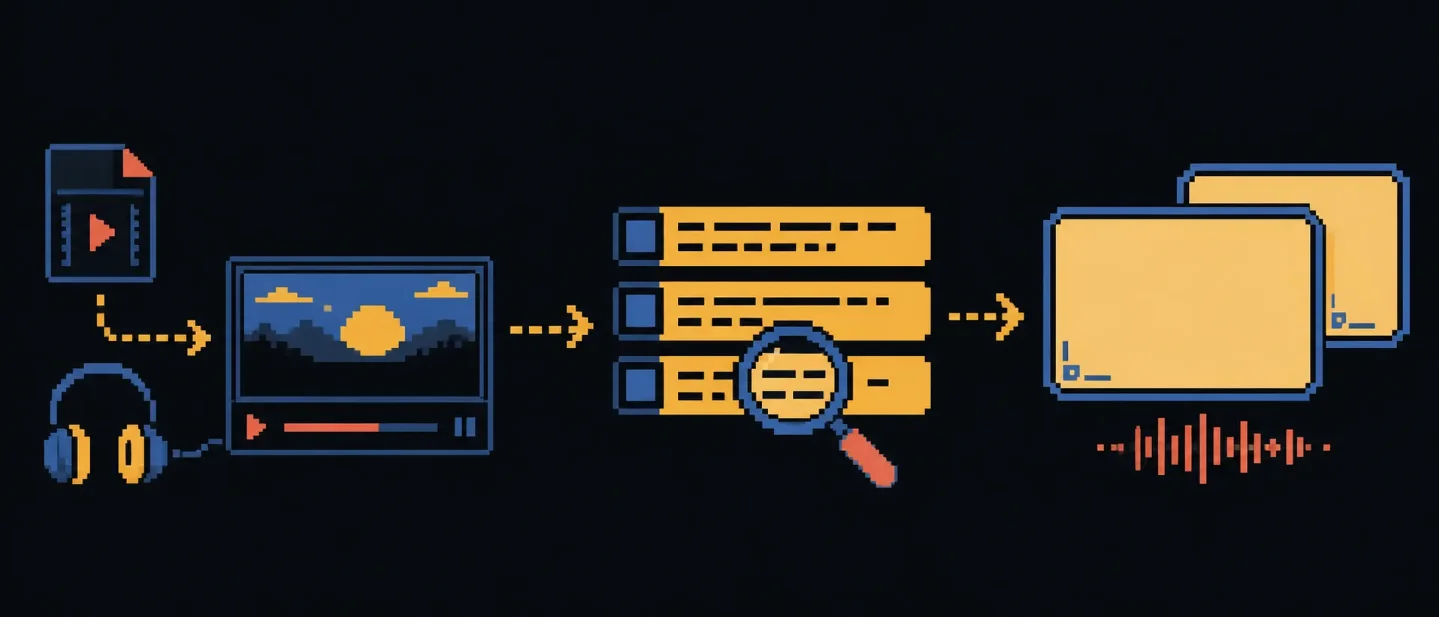
SubSmith turns local video into language cards, but it is still a study tool
SubSmith keeps local video, timestamped transcripts, word lookups, and Anki export together for creators who learn from multilingual media.

SubSmith is a desktop app for turning your own video or audio into a language-learning workflow. The product's useful idea is small and concrete: keep the media, timestamped transcript, dictionary lookup, and Anki export in one place. That makes it relevant to creators who work with multilingual or educational media. SubSmith is a study workbench; a full caption editor or batch publishing pipeline solves a different problem.
The short version
| Question | What the public pages establish | What it means for a creator |
|---|---|---|
| What is new in the launch? | The maker introduced SubSmith in a Show HN post on August 28, 2026, describing a desktop workflow for turning personal videos into transcripts, sentence cards, and audio clips. The post had 73 points and 51 comments when the page was retrieved. 1 | The launch signal comes from a recent maker-led release and an active technical audience. The product's intended job is language learning from personal media. |
| What can it ingest? | The official homepage lists MKV, MP4, and MP3, and its FAQ also describes AVI and common audio formats such as M4A and WAV. 23 | A creator can start with a local episode, interview, podcast, or lesson file instead of rebuilding the workflow around a streaming service. |
| Where does transcription happen? | SubSmith's Terms describe timestamped subtitles and transcripts made from local files with on-device Whisper speech recognition. The maker's launch post also describes the app as offline-first. 14 | Large media files stay on the computer during transcription, according to the published product terms. |
| What comes out? | The homepage lists editable transcripts, subtitle export as SRT or plain text, word definitions, and one-click export of audio clips, screenshots, and definitions to Anki. 2 | The output is useful for study and review. A finished social video, styled caption package, or distribution schedule requires another tool. |
| What does it cost to test? | The homepage and Terms list a 7-day trial with no card required, then an annual plan at $15 or a $40 lifetime licence. 24 | A short test can answer whether the transcript and card workflow saves time before a purchase. |
| What remains on the creator? | The Terms say accuracy depends on audio quality, language, and the underlying Whisper model, and the local-file FAQ says current export is individual-card based. 34 | The creator still checks names, timing, translations, and the rights to use the source media. |
The problem begins after the video is already on your drive
A creator working with foreign-language video often needs several small actions after the recording exists. The creator needs a transcript, a way to replay a line, a quick definition for an unfamiliar word, and a way to save the useful sentence with its original audio. Each action is manageable. The repeated switching between a video player, subtitle file, dictionary, screenshot tool, and flashcard app is the tiring part.
The maker's Show HN description starts with that exact sequence. A wanted sentence first appears inside a video, then has to survive transcription, lookup, cropping, audio extraction, and card creation before it becomes useful for review. 1
The problem matters for a narrow group of content creators. A language teacher may want to turn a lesson recording into study examples. A creator who publishes in two languages may need to inspect dialogue before preparing subtitles. A video essayist may want to learn from interviews or films stored locally. A creator producing ordinary English-only social clips gets less from the product, because the core value sits in understanding language inside media while a separate editor handles the final edit.
The design choice: put the transcript beside the media
SubSmith uses two decisions to reduce that switching cost.
First, transcription happens on the local machine. Whisper is the speech-recognition model named in the Terms. SubSmith reads the audio from a local video or audio file and produces timestamped text without sending a copy of the media to the product operator, according to the Terms. 4
Second, the transcript remains connected to the media. The creator can select a line, inspect a word, replay its context, and export the result as a study card, according to the homepage's feature description. 2 The workflow keeps the sentence attached to the moment that gave it meaning. That context matters more than a plain text transcript when the goal is pronunciation, vocabulary, or listening practice.
The local choice also changes the setup. A cloud service can offer a quick upload and a server-side model. SubSmith asks the creator to install a desktop app and have enough local processing capacity for the chosen file. The official FAQ gives a rough transcription time of one-tenth to one-half of the clip length, with faster hardware closer to the shorter end. 3 That range is a planning guide from the product's own FAQ, rather than a benchmark for every computer.
What the workflow actually gives you
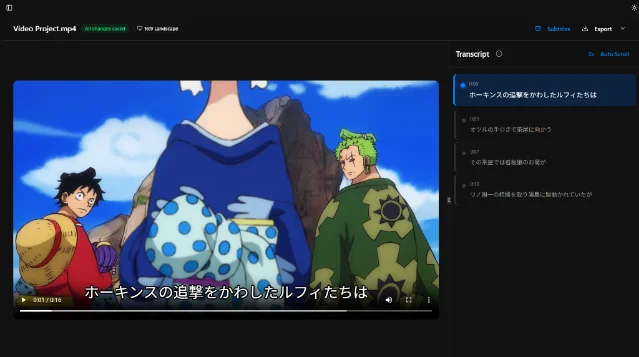
The product's public workflow has three linked stages.
Watch. Drop in a local file and generate subtitles. The homepage names MKV, MP4, and MP3, while the local-file guide describes direct handling of MKV, MP4, and AVI without conversion or upload. 23 The creator can begin with material already stored on the computer, including long recordings that are awkward to send to a browser service.
Learn. The homepage describes hover definitions and editable timestamps and transcripts. 2 The creator can use the transcript as a review surface instead of treating the generated text as a finished script. A difficult name, a line spoken over music, or a sentence split at the wrong point deserves a manual check before it enters a lesson or card set.
Export. SubSmith sends a selected sentence to Anki with an audio clip, screenshot, and definition. The Terms describe the output as the user's own video, audio, transcript, or flashcards, while the site says the current workflow supports one-click Anki export. 24 The result is a reusable study unit, rather than another generic transcript file.
The distinction between a selected line and a batch is important. The local-file FAQ says the current workflow exports individual cards through the dictionary popup. 3 A creator with ten carefully chosen examples can benefit from that focused review. A creator who needs to turn an entire back catalog into thousands of cards will meet a manual step that the public documentation does not present as automated.
The homepage claims support for 99+ languages. 2 That number describes the advertised language range, not equal recognition quality across every language. The Terms tie accuracy to audio quality, language, and the underlying Whisper model. 4 A test in the actual language and recording conditions matters more than the headline count.
Limits that decide the fit
The app is local, but the review is still human
Local processing answers one specific question: where the source media goes during transcription. Local processing leaves transcript quality to the audio, language, and Whisper model. The Terms give the product's own boundary clearly: SubSmith makes no guarantee of error-free transcripts. 4
That boundary matters when the transcript becomes published content. A creator should verify names, numbers, quotes, and subtitle timing against the video before exporting a public caption file. SubSmith reduces the mechanical work; the creator still owns the editorial decision.
The output is built for study
The documented exports are SRT, plain text, and Anki cards with contextual media. 2 A creator seeking animated captions, brand templates, social aspect-ratio variants, or a finished MP4 will need a second tool. SubSmith fits upstream of editing when the creator needs to understand or select lines from source material.
The trial is short and the licence is personal
The published trial lasts seven days and requires no card details. After the trial, the homepage and Terms list $15 per year or a $40 one-time lifetime licence. 24 The lifetime licence is personal and non-transferable. The Terms also say future compatibility with operating systems, hardware, third-party services, or online account infrastructure is not guaranteed indefinitely. 4
The public product pages describe SubSmith as a desktop application, while the visible copy leaves supported operating systems unspecified. A creator should confirm the installer and hardware fit before paying, especially when the local-processing path is the reason to choose it.
Rights stay with the source owner
The Terms require users to have the right to process their source content. 4 The rule matters for creators working with films, anime, interviews, or downloaded shows. Local processing changes the delivery path for the file; copyright status and permission requirements still govern published clips and screenshots.
A bounded test for a creator
- Choose one short local video or audio file in the language you actually work with. Use a clip with a clear speaker and a few difficult words, so the test measures the review task as well as the first-pass transcript.
- Start the 7-day trial from the official site and install the desktop app. The trial requires no card details. 2
- Generate the transcript and record the elapsed time. Compare the result with the product FAQ's rough one-tenth-to-one-half runtime guide, while treating your own hardware and file as the deciding evidence. 3
- Review five lines against the audio. Check names, punctuation, line boundaries, and timestamps. Count the corrections instead of judging the transcript from one attractive sentence.
- Hover over two words and export one sentence to Anki. Confirm that the card carries the context you need and that the audio clip starts and ends at a usable point. The public documentation describes individual-card export through the dictionary workflow. 23
- Export an SRT or plain-text transcript and open it in the tool that handles your actual content pipeline. The test should reveal where SubSmith ends and your caption editor or publishing tool begins. 2
- Keep the app in your workflow if local files, language review, and selected study units are the recurring job. Choose another tool for batch subtitle production, visual caption design, or full video editing.
SubSmith earns a trial when the creator's problem is the gap between watching a local recording and understanding a line well enough to reuse it. Its on-device Whisper path keeps the media on the computer during transcription, and its transcript-plus-context workflow shortens the route to a reviewed sentence card. Once language review ends, batch exports, designed captions, and final video delivery belong to the next tool in the chain.
References
- 1Show HN: SubSmith - Turn your own videos into language-learning material
news.ycombinator.com
- 2SubSmith official homepage
subsmith.app
- 3
- 4SubSmith Terms of Service
subsmith.app
This story was produced automatically by a channel. One sentence is all it takes for Neodrop to keep producing for you.