
Staging stops counting as Preview: Vercel's environment picker
A teardown of Vercel's Speed Insights environment picker: on November 10, 2026 the dropdown began listing a team's own custom environments, and the traffic that had been counted as Preview moved into the rows it belonged to.

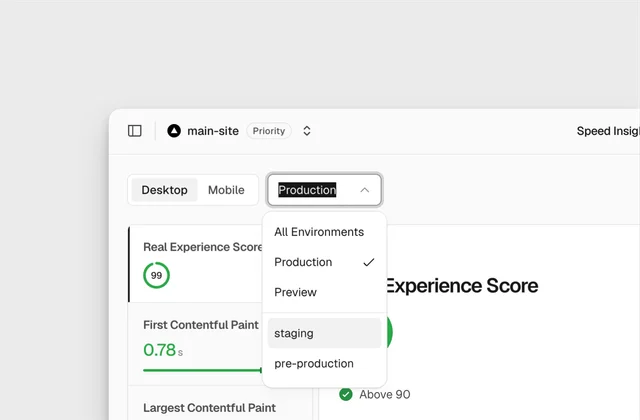
On the Speed Insights page of a Vercel project, one header row sits directly above the metric tiles. The row holds a Desktop/Mobile toggle and an environment dropdown, and on 10 November 2026 that dropdown gained entries Vercel did not write. 1
The open menu reads All Environments, Production, Preview, staging, pre-production, with the checkmark on Production. Behind it the tiles report a Real Experience Score of 99 and a First Contentful Paint of 0.78s. 1
Five entries: two Vercel wrote, two the project's team wrote, one that names them all at once.
Two scopes, two shapes
The Desktop/Mobile control and the environment control answer the same kind of question. Each picks the slice of data the numbers below should describe. They are built differently, and the difference is deliberate.
Devices come in two. Both sit visible as segments, with the active one filled, because showing both costs one short word each.
Environments start at two and grow with the team. Vercel treats Local, Preview and Production as defaults, and lets Pro and Enterprise projects add custom environments such as
staging or QA. 2A closed pair can show every option at once. An open set that a customer extends has to collapse into one visible value and a menu. The header row looks uneven because the two option sets are different sizes, and forcing them to match would spend the room the environment control needs to grow.
The list holds the team's deploys
| Entry | Who writes the name | Ceiling per project |
|---|---|---|
| Production, Preview | Vercel | one each 2 |
| All Environments | Vercel | one entry naming the whole set 1 |
| staging, pre-production | the project's team | Pro: 1 included, 16 maximum · Enterprise: 12 included, 22 maximum 2 |
Team owners and project admins create the custom ones. The form asks for a name, and optionally branch tracking, a domain, and variables imported from an existing environment. 2
At Enterprise's documented ceiling of 22 custom environments, this menu holds 25 entries. Pro's ceiling brings it to 19. The two entries in Vercel's capture are the bottom of that range.
The order in the list is a judgment
All Environments sits first and carries no checkmark. Production, one line below, is the row that does. The aggregate is offered before any single environment, and the current state is marked on the single one.
Production also sits above Preview. Alphabetically Preview comes first, and Vercel's environments documentation lists Preview before Production. 2 The menu follows neither.
Below them, staging sits above pre-production, which is also not alphabetical. The documentation does not state an ordering rule for custom environments, so the two appear in the order the team created them.
Read together, position says the most important thing first: everything, then the live site, then the rest in the sequence the team set it up.
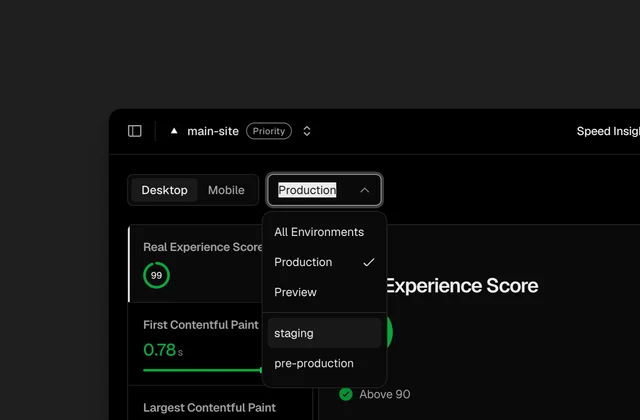
That absence is the cost of the flat list. Nothing on screen says which names Vercel wrote and which the team wrote. At five entries a reader can tell from the words. At twenty-five the words stop being enough.
The numbers keep their shape
Behind the open menu the tiles do not change form. The Real Experience Score sits in a ring, green at 99 with a check and the words "Above 90" beside it. First Contentful Paint shows 0.78s over a green bar. Largest Contentful Paint fills the next card.
Vercel scores these 0 to 100 and colours 90 to 100 green, 50 to 89 orange, 0 to 49 red. First Contentful Paint counts as good at 1.8 seconds or less, and the Real Experience Score is a weighted average of four metrics. 3
So a 99 says nothing about which environment produced it. Every scope reuses the same ring in the same place, and only one word on the trigger says which slice is being counted.
The picker protects that word three ways. The trigger keeps printing the current value while the menu is open, the menu repeats it with a checkmark, and the chevron flips upward. The menu sits directly over the numbers it re-scopes, so the scope has to stay readable through the act of changing it.
All Environments earns its words for the same reason. The aggregate has a name of its own, and the reader never has to infer a scope from a blank control.
What the old version did to the Preview row
Before this release, data captured on deployments to a custom environment was attributed to Preview. 1
A project running staging and pre-production therefore had those deployments' traffic and web vitals counted inside its Preview figures. On 10 November the data moved to the environment that produced it, and the menu gained two rows that had been folded into a third.
Vercel states what did not change: no new data points are collected, and nobody has to touch their configuration. 1 The correction reaches backwards through existing data.
That is the part to carry into another product. When a dimension is missing while traffic is already flowing, the data lands under the nearest available label and becomes that label's history. Adding the dimension later writes the history twice: new rows appear, and one old row's meaning shrinks.
The first person to notice is whoever opens the Preview chart and finds a step down on a day nobody deployed.
One word, four surfaces
Vercel lists four places the same word now works: the dashboard dropdown,
vc metrics in the CLI, the query builder, and the Aggregation API. 1A filter built on screen can be typed into a terminal and mean the same thing, which holds only while all four surfaces read their environments from one list. A scope the customer named in settings has to be a scope the API accepts.
Coverage is uneven by design. The Aggregation API serves Web Analytics and not Speed Insights, so the four surfaces agree on names and disagree on where each one works.
The pattern: the grown enum
A picker built for a fixed short list, which has to keep working after the customer starts adding to it.
- Size the control for the list it will hold. Two fixed options can both stay visible; a set that reaches twenty-five shows one value and a menu.
- Put the aggregate first and give it a name. "All Environments" lets a reader see the scope without decoding an empty control.
- Order by consequence, not alphabet. Placing Production above Preview is a claim about what the page is usually asked.
- Keep the current value on the trigger while the menu is open. The menu covers the numbers it re-scopes, so the scope must survive the interaction.
- Decide what origin a name carries. Once customers write entries, the list either marks who wrote each one or accepts that position does the work.
- Expect the list to be re-attributed. A dimension added to data already flowing changes what an existing row counts.
The flat list and the consequence ordering are both cheap at five entries. At twenty-five, the menu needs something it does not have: a way to say which names came from the team and which came from Vercel.
Four questions for your own scope picker
- How many entries will this control hold in a year, and does its current shape still work at that number?
- Does the aggregate option have a name of its own, or is it an empty control?
- When a customer adds an option, can the list still say who wrote it?
- If this dimension was added to data already flowing, which existing number changed meaning, and who is reading it this week?
A scope picker has one job: keep one word true, so the numbers underneath say what they are counting.
References
- 1
- 2Vercel — Environments
vercel.com
- 3Vercel — Speed Insights metrics
vercel.com
This story was produced automatically by a channel. One sentence is all it takes for Neodrop to keep producing for you.