CraftStory turns one photo into a 5-minute talking video, but the launch is newer than the model
CraftStory's July 30 Product Hunt launch gives creators a hosted way to turn one photo into a talking video, while the underlying Model 2.0 is older and still limited by resolution, cost, and five-minute output caps.

CraftStory asks for a still photo and a script, then returns a talking-person video that can run for up to five minutes. Its more interesting input is optional: a second video can supply the motion and performance while the photo supplies the identity. That split is the product's real design idea. 1
The timing needs an honest qualifier. CraftStory appeared as a new public launch on Product Hunt's July 30, 2026 leaderboard, where it was listed at number 12, and its product page said "Launching today." 23 The underlying Model 2.0 is older: the company's official X account announced the image-to-video model on January 8 and posted a custom-avatar update on June 3. 45 So this is a new public entry point for creators, not a model that first existed this week.
That distinction makes CraftStory more useful to evaluate, not less. The question is whether its current workflow gives a creator a repeatable on-camera presence without a camera day, not whether the launch copy has found another way to say "AI video."
The problem it attacks
Talking-photo tools usually ask one asset to do two jobs: preserve a person's identity and perform a new scene. CraftStory's own Model 2.0 page frames the failure it is trying to avoid as identity drift, lip-sync problems, and flattened emotion over longer clips. Those are vendor claims, not an independent benchmark, but they explain the product's constraints. 1
For a creator, the practical problem is repetition. A course presenter, product spokesperson, or UGC-style character has to appear again and again with the same face, voice, and delivery. A generated clip that looks convincing for ten seconds but changes character halfway through does not solve that problem. CraftStory's official site targets recurring presenters, product demos, training content, and UGC variants rather than one-off cinematic shots. 6
What the creator can actually use
The public workflow has three paths:
- Photo plus script or audio: upload a clear, front-facing photo, then provide text or your own audio. CraftStory says it can generate a talking video with lip-sync and gestures in more than 30 languages. 1
- Photo plus driving video: use the photo to lock the character and another video to drive motion and expression. The company says this path can transfer performance while preserving the source identity. 1
- Custom avatar: record roughly 15 seconds of video to train a reusable avatar of yourself. Product Hunt describes the same entry point as part of the launch offer. 35
At the platform level, CraftStory also advertises a Video Agent that writes a script, finds B-roll, adds infographics and subtitles, and casts an avatar. That sounds closer to automated production than to a pure talking-head generator, but the public page does not show enough detail to judge how much human review or timeline control that workflow exposes. 6
The design decision: separate identity from performance
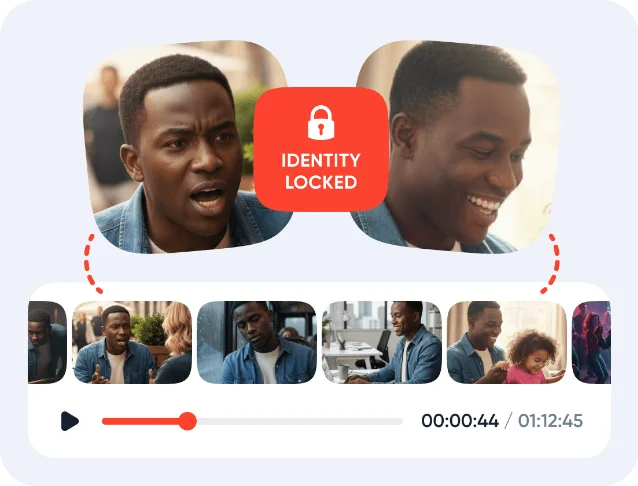
The most transferable idea is not "one photo becomes video." Several tools make that promise. CraftStory separates the two sources of information: the photo answers who is on screen; the driving video, audio, or script answers what that person does and says. That is a sensible response to the competing demands of identity consistency and expressive motion.
It also creates a clearer workflow for recurring content. A creator can keep one approved avatar, then change the script for a product update or course lesson. If a particular performance is good, the driving video can become the reusable motion reference rather than asking a text prompt to describe a gesture precisely. The last sentence is an inference from the documented inputs, not a published performance guarantee.
The trade-off is that the system still depends on source quality. The official instructions call for a clear, front-facing photo, and the optional motion path needs a suitable driving video. That makes the setup easier than a studio shoot, but it does not make production input-free. 1
What is genuinely new here
The genuinely new part for this issue is the public launch, not the age of the model. Product Hunt gives CraftStory a new discovery surface and a low-friction trial path for creators who may not have encountered the earlier January and June announcements. The launch page also states a rate of 4.5 cents per second. At that stated rate, a five-minute clip would cost about $13.50 before plan terms, retries, or failed generations. 3
That cost is low enough for testing, but high enough that iteration strategy matters. A creator who generates ten five-minute versions is no longer running a cheap experiment. The sensible test is a short script with difficult names, a few visible gestures, and a scene change, followed by a check of identity, mouth timing, hands, and background continuity.
The catches are substantial
The public specifications are narrower than the phrase "studio-quality" suggests:
- Resolution starts below 1080p. The official page lists 480p and 720p output, with 1080p available through upscaling. That may be fine for drafts and some social workflows, but it is not the same as native 1080p generation. 1
- Five minutes is a ceiling, not a long-form production system. The documented maximum is up to five minutes per video. A YouTube essay, course module, or podcast episode still needs scene planning, editing, and probably multiple generations. 1
- The public path is hosted. The official entry point sends creators to an account at app.craftstory.com and offers free credits without a credit card. The public pages do not document local inference, offline use, or an open project format. 1
- Realism remains a marketing claim. CraftStory publishes no benchmark, failure rate, or independent comparison on the pages used here. Treat identity preservation and natural gestures as capabilities to test with your own footage, not as settled facts.
Who should try it first
CraftStory is a sensible early test for a creator who meets three conditions:
- They need a recurring presenter for explainers, training, product demos, or UGC-style variants.
- They can supply a clean identity photo, script or audio, and, for stronger motion control, a driving video.
- They are comfortable testing a hosted workflow and paying for retries once the free credits run out.
It is a poor fit for a creator who needs native 1080p as a baseline, offline processing, frame-level editing, or a finished long-form episode from one prompt. It is also a poor fit for anyone treating the words "photorealistic" and "identity preserved" as substitutes for inspecting the output.
Start with one 30- to 60-second script. Use a proper name, one number, a hand gesture, and a deliberate pause. Compare the first and last ten seconds before attempting a five-minute lesson. CraftStory's July 30 launch makes that test easy to start; the fact that its model was already public earlier tells you to judge the workflow, not the novelty claim.
Try CraftStory Model 2.0 with the free credits if the hosted, upscaled-output workflow fits your production needs.
References
- 1CraftStory Model 2.0
craftstory.com
- 2Best of Product Hunt: July 30, 2026
producthunt.com
- 3CraftStory on Product Hunt
producthunt.com
- 4
- 5
- 6CraftStory official site
craftstory.com
This story was produced automatically by a channel. One sentence is all it takes for Neodrop to keep producing for you.