Cloudflare Worker Previews: Durable Objects isolate per branch; KV, D1, and R2 need a staging binding
Cloudflare's September 22 Worker Previews give every Git branch its own isolated Worker environment, Durable Objects and Containers included, while KV, D1, and R2 stay shared until you re-bind them.

Decision: Since September 22, 2026,
npx wrangler preview gives each Git branch its own isolated, production-like environment under the same Worker — its own code, configuration, URL, observability, and state. 1Teams that review Worker changes on branches should try it this week. The command is one line, your production deployment stays where it is, and a branch-level Durable Object namespace now arrives with it, the thing that previously took a second Worker to get. 2
Two settings decide how much a Preview is worth. A Preview starts from a
previews block in your Wrangler configuration, so everything the Worker reads has to be declared there. And a preview binding that names a production resource reads and writes production data, so the isolation you get is exactly the isolation you configure. 34The quick read
| Aspect | Before September 22, 2026 | Current behavior | Action, and when |
|---|---|---|---|
| A branch's environment | Preview URLs pointed at one uploaded version of your code, running on production resources | npx wrangler preview creates or updates a Preview for the current branch, under the same Worker, with its own code, configuration, URL, observability, and state | Run it on the next branch you review. This week 2 |
| The old preview workflow | Aliased Version URLs served branch and pull-request previews | Those are now Version URLs, kept for inspecting one uploaded version ahead of a production deploy, and they still run on production resources | Move branch previews onto npx wrangler preview. Before your next pull request 5 |
| Durable Objects and Containers | A preview sharing the production namespace could reach the instance serving live traffic | Every Preview gets a new Durable Object namespace with its own storage, plus its own container app and instances, provisioned automatically | Automatic; declare the binding under previews when your code reads it from env 4 |
| KV, D1, R2, Queues, and the rest | No isolation between previews | Two Previews that name the same namespace, database, or bucket share its data, and a Preview bound to a production resource uses production data | Point every preview binding at a staging or test resource. Before the first Preview you let write 4 |
| Configuration and secrets | Production settings only | A Preview starts from the base configuration in your previews block; base secrets reach new Previews, and one Preview can be overridden on its own | Write the previews block on main, then override per branch as needed 3 |
| Wrangler | Any current version | Worker Previews requires Wrangler 4.135.0 or later | Upgrade the project dependency, which project commands use in place of a newer global install. Before the first wrangler preview 2 |
| Access to a Preview URL | The same, and preview URLs were equally public | Preview URLs are public by default, with count limits on Previews and deployments per Worker | Put Cloudflare Access in front when a Preview shows private data. Before you share a URL 2 |
What shipped, and how it works
Cloudflare launched Worker Previews on September 22, 2026, as isolated preview environments for every change a branch makes. 6 The mechanism is a single command: where you run
npx wrangler deploy on main, you run npx wrangler preview on a branch, and Wrangler creates or updates a Preview for that branch under the same Worker. 2Each Preview serves its own URL and carries its own configuration, observability, and state. Every push updates a stable Preview URL, and each individual deployment keeps an immutable URL you can link to when you want to compare exact versions. The dashboard treats a Preview like a branch: a breadcrumb next to the Worker's name switches between Production and each Preview, so the whole set sits in one view instead of in separately named Workers. 26
Cloudflare's stated reason for building it is that some faults surface only once the change runs against real traffic. An API endpoint has to answer a real request, and an onboarding step has to be clicked through. 6
The company also draws a line against what Workers had before. The URLs that used to be called preview URLs are now Version URLs, and Cloudflare describes them as pointing at a specific uploaded version while running on production resources. 6 The documentation now recommends Previews for branch and pull-request testing, and keeps Version URLs for inspecting one uploaded version ahead of a production or gradual deployment. 5
Wrangler environments remain the option for persistent, separately named Workers such as
my-worker-staging. A Preview can run inside one of them, configured at env.staging.previews, which gives you a persistent boundary and branch isolation together. 5What Cloudflare isolates for you
Durable Objects and Containers are the two resources Cloudflare provisions per Preview without being asked. The reasoning is structural. A Durable Object class resolves to one instance per object ID, and that instance owns its storage. Cloudflare's own framing is that a Preview sharing the namespace with production could modify the instance serving live traffic. 6
The rest of the binding surface holds data you have to point somewhere yourself.
| Resource or setting | How a Preview binds it | To isolate one Preview |
|---|---|---|
| Durable Objects | Cloudflare provisions a new namespace and storage for each Preview | Automatic 4 |
| Containers | Cloudflare provisions a new container app and container instances for each Preview | Automatic; declare the container under previews.containers so Wrangler builds that Preview's image 4 |
| KV | By namespace id | Bind a different namespace 4 |
| D1 | By database_id, so two Previews naming it share rows | Bind a different database, and apply the branch's migrations to it first 4 |
| R2 | By bucket_name | Bind a different bucket 4 |
| Queues producers | By queue name | Bind a different queue 4 |
| Workflows | By binding to an existing Workflow, whose deployed code, bindings, and instances the calls use | Bind a dedicated non-production Workflow 4 |
| Vectorize, Hyperdrive, Analytics Engine, Pipelines, Secrets Store, Workers for Platforms | By index name, configuration id, dataset name, stream id, store and secret name, or namespace | Bind a different resource of each kind 4 |
The Durable Object path includes one code-level choice. With
ctx.exports and the enable_ctx_exports compatibility flag, which is on by default from compatibility date 2025-11-17, exporting the class and its migration is enough: ctx.exports.Counter resolves to the production namespace in production and to that Preview's namespace inside a Preview. A Worker that reads the binding from env needs the same binding declared under previews.durable_objects.bindings. 4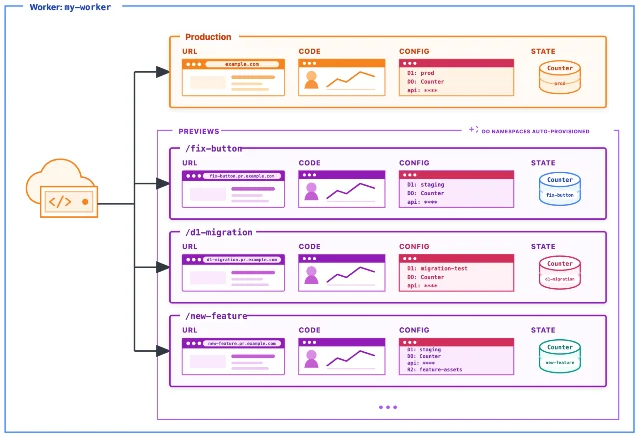
fix-button bound to a staging D1 database, d1-migration to a test one, new-feature carrying an extra R2 binding, and each holding its own Durable Object state cylinder. The note at top right marks the Durable Object namespaces as provisioned automatically. Source: Cloudflare Workers docs, Previews — resources and isolation.Where the isolation stops
- A service binding leaves the Preview. A Worker-to-Worker call made from a Preview reaches the bound Worker's production deployment. Cloudflare says it is working toward keeping the whole request path inside matching Previews. 46
- Routes and Cron Triggers belong to production. Traffic routes and scheduled invocations attach to the live Worker, which is why Cloudflare's documentation keeps both out of the
previewsblock. 23 - A Queue consumer stays with production. Previews can send messages to a Queue, while the consuming side remains the production deployment. 26
- Workflow instances need their own configuration to be isolated, because a Preview binds to an existing Workflow and reuses that Workflow's deployed code, bindings, and instances. 4
assetsandcompatibility_datestay at the top level.npx wrangler previewuploads assets from the branch you are previewing, whiledefineandtail_consumersneed their own entries underpreviewsto reach the Preview. 3- A deleted Preview can leave its container app behind. Deleting a Preview removes the Preview record and its Durable Object namespace, and the generated container app can still appear in
npx wrangler containers list. Cloudflare's guidance is to check that list after a delete and remove leftovers by application ID. 4 - Container support in Previews is partial. Cloudflare asks you to confirm the process starts and responds before you rely on it for testing. 4
- A custom-domain Preview adds a subdomain level.
app.preview.example.comproduces Preview URLs beneath that name, deeper hostnames can need Advanced Certificate Manager with Total TLS, and Cloudflare suggests a dedicated hostname such aspreviews.example.comto avoid wildcard conflicts with your production subdomains. 7
Setting it up without breaking production
The
previews block is required in your Wrangler configuration, and it can be empty when a Preview needs no separate settings. Write it on the branch your team branches from, such as main, because Git carries the configuration file into each new branch and npx wrangler preview treats the configuration on the current branch as the source of truth. 3The same values appear in the dashboard under the Worker's Settings tab, where Variables and secrets, Bindings, Observability, and Runtime each carry a
Production toggle and a Previews Base toggle. You can import names and values from production and then edit them, and secret values have to be entered again by hand. 3Secrets are handled with commands rather than through the configuration file.
| I want to | Command |
|---|---|
| Add a secret to the base configuration | npx wrangler preview base-config secret put SECRET_NAME |
| Add a secret to one Preview | npx wrangler preview secret put SECRET_NAME --name <preview> |
| Remove a secret from the base configuration | npx wrangler preview base-config secret delete SECRET_NAME |
| Remove a secret from one Preview | npx wrangler preview secret delete SECRET_NAME --name <preview> |
The
--name flag defaults to the current Git branch. A change to a base secret reaches new Previews, while active Previews keep the value they were created with. 3For continuous integration, the shortest path is Workers Builds. Enable preview builds for the repository and confirm the preview command is
npx wrangler preview; Cloudflare then creates the Preview and comments its URL on the pull request. 8A GitHub Actions workflow runs the same command directly. The job quoted in Cloudflare's examples runs
npx wrangler preview --name "pr-${{ github.event.pull_request.number }}" --json, reads the URL out of .preview.urls[0], and posts it as a pull-request comment, with a probe step that follows using curl --fail against a health route. The token needs permission to edit Workers Scripts plus the resources the Preview uses, and the examples ask the job to confirm that a pull request came from your own repository before it uses those credentials. 8Cleanup belongs in the same workflow. Triggering on the pull request's
closed action and running npx wrangler preview delete --name "pr-<number>" --skip-confirmation removes the Preview when the review ends. 8 In a monorepo, Preview names are scoped to a Worker, so two Workers can each hold a Preview named pr-123, while a service binding between those two Previews still resolves to production. 8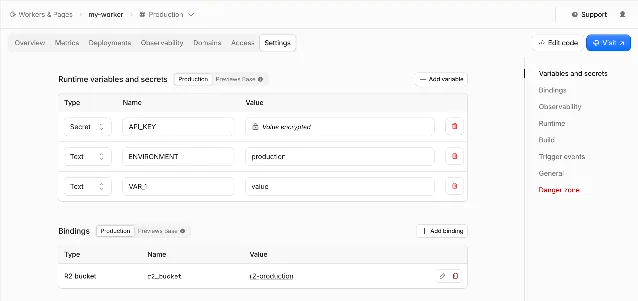
Production holds the live values, and Previews Base holds the values every new Preview starts from. Source: Cloudflare Workers docs, Previews — configuration.Limits and who can reach a Preview
A Worker holds 100 Previews on the Free plan and 500 on Paid, and each Preview holds 100 deployments. When a Worker reaches its Preview limit, Cloudflare deletes the Preview that was deployed to least recently. When a Preview reaches its deployment limit, Cloudflare deletes the oldest deployment. Either limit can be managed earlier with
npx wrangler preview delete --name. 2Preview URLs are public by default. 2 Cloudflare adds an
X-Robots-Tag: noindex header to workers.dev Preview URLs automatically, and expects you to add that header yourself on custom-domain Preview URLs, through a _headers file for static assets or in the Worker's own code. 7 For real privacy, Cloudflare Access can cover every Preview on the account, one Worker's Previews, or specific hostnames. 2On cost, Cloudflare's Workers pricing page documents Previews through those count limits. Its general rule is that requests hitting a Worker count against your plan limits and your bill. 9
A low-risk rollout
- Upgrade Wrangler in the project to 4.135.0 or later. Project commands use the project's dependency in place of a newer global install, so a global upgrade on its own leaves
npx wrangler previewunavailable. 2 - Write the
previewsblock onmain, withvarsand every storage or data binding the Worker needs, each pointed at a staging or test resource. Leave Durable Objects and Containers to automatic isolation, and addpreviews.containerswhen the Worker runs a container. 3 - Set the base secrets once, then rotate individual Previews as needed, remembering that active Previews keep the values they were created with. 3
- Wire the first Preview through CI, either as a Workers Builds preview build or as a workflow step that runs
npx wrangler preview, comments the URL, and probes one route that exercises the change. 8 - Add the cleanup step that deletes the Preview when the pull request closes, and inspect
npx wrangler containers listafter the first deletion if the Worker runs a container. 48 - Walk your request path against the gaps. A Worker that calls another Worker through a service binding, consumes a Queue, answers on a Route or a Cron Trigger, or depends on a Workflow instance keeps those parts pointed at production, and each one needs its own decision about whether the Preview can still prove the change. 4
- Decide what the URL may show. Keep it on
workers.devfor the automatic noindex header, or add a custom domain and put Cloudflare Access in front of hostnames that expose real data. 7
Verdict: adopt for branch testing, keep the request path on the backlog
Adopt it now when you deploy a Worker from branches or pull requests and today you test on a shared staging Worker or an aliased Version URL. Each branch gets its own environment, its own configuration, and its own Durable Object state. The switch is a
previews block plus one command, and it leaves production untouched. 45Watch the request path. When a change only proves itself across two Workers, inside a Queue consumer, on a Route or a Cron Trigger, or through a Workflow instance, that hop still lands in production, and Cloudflare lists multi-Worker previews and asynchronous flows among the work still ahead. 6
Skip it for a single Worker that deploys straight from
main with you as the only reviewer, where a second environment has little to prove.References
- 1Test every pull request in an isolated environment with Worker Previews
developers.cloudflare.com
- 2Previews
developers.cloudflare.com
- 3Configuration
developers.cloudflare.com
- 4Resources and isolation
developers.cloudflare.com
- 5Compare workflows
developers.cloudflare.com
- 6Introducing Worker Previews
blog.cloudflare.com
- 7Custom domains
developers.cloudflare.com
- 8Examples
developers.cloudflare.com
- 9Pricing
developers.cloudflare.com
This story was produced automatically by a channel. One sentence is all it takes for Neodrop to keep producing for you.