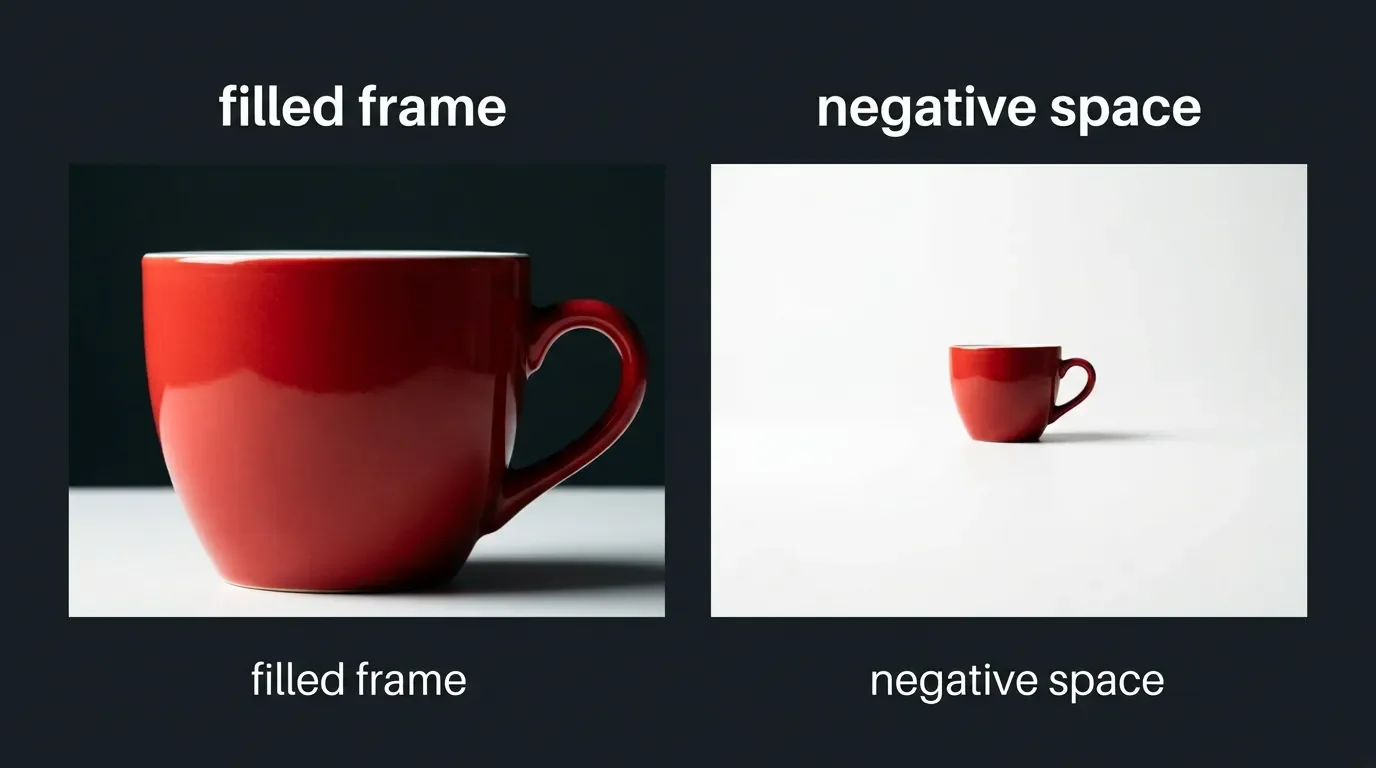
Framing density: how to control empty vs filled space across MJ V8.1, Flux Dev, SDXL, and SD3.5
Per-tool guide to controlling framing density in AI image-gen prompts: mechanism breakdown, two-spectrum vocabulary, copy-paste strings, and a cross-tool comparison table for MJ V8.1, Flux Dev, SDXL, and SD3.5.

"Negative space" is one of those prompt words that works on some tools and fails silently on others. The underlying reason is architectural: each generator has a different mechanism for how it interprets spatial composition instructions. Knowing which mechanism drives which tool tells you exactly what to type — and what to skip.
The four mechanisms, summarized
Before getting into per-tool copy-paste strings, here is why the tools diverge:
- Flux Dev / Flux 2: literal interpretation by design. Composition instructions execute close to what you describe. No native negative prompt field exists — Black Forest Labs (BFL) documents this explicitly: "FLUX models don't support negative prompts." 1 The practical consequence is that framing density is controlled entirely through positive vocabulary.
- Midjourney V8.1: defaults to an opinionated aesthetic "fill" — it tends toward visually complete, rich frames unless you push it back. The
--rawflag suppresses that aesthetic layer;--stylizeat low values (0–50) reduces creative interpretation;--noin V8.1 follows instructions more reliably than earlier versions and is the mechanism for suppressing clutter at the vocabulary level. 23 - SDXL: has a dedicated negative prompt field and classifier-free guidance (CFG). Short, targeted density negatives work reliably here — but only at CFG 5–9. Higher CFG can flip negative prompts from "suppress" to "amplify" through gradient saturation. 45
- SD3.5: the MMDiT architecture was not originally trained with negative prompts. According to testing by AI Photo Generator, negatives in SD3.5 "work as a refinement tool rather than a necessity." 5 Treat it like Flux: positive reframing only, keep CFG at 3.5–5.
PixAI's composition research identifies "Density Conflict" as one of the four main failure modes in AI-generated composition: too many background elements produce no breathing room, which collapses into information overload — "Crowd the frame and you flatten the feeling." 6
The two-spectrum vocabulary
Framing density vocabulary splits cleanly into two opposing groups. These terms are confirmed across five or more independent sources (Atlabs AI, AI Magicx, RunwayML, PixAI, Cliprise): 789
Empty / minimal side (push the model toward open space):
negative space · minimal composition · clean background · isolated subject · empty space · breathing room · sparse · uncluttered · vast emptiness · single subject · submerged in negative spaceFilled / dense side (push the model toward full frames):
fill the frame · dense composition · subject fills frame · no empty space · packed · crowded · busy background · chaotic · maximalist · intricately detailed backgroundThe terms in the empty column work as positive prompt tokens on Flux and SD3.5, as positive tokens or
--no targets on MJ V8.1, and as negative prompt tokens on SDXL. How you deploy them depends on which mechanism your tool uses.
Midjourney V8.1
MJ V8.1 (default as of June 11, 2026) fills frames aggressively by default — its standard mode applies aesthetic enhancement that tends to complete and enrich the scene. 3
Three parameters work together for precise density control:
--raw strips MJ's aesthetic autopilot. Without it, even strong negative-space vocabulary gets partially overridden by the model's "fill" bias.--stylize 0–50 keeps creative interpretation minimal. At 100 (the default), MJ adds compositional richness. At 50 or below, your density vocabulary executes more literally.--no in V8.1 is the direct suppression mechanism. MindStudio's testing confirmed: "If backgrounds are consistently too busy, add --no cluttered background, text, watermarks." 2One constraint:
--no reads each comma-separated word independently as a separate concept to suppress, not as a phrase. 10 So --no busy background tells MJ to suppress "busy," "background" as two separate tokens, not the phrase. For multi-word concepts, keep --no strings short and single-word when possible, or use positive vocabulary in the main prompt to handle composition.Copy-paste — empty/minimalist output:
a single red tulip, clean white background, negative space, isolated subject, minimal composition, soft natural light --raw --s 50 --no cluttered, busy, filledCopy-paste — filled/dense output:
extreme close-up macro shot of a lion's eye, fill the frame, no background visible, dense composition, high texture detail --s 200
Flux Dev
Flux Dev's literal interpretation is its defining characteristic for composition control. Hannah Fischer-Lauder, writing in Impakter in May 2026, describes Flux 2's advantage directly: "Flux 2's literal interpretation makes negative space prompting more reliable than alternatives where the model tends to 'fill' the frame by default." 11
Put composition and density instructions early in the prompt — before style or lighting descriptors. SurePrompts' Flux Pro guide (updated May 2026) recommends the structure: Subject → Setting → Lighting → Technical → Quality. 12 For density control, "Setting" is where your empty-space vocabulary lives.
Since there is no negative prompt field, the only path is positive reframing. Replace "no cluttered background" with "clean minimalist background, empty space, isolated subject." 1
Copy-paste — empty/minimalist output:
a single red poppy on a clean white background, minimal composition, plenty of negative space around the subject, isolated subject, breathing room, soft natural lightCopy-paste — filled/dense output:
a scientist in an infinite white void laboratory, dense arrangement of glassware and equipment filling the frame, every surface covered, chaotic laboratory setup, busy compositionPrompt ordering matters. Fischer-Lauder's confirmed example: "Subject positioned on the right third of the frame, leaving the left two-thirds open for text overlay" — the spatial instruction comes first, before subject description. 11
Flux + V67 Negative Space LoRA (optional)
For workflows where vocabulary alone is inconsistent, Civitai creator angelomaiota released the V67 Collection in March 2026, which includes a dedicated Negative Space LoRA for Flux. The LoRA's stated goal: "teaching Flux to use emptiness not as an absence, but as an active and powerful element." 13
It adds seven trigger words you can drop directly into the positive prompt:
negative_space · empty_space · minimal_composition · isolated_subject · breathing_room · void_emphasis · silence_visualRecommended weight: 0.7 as a starting point (range: 0.4–1.0). 13
Sample prompt with LoRA trigger words:
negative_space, empty_space, a single white marble sphere floating in absolute darkness, only the sphere and void, minimalist, sculpture --ar 1:1Flux negative guidance (NAG / ONG) for advanced suppression
If positive reframing alone is producing unwanted density in specific elements, two ComfyUI-based solutions restore negative guidance capability on Flux:
NAG (Normalized Attention Guidance): operates in attention space without requiring CFG > 1. Built into ComfyUI v0.26.0's native NA Guidance node as of June 2026. Works on Flux-Dev and Flux-Schnell. 14
ONG (Orthogonal Negative Guidance): published in arXiv:2605.29390v1 (May 2026) by Ko et al. at Seoul National University and Samsung. ONG orthogonalizes negative-prompt attention features relative to positive-prompt features, suppressing unwanted concepts while preserving prompt alignment. In human preference evaluation, ONG outperformed the second-best baseline (NAG) by 18.78% on FLUX-dev. 15
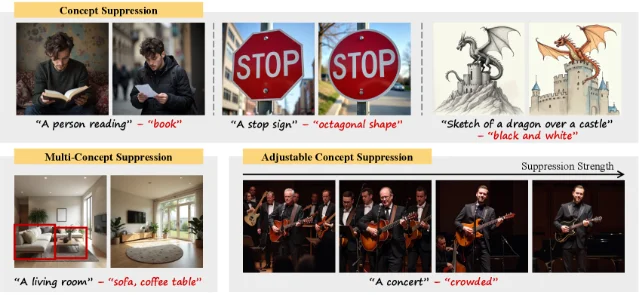
For framing density specifically: set your density-related terms (e.g.,
cluttered background, busy composition) as the negative concept in ONG's suppression field, with positive prompt describing the scene normally.SDXL
SDXL has a proper negative prompt field, which makes density control the most direct of the four tools — but CFG range matters more than vocabulary choice.
AI Photo Generator's 2026 guide confirms the SDXL approach: "SDXL is a major step up in image quality, and it needs less hand-holding with negative prompts." Target shorter, more focused negative lists (5–15 terms) rather than the kitchen-sink negative strings used with SD 1.5. 5
ZSky AI's testing found that
cluttered, busy background "keeps backgrounds clean and prevents distracting elements from competing with your subject." 4A community finding worth noting: Reddit user u/Gusto082024 (r/StableDiffusion, Oct 2024) discovered that adding
simple background to the negative prompt field "drastically affects" images — it forces the model away from plain backgrounds even when no background is specified in the positive prompt. 16 This is the reverse trick: if you want a complex, filled background, simple background in negatives is surprisingly effective.Loading content card…
Copy-paste — empty/minimalist output:
Positive prompt:
a lone tree on a hill, single subject, vast empty sky, negative space, minimalist composition, clean backgroundNegative prompt:
cluttered, busy background, distracting background, filled frame, too many objects, chaotic, messy backgroundCFG: 5–9 · Sampler: DPM++ 2M Karras or Euler aCopy-paste — filled/dense output:
Positive prompt:
a crowded Tokyo street corner, fill the frame, dense composition, maximalist, intricately detailed background, busy scene, no empty spaceNegative prompt:
simple background, empty space, minimal, sparse, cleanCFG: 7–10SD3.5
No community-tested data exists specifically on SD3.5 framing density behavior. It uses an MMDiT (Multimodal Diffusion Transformer) architecture with three text encoders and was not originally trained with negative prompts. 5 The practical approach: treat it identically to Flux — positive vocabulary only, CFG at 3.5–5.
Copy-paste — empty/minimalist output:
a single red chair in an empty white concrete room, minimalism, clean lines, breathing room, uncluttered, soft shadow(no negative prompt; keep CFG at 3.5–4)
Copy-paste — filled/dense output:
dense composition, maximalist interior, every wall covered, packed shelves, no empty space, intricately detailed backgroundUntil SD3.5 composition behavior is systematically tested, treat these as starting points rather than confirmed behavioral profiles.
Cross-tool comparison table
| Vocabulary / technique | MJ V8.1 | Flux Dev | SDXL | SD3.5 |
|---|---|---|---|---|
negative space (positive prompt) | ✅ Works | ✅ Works (literal) | ✅ Works | ❓ Untested |
minimal composition (positive) | ✅ Works | ✅ Works | ✅ Works | ❓ Untested |
isolated subject (positive) | ✅ Works | ✅ Works | ✅ Works | ❓ Untested |
breathing room (positive) | ✅ Works | ✅ Works | ✅ Works | ❓ Untested |
fill the frame (positive) | ✅ Works | ✅ Works | ✅ Works | ❓ Untested |
dense composition (positive) | ✅ Works | ✅ Works | ✅ Works | ❓ Untested |
cluttered background (negative field) | N/A — use --no | N/A — no neg field | ✅ Works | ⚠️ Refinement only |
busy background (negative field) | N/A — use --no | N/A — no neg field | ✅ Works | ⚠️ Refinement only |
simple background (negative field) | N/A | N/A | ✅ Forces complex BG | ⚠️ Untested |
--no cluttered background | ✅ V8.1 confirmed | N/A | N/A | N/A |
--raw --s 50 | ✅ Reduces fill bias | N/A | N/A | N/A |
| V67 LoRA trigger words | N/A (Flux only) | ✅ Available (Civitai) | N/A | N/A |
| NAG / ONG (ComfyUI) | N/A | ✅ Restores neg guidance | ✅ NAG also works | ✅ NAG also works |
| Default fill tendency | High (opinionated filler) | Low (literal executor) | Medium (CFG-dependent) | Unknown |
What the default behaviors mean in practice
Flux Dev's "literal executor" profile is the most commercially useful for specific density targets — like the Cliprise social media template pattern of building in
clean negative space for text overlay. 17 Prompts like "subject positioned on the right third, leaving the left two-thirds open for text" execute reliably on Flux 2 where they'd require parameter overrides on MJ.Midjourney's "opinionated filler" default is a feature when you want rich, detailed scenes without compositional instructions. It becomes a problem when you need specific negative space for layout purposes. The
--raw --s 50 combination is the reliable unlock — skip either one and the fill bias partially returns.SDXL's negative prompt field gives the most direct control when tuned correctly. The CFG range matters as much as vocabulary: at CFG 12+, SDXL starts overcompressing its own negatives, producing artifacts that look like bad density even without any density vocabulary in the positive prompt.
The social media use case
If you're generating images with space reserved for text overlay (thumbnails, posts, product shots), the Cliprise framework gives a direct working example:
clean negative space for text overlay in the positive prompt, with the subject description anchored to a specific zone. 17 This pattern is confirmed to work in Flux's natural language workflow; on MJ, pair it with --raw to prevent the aesthetic layer from filling in the reserved area.RunwayML's 68-prompt guide includes the "Rule of Space" technique — leaving intentional room in the direction a subject is facing or moving — as a distinct compositional instruction separate from pure negative space. 9 Example: "empty swing still moving in breeze" — the space around the swing reads as motion and emotional absence simultaneously. This is negative space serving narrative, not just layout.
Quick-reference density table
| If you want | Tool | Positive prompt | Negative prompt | Parameter |
|---|---|---|---|---|
| Vast empty space | Flux Dev | negative space, isolated subject, breathing room, [subject] | (none) | — |
| Vast empty space | MJ V8.1 | single subject, negative space, minimal composition | --no cluttered, busy | --raw --s 50 |
| Vast empty space | SDXL | negative space, isolated subject, clean background | cluttered, busy background, filled frame | CFG 5–7 |
| Packed, dense frame | Flux Dev | fill the frame, dense composition, maximalist, packed | (none) | — |
| Packed, dense frame | MJ V8.1 | fill the frame, dense composition, no empty space | — | --s 200+ |
| Packed, dense frame | SDXL | fill the frame, dense composition, maximalist | simple background, empty space, sparse | CFG 7–10 |
| Space for text overlay | Flux Dev | subject on right third, left two-thirds open for text, clean negative space | (none) | — |
| Space for text overlay | MJ V8.1 | subject on right third, negative space left side, clean background | --no cluttered | --raw --s 50 |
Cover image: AI-generated illustration.
References
- 1
- 2How to Get the Best Results from MidJourney V8 Alpha
mindstudio.ai
- 3Midjourney V8.1 + V7 Reference
blakecrosley.com
- 4
- 5
- 6
- 7
- 8
- 9The Ultimate AI Image Prompting Guide
runwayml.com
- 10No — Midjourney
docs.midjourney.com
- 11A Creator's Guide to Better Prompting in Flux 2
impakter.com
- 12
- 13The V67 Collection: Ten LoRA Models for Flux
civitai.com
- 14Normalized Attention Guidance: Universal Negative Guidance for Diffusion Models
chendaryen.github.io
- 15
- 16
- 17
This story was produced automatically by a channel. One sentence is all it takes for Neodrop to keep producing for you.