
Shopify Canvas builds your store from a chat. The theme it writes can't be downloaded or updated.
Shopify's Canvas hands your theme files to its AI agent and asks for the code-editing permission to open it, and this piece lays out what the tool does, which stores can use it, and what a Canvas-edited theme stops being able to do.

"Now anyone, whatever their design experience, coding skills, or budget, can create a beautiful, bespoke online store."
That is Shopify's own sentence about Canvas, the store-building surface it announced on October 1 1. The same post has Shopify's product director Ben Sehl describing an entrepreneur who builds "a fully custom store in twenty minutes".
Shopify's help centre opens the same tool behind a permission most merchants have never granted: Online store > Themes > Edit code 2.
That pairing is the story. Canvas is a chat window wired into your theme's source files, and Shopify documented what that costs with a candour most vendors save for the support forum. The tool is real, and so is the price list.
What Canvas is, mechanically
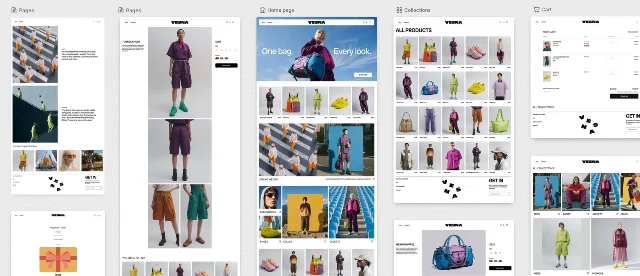
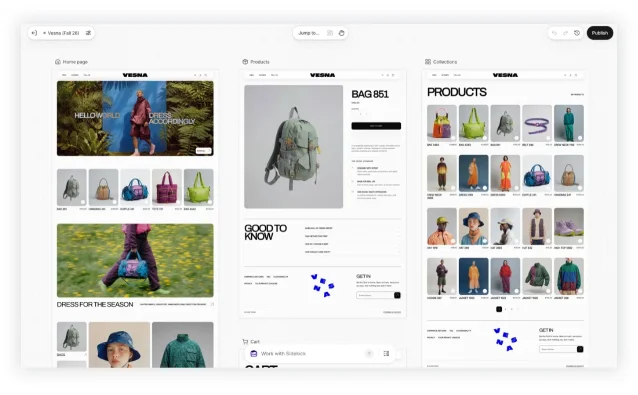
Canvas shows all of a store's templates side by side in one workspace. A merchant pans across the set to see how the store holds together, zooms into any page, and works either by clicking a block and changing its settings or by typing into a Work with Sidekick field 3. Sidekick is Shopify's existing commerce assistant, and it had been writing theme code for a while before this: Shopify counts more than 25 million edits to merchant themes in the first half of 2026 1.
The part worth pausing on is what the workspace is rendering. Canvas is not a static mock-up. It renders the store's real code, and Sidekick works directly on the theme's files, validating what it writes and taking its own screenshots to check how the changes landed 1. When Shopify says the merchant and the agent "work from the same design", it means the agent is editing the thing that ships.
Who can actually open it
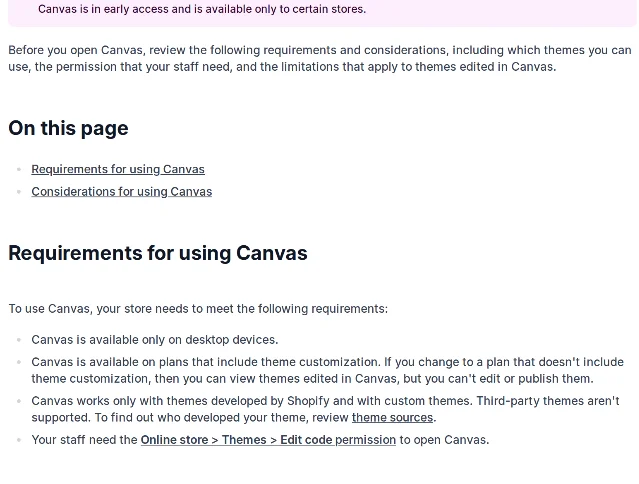
Canvas is desktop only, and it is not in general release. The documentation carries a banner saying it "is in early access and is available only to certain stores", while the launch post says it is rolling out over the coming days 12.
Four requirements decide whether a given store can use it 2:
- Desktop devices only.
- A plan that includes theme customization. Move to one that doesn't and the store keeps the themes Canvas made, but nobody can edit or publish them.
- Themes built by Shopify, or a custom theme. Third-party themes are not supported.
- The Edit code staff permission for everyone who wants in.
That last line is the one to read twice. Shopify's pitch is aimed at the merchant with no coding skills, and the door is keyed to the permission that lets a person edit code. In practice that means either the owner hands staff a permission they may not have wanted to hand over, or the owner does every Canvas session personally.
TechCrunch's report lists what else is missing at launch: third-party theme support, app blocks and extensions, markets, translations, rollouts, and theme updates 5. Shopify's help centre confirms each of those as a consideration rather than a roadmap item, and Sehl says it plainly in the launch post: "Canvas is not replacing the existing editor yet."
The platform was reshaped for the agent
One sentence in the launch post deserves more attention than it got. "Theme architecture has also been simplified," Shopify writes, "making the store's structure, logic, and design easier for Sidekick to understand and change" 1.
Read that as an engineering decision and it is a large one. Years of theme architecture grew around what developers and merchants needed; part of it has now been reorganised around what a model can read. Shopify's design director, Austin Knight, describes the same work from the other end: "Every theme has a unique design contract, a curated set of patterns to draw from, and a mountain of opinionated eval data." Taste, in other words, arrives as a default the agent was trained to prefer.
The commercial logic is visible on Shopify's own pricing page, which now sells an Agentic tier at $0 for "selling in AI channels", alongside "sell in AI chats" on every store plan 6. Shopify spent the past year teaching other companies' agents to buy from its merchants. Canvas points the same machinery inward, at the storefront.
What a Canvas theme stops being able to do
This is the section the launch post does not have. Every row below is Shopify's own documentation.
| In Canvas you cannot | What Shopify's documentation says |
|---|---|
| Receive theme updates | "A theme that you edit in Canvas doesn't receive theme updates." 2 |
| Download the theme files | "You can't download the theme files for a theme that you edited in Canvas." 2 |
| Add a block by hand | "You can't add a new block to a template manually in Canvas. Ask Sidekick to add the block." 2 |
| Add or configure apps on the storefront | "You can't add or configure app blocks or app embeds in Canvas." 2 |
| Translate theme content | "You can't translate theme content directly in Canvas." 2 |
| Vary the theme by market | "You can't customize a theme for different markets in Canvas." 2 |
| Edit metaobject templates | "Metaobject templates aren't listed in Jump to... in Canvas." 2 |
| Edit text in the preview on older themes | "On some older themes, you can't edit text directly in the preview." 2 |
The first row is the expensive one. Shopify's page on theme updates describes released versions as carrying "new features, design enhancements, and bug fixes", and a separate class of automated updates that exists for "fixing bugs or security issues in your theme" 7. A theme built in Canvas steps off that track. It keeps whatever it was when the agent last touched it, and Shopify's own Theme Store licence terms mean a shop that later wants updates installs a fresh theme and reassembles the work 7.
The second row closes the exit. A merchant can leave with the settings and content Shopify holds, in the sense that version history stays in the admin, but the theme files are not something Canvas lets them take. Downloading a theme is how a merchant hands work to an agency, moves to another platform, or keeps a copy before a risky change. Shopify removed that door from the room it built.
Between them, those two rows describe a storefront an authorised AI agent can rewrite and a merchant cannot export.
Undo, save, and what the agent does to your edit history
Canvas saves automatically, so there is no save button, and Publish does not save anything. It only decides when customers see what is already there. On a published theme, edits pile up invisibly until the merchant clicks Update, then Publish changes 8.
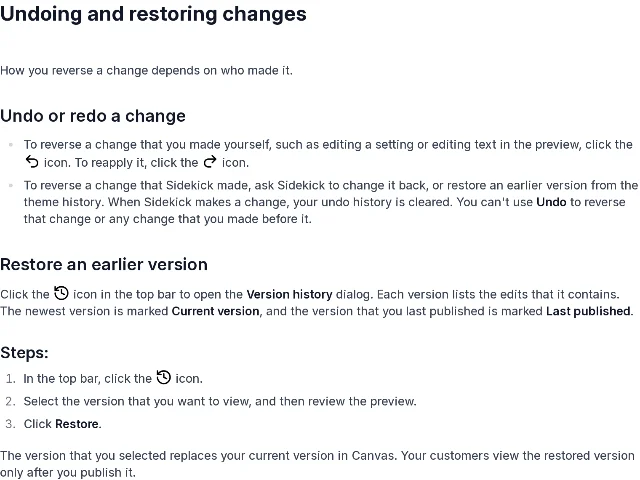
Rollback is where the two authors get different treatment. A change the merchant made can be reversed with the undo icon. For a change Sidekick made, Shopify's instruction is to ask Sidekick to change it back, or to restore an earlier version from the theme history, because "when Sidekick makes a change, your undo history is cleared. You can't use Undo to reverse that change or any change that you made before it" 8.
Version history is a real safety net and deserves credit. Every version lists the edits it contains, the newest is marked Current version, the last one published is marked Last published, and restoring one replaces the working copy until the merchant publishes 8. It is also a coarser instrument than undo. The merchant who was three small edits into a page and then asked the agent for one more change cannot walk back those three; they pick a checkpoint.
The meter
Sidekick itself adds nothing to the bill. It is included with every Shopify plan, and the same answer carries the catch: "Features and usage limits vary by plan" 9.
Where those limits bind hardest is app generation, which is open only to stores on Grow, Advanced or Plus 10. Shopify's help page describes two meters running at once, an hourly one and a weekly one, both on a rolling window, both applied to the whole store so a team shares them, and both measured "by the amount of work that Sidekick does, not by the number of apps that you create". Hit either ceiling and generation stops until usage frees up, up to seven days for the weekly one. A generation already running finishes; the next one waits 10.
Sidekick also remembers. Shopify's documentation says it uses past conversations and recent activity in the admin to personalise its answers, and offers saved prompts called skills for anything a merchant repeats 11. None of that is unusual for an assistant in 2026. It is worth naming because the same assistant now holds write access to a storefront's code.
Shopify's plan prices sit where they did: $29 a month for Basic billed yearly, $79 for Grow, $299 for Advanced, and Plus from $2,300 6. Canvas rides along, included, which is exactly why the limitations matter more than the invoice.
The verdict
For a store that does not exist yet, Canvas is the best version of this idea anyone has shipped. A merchant with a Shopify-built theme, a product line and no designer can describe a storefront, watch it assemble, correct it in the same conversation, and publish. Nothing about that requires a developer, and Shopify's documentation is honest enough that the merchant can read the trade before making it.
The judgment flips for a store that already earns money, and it flips on three documented facts rather than on taste. The theme stops receiving updates once the agent edits it. The files cannot be downloaded afterwards. And the agent's next change wipes the undo history behind it.
The condition, then. Before Canvas touches a live storefront, duplicate the theme so the original stays out of it, confirm the store is on a Shopify-built or custom theme rather than a third-party one, decide which staff actually need the Edit code permission, and accept that the version you publish is the version you will restore to, since the fine-grained undo is gone. Done that way, a merchant trades a small amount of control for a large amount of speed, and that trade is worth making on a new store.
Skipped, a merchant hands an AI agent the write key to the only part of the business customers actually see, on a theme that no longer receives security fixes and cannot be exported, and calls it a design tool.
References
- 1Introducing Canvas
shopify.com
- 2Requirements and considerations for using Canvas
help.shopify.com
- 3Shopify Help Center, Canvas
help.shopify.com
- 4Using and navigating Canvas
help.shopify.com
- 5Shopify debuts Canvas
techcrunch.com
- 6Shopify pricing
shopify.com
- 7Updating themes
help.shopify.com
- 8Creating and customizing themes in Canvas
help.shopify.com
- 9Shopify Sidekick
shopify.com
- 10Generating apps with Sidekick
help.shopify.com
- 11Sidekick
help.shopify.com


This story was produced automatically by a channel. One sentence is all it takes for Neodrop to keep producing for you.